
Table of Contents (11)
007 First Light Path Tracing: The Quick Answer
Yes — the free 11GB 007 First Light PC update released on September 15, 2026 adds a full path-traced lighting mode and NVIDIA DLSS 4.5 Ray Reconstruction. It replaces the game’s previous hybrid ray-tracing approach with a renderer that calculates lighting, shadows, reflections, and global illumination across the full scene.
The catch is hardware. IO Interactive’s published targets put 1080p at 60 fps with Medium path tracing on an RTX 5070, while native 1440p at 60 fps with Medium calls for an RTX 5080. For 4K at 60 fps with High path tracing, the listed GPU is an RTX 5090. That is a serious ladder, but at least it is refreshingly clear about what full-scene lighting costs.
It is also worth being precise about what this update is and is not. This is a PC-only graphics patch, not a launch-day feature that quietly existed all along. If you are playing on PlayStation 5 or Xbox Series X|S, or waiting on the Nintendo Switch 2 version that IO Interactive moved to March 2027, this specific path-tracing setup guide does not apply. On PC, though, the option is live now, and the game’s menus are suddenly a lot more important than they were a week ago.
007 First Light Path Tracing Requirements
| Target | Path Tracing Setting | CPU | Memory | GPU | VRAM |
|---|---|---|---|---|---|
| 1080p, 60 fps | Medium | Intel Core i5-13500 / AMD Ryzen 5 7600 | 16GB RAM | NVIDIA GeForce RTX 5070 | 12GB |
| Native 1440p, 60 fps | Medium | Intel Core i5-13500 / AMD Ryzen 5 7600 | 16GB RAM | NVIDIA GeForce RTX 5080 | 16GB |
| 4K, 60 fps | High | Intel Core i5-13600K / AMD Ryzen 7 7700X | 32GB RAM | NVIDIA GeForce RTX 5090 | 32GB |
That table is the part to trust, and it is also the part that should keep expectations sane. These are the official path-tracing targets tied to the new mode, not the base game’s original general requirements. The older non-path-traced floor is much lower: the standard PC minimum remains an Intel Core i5-9500 or AMD Ryzen 5 3500 with a GTX 1660, Radeon RX 5700, or Intel discrete equivalent, plus 16GB of RAM and an 80GB SSD. Recommended non-path-traced play is also far more forgiving, with an Intel Core i5-13500 or AMD Ryzen 5 7600 and an RTX 3060 Ti, RX 6700 XT, or Intel Arc-class equivalent.
In other words, there are now really two conversations around 007 First Light on PC. One is “Can I run the game?” The other is “Can I run the new lighting mode that turns half the scene into a ray budget?” Those are not the same question anymore.
What Changed Visually
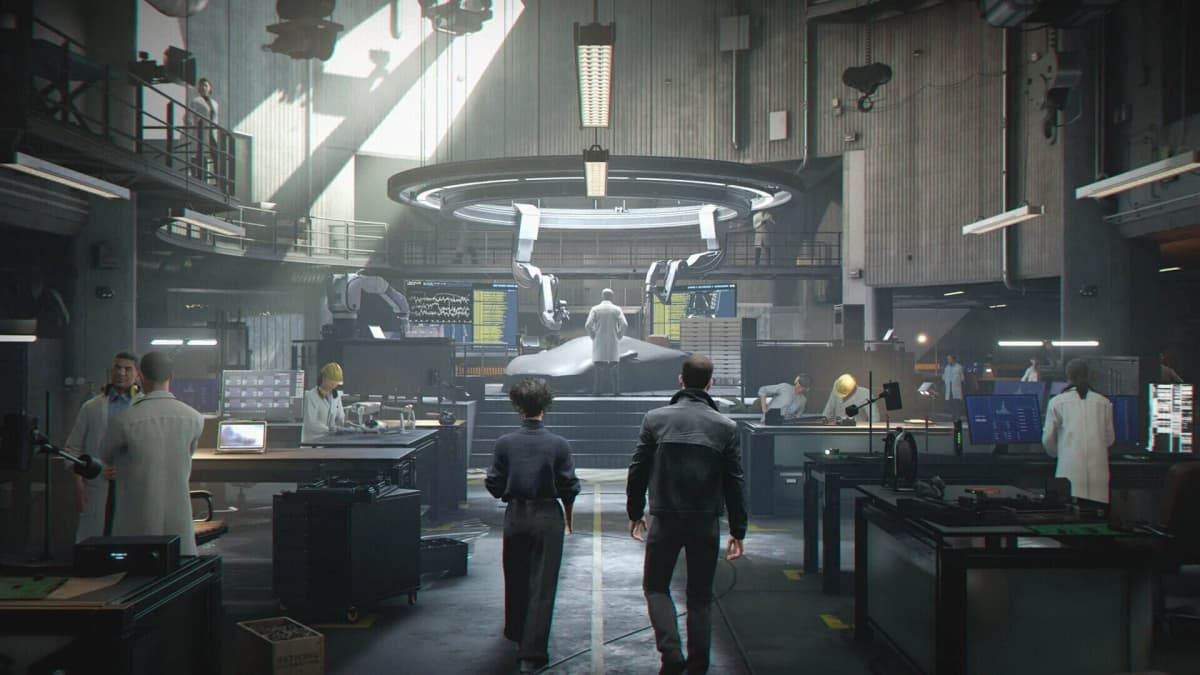
Path tracing matters because it treats the scene as a connected lighting problem instead of applying a few expensive effects on top of conventional rendering. Light can bounce more naturally through an interior, soft shadows better reflect their distance from an object, and reflections carry scene detail that conventional screen-space techniques can miss.
That is particularly useful for a Bond game built around polished interiors, nighttime environments, glass, metal, and cars. Vehicle paint and windows can reflect their surroundings with greater consistency, while glossy floors, metallic fixtures, and indirect light in enclosed spaces behave less like a collection of isolated visual tricks.
The update also improves the game in the places where hybrid ray tracing usually gives itself away. Interiors can look less patchy because indirect light now behaves more like it belongs to the whole room. Exterior scenes benefit from more stable shadowing and reflection detail, especially around wet surfaces, polished bodywork, and bright signage. Materials on metallic or highly polished objects read more naturally because the reflected environment is integrated into the image instead of feeling stapled on after the fact.
DLSS 4.5 Ray Reconstruction is the other half of the update. It uses an AI model to reconstruct ray-traced data rather than relying on the older hand-tuned denoising path. In practical image-quality terms, it is designed to clean up noisy reflections, stabilize indirect lighting, and reduce the smearing or ghosting that can creep into fast-moving ray-traced scenes.
That distinction matters because path tracing without good reconstruction can still look rough around the edges when the GPU is under stress. You may get the more physically complete lighting model, but also more visible instability in reflections, shadow transitions, or fine detail. Ray Reconstruction is there to make the whole stack feel less like a brute-force tech demo and more like a coherent image.
Enable the Right Settings
This is the part where it helps to slow down and do things in the right order. A lot of “path tracing doesn’t work” complaints turn out to be one of three simpler problems: the patch is not installed, the in-game preset is still on the older ray-tracing mode, or the NVIDIA-side Ray Reconstruction model is not updated.
- Install the September 15 PC patch. The path-tracing download is 11GB, so verify that the game is fully updated before hunting for the new graphics options.
- Check the platform and build. This update is for the PC version. If you are on console, there is nothing to enable here.
- Confirm your baseline requirements. Windows 10 or Windows 11 64-bit, 16GB of RAM or more, and 80GB of SSD storage remain part of the required floor.
- Update the NVIDIA driver. DLSS 4.5 Ray Reconstruction can remain unavailable or disabled on an older driver stack. NVIDIA’s published requirement for the newer Ray Reconstruction model is GeForce Game Ready Driver 580.88 WHQL or newer.
- Open Graphics or Display settings in-game. Look for the ray-tracing control. Depending on the menu label used by the build, that may appear as Ray Tracing Quality or Lighting Mode.
- Select the preset explicitly labeled Path Tracing. Do not assume that turning ray tracing on automatically switches the game from its older hybrid mode to full path tracing. The path-traced option should be named directly.
- Set DLSS Super Resolution deliberately. This is the upscaler. It is separate from Ray Reconstruction. Balanced is a sensible first pass for many systems; Performance is the escape hatch when the GPU load becomes excessive.
- Enable Frame Generation only if it suits the setup. Dynamic Multi Frame Generation can raise displayed frame rates on supported RTX hardware, though it does not reduce the input latency of the base rendered frames.
- Then verify Ray Reconstruction itself. This step deserves its own section, because it is not the same toggle as path tracing.
If you want the short version, the intended stack is simple: Path Tracing ON, DLSS Super Resolution set on purpose, DLSS Ray Reconstruction active, and Frame Generation enabled only on supported hardware if you want the extra fluidity. The mistake is thinking one switch secretly does all four jobs. It does not.
Where Ray Reconstruction Actually Lives
This is the important distinction the menus do not make especially friendly: Path Tracing is a game-side graphics mode, while the updated Ray Reconstruction model is tied to NVIDIA’s software stack. So if you switch path tracing on in-game and the image still does not look or behave the way you expected, the missing step may be outside the game.
To get NVIDIA’s updated Ray Reconstruction model in place, open the NVIDIA app and go to Settings > About. Opt in to Early Access releases if needed. Then go to the Graphics section, select either the supported game profile or Global Settings, open Driver Settings, choose DLSS Override – Model Presets, set it to Custom, open the Ray Reconstruction drop-down, choose Recommended or Preset F, and click Apply.
That is the cleanest published path to the newer model. It also explains why some players will swear they enabled everything already while still missing the final piece. They enabled the rendering mode inside 007 First Light, but not the updated reconstruction path on the NVIDIA side.
Two cautions belong here. First, DLSS Ray Reconstruction requires an NVIDIA RTX GPU. GTX-class GeForce cards cannot use it. Second, the published material does not clearly document a separate, universally visible in-game badge proving that Ray Reconstruction is active. So the safest way to verify it is to check both the game settings and the NVIDIA app rather than waiting for some magic “RR ON” stamp to appear on screen.
DLSS Super Resolution, Ray Reconstruction, and Frame Generation Are Different Tools
| Feature | What It Does | Why It Matters With Path Tracing |
|---|---|---|
| Path Tracing | Calculates full-scene lighting, reflections, shadows, and global illumination. | Creates the visual leap, while imposing the largest GPU load. |
| DLSS Super Resolution | Upscales a lower internal resolution to the selected display resolution. | Supplies the rendering headroom that path tracing needs at higher output resolutions. |
| DLSS Ray Reconstruction | Uses AI to denoise and reconstruct ray-traced image data. | Improves the clarity and stability of reflections, shadow detail, and indirect light. |
| Dynamic Multi Frame Generation | Generates additional displayed frames between traditionally rendered frames. | Can improve perceived fluidity, but adds latency and cannot rescue a weak base frame rate. |
If you have ever looked at a modern PC graphics menu and felt like it was daring you to confuse four different acronyms, this is why. Super Resolution is about render resolution and performance headroom. Ray Reconstruction is about cleaning up the ray-traced or path-traced image. Frame Generation is about creating extra displayed frames. Only Path Tracing changes the underlying lighting model.
That also means you can test them in layers. Start by getting path tracing itself active. Then choose a DLSS Super Resolution mode that makes sense for your target resolution. After that, confirm Ray Reconstruction. Only then is it worth deciding whether Frame Generation improves the experience on your machine or simply makes the frame counter look happier than the inputs feel.
GPU Compatibility Is the Real Divider
An RTX GPU is mandatory for DLSS Ray Reconstruction. The original non-path-traced PC minimum of a GTX 1660, Radeon RX 5700, or comparable Intel discrete GPU remains relevant for basic play, but those cards sit in a completely different class from the new lighting mode.
GTX-class GeForce cards cannot use Ray Reconstruction or Frame Generation. AMD and Intel GPUs can run the base game, but they do not have access to NVIDIA’s DLSS suite. The graphics menu may expose alternative upscaling options depending on the installed build, yet the path-tracing patch’s intended feature stack is NVIDIA RTX hardware, DLSS Super Resolution, and Ray Reconstruction.
There is also a practical distinction between “supports the game” and “matches the official path-tracing targets.” IO Interactive’s own ladder begins at an RTX 5070 for 1080p with path tracing at Medium. That does not mean every card below it fails to launch the game. It means the developer has been unusually blunt about where it expects this full-scene lighting mode to make sense.
Memory deserves equal attention. The base game lists 16GB of system RAM and an 80GB SSD as requirements, but the 4K path-tracing target moves to 32GB. That makes sense: a high-resolution path-traced scene can lean hard on VRAM, system memory, storage streaming, and cooling at once. A case with poor airflow or a GPU already running near its thermal limit can become the hidden bottleneck here.
One more point that deserves caution: the official materials are clear about NVIDIA’s RTX-based path-tracing stack, but they do not publish a full matrix spelling out exactly how every AMD or Intel GPU behaves with the path-tracing preset. So if you are on non-NVIDIA hardware, do not assume missing DLSS controls are a bug. They are simply not part of your feature set.
How to Verify Path Tracing and Ray Reconstruction Are Really Active
This deserves its own section because there is a difference between “I changed a setting” and “the game is clearly running the new rendering path.” The official materials do not confirm a dedicated on-screen badge that says “Path Tracing Active” as distinct from the older hybrid ray tracing mode. So verification is a sanity check, not a hidden benchmark ritual.
Step one: reopen the graphics menu after applying your settings and make sure the ray-tracing option still reads Path Tracing. If it reverted after a restart, your system may have rejected the change, a related option may have overridden it, or the game may require another launch after the patch.
Step two: verify your DLSS Super Resolution mode and, if applicable, Frame Generation state. These do not prove path tracing by themselves, but they tell you whether the surrounding performance stack is configured the way you intended.
Step three: check the NVIDIA app and confirm the Ray Reconstruction override is set the way you left it. If the driver is outdated, or Early Access support for the new model is not enabled, this is where the setup can quietly fall apart.
Step four: use image behavior, not just the frame counter, as your reality check. Good places to look are glossy floors, metallic trim, vehicle panels, windows at night, and interiors lit by multiple bouncing light sources. Compared with the older hybrid approach, full path tracing should generally produce more coherent reflections, softer and more natural shadow behavior, and better-connected indirect light across the scene.
You are not hunting for miracle screenshots here. You are looking for whether the scene behaves more like one lighting system instead of several separate effects taking turns. Cars should sit more convincingly in their surroundings. Polished materials should carry more believable reflected detail. Interior light should feel less isolated and more like it travels.
If all of that sounds a little less definite than a giant green “ON” label, that is because it is. The safest factual verification is still the boring one: check the graphics preset, check the NVIDIA app, and check that your hardware lines up with the published tier you are trying to use.
Troubleshooting the Missing-Option Headaches
If the Path Tracing option does not appear: first confirm the 11GB September 15 PC patch is installed. Then make sure you are on the PC version, not a console build. After that, verify that the GPU in use is the one you think it is, especially on systems with integrated graphics or laptop switching behavior. The developer’s published path-tracing tiers begin with RTX 5070-class hardware, and the game’s official materials center this update on NVIDIA RTX support.
If Ray Reconstruction is missing or seems unavailable: update to GeForce Game Ready Driver 580.88 WHQL or newer, open the NVIDIA app, and check whether Early Access releases are enabled under Settings > About. Then revisit the DLSS Override – Model Presets path and confirm the Ray Reconstruction drop-down is set to Recommended or Preset F.
If you are on AMD or Intel graphics: missing DLSS and Ray Reconstruction controls are expected. Those features are NVIDIA-specific. Depending on the build, you may still have other upscaling options for the base game, but this particular update’s headline stack is not aimed at your hardware.
If the game becomes unstable after switching the preset: back the setup down one layer at a time. First disable Frame Generation if it is on. Then move DLSS Super Resolution to a more performance-oriented mode. Only after that should you consider stepping down the path-tracing quality preset itself. This keeps the visual identity of the update intact for as long as possible instead of instantly throwing the whole lighting model overboard.
If the picture looks softer than expected: do not immediately blame path tracing. Super Resolution mode is usually the first suspect. Performance mode buys headroom by lowering internal render resolution more aggressively, so a quick comparison against Balanced or Quality can tell you whether the softness is coming from the upscaler rather than the lighting mode.
If the frame rate still feels rough on high-end hardware: remember that official target tiers are published guidance, not a promise that every scene behaves identically. The supplied materials do not publish a complete benchmark breakdown for every area, combat state, or weather condition, so the practical fix is still the old reliable PC routine: check the preset, check the driver, check the upscaler mode, and avoid expecting magic from Frame Generation if the underlying rendered frame rate is already struggling.
How to Choose a Sensible Preset
RTX 5070 systems targeting 1080p: Start with Medium path tracing, DLSS Super Resolution on Balanced, and Ray Reconstruction enabled. Use Performance mode only if the GPU needs more headroom. The published 1080p target is built around Medium path tracing rather than a no-compromise preset, and that is the right expectation to bring into the menu.
This is also the tier where restraint helps more than bravado. If the goal is to enjoy the new lighting rather than win an argument with the options menu, keep the official target in mind and resist stacking every expensive setting simply because the game allows it.
RTX 5080 systems targeting 1440p: The official target is native 1440p at 60 fps with Medium path tracing. Leave DLSS Super Resolution off to test that native target first; switching to Quality, Balanced, or Performance is a deliberate quality-for-headroom trade rather than the stated native configuration.
From there, tune according to taste. If you value a sharper image, hold the native setup as long as it remains comfortable. If you value consistency during heavier scenes, DLSS Super Resolution becomes the cleaner compromise. Ray Reconstruction should stay in the mix either way because it is directly tied to the quality and stability of the ray-traced image.
RTX 5090 systems targeting 4K: High path tracing at 4K requires the strongest published configuration, including 32GB RAM and the faster CPU tier. Ray Reconstruction should remain enabled. DLSS Super Resolution and Frame Generation are useful tuning options when prioritizing motion smoothness, but they change the rendering path away from a native 4K baseline.
That last point is worth stating plainly because it is where PC graphics discussions love to get slippery. Native 4K, DLSS-assisted 4K, and Frame-Generated 4K can all be valid ways to play, but they are not interchangeable descriptions. Decide whether you are chasing image purity, headroom, or fluidity first, then choose the stack that matches that priority instead of pretending every toggle serves the same goal.
What the Official Requirements Do and Do Not Promise
The good news is that IO Interactive has given players a clearer hardware ladder than many PC graphics updates ever do. The official published targets for this patch identify the CPUs, RAM, and RTX GPUs tied to 1080p, 1440p, and 4K path-traced play. That is useful, and refreshingly specific.
The less glamorous truth is that those figures do not magically answer every performance question. They do not provide a scene-by-scene benchmark map. They do not spell out every possible interaction between native rendering, DLSS Super Resolution modes, Ray Reconstruction behavior, and Frame Generation. And they do not provide a second, foolproof in-game confirmation badge for path tracing versus the previous hybrid RT mode.
So the practical way to read this update is simple. Treat the published requirements as the official anchor. Treat the 11GB patch and the NVIDIA app setup as mandatory housekeeping. Treat visual verification as a sanity check rather than a synthetic benchmark. And if your system sits well below the RTX 5070 starting line for the official path-tracing tier, do not expect this particular Bond fantasy to arrive cheaply.
Still, for players with the hardware, the upgrade is easy to understand: 007 First Light now has a much more cinematic PC lighting mode, and it finally has the settings stack to show it off properly. You just have to make sure all the switches are actually in the right places.
FinalBoss // Gear
Level up your setup
01Graphics cardson Amazon→02Gaming laptopson Amazon→03High-refresh gaming monitorson Amazon→04Discounted game keyson Kinguin→
Affiliate links · As an Amazon Associate, FinalBoss earns from qualifying purchases.