
Table of Contents (11)
Why Anime Crossover Defense codes matter (and how I use them)
After sinking way too many hours into Anime Crossover Defense, I reached the point where story stages started hard-gating me behind unit levels and banner luck. The breakthrough came when I stopped ignoring redeem codes and started treating them like a regular part of my progression. A single big code drop (like 1stAnniv) has been enough to carry new accounts through the early game and even jump-start late-game upgrades on my main profile.
This guide is built as a single, up-to-date reference for March 2026. I’ll walk you through:
- All currently working Anime Crossover Defense codes and what they give
- Exactly how to redeem them on PC and mobile
- A reference list of expired codes so you don’t waste time
- How I personally spend Gems, Crystal Helixes, Shards, and Rift Orbs efficiently
- Common errors and how to fix them when a code “doesn’t work”
If you follow along, you can redeem everything in under 5 minutes, and those freebies can easily shave hours off your early grind.
How to redeem Anime Crossover Defense codes (step-by-step)
I’ll start with the redemption process because there’s one easy-to-miss step that confused me the first time I played. You can’t redeem from a plain text menu like in some Roblox games – you actually have to walk to the codes area.
- Step 1 – Launch the game
Open Anime Crossover Defense on Roblox (PC, console, or mobile) and wait for the lobby to load completely. - Step 2 – Head to the Codes zone
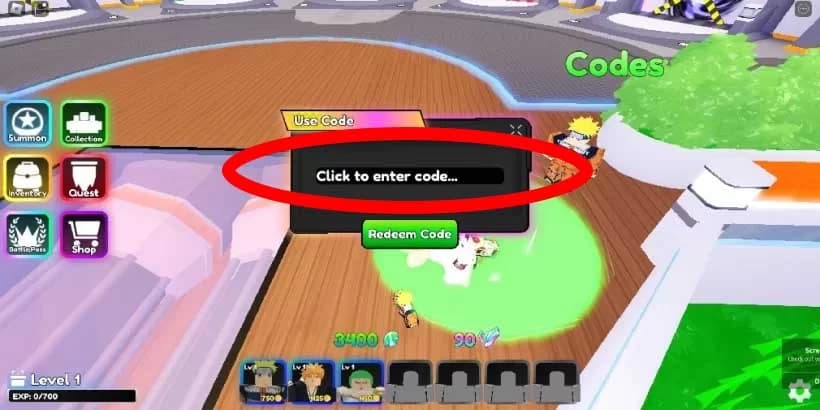
Once you spawn in the lobby, turn and go down the stairs from the main spawn area. Look for the section marked for codes – it’s highlighted with a green “Codes” circle/area on the floor. - Step 3 – Step into the green circle
Physically walk your character onto the green highlighted zone. This is what actually opens the redemption UI. - Step 4 – Enter your code
A text box will appear. Click/tap it and then:- Copy one of the working codes from the list below
- Paste it into the text box (or type carefully if you’re on console)
- Step 5 – Press “Redeem Code”
Hit the Redeem button. If the code is valid and unused, your rewards should appear instantly in your resources (Gems, Helixes, Shards, Orbs, etc.).
Pro tip: I always redeem codes in a quiet lobby before starting any match. If you’re mid-game, latency and pop-ups can sometimes make it look like nothing happened even though the rewards did go through.
All working Anime Crossover Defense codes (March 2026)
Here are the codes that have been confirmed working around March 1, 2026. I’ll split them into “big bundles” and “regular drops” based on how impactful they’ve been for my runs.
Major bundle codes (use these first)
1stAnniv– 2 Legendary Rift Orbs, 1,000 Gems, 525 Crystal Helixes, 240 Crystal Shards
This is the must-use code right now. On a fresh account this has basically covered my early summons and a good chunk of upgrades.YEAR2025– 1,000 Gems, 5 Crystal Helixes
Great for an extra round of banner pulls plus a small upgrade bump.MiniUpdate– 1,000 Gems, 10 Crystal Helixes100kmembers– 1,000 Gems, 30 Crystal HelixesCurseUpd– 1,000 GemsConsole– 1,000 Gems (works even if you’re not literally on console – I’ve redeemed it on PC).NewYear2026– Currently grants a New Year resource bundle (primarily Gems and Helixes; exact totals may shift with balance updates).MerryChristmas2025– A holiday pack with free Gems and other materials; worth trying even post-holiday as it remained active into 2026.
Whenever I start a new profile, I redeem these eight first. That’s usually enough to grab at least one strong mythic/legendary from the banner and push my main damage dealers a couple of upgrade tiers.
Rift/raid and mixed-resource codes
Fish– 200 Gems, 5 Crystal Helixes, 90 Star Shards, 1 Cupcake, 1 Legendary Rift Orb, 1 Ramen, 1 Rift Orb, 2 Sushi Rolls
This one feels like a mini event in a box. The extra Rift Orb and food items are fantastic when you’re just starting to poke at rift content.RaidUpd– 200 Crystal Helixes + Raid Keys
If you’re stuck waiting on raid entry, this is a nice kickstart. I usually save this for a session where I know I’m going to spam raids.SoloLevUpd– Gives a mix of Crystal Helixes and GemsSorcUpd– 1,000 Gems + 10 Crystal HelixesSorryForCRBug– 100 Crystal Helixes
Pure upgrade fuel. I used this one to push a single carry unit up a few levels instead of spreading it thin.
Creator and support-style codes
These are smaller but still very worth using, especially stacked together. Different trackers sometimes disagree on individual totals, but in practice they all deliver some combination of Gems and Helixes.
Valk– Around 300–1,000 Gems plus Helixes (varies by update)Sebbyastian– Typically 300 Gems + 5 Crystal HelixesMozKing– Similar to Sebbyastian (Gems + Helixes)KingLuffy– Gems + HelixesStarCodeVanilla– Gems + HelixesZerozKingner– Gems + HelixesBlamSpot– Gems + HelixesBean– Gems + HelixesWinterWinter– Winter event style bundle, mainly Gems and HelixesHalloween2024– Halloween event bundle, still listed as active in some March 2026 checks
Note on conflicting reports: Some sites list WinterWinter and Halloween2024 as expired, others still mark them active. On my last check in early March 2026, I could still redeem at least one of them on an account that hadn’t used them before. If the game tells you they’re expired or already redeemed, don’t stress – just move on to the next code.
Expired Anime Crossover Defense codes (reference list)
These codes are no longer working as of March 2026, but I’m including them so you don’t waste time trying them, and so you can recognise them if you see outdated YouTube thumbnails.
cow– 1,000 Gemschristmas2024– Crystal Helixes and GemsBizarre– Crystal Helixes and GemsAugust– 300 Gems and 5 Crystal HelixesMaintenance2– Crystal Helixes and Gems1mvisits– 1,000 Gems, 10 Crystal Helixes10k– 300 Gems, 5 Crystal Helixes15k– 300 Gems, 5 Crystal HelixesRelease– 1,000 Gems, 5 Crystal Helixes, 90 Star Shards
There are more older codes floating around, but every time I’ve tested them in 2026 they’ve come back as expired. If a code isn’t on the “working” list above, treat it as suspect until you see it confirmed on the official Discord or a recently updated guide.
How I spend my free Gems, Helixes, Shards, and Orbs efficiently
Redeeming codes is only half the story. I wasted a lot of early freebies by spreading them too thin; what finally worked was treating them like focused investments rather than random spending money.
- Gems
Gems are your banner currency. My rule now:- Save until you can do multi-summons on a banner with at least one meta-relevant mythic/legendary unit.
- Never trickle-spend single pulls just because you’re bored in the lobby – that’s how I burned through
1stAnniv’s 1,000 Gems with nothing to show for it.
- Crystal Helixes
These are upgrade fuel. I’ve had the best results by:- Funneling Helixes into one or two main carries instead of upgrading everything.
- Always checking which unit gains the biggest power spike from the next upgrade step before committing.
- Star Shards
These are slower-earning, so I treat code Star Shards like premium currency:- Save them for systems that have permanent impact (strong passives, evolution items, etc., depending on the current update).
- Rift Orbs (Legendary & regular)
Because Rift Orbs are rarer, I never pop them casually:- Wait until you’re comfortable with the rift mechanics and have a solid team – that way you can actually clear and benefit from using the Orb.
- I used my first Legendary Rift Orb from
1stAnnivonly after I had a team that could reliably handle higher difficulty content; it felt much more impactful that way.
If you treat code rewards as a way to accelerate a focused plan instead of a random spending spree, you’ll feel their impact far more clearly.
Common code problems and how to fix them
Most of the “this code doesn’t work” complaints I’ve seen – and that I ran into myself – come down to a handful of issues. Before you assume a code is dead, run through this checklist:
- 1. Typos and case-sensitivity
Codes are case-sensitive and often mix numbers and letters. I once kept typing1stanivinstead of1stAnnivand thought it was expired. Always copy–paste when possible. - 2. Extra spaces
On mobile, it’s easy to copy a trailing space. If the game says “invalid code” instantly, delete any leading/trailing spaces and try again. - 3. Already redeemed on that account
Every code is one-time per account. If you redeemed it months ago, you won’t get anything now even if you don’t remember using it. The game usually tells you it’s already been used. - 4. Confusing it with other games
This one surprised me: some codes likeUPDATE24are for Anime Guardians, not Anime Crossover Defense. If a YouTube video claims a code gives reroll items like “TraitReroll” or “Mystic Coins,” that’s a red flag – those rewards belong to a different game. - 5. Server desync
On rare occasions, rewards don’t visually pop up due to lag, but your resources still increase. Before retrying the code, check your Gems/Helixes count and re-open the inventory.
If you’ve checked all of these and a code still won’t work, it’s probably truly expired on that server version.
How to stay updated on new Anime Crossover Defense codes
Right now, new codes usually drop when the game hits milestones (player counts, visit targets) or major content updates. From my experience, these are the best ways to catch them early:
- Join the official Discord
The developers announce new codes in their Discord server first. I keep notifications on for their announcement channel and have grabbed a few codes before most tracker sites updated. - Check recently updated guides
Look at the last updated date on any code article. If it hasn’t been touched in months, treat its list as outdated. Anything updated late February / early March 2026 is a safer bet. - Watch milestone events
When you see in-game notices about anniversaries, big updates, or new raids, that’s your cue to go code-hunting;1stAnniv,MiniUpdate,RaidUpdand similar all followed that pattern.
I make a habit of checking for new codes roughly once a week if I’m actively playing. It takes two minutes and usually nets enough Gems for at least a few extra summons per week.
Wrap-up: Redeem everything now, then build smart
To recap, here’s what I recommend you do right after reading this:
- Launch Anime Crossover Defense and head to the green Codes circle in the lobby.
- Redeem the big bundles first:
1stAnniv,YEAR2025,MiniUpdate,100kmembers,CurseUpd,Console,NewYear2026,MerryChristmas2025. - Then clean up the rest:
Fish,RaidUpd,SoloLevUpd,SorcUpd,SorryForCRBug, plus all the creator codes. - Spend your new resources with a plan: focus Gems on good banners and Helixes on your best carries.
- Join the dev Discord so you don’t miss the next wave of codes.
Once you get into the habit of redeeming codes as soon as they drop, Anime Crossover Defense feels far less grindy. If these freebies helped me drag under-leveled teams through tougher stages, they can absolutely do the same for you.
FinalBoss // Gear
Level up your setup
01Mobile gaming controllerson Amazon→02Top-rated gaming headsetson Amazon→038BitDo controllerson Amazon→
Affiliate links · As an Amazon Associate, FinalBoss earns from qualifying purchases.
Want to Level Up Your Gaming?
Get access to exclusive strategies, hidden tips, and pro-level insights that we don't share publicly.
Ultimate Guide Strategy Guide + Weekly Pro Tips