
Table of Contents (10)
AYN Thor: Flagship phone guts, emulation brain, tinkerer soul
Modern retro gaming is a bit of a joke unless you’ve got money to burn. Even a used Nintendo 3DS can hover around $300, older hardware swings wildly in price, and half the “classic” collections on modern platforms still miss huge chunks of history. That’s the backdrop the AYN Thor walks into: an Android handheld that basically says, “Forget chasing old plastic, just run it all here.”
On paper, it’s ridiculous in the best way: a Snapdragon 8 Gen 2 under the hood and a 1920×1080 OLED “top” screen, clearly built with 3DS-style dual-screen layouts and high-res emulation in mind. In practice, it really does punch like a flagship phone that’s been reborn as a dedicated handheld, happily chewing through everything from classic PS1 up to Nintendo Switch emulation and demanding Android titles.
The catch? It doesn’t baby you. Out of the box it’s more “very fancy Android phone in a controller shell” than curated console. To make the Thor feel like a true portable emulation box, you’ll be doing launcher setup, emulator configuration, and a bit of file shuffling. If that sentence made your eye twitch, that’s important context.
First contact: A handheld that actually feels worth carrying
The first thing that stands out with the Thor is that it doesn’t look or feel like a cheap AliExpress experiment. The build quality sits above a lot of budget handhelds I’ve handled over the years. There’s a reassuring density to the chassis, buttons don’t rattle, and nothing screams “toy” the way some emulation handhelds unfortunately do.
The star, though, is that 1080p OLED. Calling it a “top” screen isn’t just marketing – when you’re running 3DS or DS content, it really does feel like a luxurious upgrade to the original hardware’s upper display. Colors pop, blacks are properly inky, and old games that were never meant to be seen on this kind of panel suddenly feel weirdly modern. Even just scrolling around an emulator frontend or watching a YouTube video looks great here.
This matters more for portable emulation than people think. I’ve used handheld PCs where the hardware is powerful, but the washed-out LCD turns every retro game into a flat mess. On the Thor, a PS1 classic like Final Fantasy IX or a 2D platformer snaps to life. The OLED doesn’t magically upgrade sprites, but it does give them a richness that helps old art hold up.
Ergonomically, the Thor sits in that middle ground between a Switch and the chunkier Windows handhelds. It’s not Steam Deck-thick, and the weight feels manageable for long sessions. Analog sticks and buttons are laid out in familiar console fashion, so you’re not dealing with bizarre layouts or mystery function keys every time you jump between systems.
Performance: Snapdragon 8 Gen 2 finally feels like overkill in a good way
Under the hood, the Snapdragon 8 Gen 2 is unapologetically flagship phone silicon. That’s the same tier of chip you’d find in high-end Android phones, which means you’re not just scraping by on emulation – you’re brute forcing your way through a huge amount of the back catalog.
On the Android side, this thing doesn’t really flinch. Demanding mobile games like Where Winds Meet and the mobile version of Warframe have been run on Thor at maxed-out settings and hit a crisp 60-120fps, with no major dips reported. It feels odd seeing what are effectively console-class visuals humming along on what looks like a retro-focused handheld, but that’s the point: you’re not choosing between “modern phone game performance” and “retro box” – Thor does both.
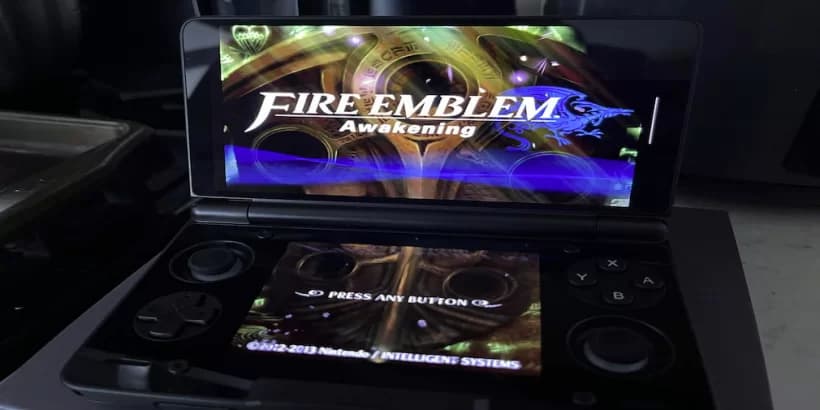
For emulation, the story is even more impressive. The Thor has been pushed through PS1, PS2, New 3DS, and even Nintendo Switch emulation, and it handles those workloads far better than you’d assume from something in this price bracket. PS1 is a walk in the park, PS2 runs comfortably if your chosen emulator is configured properly, and New 3DS – the platform this machine so obviously nods to – feels shockingly natural here thanks to the vertical real estate and that OLED panel.
Switch emulation is where a lot of devices fall apart, but here it’s not a gimmick. Obviously, heavier Switch titles are always going to be case-by-case and require some tinkering, but the fact that you can realistically treat Thor as a Switch-adjacent handheld at all is wild considering what original Switch hardware still costs today.
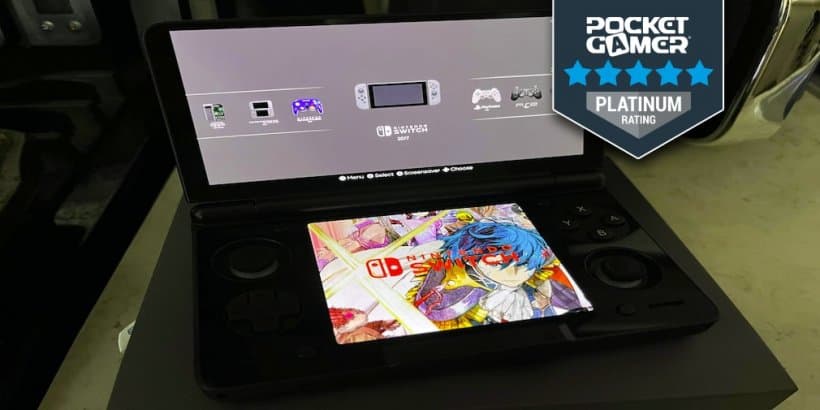
The one caveat on performance shows up when you start pushing beyond consoles into PC territory. Using apps like Gamehub or Gamenative to stream or emulate PC titles is possible, but if that’s going to be a main use case, the Pro model is the smarter pick. The extra RAM makes a tangible difference for heavier PC-centric scenarios – not because the chip is weak, but because Windows-style workloads and bigger game libraries love memory.
Once you’re dialled in, Thor isn’t a “hope this runs” device. It’s more “assume it runs, and spend your time tweaking for perfection rather than basic playability.” That’s a huge mental shift if you grew up with underpowered emulation handhelds that constantly made you compromise.
But you will tinker: Android roots, launchers, and file spelunking
The flip side to all this power is the software experience. Straight out of the box, the AYN Thor is basically a very capable Android phone trapped inside a handheld shell. You get the standard Android app bundle, no bespoke “console UI”, and then you’re on your own.
For some people, that’s a red flag. There are no comforting Nintendo-style tiles or SteamOS-like library views waiting for you. You’ll want to install a dedicated launcher or front-end tailored for emulation, grab your emulators of choice, and then start wiring everything together: systems, controller mappings, bezel layouts, and so on.
That process naturally involves a lot of file hunting and unzipping, especially if you’re dealing with multiple regions and systems. Internal storage paths, BIOS placement, per-system configuration – it’s all very familiar to anyone who has turned an Android phone into an emulation hub before. On Thor, you’re doing that work, but with the payoff of real controls, better thermals, and that OLED display.
This is the fork in the road for potential buyers. If your dream device is “open box, sign into an account, have an instant curated retro shelf,” Thor is going to feel like homework. If, however, you’re the type who enjoys building your dream emulation setup – tweaking shaders, perfecting aspect ratios, hunting the nicest-looking front-end themes – this thing is a playground.
The nice bit is that once you’ve climbed that initial hill, the Thor doesn’t fight you. Android is well understood at this point, and the emulation scene on it is insanely mature. There are plenty of guides, community launchers, and pre-made config packs floating around that can turn the “glorified Android phone” feeling into “this is my own custom retro console” over the course of a weekend.
OLED, media, and living with it day-to-day
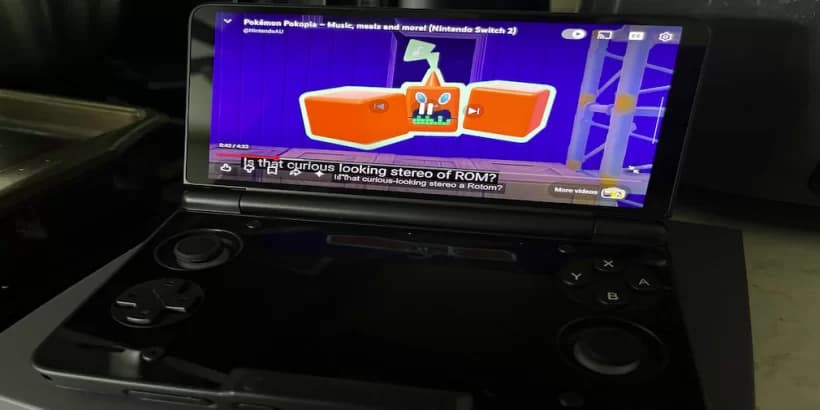
One unexpected side-effect of the Thor’s hardware is that it quietly doubles as a really nice little media device. That 1920×1080 OLED isn’t just great for 3DS and Switch games – it’s also lovely for binging a show, watching YouTube, or doing some light web browsing between sessions.
OLED, media, and living with it day-to-day
One unexpected side-effect of the Thor’s hardware is that it quietly doubles as a really nice little media device. That 1920×1080 OLED isn’t just great for 3DS and Switch games – it’s also lovely for binging a show, watching YouTube, or doing some light web browsing between sessions.
🎮 Get This Game at the Best Price
Compare prices instantly and save up to 80% on Steam keys with Kinguin — trusted by 15+ million gamers worldwide.
Check Prices on Kinguin →*Affiliate link — supports our independent coverage at no extra cost to you
Because it’s Android, the usual suspects are all there: video apps, browsers, streaming services. If you’ve ever used your phone as a mini-TV, this feels like that but with a more comfortable grip and physical volume and power controls that don’t feel like afterthoughts. It’s easy to imagine taking Thor on a long train ride, playing a couple of PS2-era missions, then propping it up for an episode of something without ever reaching for another device.
Battery life, as with any Snapdragon-based device, will swing a lot depending on what you’re throwing at it. Lighter 8- and 16-bit emulation sips power; cranking modern Android games or demanding Switch workloads will understandably drain things faster. The important bit is that you’re not wrestling Windows-level overhead here. Android is leaner, and that helps the battery story compared to some Windows handhelds that burn a ton of power just idling on the desktop.
Thermals feel more phone-like than PC-like: active cooling isn’t screaming constantly, and the device doesn’t instantly become a hand-warmer the second you load up something 3D. You know when the hardware is working, but it doesn’t scream about it the way some “mini gaming PCs” do.
Thor vs Steam Deck and Windows handhelds
It’s almost impossible to talk about any new handheld now without someone asking, “So… how does it compare to a Steam Deck?” The short answer is that it doesn’t really compete on the same axis – and that’s exactly why it’s interesting.
Steam Deck OLED and the wave of Windows handhelds (ROG Ally-style machines, etc.) lean on x86 hardware and PC operating systems. Their strength is running native PC titles: your Steam library, Game Pass, mods, the whole deal. The downside is the complexity and overhead of Windows, along with higher prices and, often, bulkier designs.
The AYN Thor flips that equation. It’s not trying to be a handheld gaming PC. Instead, it’s a ruthlessly efficient Android powerhouse. You give up effortless access to native PC games, but you gain:
- Far simpler power management and generally better efficiency for what it does
- A more console-like always-on feel (wake, play, sleep) thanks to Android
- Top-tier mobile performance for modern phone games alongside emulation
- Lower pricing across the range – roughly $249 to $489 at launch
If your gaming life is heavily anchored to Steam, console storefronts, and PC mods, a Deck or Windows handheld still makes more sense. But if your heart is in emulation, mobile games, and the idea of carrying a massive slice of gaming history in one device, the Thor is a more targeted and arguably more elegant solution.
Price, value, and the retro problem it actually solves
The real magic trick here is the price-to-capability ratio. With the line spanning roughly $249–$489 depending on configuration, the Thor undercuts a lot of Windows handhelds while still delivering performance that makes PS2, New 3DS, and even Switch emulation feel practical instead of aspirational.
Stack that against the current retro market, where hunting down even “recent” hardware like a 3DS can run you around $300 used, and it starts to feel almost irresponsible not to go the emulation route if your goal is to explore older libraries. Sure, you lose the charm of original hardware, but you gain:
- One device instead of a shelf full of aging consoles
- An OLED screen that makes 20+ years of art styles look their best
- Save states, quick resume, and all the modern emulation comforts
- A platform that also handles new mobile titles without blinking
That combination is what makes Thor feel less like a novelty and more like a practical answer to, “How do I actually play all this stuff without going broke?”
Who the AYN Thor is (and isn’t) for
After living with what this device is designed to do, it’s pretty clear who will thrive with a Thor and who should look elsewhere.
You’ll probably love the Thor if:
- You’re into retro and emulation and don’t mind (or even enjoy) configuration and tweaking.
- You want a single machine that can handle PS1, PS2, New 3DS, and Switch-era titles alongside modern Android games.
- You appreciate a high-quality OLED more than having a full Windows desktop in your pocket.
- You see the appeal in building your own front-end and “owning” the software experience.
You should probably skip it if:
- You hate file management, BIOS setups, and messing with emulator settings.
- You primarily want to play native PC games and live inside the Steam or Xbox ecosystem.
- You need a plug-and-play interface out of the box with zero setup.
The Thor leans hard into the “tinkerer’s dream” angle. Once configured, it runs incredibly well and feels more polished in the hand than a lot of its competition, but that initial lift is part of the deal.
FinalBoss // Gear
Level up your setup
01Retro consoleson Amazon→028BitDo controllerson Amazon→03Capture cards (Elgato & more)on Amazon→04Discounted game keyson Kinguin→Affiliate links · As an Amazon Associate, FinalBoss earns from qualifying purchases.
Want to Level Up Your Gaming?
Get access to exclusive strategies, hidden tips, and pro-level insights that we don't share publicly.
Ultimate Reviews Strategy Guide + Weekly Pro Tips