
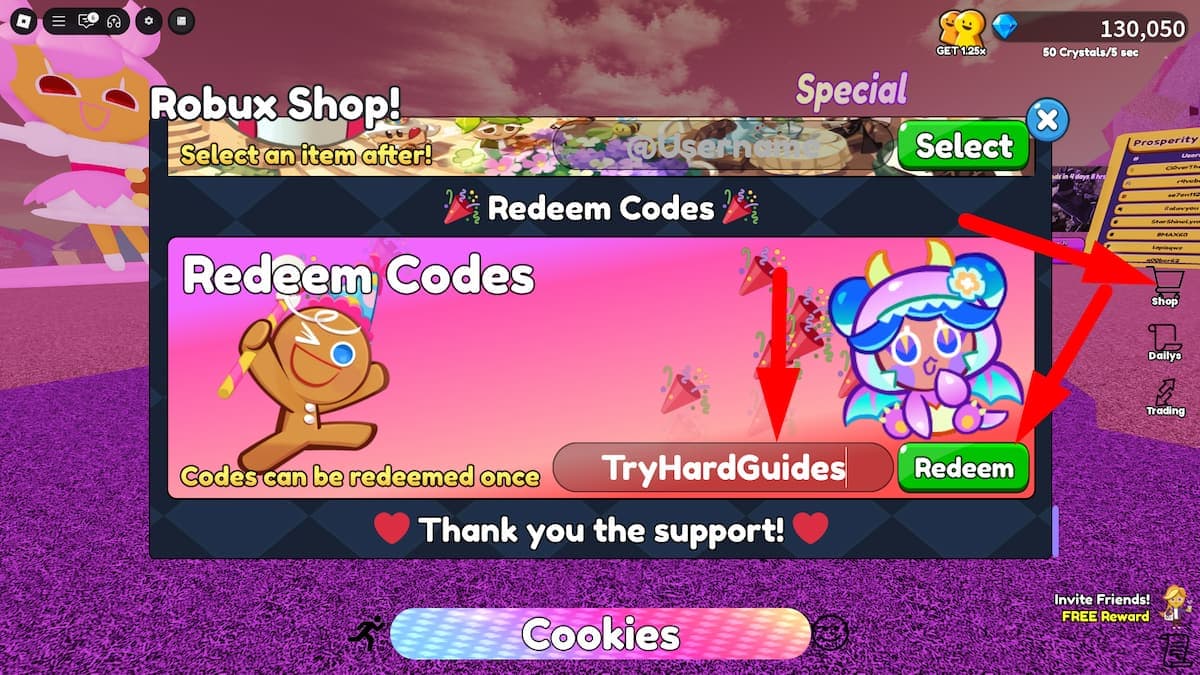
Codes in Cookie Run Gacha Simulator (the Roblox game by Doll Core :3) hand you Crystals and Gems instantly, which is the difference between rolling a banner properly and waiting on special orbs. You redeem them through the Shop button on the right of the screen — scroll to the bottom of that window for the Enter Code box and the green Redeem button. There is no separate Codes menu on the main HUD in the current build.
An honest note before the list, because it matters more than the list. We checked every major code tracker for this game in July 2026, and none of them has refreshed since March 2026. That means nobody — us included — can truthfully tell you a code is “verified working today”. What we can do is show you exactly what each tracker says, when it last checked, and where they disagree, so you know which codes are worth your time first. We would rather hand you a dated list you can trust than a fake “July 2026 verified” badge.
Table of Contents (16)
Where the code lists actually stand (checked July 2026)
| Tracker | Last updated | What it claims |
|---|---|---|
| TryHardGuides | March 2026 (Chiikawa Banner) | The most recent list. 15 codes marked active. |
| RobloxDen | 7 October 2025 | 6 active, 9 expired — and it marks several codes other sites still list as working. |
| Twinfinite | September 2025 | 3 active, no expired list. |
| Pro Game Guides | July 2025 | Same 3 codes as Twinfinite. |
Nothing newer than March 2026 exists for this game. Treat everything below as “last confirmed on this date”, not “confirmed today”.
The current best-guess code list
These come from the March 2026 TryHardGuides list — the freshest source available. Try these first.
Crystal codes
- Chiikawa — crystal bonus (the newest code on the freshest list, tied to the Chiikawa collab banner)
- MLP — crystal bonus
- VALENTINES — crystal bonus
- WICKED — crystal bonus
- WITCH — crystal bonus
- VOCALOID — crystal bonus
- DollBDay — crystal bonus
- HaveAGreat2026 — crystal bonus
- AlmostXmas25 — crystal bonus
- PowerPuff — crystal bonus
- MerryChristmas25 — crystal bonus
Gem codes
- White Lily Cookie — 50,000 Gems
- First berry Cookie — 50,000 Gems
- Update23 — Gems
- Festa — Gems
The two 50,000-Gem codes are by far the biggest single payouts on any list, so enter those first if you only have a minute.
Older codes that were active in October 2025
RobloxDen listed these as working at its last check. They do not appear on the newer TryHardGuides list, which usually means they have since rotated out — but they cost nothing to try:
- New CodeFountain — 35,000 Gems
- New CodeSilent Salt — 40,000 Crystals
- New Code2M Visits — 50,000 Crystals
- First Cookies — 40,000 Crystals
- Teeniepings — 42,500 Crystals
- 50k visits — reward unspecified; RobloxDen flags this one as unconfirmed rather than active
Confirmed expired — do not waste time on these
RobloxDen explicitly marks these dead as of its October 2025 check, and TryHardGuides moved another one into its expired section:
- Beast Yeast (was 50,000 Crystals)
- Dragons (was 50,000 Crystals)
- Discord (was 25,000 Crystals)
- Hello Kitty (was 50,000 Crystals)
- Blueberry Yogurt Academy
- TRADING, Release, 100k visits, major update, gTnYaPlyiorF
Worth knowing: Beast Yeast, Dragons and Discord are still listed as “active” by Twinfinite and Pro Game Guides — but both of those pages date from mid-2025, older than the RobloxDen check that marks them expired. Where trackers disagree, trust the newer check.
How to redeem codes: the exact path
- Load into a server in Cookie Run Gacha Simulator on Roblox.
- Press the Shop button on the right side of the screen — usually a shopping bag or cart icon. This opens the Robux Shop window.
- Scroll all the way to the bottom of that window. This is the step everyone misses: the code field does not appear until you scroll past the Robux bundles, which is why people think codes are bugged.
- Type or paste the code into the Enter Code box. Match capitalisation exactly and check for a stray leading or trailing space — that is the number one cause of a “valid” code failing.
- Hit the green Redeem button (or press Enter on PC). Valid codes credit instantly; you do not need to rejoin.
Some older guides describe a separate Codes button on the right of the HUD leading to a Claim Reward button. That was the earlier UI. If the developer has changed the layout again since March 2026, the pattern to look for is the same: a right-side button that opens a window with an Enter Code field near the bottom.
Why a code might fail
- Typo or extra whitespace — by far the most common cause, especially when copying from chat.
- Wrong capitalisation — several codes here mix cases (DollBDay, First berry Cookie). Copy them exactly as written.
- Expired without announcement — the developer does not always flag retirements. If it is typed correctly and still fails, it is dead.
- Stale server — occasionally a fresh code will not register until you leave and rejoin, which puts you on an updated server.
- Already redeemed — most codes are one-use per account, and the game usually just returns an invalid message rather than telling you so.
Currencies and what to spend on
Two currencies matter here. Crystals are the workhorse — you roll most banners and interact with special orbs using them, and you farm them from drops and the orbs that spawn roughly every 150 seconds. Gems are the higher-value currency, which is why the 50,000-Gem codes are worth prioritising.
A sensible spend order once you have redeemed everything:
- Commit to one banner. Scattering pulls across everything is how you end up with nothing from any of them.
- Use Crystal codes to reach pity thresholds rather than stopping at an arbitrary pull count.
- Hold the big Gem payouts until a banner or update you actually want lands.
- Keep collecting orbs. They stack with code rewards and cost you nothing but time.
Where new codes show up
The developer does not run a public schedule, but the pattern across the code history is clear: codes cluster around major updates (that is where Update23 came from), seasonal events (VALENTINES, MerryChristmas25, AlmostXmas25), collab banners (Chiikawa, MLP, VOCALOID, PowerPuff, Teeniepings) and visit milestones (2M Visits, 50k visits).
The fastest places to catch a new one, in order: the game’s Roblox description right after an update, the linked Discord or Roblox group on the game page, and in-game chat on a busy server the day a banner drops. Given how stale the third-party trackers currently are, those first-party channels are genuinely your best source right now.
Not to be confused with Cookie Run: Kingdom
Plenty of search results mix these two up. Cookie Run: Kingdom is the Devsisters mobile game, and its codes are redeemed through a completely different flow — a DevPlay ID and an external coupon website reached via Settings → Info, not an in-game shop box. Kingdom codes such as CRKCHRONOSLIVE26 will not work here, and Gacha Simulator codes will not work there. If you actually wanted the mobile game, our Parfait Cookie build guide is a good starting point for that side of the franchise.
For other games with the same redeem-and-pull loop, we keep current lists for Anime Astral Simulator and Illusion Connect: Re. Everything else we cover on this game lives on the Cookie Run Gacha Simulator hub.
FAQ
Are any Cookie Run Gacha Simulator codes verified working in July 2026?
No source verifies any code as active in July 2026. The newest maintained list is from March 2026. Every code above is presented with the date it was last confirmed, and you should test rather than assume.
Is the MLP code still active?
It was still listed as active in March 2026, alongside the newer Chiikawa collab code. It has not been re-verified since. The MLP banner it was tied to has been superseded, so treat it as a low-confidence entry and try Chiikawa and the Gem codes first.
Where is the code box?
Inside the Shop window, at the very bottom. Open Shop from the right side of the screen and scroll past everything else. There is no dedicated Codes button on the current HUD.
Are codes case-sensitive?
Treat them as case-sensitive and copy them exactly, spaces included. First berry Cookie and White Lily Cookie both contain spaces that are part of the code.
FinalBoss // Gear
Level up your setup
01Mobile gaming controllerson Amazon→02Top-rated gaming headsetson Amazon→038BitDo controllerson Amazon→Affiliate links · As an Amazon Associate, FinalBoss earns from qualifying purchases.
Want to Level Up Your Gaming?
Get access to exclusive strategies, hidden tips, and pro-level insights that we don't share publicly.
Ultimate Guide Strategy Guide + Weekly Pro Tips