
Table of Contents (9)
Corsair 3200D: My week living with an $80 “budget” case that doesn’t feel cheap
I’ve been around enough bargain-bin PC cases to know how bad they can get. Flexy panels, one sad rear fan wheezing away, front “vents” that are basically just decorative plastic. So when I pulled the Corsair 3200D out of the box and it didn’t creak in my hands like an empty soda can, I already felt like I’d dodged the usual budget case traps.
Over the past week I built a mid-range gaming rig in the 3200D, moved it between under-desk and on-desk setups, and messed around with fan curves more than I’d like to admit. The short version: for $80-$90, this thing is kind of a steal in terms of build quality and included hardware. The catch is that Corsair squeezed so much value into the case that the obvious place they cut corners is the fans. They cool fine, but when they spin up, you absolutely know about it.
If you’re noise-sensitive or your PC sits right next to your head, that trade-off matters more than anything else. If you wear a headset and just want a sturdy, easy-to-build-in mid-tower with good airflow on the cheap, the 3200D makes a strong argument for itself.
First impressions: not “budget case” vibes at all
The first 10 minutes with the 3200D were mostly me poking and tapping bits of the chassis to see where Corsair cheaped out. The answer: not many obvious places.
The front panel is what grabbed me first. It’s a full mesh face, but Corsair’s carved it into this repeating Y-pattern that you start noticing everywhere else on the case once you see it. It’s got this slightly industrial, slightly sci‑fi look-almost like someone smacked the panel inward along those Y-lines on purpose. Up close, it doesn’t scream “$80 case” at all.
Build-wise, it feels sturdier than Corsair’s older budget stuff like early runs of the 4000D. The side panels don’t bend under your grip, the frame doesn’t twist when you lift it with one hand, and the glass panel slots in without that “is this actually lined up?” anxiety.
Size-wise, it’s a standard mid-tower: plenty tall and deep enough for a full ATX board and long GPUs (Corsair rates it for up to 370 mm cards). I dropped in an RTX 4070 Ti and still had headroom at the front, so unless you’re rocking some obscene triple-fan monster with a huge cable connector, you’re fine.
The front I/O is on the top front edge, which I love. I hate having to reach down the side of a case parked under a desk. Here you get:
- 1x USB-C (USB 3.2 Gen 2×2 at 20 Gbps)
- 1x USB-A (USB 2.0, old and slow but fine for keyboard/mouse dongles)
- Headset combo jack
- Power and reset
It’s a bit weird having just one fast and one very slow USB instead of two decent Type-A ports, but I’ll take a 20 Gbps USB-C on an $80 case any day. External SSD? Plugged in, maxed out, no problem.
Building in the 3200D: refreshingly straightforward
My test build for this case was a pretty typical mid-range gaming setup: ATX motherboard, Ryzen 7, RTX 4070 Ti, 2x M.2 SSDs, and a fully modular PSU. I also abused it a little with an oversized air cooler to see how much headroom it actually has.
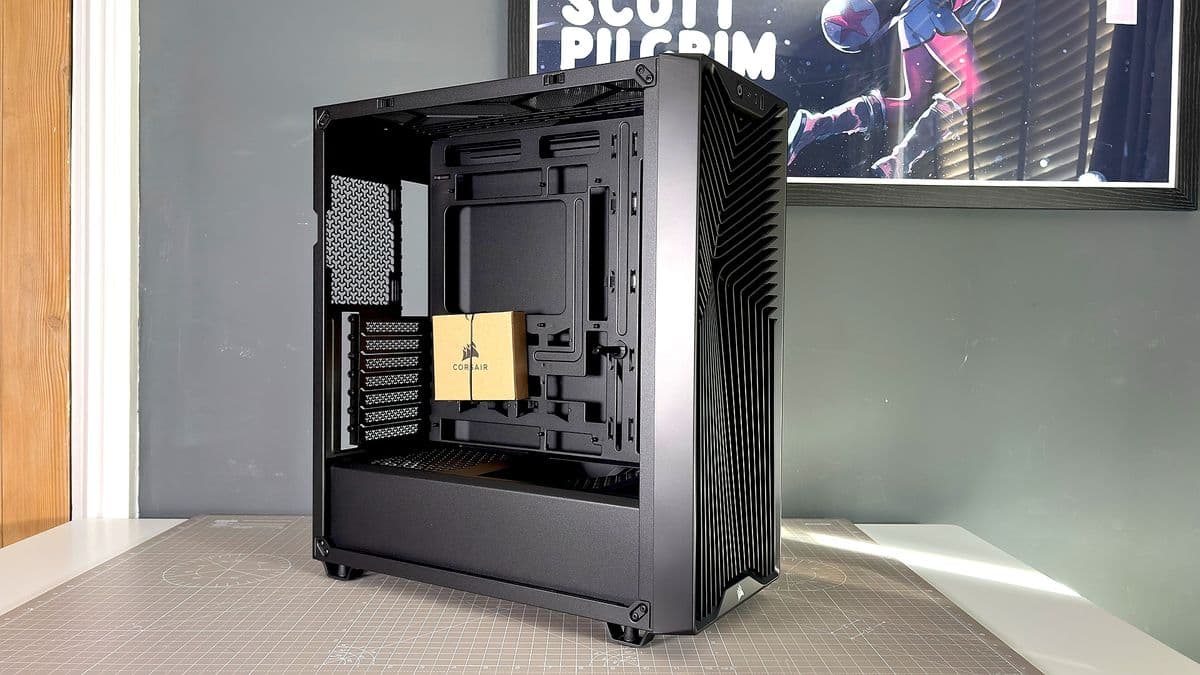
Case layout is conventional, which I mean as a compliment. PSU shroud at the bottom, drives tucked along the back and under the shroud, three fans preinstalled at the front. No weird hidden compartments, no cursed recessed motherboard tray like some “premium” cases that make plugging in headers a nightmare.
Motherboard install was painless, and there’s plenty of clearance at the top for fingers and a screwdriver-even with a 240 mm radiator or extra fans mounted up there, you’re not working in an impossible gap. The 3200D officially supports air coolers up to 165 mm tall. I threw in a massive dual-tower cooler that usually barely fits most mid-towers. With both fans, it was a hair too tall; with one fan removed, it cleared comfortably. That tells me any normal 120 mm or 140 mm tower is going to be fine.
GPU-wise, the case also includes a little support arm. I appreciate the thought, but in practice it’s not my favorite design. It tends to want to sit right in the middle of the GPU fans rather than at the edge, which isn’t ideal for airflow. Still, if GPU sag bugs you and you’re not running a super-hot card, it’s better than nothing.
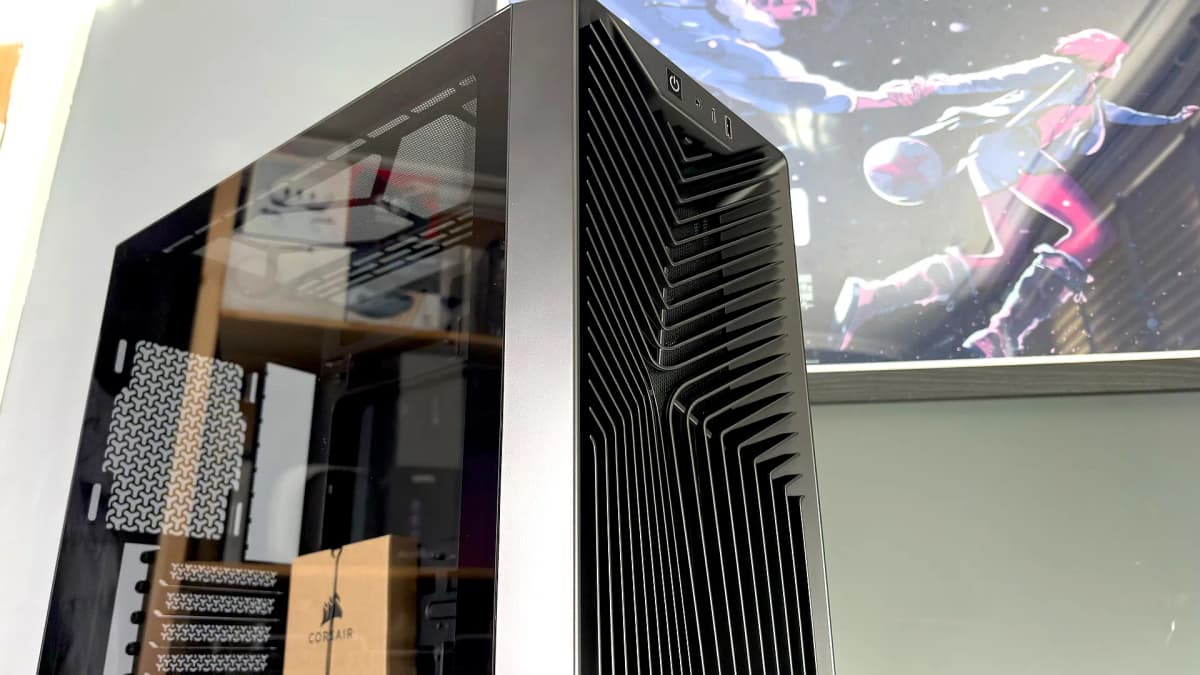
Storage support is modest but appropriate for 2026: there’s room for two 3.5-inch drives or up to four 2.5-inch drives, and realistically most people are on M.2 these days anyway. I slapped a single 3.5-inch HDD in the basement and a 2.5-inch SATA SSD on the rear tray and had no clearance issues around the PSU cables.
Cable management: mostly solid, with a couple of “yep, this is an $80 case” hints
Round the back, the 3200D is a mix of “nice touch” and “yeah, cost-cutting lives here.” Corsair gives you a metal cable cover down the center that hides the worst of the 24-pin and front-panel spaghetti. There are a couple of Velcro straps in the main channel and plenty of tie-down points everywhere else.
It’s not as idiot-proof as something like a be quiet! Shadow Base 800, where you can be completely lazy and still close the side panel on the first try. Here, if you just shove everything in and hope, you’ll probably have to re-open it and compress the main bundle a bit. But after a couple of zip ties, my panel closed without needing a knee pressed against it, which is more than I can say for some cheaper cases I’ve used.
There’s also support for “back-connect” motherboard layouts, which route a lot of connectors through the rear. I used a standard board this time, but you can see the extra cutouts clearly-it’s nice future-proofing if you plan an upgrade later.
Cooling and airflow: better than it looks, with one big omission
The Corsair 3200D ships with three 120 mm RS120 fans mounted at the front (or RS120 ARGB for about $10 more). That’s already a huge advantage over competing budget boxes that ship with a single exhaust and call it a day. But there’s a catch: there’s no rear exhaust fan included.
That means out of the box you’ve got plenty of intake, but hot air mostly escapes through passive vents at the back and top. In practice, this was less of a disaster than I expected. With my stock test setup—three front intakes only, no extras—CPU and GPU temperatures stayed absolutely fine under gaming loads, in line with most decent airflow cases I’ve used.
The mesh-heavy front panel and magnetic dust filter on the inside breathe better than they look. I actually tested airflow with the front filter on and off, and the difference was pretty small; you’re not sacrificing much cooling to keep dust in check. The top and PSU filters are also easy to pop off and clean, which is non-negotiable for me now after living with closed-off “glass box” cases that cook components and clog with dust.
Where I did notice a difference was when I experimented with adding a rear exhaust fan and a couple of shroud-mounted fans under the GPU. With a single 120 mm rear fan installed, CPU temps dropped a few degrees and the case felt like it “breathed” more naturally. You can absolutely run the 3200D without a rear fan, but if you’ve got a spare lying around, it’s worth putting in.
The PSU shroud has mounts for two 120 mm fans angled toward the GPU. On paper, this is great; in practice, my GPU temps barely moved compared to just using the three front fans. That’s not a knock, more a sign that the default airflow pattern is already good enough for a single mid-range card.
The elephant in the room: these fans are loud
Here’s where Corsair’s value proposition really shows its seams. The RS120 fans that come with the 3200D move a decent amount of air, but they are noisy when they’re allowed to run fast.
On my first boot, with a fairly aggressive motherboard default fan curve, the system would spike into a mini tornado every time a game launched. Fans spun up hard, the case hit a harsh whooshing and a noticeable high-pitched tone, and then after a few seconds things would settle down to something tolerable.
Out of curiosity, I cranked the fans to 100% and measured around 58 dB right next to the side panel. That’s properly loud—“you don’t want to sit next to this all day” loud. At a more realistic gaming fan curve, they sat closer to the high 40s dB, which is a lot better, but still clearly audible in a quiet room.
The tone of the noise matters too. Some cheap fans just give you a low whoosh that fades into the background. These RS120s have a slightly sharper character at higher RPMs that cuts through room noise. Not coil-whine bad, but not something I could fully ignore once I noticed it.
On the upside, they do their main job: cooling performance is solid even with the fans limited to 60-70% duty. I ended up manually tuning the fan curve so that they rarely go past that point unless the CPU is absolutely pegged. With that setup, my temps stayed competitive and the noise dropped down to “yeah, I know the PC is on, but it’s fine” levels.
If you’re the sort of person who buys Noctua fans and fan controllers, you’re going to replace these anyway. If you’re trying to keep the whole build on a tight budget, the RS120s absolutely get the job done—you just might want to spend 10 minutes in your BIOS or software dialing them back a bit.
Day-to-day use: good filters, minor annoyances
Living with the 3200D day-to-day felt surprisingly close to nicer mid-range cases I’ve used, with a couple of small reminders that this is still an $80 chassis.
The good:
- Three dust filters (front, top, and PSU) mean cleaning is easy. The front and top are magnetic; the bottom PSU filter uses metal clips.
- The tempered glass panel is nicely tinted and sits flush without rattling.
- Removable and replaceable PCI slot covers (not those awful snap-off-only ones).
- Plenty of room under the PSU shroud for normal and sideways “Shift” PSUs, plus excess cables.
The annoyances:
- The magnetic dust filters on top and front have a habit of sliding a bit if you brush them. Functionally fine, but slightly irritating.
- Only one usable high-speed USB port on the front panel (that USB-C). Older USB-A devices are stuck on a sluggish USB 2.0 port.
- No rear exhaust fan included, which feels like the one obvious missing piece in an otherwise generous package.
None of these were dealbreakers for me, but they are the spots where you can see Corsair shaving costs to squeeze in those extra front fans and the sturdier steel.
How it stacks up against other budget cases
Compared to the truly cheap sub-$60 boxes that still haunt online listings, the 3200D feels like it’s from a different world. It doesn’t flex, it has real airflow, and you’re not immediately planning a fan shopping list just to make it usable.
Versus something like Thermaltake’s S100 TG, which often sits around $70, the 3200D’s value is obvious: the S100 ships with just one fan, while the Corsair gives you three. Even assuming the RS120s cost Corsair very little, you’d be paying a good chunk of change to add three halfway decent fans after the fact to a cheaper chassis.
On the other side, if you stretch your budget toward $110-$150 cases, you start seeing quieter stock fans, more refined cable management, and sometimes nicer little quality-of-life touches (rubber grommets everywhere, more USB, fan hubs, etc.). But that’s a different price tier. In the sub-$100 bracket, the 3200D feels like it’s punching up.
Who the Corsair 3200D is actually for
After building and gaming in it, the target audience for the 3200D feels pretty clear.
- Budget and mid-range builders who want to spend their money on GPU and CPU rather than the box it all lives in, but don’t want the case to look or feel cheap.
- Airflow-focused setups that value mesh fronts and multiple intakes out of the box, even if that means a bit more noise.
- First-time builders who want a forgiving layout and decent cable management without getting overwhelmed by weird design experiments.
On the flip side, I wouldn’t recommend it if:
- You’re extremely noise-sensitive or your PC will sit on your desk right next to your ears.
- You’re building a near-silent workstation or audio production rig where fan tone matters as much as raw volume.
- You already know you’ll be buying premium, ultra-quiet fans anyway—in that case, a cheaper, fanless chassis might actually make more sense.
FinalBoss // Gear
Level up your setup
01Graphics cardson Amazon→02Gaming laptopson Amazon→03High-refresh gaming monitorson Amazon→04Discounted game keyson Kinguin→Affiliate links · As an Amazon Associate, FinalBoss earns from qualifying purchases.
Want to Level Up Your Gaming?
Get access to exclusive strategies, hidden tips, and pro-level insights that we don't share publicly.
Ultimate Reviews Strategy Guide + Weekly Pro Tips