
Table of Contents (14)
Corsair Novablade Pro review: wireless freedom, genius switches, clumsy UX
The Corsair Novablade Pro was the first time I seriously considered ditching cables for fighting games. I’ve used leverless boards and arcade sticks for years, but always wired, always nervous about latency. Two weeks into using the Novablade Pro as my main controller across PC and PS5 – for Street Fighter 6 lobbies, Tekken 8 training, and Guilty Gear Strive sets – I caught myself doing something I never thought I would: trusting 2.4GHz wireless in ranked.
This thing nails so many of the fundamentals – rock-solid wireless, silly levels of customization thanks to Hall effect switches, PS5 certification, a genuinely premium build – that it feels like a bit of a landmark for the leverless space. At the same time, Corsair trips over some surprisingly basic usability problems: no iCUE support, no onboard legend for all the “G” controls, and a setup flow that almost demands you keep the PDF manual open on a second screen.
Key Takeaways
- Fantastic wireless performance: 2.4GHz mode at 1,000Hz felt indistinguishable from wired in my testing on both PC and PS5.
- Hall effect switches with crazy tuning options: Per-button actuation from 0.1–4.0mm, including fine 0.1mm steps via onboard controls.
- Extra features built for competitors: SOCD toggles, Rapid Trigger, macros (PC only), multiple profiles, and a sturdy travel cover.
- Ergonomics are unusual: Tall, domed buttons with long travel feel very different from classic Sanwa-style fight buttons – satisfying but loud.
- UX is the weak link: No iCUE support, no on-device legend, and fixed G-Keys make the wealth of options harder to manage than it needs to be.
- Pricey but aggressively positioned: At around $249.99 / £229.99 (and often on sale), it undercuts most “premium” PS5 leverless competitors.
If you want a tournament-legal, PS5-certified leverless controller that can genuinely run wireless with almost zero compromise, the Novablade Pro is one of the strongest options available. Just be ready to wrestle with its controls and live without software.
Setup and first impressions
Out of the box, the Novablade Pro gives off a very “Corsair keyboard on steroids” vibe. Matte black shell, clean lines, understated RGB accents – no anime artwork or loud branding, just a big, serious slab of hardware that clearly means business. At 1.4kg it feels dense in the hands, heavier than most of its rivals, but solid and reassuring rather than unwieldy. It rides the line between “portable” and “this is my main home controller,” and just about lands on the right side.
Setup is a little different from most boards because of the clever magnetic top plate. Pop that off and you reveal:
- A physical switch to change platform compatibility (PS5 / PC)
- A selector for connection type (2.4GHz dongle / wired / Bluetooth)
- A neatly hidden slot for the 2.4GHz USB receiver
The idea is great – everything important is tucked away, and you’re not left wondering where the dongle went in your backpack. In practice, my very first interaction was a bit clumsy: the gap for lifting the top plate is tiny. With short fingernails I had to use a card edge to pry it up. After a few days I got used to the motion, but it never felt quite as slick as it looks.
On the bottom, a full sheet of grippy rubber keeps the board planted on a desk or lap. It barely moved even during frantic Tekken sidestep spam. There’s also a USB cable locking mechanism meant for tournament safety. Personally, these locks drive me up the wall. They usually prefer one specific cable size and play badly with thicker custom leads. If you live at locals and worry about someone stepping on your cord mid-round, it might be comforting. At home, I wished I could ignore it.
The last first-impression detail that stuck with me: Corsair includes a hard plastic cover that snaps over the buttons for travel. For anyone who throws their controller into a backpack with a laptop and a water bottle, this is genuinely useful, not just a nice-to-have.
Design, layout, and ergonomics
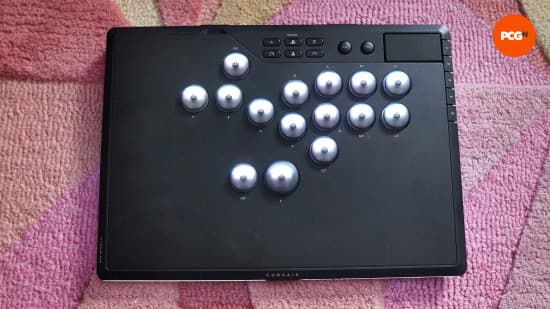
The Novablade Pro follows the standard 12-button leverless layout and then builds on it. You get the usual WASD-style directional cluster on the left and eight face buttons on the right. On top of that, Corsair adds three extra programmable buttons around the movement area: one above the movement keys and two flanking the Up button.
These extras are fixed; unlike the Victrix Pro KO, you can’t swap them out for spacers. I never accidentally hit them in normal play, even while grinding tight combos, but I can see some players being nervous about any extra surface near Up. If the thought of stray jumps keeps you up at night, this could be a sticking point, even if in reality they’re quite well placed.
Above the main clusters sits a row of function buttons, plus L3, R3, and a touchpad for PS5. Along the right edge, you get five G-Keys dedicated to system-level functions:
- Switching RGB lighting effects
- Adjusting brightness
- Changing SOCD (Simultaneous Opposite Cardinal Directions) behavior
- Toggling Rapid Trigger
- Adjusting actuation point
These side G-Keys are where the design’s strengths and weaknesses come into focus. They give you a ton of control directly on the device, but:
- Their functions are fixed; you can’t reassign them.
- There’s no label or legend anywhere on the chassis.
- All feedback is via RGB color and blinking patterns.
After nearly two months, I still couldn’t rattle off what each G-Key did without mentally mapping colors to features or checking the manual. If Corsair wants to keep the clean, minimalist look (which I like), at least hiding a tiny printed legend under the magnetic plate would make life so much easier.
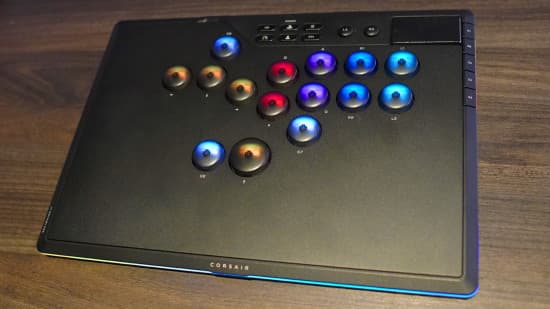
Ergonomically, the biggest surprise is the buttons themselves. Instead of the usual low-profile, flat arcade-style caps, Corsair uses tall, slightly domed buttons with noticeably longer travel. They feel more like ultra-light keyboard keys than Sanwa buttons. Pressing them has a deep, soft bottom-out but with a lot of movement on the way down.
The pros:
- They’re extremely satisfying to tap and drum on.
- The curvature helps guide your fingers and encourages consistent placement.
- The extra travel pairs interestingly with adjustable actuation and Rapid Trigger.
The cons:
- They’re loud. Louder than most arcade buttons, especially in a quiet room.
- The total travel feels roughly twice as long as typical fight buttons.
- If you like feather-light, hyper-short clicks, there’s an adjustment period.
I settled on a 1mm actuation point and, with that setting, the long travel stopped causing missed inputs. I still wished Corsair had physically shortened the throw by about half. Rapid Trigger helps mitigate the long travel (more on that later), but it is still a workaround for a problem that more conventional buttons don’t really have.
Hall effect switches and crazy customization
The headline feature of the Novablade Pro is its Hall effect switch system. Instead of using a traditional mechanical contact, each button uses a magnetic sensor to detect how far the plunger has moved. That means no physical contact to wear out, but more importantly for players, it means you can pick exactly where the button “activates” and “deactivates.”
Corsair lets you set the actuation distance anywhere from 0.1mm to 4.0mm. There are five predefined steps if you just want “shallower” or “deeper,” or you can go granular with 0.1mm increments using the function keys. In practice, that looks like:
- Holding a function button
- Tapping a G-Key to change mode
- Watching the RGB strip grow/shrink or change color to indicate the new setting
The RGB strip around the chassis and the backlit buttons do double duty here: they’re both decoration and menu. The light strip will change its “fill” to represent actuation distance, and the buttons will flash to warn that an option is about to change. Once you internalize the logic, it works. The problem is that nothing on the device explains what any of this color language means. If you put it down for a week, you will almost certainly need to reopen the manual to remember which effect corresponds to which setting.
On top of that, the board supports:
- SOCD modes: Adjust how opposite directions resolve (important for tournament legality and personal preference).
- Rapid Trigger: Inputs can reset as soon as you move up off the actuation distance, rather than waiting for the full return.
- Macros (PC only): You can set up sequences for training or labbing, but you can’t use these on PS5.
- Multiple profiles: Different games or characters can have their own setups.
There’s one very interesting detail for modders: Corsair doesn’t advertise it, but the stock Hall effect switches can be replaced with third-party Hall effect alternatives. Corsair doesn’t sell its own MGX Hyperdrive replacements, though, so if one fails you’re sourcing parts yourself.
All of this customization power is both the Novablade Pro’s best trait and its biggest headache. Once I had everything dialed in – actuation at 1mm, Rapid Trigger on, SOCD set the way I like – the board felt amazing. But getting there, and more importantly keeping it there, is less smooth than it should be because there is no companion software and no screen.
Performance in real games
I used the Novablade Pro as my main controller for several weeks across PS5 and PC. Most of that time was spent in Street Fighter 6 ranked, plus a lot of lab time in Tekken 8 and Guilty Gear Strive.
Wired vs 2.4GHz vs Bluetooth
On paper, both wired and 2.4GHz connections run at a 1,000Hz polling rate. Bluetooth, by contrast, is the “for the menu” option; you lose that super-high responsiveness there. In actual play:
- Wired vs 2.4GHz: I genuinely couldn’t feel a difference. I tried switching mid-session, running the same combos and reactions tests, and it just felt the same.
- Bluetooth: It’s fine for casual stuff or navigating a console UI, but not how I’d choose to play anything serious.
To be clear, you still won’t see tournament players relying on wireless. Interference is always a risk in a crowded venue, and TOs are understandably strict. At home, though, where I’m playing from a sofa with the PC or PS5 across the room, the 2.4GHz mode is a luxury that quickly starts to feel like a necessity. No cable draped across the living room, no tugging on ports, no rearranging furniture: it just works and keeps working.
Button feel and execution
The combination of long travel, adjustable actuation, and Rapid Trigger made the Novablade Pro feel very different from my usual leverless controllers.
- With actuation at 1mm, my anti-airs and whiff punishes felt crisp and consistent.
- Rapid Trigger was especially helpful for very fast taps (think micro-walks or short charge releases).
- Holding down charge motions felt fine; the longer travel didn’t impede that at all.
Where things got a little dicey was at ultra-low actuation settings. At 0.1mm, the board became almost too sensitive. Simply resting a finger slightly off-center could trigger an input. It’s a mode that makes sense on paper – “fastest response possible” – but in practice it led to more dropped confirms and accidental inputs than anything else. Hall effect or not, there’s a point where human hands are the bottleneck.
One of the few genuinely bad moments I had with the board was self-inflicted but revealing. During a long ranked session, I accidentally hit one of the G-Keys and changed my actuation point mid-match. Suddenly, all my timings felt wrong. Nothing on-screen told me what had changed, just a brief flash of color I didn’t fully register. I only figured it out after exiting to training mode and digging through the manual. Since then, I’ve used “Game Mode” to lock the G-Keys during play and avoid surprises.
That little story sums up the experience well: the hardware is incredibly capable, but the way you interact with its options can get in the way at the worst possible moments.
RGB, feedback, and the lack of iCUE
The Novablade Pro is full-RGB, but in a very Corsair keyboard sort of way. Every main button is backlit, and a light strip runs around the edge of the case. Strangely, you can’t set individual colors for specific keys or the strip. You get pre-made lighting effects and brightness control, and that’s about it.
More importantly, the RGB isn’t just for show. It’s the only feedback system for nearly every setting on the controller. Change actuation, and the strip grows or shrinks. Toggle Rapid Trigger, SOCD, or profiles, and colors shift or blink in specific patterns. It’s clever, but it’s opaque unless you’ve memorized the color code.
This is where the lack of iCUE software support hurts the most. Corsair’s RGB and control suite is well established on PC, but this device exists completely outside that ecosystem. No GUI to see or set actuation per button. No ability to click through SOCD modes on a screen. No simple way to remap anything beyond what’s exposed in hardware. You’re stuck doing everything through key combos and color flashes.
The Novablade Pro really feels like it was crying out for either:
- A small OLED or segment display to show what you’re changing
- Or full integration into iCUE with a dedicated tab for fighting-game tweaks
Instead, it has neither. The result is that many of its best features become “set it once and never touch again” options because changing them mid-season feels risky without clear visual confirmation.
Battery life and wireless reliability
Corsair rates the Novablade Pro at around 40 hours of use over 2.4GHz wireless with RGB at full brightness, and up to 200 hours with lighting off. In practice, my experience matched that 40-hour claim pretty closely. Over two weeks of nightly sessions (roughly 2–3 hours per night), I hit low battery right around when I expected.
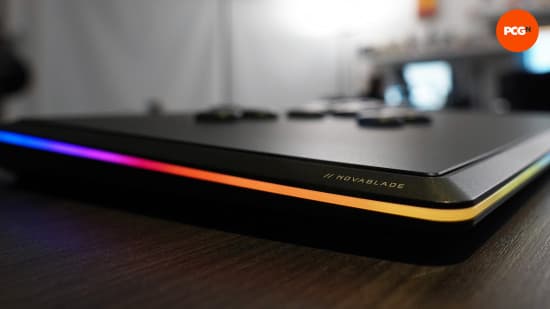
Battery checks are also handled through the Function key and RGB strip. Press the right combo, and the strip changes color to represent a charge range. It’s crude but workable – not as elegant as a percentage in software, but usable once you remember which color equals which bracket.
You can keep playing wirelessly while charging via USB, which helped when I forgot to plug it in after a long set. A simple battery bank on the sofa armrest kept things going without having to run a cable all the way to the console.
As for wireless reliability, I experienced no dropouts or phantom inputs in 2.4GHz mode, even in a room full of other devices. That doesn’t mean it’s foolproof in a packed tournament hall, but for home use it felt rock solid.
Price, value, and alternatives
The Corsair Novablade Pro comes in at $249.99 / £229.99, which puts it squarely in the “premium leverless” bracket. If you’re looking for a PS5-certified leverless board, you’re almost always going to be spending north of $200 anyway. In that context, Corsair has positioned this as one of the cheaper high-end options, especially when deals drop it as low as about $199.99 / £159.99.
For that money, you’re getting:
- PS5 and PC compatibility
- High-speed 2.4GHz wireless plus wired and Bluetooth
- Hall effect switches with per-button actuation tuning
- Rapid Trigger, SOCD options, macros (on PC), and multiple profiles
- Travel cover and a very sturdy, premium-feeling chassis
In terms of competitors:
- Victrix Pro KO Leverless: A very tournament-focused option. It has hot-swappable buttons with built-in tools, and it supports different mechanical switches if you want to tune feel. If your priority is serviceability and you love the idea of swapping a dead button in minutes, the Pro KO is hard to beat. Its extra-button layout might also suit some players better.
- Razer Kitsune: The minimalist choice. It strips away most frills and focuses on being thin, light, and easy to pack, with dead-simple controls. You give up Hall effect tuning and wireless, but you gain a razor-focused competitive tool with almost no distractions.
The Novablade Pro slots between those two philosophies. It’s more feature-rich than the Kitsune and more “gadgety” than the Pro KO, but it’s also cheaper than many similarly specced rivals when discounts hit. If you care about wireless and love tweaking hardware behavior, it offers a lot for the price.
Who the Corsair Novablade Pro is (and isn’t) for
After a lot of time with the Novablade Pro, a clear picture emerged of who will appreciate it the most.
- Great for:
- Competitive players who want PS5 certification and are willing to tune actuation and SOCD to their liking.
- People who play from a sofa or living room setup and are sick of long cables cutting across the floor.
- Tinkerers who enjoy squeezing every last drop of performance out of Hall effect switches.
- Players who value a heavy, stable board that won’t shift in intense matches.
- Not ideal for:
- Anyone who hates loud buttons or lives in a sound-sensitive space.
- Players who want a “set and forget” experience with minimal options and no learning curve.
- Fans of thin, ultra-light boards like the Razer Kitsune.
- People who rely heavily on companion software and visual UI for managing settings.
Bottom line: a brilliant board held back by its own brain
The Corsair Novablade Pro quickly won me over on feel and performance. The Hall effect switches with adjustable actuation, coupled with Rapid Trigger, make it incredibly responsive once dialed in. The wireless performance is so good over 2.4GHz that I happily used it for ranked play, which I never thought I’d say about a fighting game controller. Build quality is high, the travel cover is genuinely practical, and PS5 + PC compatibility makes it versatile.
Where it stumbles is in user experience. The lack of iCUE or any software suite is bizarre for a Corsair product this complex. The reliance on color codes and undocumented G-Keys makes its deep customization harder to access than it should be. A simple legend under the top plate or a tiny OLED display would go a long way; a full PC UI would make it a standout.
Even with those frustrations, the Novablade Pro has become one of the few leverless controllers I’d confidently recommend to serious players who also care about home comfort. It feels like a “hardware team knocked it out of the park, UX team never showed up” situation – but the core experience is strong enough that I’m willing to live with the quirks.
Rating: 8/10 – Exceptional hardware, class-leading wireless, and deep customization, held back by confusing controls and missing software support.
TL;DR
- The Corsair Novablade Pro is a premium leverless controller for PS5 and PC with Hall effect switches and per-button actuation from 0.1–4.0mm.
- Its 2.4GHz wireless mode felt as responsive as wired in real play, with a 1,000Hz polling rate and around 40 hours of battery life with full RGB.
- Buttons are tall, domed, and loud with long travel – different from typical arcade buttons, but satisfying once you get used to them.
- Extra G-Keys control SOCD, Rapid Trigger, actuation, and lighting, but there’s no onboard legend and no iCUE support, so managing settings can be confusing.
- At $249.99 / £229.99 (often less on sale), it undercuts many other premium PS5 leverless options while offering more features, especially wireless.
- If you want a deeply tunable, tournament-ready leverless controller and are willing to put up with a clunky UX, the Novablade Pro is one of the best choices available right now.
FinalBoss // Gear
Level up your setup
01Best-selling PS5 gameson Amazon→02DualSense controllerson Amazon→03PS5 SSD upgrades (M.2 NVMe)on Amazon→04Discounted game keyson Kinguin→Affiliate links · As an Amazon Associate, FinalBoss earns from qualifying purchases.
Want to Level Up Your Gaming?
Get access to exclusive strategies, hidden tips, and pro-level insights that we don't share publicly.
Ultimate Reviews Strategy Guide + Weekly Pro Tips