
Table of Contents (16)
Crimson Desert on PC: Ambitious rendering, inconsistent results
Crimson Desert is one of those games where the first still image looks incredible and the first five minutes of motion expose the cracks. On high-end PCs, it can deliver dense, dramatic vistas with ray-traced lighting, elaborate weather, and detailed materials. Yet players are still reporting a familiar pattern after the latest patches: turn on the fancy PC features, and the frame rate falls apart while the image gets noisier, not cleaner.
The trouble clusters around two headline technologies: Nvidia’s Ray Reconstruction (and AMD’s similar Ray Regeneration) plus DLSS 4.x upscaling and frame generation. On paper, these are supposed to stabilise ray-traced effects and smooth performance. In Crimson Desert specifically, the current implementation often does the opposite—especially indoors or in low light—and creates strange side effects like disappearing rain and “boiling” noise during camera movement.
Recent patches have improved stability and some performance paths, particularly on consoles and high-end GPUs, but the core PC complaints keep resurfacing: Ray Reconstruction attached to a heavy-handed lighting preset, DLSS Performance modes producing unstable images, and a general feeling that no combination of toggles quite behaves the way it should. This isn’t a simple “turn everything down” situation; the problems are in how options interact under the hood.
This breakdown focuses on those interactions. What Ray Reconstruction and DLSS are trying to do in Crimson Desert, why noise and artifacts are so prominent on PC, and which settings combinations currently produce the least broken experience.
What Crimson Desert’s PC graphics stack is trying to achieve
Crimson Desert ships with a fairly typical modern AAA PC rendering stack, on paper at least. The key pieces relevant to the current problems are:
- Ray-traced global illumination and reflections, with multiple quality levels controlled by the Lighting preset.
- Nvidia Ray Reconstruction (RR), a neural denoiser intended to replace hand-tuned per-effect denoisers for shadows, GI, and reflections.
- AMD Ray Regeneration, AMD’s answer to RR on Radeon hardware, conceptually similar in sitting between raw ray samples and the final shaded frame.
- Upscaling and frame generation via DLSS 4.x on Nvidia GPUs and FSR 3 on others, with different Quality/Performance modes.
- Standard TAA / DLAA-style anti-aliasing if you want native-resolution reconstruction instead of upscaling.
In theory, the workflow is straightforward: the game traces a limited number of rays per pixel (too few to look clean by themselves), Ray Reconstruction or Ray Regeneration uses temporal and spatial data to produce a stable ray-traced result, then DLSS or FSR upscales and reconstructs fine detail to your display’s resolution. When everything lines up, you get convincing lighting with less noise and less performance cost than brute-forcing more rays.
In practice, Crimson Desert’s current build leans hard on certain quality presets and seems to tie sample counts to internal resolution in ways that make the system fragile. Upscaling choices, lighting level, and reconstruction algorithm are not independent knobs. Change one, and you can trigger noise, ghosting, or performance deaths in situations that should be relatively simple to render.
The main PC issues players still run into
Most reports and tests converge on a few repeatable pain points:
- Ray Reconstruction is tied to the heaviest lighting preset. Enabling RR forces or expects maximum lighting quality, which significantly increases ray counts and cascades into large performance drops, especially on midrange GPUs.
- DLSS Performance (and lower) introduces “boiling” noise in motion. In low light or high-contrast interiors, details in armour, foliage, and shadows shimmer and crawl as the camera moves.
- Indoor and night scenes show disproportionate artifacts. Where you’d expect reconstruction tech to shine—dim, complex lighting—Crimson Desert often shows the worst temporal instability.
- Ray Reconstruction can erase visible rain. Multiple tests have confirmed situations where enabling RR removes rain particles from the final image, both outdoors and indoors, which appears to be a genuine rendering bug rather than a mere stylistic choice.
- Upscaling mode choice (DLSS 4.0 vs 4.5) affects noise in unintuitive ways. Some preview testing on RTX 5090 hardware suggests DLSS 4.0 in Performance mode with RR can look less noisy than DLSS 4.5, due to how sample counts are tied to the internal render resolution rather than the output.
These are not just edge cases on outdated GPUs. Even relatively powerful cards like an RTX 5070 Ti can see frame rate slashed when RR is active alongside Max lighting, while image quality remains compromised in scenarios where the expensive modes should be clearly superior.
Specifications
Ray Reconstruction and lighting: why one toggle breaks so much
Specifications
Ray Reconstruction is supposed to be the clever part of modern ray tracing. Instead of using a different denoiser tuned for each effect (shadows, GI, reflections) and each quality level, a neural network is trained on many scenarios and learns to convert noisy ray samples into a stable, high-quality image with fewer rays. When integrated cleanly, it can allow lower ray budgets and better image quality, which is particularly valuable for open-world games with complex lighting.
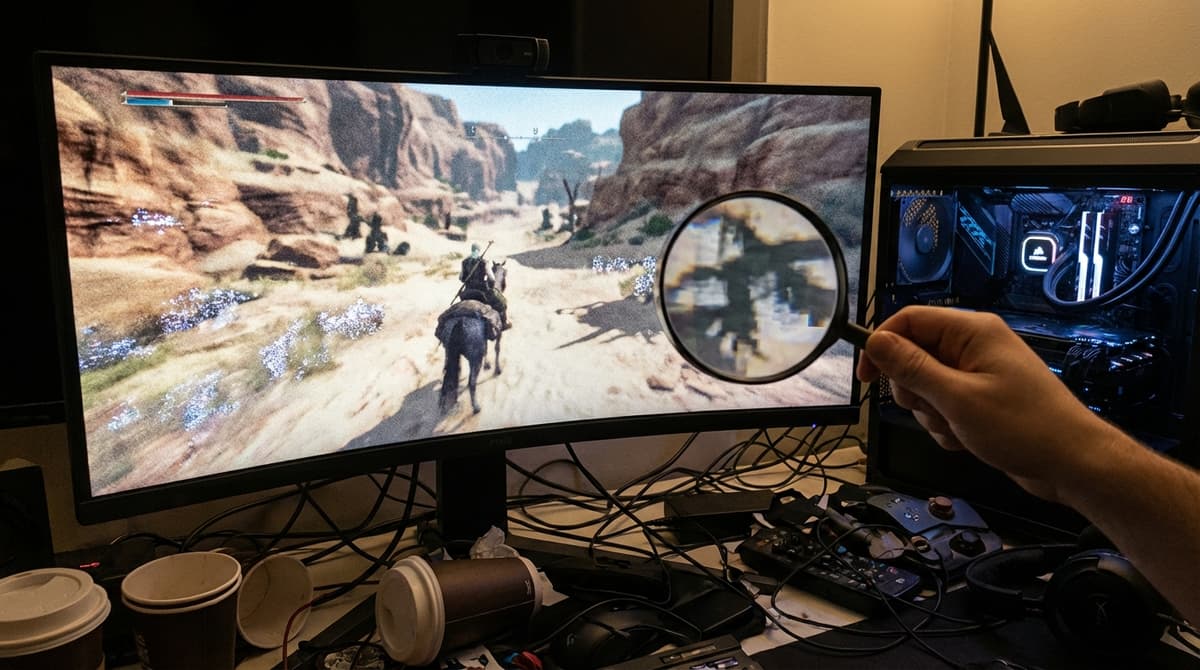
In Crimson Desert, RR is effectively fused to the Max lighting preset. That preset pushes ray counts and related quality controls to their extremes, then hands the result to the RR path. On high-end GPUs this can look impressive outdoors in bright conditions, but the cost is steep. On more typical hardware, the combination of higher ray budgets and RR’s computational overhead can turn a comfortably above-60fps scene into something hovering around or below 40fps, depending on resolution and CPU headroom.
The more troubling element is the apparent rendering bugs that come with RR in this game. Multiple testers have reproduced a case where enabling Ray Reconstruction simply removes visible rain from the scene, both outdoors and through windows, as if rain particles or their contributions are being filtered out by the denoiser. Similar, if less dramatic, geometry and specular anomalies show up on certain materials indoors. This indicates that the training data or integration path for RR in Crimson Desert is not properly accounting for all the effects layered into the final frame.
Compounding this, the Lighting: Max preset does not appear to add a proportionate visual improvement over Ultra or even Cinematic in many situations. It imports the RR path and its side effects without delivering a consistently obvious upgrade in GI or reflection fidelity. As a result, the most expensive mode is also the least reliable visually, which flips the usual expectation that “Max” should at least be the reference for cleanest output on powerful hardware.
DLSS 4.x, internal resolution, and the source of the “boiling” noise
DLSS 4.x in Crimson Desert works broadly as in other recent titles: it reconstructs a higher-resolution image from a lower-resolution input using motion vectors and a neural network. At Quality mode, the internal resolution is relatively high; at Performance and Ultra Performance, it drops considerably, which is where the problems become much more visible.
FinalBoss // Gear
Level up your setup
01Graphics cardson Amazon→02Gaming laptopson Amazon→03High-refresh gaming monitorson Amazon→04Discounted game keyson Kinguin→Affiliate links · As an Amazon Associate, FinalBoss earns from qualifying purchases.
One of the more interesting findings from early RTX 5090 testing is that DLSS 4.0 in Performance mode with Ray Reconstruction enabled can sometimes look less noisy than DLSS 4.5 under the same conditions. The explanation offered is that Crimson Desert’s upscaling and ray-tracing pipelines tie lighting sample counts to the internal render resolution, not the final output. When that internal resolution is shaved too far down, the ray-traced data feeding RR becomes so sparse that the denoiser and DLSS are both working from an unstable foundation.
That foundation is exactly what DLSS Performance undercuts. The upscaler can usually hide the softness from lower internal resolution in bright outdoor scenes where temporal data is plentiful and the signal-to-noise ratio is high. Indoors or at night, with torches, candles, or spotlights creating sharp contrasts, the same reconstruction path has far less room to manoeuvre. The result is the characteristic “boiling” effect: noisy per-pixel variation that never quite converges, especially in motion.
Ray Reconstruction amplifies this if the game is aggressively reducing ray counts in Performance mode. RR expects at least a minimally coherent input; when the input is extremely sparse and noisy due to low resolution and low samples, the neural network’s temporal accumulation can misinterpret details, leading to the shimmering surfaces and unstable indirect lighting players are describing.
While DLSS 4.5 brings neural improvements on paper, those benefits are partially lost if the game’s sample allocation strategy does not change accordingly. That’s why switching between DLSS 4.0 and 4.5 can produce counterintuitive results in Crimson Desert: what should be a straightforward upgrade is constrained by design decisions in the engine’s ray-tracing and upscaling integration, not just by Nvidia’s algorithms.
Why low-light interiors look worse than daylight vistas
Most reports highlight indoor and low-light scenes as the primary problem areas. This tracks with how both ray tracing and temporal upscaling behave. Interiors and night scenes often rely heavily on indirect light bounces and small, high-contrast sources; they expose deficiencies in both ray budgets and reconstruction stability much more than evenly lit exteriors.
When Lighting is set to Max, the engine appears to push more secondary bounces and finer-grained ray queries, but RR and DLSS have to rebuild a lot of that data after both denoising and upscaling. If the internal resolution is low because DLSS is in Performance or Ultra Performance mode, each pixel has less information about those secondary bounces. The neural reconstructions then lean heavily on motion history and neighbouring pixels, which is exactly how you end up with smearing, ghosting, and noise that never quite settles.
By contrast, native-resolution or DLAA-based rendering with Lighting on Cinematic or Ultra can look markedly more stable. The GPU is asked to do more raw work per pixel, but less is left to the temporal algorithms to guess. That is part of why many players report that simply turning off upscaling and stepping down the lighting preset produces a frame that looks cleaner, even if the estimated “quality level” of the settings is lower on paper.
Practical tuning: how to reduce noise and keep performance sane
Given the current state of the PC build, treating Crimson Desert’s most advanced options as experimental features rather than default recommendations is the safer approach. A methodical tuning process helps avoid jumping straight into the least stable combination of toggles.
1. Establish a native baseline without Ray Reconstruction
Start at your monitor’s native resolution with:
- Upscaling: Off (or DLAA/native TAA where available).
- Lighting: Cinematic.
- Ray Reconstruction / Ray Regeneration: Off.
- Other heavy settings (shadows, volumetrics) set one step below their maximum.
This gives a reference for how your GPU handles the game without the compounding impacts of RR and aggressive upscaling. If performance is adequate and the image looks stable in interiors and at night, you’ve already bypassed most of the known problem paths.
2. Introduce conservative upscaling, then re-test interiors
If frame rates are too low at native resolution, enable:
- DLSS 4.x Quality on Nvidia GPUs, or
- FSR 3 Quality on AMD/older hardware.
Quality modes keep internal resolution high enough that ray-traced data and material details remain reasonably well sampled. Revisit the same indoor and low-light test scenes. If noise and shimmer are acceptable here, you’ve found a workable compromise. Only then consider Balanced; Performance mode should be a last resort in this particular game.
3. Treat Lighting: Max and Ray Reconstruction as opt-in tests
With a stable baseline in place, try switching Lighting to Max and enabling Ray Reconstruction only if your performance headroom is substantial and you want to see how the mode behaves on your machine. Keep a close eye on:
- Rain and weather effects in busy towns or open fields.
- Specular highlights on armour and metal surfaces indoors.
- Shadow edges and mid-distance foliage during slow, smooth camera pans.
If you notice missing rain, strange sparkling surfaces, or lighting that changes character compared to Cinematic or Ultra, revert RR and Lighting: Max for regular play. At this stage, the visual inconsistencies and known bugs outweigh the theoretical quality advantages for most PCs.
4. Prefer VRR displays and 40-60 fps ranges over chasing 120+
Given the CPU and GPU load of Crimson Desert’s open world plus its current reconstruction quirks, the sweet spot on PC is often a locked or VRR-smoothed 40-60 fps rather than a fragile 100+ fps target enabled by very aggressive DLSS settings. Variable refresh rate (G-Sync / FreeSync) masks the difference between 45 and 60 fps far more effectively than DLSS Performance can hide severe noise in motion.
For VRR-capable monitors, aim for a configuration where the frame rate mostly stays in the display’s VRR window without relying on the lowest-quality upscaling modes. That usually means accepting medium-to-high presets and quality-level upscaling instead of ultra presets and DLSS Performance.
5. For Radeon and older GPUs, keep ray tracing and neural denoisers optional
On AMD hardware, Ray Regeneration appears to suffer from similar issues as Nvidia’s RR in Crimson Desert: high performance cost and non-trivial visual quirks. The conservative approach is to:
- Disable Ray Regeneration.
- Use FSR 3 in Quality mode if needed.
- Run Lighting on a non-Max preset or disable ray tracing entirely if the cost/benefit ratio doesn’t make sense for your GPU.
On older Nvidia cards that don’t support the latest DLSS features, native resolution with TAA or DLAA (where available) at 1080p or 1440p with reduced lighting is often more visually consistent than stretching for ray tracing or frame generation.
Patch trajectory and what still needs to change
Updates since launch have focused heavily on stability, CPU bottlenecks, and console experience. PlayStation 5 and PS5 Pro, for example, received new modes and tweaks that stabilise 40 and 60 fps targets in many scenarios, and PC has benefited from general optimisation work. However, the more structural questions around Ray Reconstruction and upscaling integration have not yet been fully resolved.
For the PC version to fully realise its technical ambitions, two areas stand out:
- Decoupling Ray Reconstruction from “Lighting: Max”. RR should be an independent toggle or at least offered at multiple ray-budget tiers, not hard-wired to the most extreme preset.
- Rebalancing sample allocation around internal resolution. If Performance-level upscaling is going to remain an option, the engine needs smarter sample distribution so RR and DLSS aren’t starved of usable data in those modes.
On top of that, specific visual bugs such as rain removal under RR and the more glaring material anomalies indoors need targeted fixes. These are not inherent flaws in the underlying Nvidia or AMD technologies; they are integration and content issues that can, in principle, be patched out. But until they are, PC players will continue to discover that the “highest” settings are not the best settings.