
Table of Contents (11)
Why Squid Sashimi Matters (And Why I Got Hooked On It)
After spending way too long hunting rare ingredients in Disney Dreamlight Valley, discovering Squid Sashimi in The Storybook Vale DLC felt like a relief. It’s a 1-star main course that only needs a single squid, gives a big energy boost, and is surprisingly easy to farm once you understand where to fish in Mythopia.
At first I wasted time fishing in the wrong spots and overcomplicating the recipe, assuming a sashimi dish had to need multiple ingredients. The breakthrough came when I realized two things:
- The recipe is literally just 1 squid in the cooking pot (no extras).
- The most reliable way to get squid is farming the blue fishing rings in Mythopia inside Storybook Vale.
If you follow this guide, you can unlock the recipe, stack squid quickly, and fill out your cookbook in under an hour of focused play on PC, PlayStation, Xbox, or Nintendo Switch.
Squid Sashimi Basics: Stats and Requirements
Here’s what you’re working toward before we dive into the step-by-step:
- Dish name: Squid Sashimi (Sashimi de Calamar)
- Category: Entrée / Main course
- Star rating: 1-star recipe
- Ingredients required: 1 × Squid
- Energy restored: around 1650 energy
- Sell price: about 600 Star Coins
- DLC: The Storybook Vale (Storybook Vale biome required)
Because it’s only 1-star and uses one ingredient, you don’t have to juggle farming, animal products, or Remy’s pantry at all. As long as you can fish squid, you can mass-produce this recipe.
Step 1 – Access Storybook Vale and Reach Mythopia
You can only make Squid Sashimi once you have access to the Storybook Vale DLC area. I’m not going to rehash every quest step here, but from my own run there are a couple of things to keep in mind before you go squid hunting:
- Make sure you’ve unlocked Storybook Vale through the usual questline and currency requirements in your Valley.
- Progress far enough to reach the Mythopia section of Storybook Vale – this is the biome where squid farming becomes trivial.
- Bring your Royal Fishing Rod and at least a little free inventory space before heading in.
In my case, I unlocked Storybook Vale, rushed through the intro quests, then beelined to Mythopia specifically to test squid spawns. If you’re already running around that biome, you’re ready for the next step.
Step 2 – Understand Fishing Rings (And Why Blue Matters)
My first mistake was assuming any fishing spot would give squid eventually. That’s not how it works here. In Storybook Vale, as in the rest of Dreamlight Valley, fish are tied to the color of the water ripples:

- White rings: Common fish
- Orange rings: Rarer or special fish
- Blue rings: Specific biome-locked or higher-value fish (including squid in Mythopia)
For Squid Sashimi, you only care about the blue fishing rings. Don’t waste time on white or orange ripples while you’re farming squid; I burned 15–20 minutes doing this before I paid attention to the color patterns.
Approach any body of water in Mythopia, and you’ll usually see a mix of ripple colors. If there’s no blue ring visible, catch whatever is there to clear the spot; the game will eventually respawn ripples, and blue will pop in again.
Step 3 – Farm Squid Efficiently in Mythopia
Mythopia is the MVP for this recipe. In my sessions, the drop rate for squid in Mythopia’s blue rings has been extremely high – very often 1 squid per blue ring, and more than once I pulled two squid in quick succession by clearing and respawning the spots.
Here’s the exact loop I settled into that kept my squid count climbing steadily:
- Start near a pond or river in Mythopia with visible blue ripples.
- Walk up to the edge and press
Interact(for example,Eon PC, or the main interact button on your console) to ready the Royal Fishing Rod. - Cast into the center of the blue ring and hit the usual timing prompts until you catch the fish.
- When it’s squid, great – it goes straight to your inventory. When it’s not, don’t panic; just keep clearing rings so new ones can spawn.
- Once you’ve emptied the visible spots, move a short distance along the water and look for more blue ripples. If you don’t see any, wait a moment or fish other colors to force respawns.
From my experience, plan on 10–15 minutes for a comfortable stack of squid if you stick to Mythopia and focus only on blue rings. On a good run, I’ve filled half an inventory tab in roughly that time.
There is an alternative: some runs in the DLC also spawn squid from blue rings in Elysian Fields. It works, but Mythopia has consistently felt faster and denser to me, so I only treat Elysian Fields as a backup if I’m already questing there.
There is an alternative: some runs in the DLC also spawn squid from blue rings in Elysian Fields. It works, but Mythopia has consistently felt faster and denser to me, so I only treat Elysian Fields as a backup if I’m already questing there.
🎮 Get This Game at the Best Price
Compare prices instantly and save up to 80% on Steam keys with Kinguin — trusted by 15+ million gamers worldwide.
*Affiliate link — supports our independent coverage at no extra cost to you

Step 4 – Manage Your Inventory While Farming Squid
One thing that blindsided me during my first squid grind was inventory clutter. Mythopia’s fishing spots also give you other fish and seafood; if you’re not paying attention, your backpack fills up and you’ll have to stop farming just to sort items.
Here’s how I avoid that now:
- Before you start, empty as many inventory slots as possible at a chest in your Valley.
- While fishing, regularly drop or sell low-value extras if they’re getting in the way. I usually keep only higher-value or new fish while I’m on a squid run.
- Once you’re done fishing, store excess squid in a dedicated chest near a cooking station. That way, you can grab some quickly whenever you want to cook more Squid Sashimi without clogging your main inventory.
This “squid-only” chest has saved me a lot of back-and-forth. I basically treat squid like a cooking currency: I farm a batch, store them, then draw from that pile whenever I need fast energy or extra Star Coins.
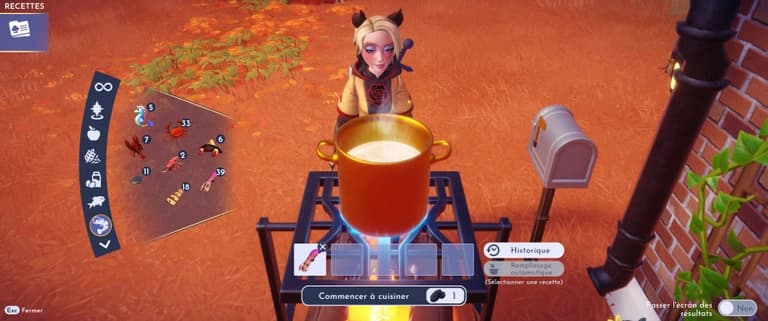
Step 5 – Cook Squid Sashimi (How the Recipe Actually Works)
Once I finally had a pocket full of squid, I overthought the recipe and tried mixing veggies and seasonings, thinking “it’s sashimi, there has to be rice or something.” That’s how I accidentally discovered a bunch of other dishes – but it’s not what the game wants for this one.
To cook Squid Sashimi correctly, do this:
- Go to any cooking station (Remy’s restaurant, your home stove, or a campfire pot in Storybook Vale).
- Interact with the stove and make sure you have at least one coal available.
- Open your ingredient list and go to the Seafood tab.
- Select Squid. You should see it appear in the pot as the only ingredient.
- Do not add anything else. Leave the pot with just 1 × Squid.
- Hit the cook button to confirm.
The result is instant: you’ll get a 1-star Squid Sashimi. Once you’ve cooked it for the first time, the recipe is permanently recorded in your cookbook, which is important if you’re trying to complete the entire Storybook Vale recipe collection.
If the game produces anything other than Squid Sashimi, it means you accidentally added another ingredient. Back out, clear the pot, and try again with only squid.
Step 6 – When to Eat It vs. When to Sell It
Once I realized how strong Squid Sashimi was for a 1-star dish, I started treating it as both an energy battery and a money maker.
Here’s how I decide what to do with each batch:
- Eat it when you’re planning a long building or mining session. The ~1650 energy is more than enough to refill your bar and push you into the “golden energy” state where actions cost less effort.
- Sell it when you’re short on coins. At around 600 Star Coins per plate and only requiring a single ingredient, it’s a solid early- to mid-game money farm inside the DLC.
- Save a few in your chest for friendship quests or Dreamlight duties that ask for specific meals or main courses – having a cheap, one-ingredient entrée ready is handy.
Personally, I keep one stack for eating, one stack for selling, and leave a few as “quest bait” in case a character asks for something from the Storybook Vale set.
Common Mistakes to Avoid
To save you from the same time sinks I hit, here are the most common pitfalls with this recipe and how to dodge them:
- Fishing in the wrong rings: If you’re not targeting blue ripples in Mythopia, your squid rate will feel awful. Always prioritize blue.
- Ignoring respawns: If no blue rings are visible, don’t just stand there waiting. Clear other rings nearby so the game cycles in new ones.
- Overfilling your backpack: Bring space or you’ll be forced to stop farming to sort junk fish. Make room beforehand and store squid in a chest afterward.
- Adding extra ingredients when cooking: Even a tiny herb or veggie will change the recipe result. For Squid Sashimi, it must be only squid.
- Forgetting to cook at least one dish: You need to actually cook Squid Sashimi once to log it into your recipe collection, not just own squid.
Wrap-Up: Turning Mythopia Into Your Squid Farm
Once you understand that Squid Sashimi is a simple 1-squid recipe and that Mythopia’s blue fishing rings are essentially a squid fountain, the whole process becomes painless:
- Unlock Storybook Vale and reach Mythopia.
- Fish only in blue water rings to farm squid quickly.
- Manage your inventory so you can carry a good batch home.
- At a stove, put 1 × Squid into the pot from the Seafood tab and cook.
- Use the resulting Squid Sashimi for big energy boosts, steady Star Coins, and recipe collection progress.
If I can turn Mythopia into a personal squid farm and fill my recipe book in under an hour, you can too. Once you’ve got Squid Sashimi on farm status, you’ll be in a great spot to start tackling the more complex multi-ingredient dishes in The Storybook Vale DLC.
FinalBoss // Gear
Level up your setup
01Top-rated gaming headsetson Amazon→02High-refresh gaming monitorson Amazon→03Gaming chairson Amazon→04Discounted game keyson Kinguin→Affiliate links · As an Amazon Associate, FinalBoss earns from qualifying purchases.
Want to Level Up Your Gaming?
Get access to exclusive strategies, hidden tips, and pro-level insights that we don't share publicly.
Ultimate Guide Strategy Guide + Weekly Pro Tips