
Table of Contents (8)
Living With the Gamesir G7 Pro Tri-Mode: A Week That Made My Elite Nervous
The last few years have been wild for “Pro” controllers. What used to be exotic gear for sweaty tournament players is now a minefield of €200 pads, stick drift horror stories, and more RGB than a gaming chair convention. I’ve used an Xbox Elite Series 2, tried third‑party stuff from Razer and Scuf, and I’ve hit that point where spending over €200 on a controller feels… indecent.
So when the Gamesir G7 Pro Tri-Mode showed up with its under‑€100 price, charging dock, anti‑drift sticks, four extra buttons, gyro on PC, and a customization app that reads like a feature checklist, my first thought was: where’s the catch?
After a solid week swapping it in for my Xbox Series X controller on console, for shooters on PC, and a bit of cloud gaming on Android, I have a pretty clear picture. The G7 Pro Tri-Mode doesn’t feel like a cheap “almost Elite” – it feels like someone actually sat down and listed what matters in 2026, then tried to cram it all into a pad that stays under €100.
It’s not perfect, and there are a couple of annoyances you should know about (especially if you’re primarily on Xbox). But the value here is borderline ridiculous.
Unboxing a “Pro” Controller That Actually Feels Pro
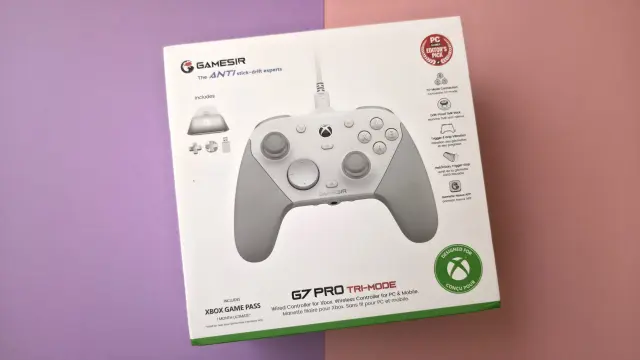
My first surprise came right out of the box. Most mid‑price controllers try to feel premium with fancy cardboard but then ship with the bare minimum: a cable if you’re lucky and maybe a cheap pouch. The G7 Pro Tri-Mode does the opposite. The outer packaging is nothing special, but what’s inside is absolutely stacked for the price:
- The controller itself
- A sturdy 3‑meter braided USB‑C cable
- A charging dock with pogo pins and RGB strip
- A 2.4 GHz USB‑A dongle (for PC)
- Two extra D‑pads (on top of the one pre‑installed)
- A clip that locks the USB‑C plug so it doesn’t wiggle out mid‑match
- Paperwork plus a 1‑month Xbox Game Pass Ultimate code
The dock is the real star here. Plug it into a USB port, drop the controller on it, and it charges through rear contacts – no cable juggling every night. There’s even a hidden slot underneath to park the 2.4 GHz dongle so it doesn’t vanish into your cable drawer. Most brands either sell a dock separately or reserve it for pads in the €150+ range; getting it bundled at this price feels like cheating.
The only obvious omission is a hard case and some spare stick caps or height options. Swappable D‑pads are nice, but once you give me a modular front shell and a Pro‑tier feature list, it’s hard not to wish they’d thrown in at least a couple of different stick tops.
Comfort, Build, and Those Anti‑Drift TRM Sticks
In the hand, the G7 Pro Tri-Mode feels immediately familiar if you’ve used an official Xbox Series controller. Same basic shape, same asymmetric stick layout, same trigger silhouette. The weight is a touch higher – around 272 grams – which makes sense when you remember this thing has an internal battery, gyro sensor, extra buttons and wireless guts.
The grips are lightly textured with a laser‑etched pattern that lands in a sweet spot: grippy enough that your hands don’t slide when things get sweaty, but not that sandpaper feel some “esports” pads have. Both the front shell and the grips are magnetically attached, so you can pop them off in a second. That’s useful both for cleaning and for swapping faceplates; Gamesir sells custom fronts pretty cheaply if you want to ditch the default look.
Popping the front plate off also makes it easy to swap the D‑pad. You get three in total: the default Xbox‑style hybrid, plus two one‑piece “Nintendo‑style” crosses, one of them sitting on a circular base. I settled on the circular cross for fighting games and 2D platformers – doing quarter circles in Street Fighter 6 felt much more controlled than on the stock Xbox pad.
The sticks use TRM technology, which is Gamesir’s approach to the anti‑drift problem. The pitch is simple: tighter tolerances, lower internal friction, smaller dead zones, and better long‑term resistance to the classic “my character walks by themselves” issue. I obviously couldn’t fast‑forward two years of wear to test the longevity claim, but after a week of heavy use, they feel excellent: no wobble, consistent resistance in every direction, and extremely minor dead zones out of the box.
In Halo Infinite on PC, I nudged the stick sensitivity slightly in the Gamesir Nexus app and immediately noticed micro‑corrections felt easier than on my stock Series pad. It’s subtle – this won’t magically turn you into a tournament player – but if you’re sensitive to stick feel, you’ll pick it up quickly.
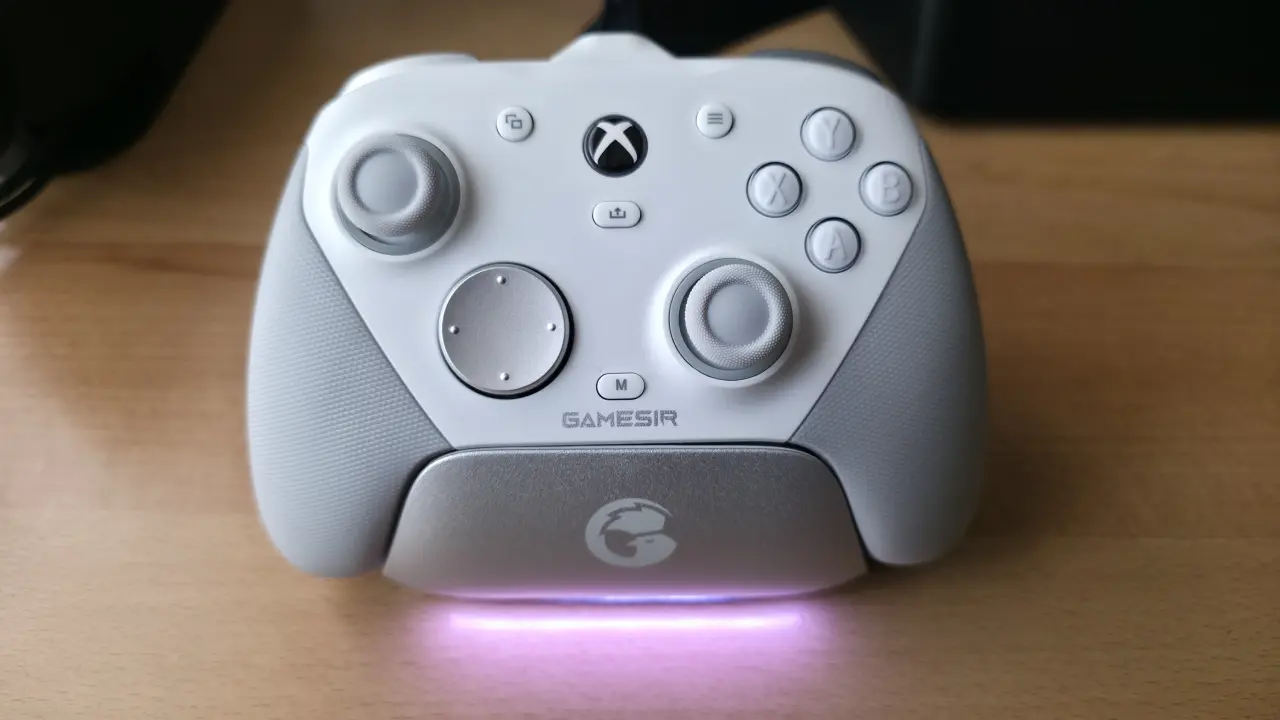
One caveat: you can swap the tops of the sticks, but not the whole stick modules like you can on some high‑end controllers. If, years down the line, a stick does die, you’re not clicking in a replacement module; you’re either living with it or replacing the whole controller.
Buttons, Paddles and Switches: The G7 Pro’s Secret Weapon
Where the G7 Pro Tri-Mode really starts to feel “pro” is around the buttons and switches.
The ABXY buttons use short‑travel microswitches. They’re not obnoxiously clicky like a cheap gaming mouse, but they have a distinct, crisp tactile bump and a soft click sound. After a couple of hours of Hades, it became obvious how much I prefer this to the mushier membrane feel of the stock Xbox pad; it’s similar in spirit to what I’ve felt on some expensive Razer pads, just not as loud.
You also get four extra programmable buttons:
- Two “paddle‑like” buttons on the rear
- Two more extra buttons on the top, near the bumpers
You can remap them on the fly with a simple button combo or dive into the Nexus software and assign them more deliberately. I ended up using the rear buttons for jump and reload in shooters, and the top extras for dodge and interact in action games. It didn’t take long before going back to a plain controller felt like losing fingers.
Cool little touch: there are physical switches on the back that let you lock the rear buttons so they don’t actuate. If you’re like me and sometimes squeeze the pad too hard in tense moments, that’s a lifesaver. Flip the lock and they go stiff, almost impossible to press by accident. I wish more brands did this.
The triggers have two‑stage hardware stops. Slide the rear toggles forward and the trigger travel shrinks to something closer to a mouse click – ideal for firing semiauto weapons quickly. Slide them back and you get the full analog range for driving games or pressure‑sensitive actions. Combined with the separate vibration motors in the triggers, Forza Horizon still feels punchy even without anything fancy like adaptive triggers.
Scattered across the pad are a few more quality‑of‑life touches:
- A dedicated M button that cycles between Xbox / PC / Android modes, swaps profiles, and lets you tweak chat/game audio mix and volume on the fly
- A microphone mute button near the 3.5 mm jack
- A rear switch to change wireless mode between the 2.4 GHz dongle and Bluetooth
Nothing here feels like a gimmick. After a couple of nights on Xbox party chat, having quick access to chat/game balance from the controller itself spoiled me.
Tri-Mode Connectivity & Battery: Great Flexibility, One Catch
“Tri-Mode” means three ways to connect:
- USB‑C wired
- 2.4 GHz wireless via the included dongle
- Bluetooth
In practice, how you can use those changes depending on the platform:
- Xbox Series X|S: wired only. Plug‑and‑play, no fuss, but no wireless here.
- PC: wired or 2.4 GHz wireless via the dongle. This is where the pad feels best.
- Android: Bluetooth only, which is fine for cloud gaming or lighter titles.
On PC, the low‑latency 2.4 GHz connection felt indistinguishable from wired in Apex Legends and DOOM Eternal. You can also crank the polling rate up to 1000 Hz in the Nexus software, which is overkill for most people but nice if you obsess over input lag charts.
The one real compromise is battery life. I averaged around 10 hours of use per charge in mixed play on PC and Android, with rumble on and rear buttons active. That’s not awful, and the dock makes topping it up painless, but compared to some monsters that hit 30+ hours, it’s “fine” rather than impressive. If you play all weekend without dropping the pad on the dock, you’ll hit the low‑battery warning.
On Xbox the battery life matters a bit less since you’re wired anyway, but I still found myself absent‑mindedly parking it on the dock out of habit. It’s just too convenient not to.
Gamesir Nexus Software: Where the Real Magic Hides
The G7 Pro Tri-Mode works fine out of the box. If you never plug it into a PC, you can still map the extra buttons and use the trigger stops. But you’ll be missing a big chunk of what makes this thing interesting.
On Windows, the Gamesir Nexus app turns the pad into a little science lab. From there you can:
- Change the polling rate (up to 1000 Hz on PC)
- Tweak stick dead zones and their response curve
- Adjust trigger dead zones and curves
- Individually tune vibration intensity, including the trigger motors
- Fully remap buttons, including the extras
- Enable and configure gyro controls for PC
- Update firmware
You can store up to four profiles in the controller’s memory and flip between them using the M button, so once they’re saved you don’t have to keep the app open. I ended up with:
- A low dead‑zone, high‑polling shooter profile for PC
- A comfy all‑rounder for Xbox with stronger vibration
- A gyro‑enabled profile for third‑person games on PC
The gyro deserves a shoutout. It doesn’t work on Xbox, but on PC it’s genuinely good. Aim‑assist‑friendly shooters and third‑person games suddenly feel a lot more precise when you combine stick aiming with a bit of gyro correction. It reminded me of using the gyro on a Switch Pro Controller, but with better sticks attached.
The downside is obvious: you only get full control if you own a PC and are willing to plug the pad in at least once. If you’re 100% console‑only and allergic to software, you’ll still get a lot out of the controller, but some of its best tricks will stay locked away.
Compared to the Big Names: Elite, Wolverine, Raiju & Friends
To put the G7 Pro Tri-Mode in context, you have to look at where it sits on the price ladder.
On one end, you’ve got official heavyweights like the Xbox Elite Series 2 and high‑end third‑party pads from brands like Razer and Scuf. We’re talking €180–€220 territory: metal accents, replaceable stick modules, cases, long battery life and, sometimes, their own quirks and failures.
On the PlayStation side, I’ve tested premium controllers built around anti‑drift technologies and mecha‑tactile buttons that cost around €210. They’re amazing pieces of kit, but you feel every euro when you drop them.
The G7 Pro Tri-Mode slices in under €100 and still manages to tick a frankly absurd number of “premium” boxes:
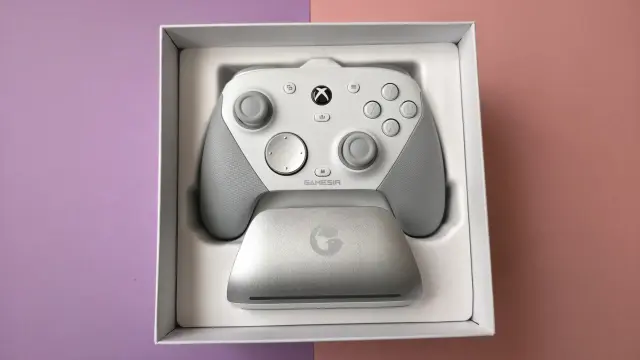
- Anti‑drift TRM sticks
- Four extra programmable buttons
- Trigger stops
- Charging dock with dongle storage
- Swappable D‑pads and magnetic faceplate
- Gyro support on PC
- Deep software customization
- Official Xbox layout and licensing
What you don’t get compared to €200 monsters:
- Wireless use on Xbox – you’re wired only there
- Huge 25–30 hour batteries
- Replaceable stick modules rather than just caps
- A hard carry case or full accessory kit of stick heights and shapes
- Fancy haptics or adaptive triggers
Given the price difference, those trade‑offs make sense. The only one that truly stung for me is the lack of wireless on Xbox. I get why – licensing and radio stuff adds cost quickly – but once you’ve gotten used to couch gaming with a wireless Elite, going back to a cable does feel like a step back.
Who the G7 Pro Tri-Mode Is (and Isn’t) For
After living with the G7 Pro Tri-Mode for a week, it’s pretty clear who should be eyeing this thing.
If you’re a multiplatform player bouncing between Xbox, PC and maybe an Android phone or handheld, this is basically a dream on a budget. One controller, one ecosystem of settings and profiles, one dock on your desk. Use it wired on Xbox, dock it to charge, grab the dongle for PC, and flick over to Bluetooth for a bit of cloud gaming in bed. That workflow just clicks.
If you’re primarily a PC player hunting for a pad that behaves like an Xbox controller but gives you gyro, better sticks, extra buttons, and a serious customization suite, the value is enormous. This is where, for me, it easily justifies its place over something like a basic Series pad or many “RGB gamer” controllers in the same price band.
If you’re an Xbox‑only player who cares deeply about being wireless on the sofa, the picture changes. You either accept the cable, keep a second wireless pad around for more relaxed sessions, or you start looking up to the pricier Elite and third‑party wireless options.
And if you’re the sort of person who absolutely needs easily swappable stick modules for long‑term peace of mind, or you want luxury touches like metal paddles and included hard cases, you’re still in that €180+ bracket. The G7 Pro Tri-Mode is aggressively good for the money, but it doesn’t pretend to be a 1:1 rival to the absolute top end in every single category.
FinalBoss // Gear
Level up your setup
01Racing wheels (PC & PS5)on Amazon→02High-refresh gaming monitorson Amazon→03Gaming chairson Amazon→04Discounted game keyson Kinguin→Affiliate links · As an Amazon Associate, FinalBoss earns from qualifying purchases.
Want to Level Up Your Gaming?
Get access to exclusive strategies, hidden tips, and pro-level insights that we don't share publicly.
Ultimate Reviews Strategy Guide + Weekly Pro Tips