
Table of Contents (20)
How to start playing Hytale in early access
After spending my first weekend with Hytale’s early access, I realized the hardest part wasn’t the bosses or the crafting trees – it was just figuring out how to get the game installed, bought, and running smoothly across different PCs. Hytale doesn’t use Steam or consoles, it runs through its own cross-platform launcher, and you need to pick between three editions before you ever see the main menu.
This guide walks you through the full process I wish I’d had up front: checking if your PC can run Hytale, installing the launcher on Windows, macOS (Apple Silicon), or Linux, choosing the right edition, and setting expectations for early access and mods.
Time to get playing: 15-30 minutes, depending on your internet speed.
Difficulty: Easy (a bit of reading and a few logins).
What you’ll do in this guide
- Check whether your PC or laptop meets Hytale’s minimum or recommended specs.
- Install the official Hytale Launcher on Windows, Apple Silicon Mac, or Linux.
- Create (or link) a Hytale account using email, Discord, or other providers.
- Understand the three Hytale editions, what you actually get, and which is worth it.
- Download and launch Hytale without hunting around for Steam or console versions.
- Prepare for early access bugs, big patches, and how mods impact performance.
Hytale’s developers are clear that early access will be rough: they’ve said Hytale will be “in a rough state as early access begins” and that the roadmap “isn’t completely pre-planned” because they’re expecting feedback from players experiencing the game for the first time. Over a million players jumped in on release day, so getting set up cleanly now will save you a lot of frustration later.
Step 1 → Make sure your PC can run Hytale
Step → Check your hardware → Result: you know whether Hytale will run well on your system before you spend money or time downloading.
Hytale is surprisingly forgiving – it can run on many PCs from the last 10–15 years – but mods and higher resolutions will push your hardware. Here are the official requirements.
Minimum PC requirements (bare minimum to play)
- OS: Windows 10/11 / Linux (x64, Kernel 6.15) / Apple Silicon with macOS Tahoe (26.0)
- CPU: Intel Core i5-7500 / AMD Ryzen 3 1200 / Apple M1
- RAM: 8 GB
- GPU:
- Integrated: Intel UHD Graphics 620 / AMD Radeon Vega 6 / Apple M1
- Discrete: NVIDIA GTX 900 Series / AMD Radeon 400 Series / Intel Arc A-Series
- Storage: SSD with 10 GB free space
Recommended PC requirements (for smoother play)
- OS: Windows 10/11 / Linux (x64, Kernel 6.15) / Apple Silicon with macOS Tahoe (26.0)
- CPU: Intel Core i5-10400 / AMD Ryzen 5 3600 / Apple M2
- RAM: 16 GB
- GPU:
- Integrated: Intel Iris Xe Graphics / AMD Radeon 660M / Apple M2
- Discrete: NVIDIA GTX 900 Series / AMD Radeon 400 Series / Intel Arc A-Series
- Storage: SSD with 20 GB free space
What this means in practice:
- If your PC is from the last 10–15 years and has any GTX 900-series (or better) GPU or equivalent, you’re probably fine.
- 8 GB RAM will run the base game, but once you start stacking mods and higher-resolution textures, 16 GB makes a big difference.
- An SSD isn’t optional – Hytale expects one. You’ll get faster loads and fewer stutters in big worlds.
- On Mac, only Apple Silicon (M1/M2 and newer) is officially supported. Older Intel Macs are not on the supported list.
Pro tip: If you already know you’ll dive into heavy modding and high-res texture packs, aim for the recommended specs or better. On my older mid-range rig, the base game was fine, but heavy texture mods made 8 GB RAM feel extremely tight.
Step 2 → Download and install the Hytale Launcher
Step → Install the official launcher → Result: you have the only app you need to download, update, and run Hytale.
Hytale is not on Steam, Epic, or any console store. Everything runs through the Hytale Launcher, similar to how Minecraft uses its own launcher.
- Open your browser and go to the official Hytale site.
Step → Visit the official site → Result: you see the download options and pre-purchase button. - Find the launcher download.
Look for a button or section to download the Hytale Launcher. Pick the version for your OS (Windows, macOS, or Linux). - Download the installer file.
Step → Click the download for your OS → Result: an installer (like.exeon Windows or.dmgon macOS) is saved to your downloads folder. - Run the installer.
On Windows, double-click the.exeand follow the prompts. On Mac, open the.dmgand drag the launcher to your Applications folder. On Linux, follow the instructions provided on the site for your distribution. - Launch the Hytale Launcher.
Step → Open the newly installed launcher → Result: you reach the sign-in / account creation screen.
Pro tip: Pin the Hytale Launcher to your taskbar or dock right away. I kept instinctively opening Steam at first; having the launcher pinned made it feel like “just another game” instead of something separate I kept forgetting about.
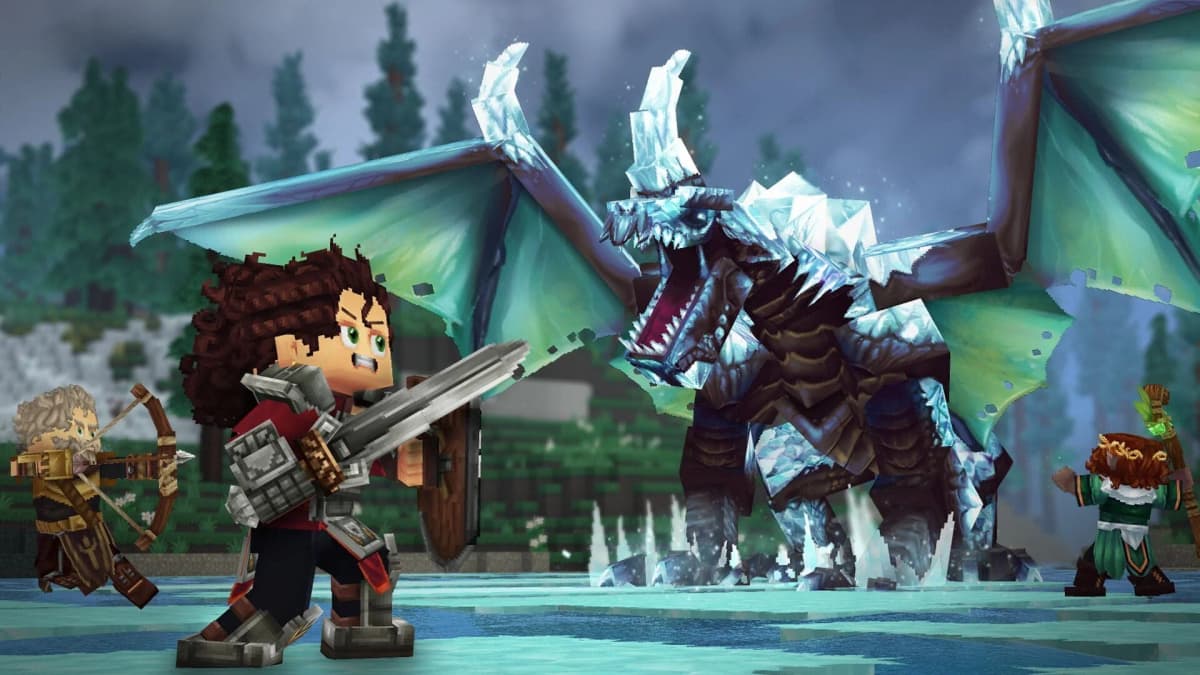
Step 3 → Create or sign into your Hytale account
Step → Set up your account → Result: your purchases, characters, and progress are tied to a single login across devices.
- In the launcher, click to sign in or create a new account.
If you already registered on the Hytale site, just log in. Otherwise, choose the option to create a new account. - Complete account creation on the website.
The launcher will redirect you to the official site, where you can sign up using:- Discord
- Or other supported login providers
Step → Choose your preferred login method → Result: a new Hytale account is created for you.
- Confirm any verification emails or prompts.
Some providers may require email confirmation. Complete that so your account is fully active. - Return to the Hytale Launcher and sign in.
Step → Enter the same credentials you just set up → Result: the launcher is now linked to your Hytale account.
Tip: Use the same login method everywhere (for example, always logging in via Discord). It keeps things simpler if you ever reinstall the launcher or move between devices.
Step 4 → Choose the right Hytale edition and pre-purchase
Step → Pick an edition → Result: you unlock access to early access plus the full game at launch, with cosmetic bonuses based on the edition.
Hytale is not free-to-play. Hypixel Studios is running Hytale as an independent project, funded largely by game purchases. The dev team is about 50 people, and current pre-purchases are designed to fund roughly the next two years of development, so your purchase directly supports ongoing updates.
On the official site, click the blue Pre-purchase button in the top-right. You’ll see three editions:
Standard Edition – $19.99 (Best for most players)
This is the base version and includes the full game plus early access, plus a set of cosmetic items:
- Forest Guardian Set
- Voyager Set
- Savanna Scout Set
- Exclusive Standard Cape
Who it’s for: If you just want to play Hytale, experience early access, and don’t care much about extra cosmetics, this is enough.
Supporter Edition – $34.99 (For cosmetic fans)
Everything in Standard, plus more cosmetic outfits and capes:
- Everything included in Standard
- Featherbound Set
- Scavenger Set
- Arctic Scout Set
- Explorer Goggles
- Exclusive Supporter Capes
Who it’s for: You want to support development a bit more and like having extra fashion options from day one.
Cursebreaker Founder’s Edition – $69.99 (For big supporters)
This is the top tier. It includes everything from Standard and Supporter, plus the largest cosmetic bundle:
- Everything included in Standard and Supporter
- Hope of Gaia Set
- Void Hero Set
- Pop Star Set
- Voidbearer Set
- Exclusive Cursebreaker Capes
Who it’s for: You’re all-in on Hytale, want a pile of unique cosmetics, and are happy to heavily support the devs.
Important: All three editions grant early access and the same core game content; the differences are purely cosmetic and supportive. You can upgrade later if you start with a cheaper edition and decide you want more cosmetics.
Step → Choose your edition and complete payment → Result: your Hytale account is flagged as owning that edition, ready to install and play.
Step 5 → Download, install, and launch Hytale
Step → Install the actual game through the launcher → Result: Hytale is downloaded to your SSD and ready to play.
- Open the Hytale Launcher and sign in.
If it was already open during purchase, restart or refresh it so it detects your new license. - Locate Hytale in the launcher’s main screen.
You should now see an option to install or download the game. - Choose your install location.
Step → Select an SSD with enough free space (10–20 GB minimum) → Result: faster loads and fewer stutters than a hard drive. - Start the download.
With over a million players hitting early access, download speeds may spike at peak times. Let the launcher run in the background until it finishes. - Click
Playin the launcher once the download completes.
Step → HitPlay→ Result: the game boots to its main menu.
Pro tip: If you’re on a slower connection, start the download earlier in the day and let it run. The launcher will also handle future patches automatically, so expect occasional large downloads as new content and bug fixes roll out.
Step 6 → Tuning performance and dealing with early access rough edges
Step → Adjust basic settings and set expectations → Result: smoother gameplay and less frustration with bugs and instability.
Hytale’s team has been upfront: early access is unfinished, and they’re relying heavily on player feedback to shape the roadmap. That means:
- You will see bugs, balance issues, and occasionally broken quests or features.
- Systems will change over time – crafting recipes, progression, and world generation may shift.
- Regular patches will tweak content and fix issues, sometimes changing your experience mid-playthrough.
Quick performance tuning tips
- Lower graphics first if you stutter. In the settings menu, reduce things like render distance, shadows, and effects before dropping resolution.
- Close heavy background apps. Browsers with lots of tabs, streaming apps, and overlays can steal RAM and CPU, especially on 8 GB systems.
- Keep your GPU drivers updated. New games often benefit from the latest drivers, particularly on NVIDIA and AMD cards.
- Use the in-game bug report tools. If you hit a nasty bug, report it directly through Hytale’s built-in reporting options (usually found in the menus). That feedback is part of how they’re planning updates.
Mindset that helped me: I treated my first characters as “test runs” rather than permanent saves. That made it easier to roll with early access changes and restarts without feeling like I’d “wasted” progress.
Step 7 → Getting into Hytale mods (without breaking your game)
Step → Explore official mod support carefully → Result: a richer game with new content, without tanking performance or stability.
One of Hytale’s biggest strengths at launch is that it ships with official mod support. Mods are integrated through CurseForge, so you don’t have to juggle random files or sketchy downloads.
- From the launcher or main menu, look for a Mods / Add-ons section.
Step → Open the mods browser → Result: you see curated mods powered by CurseForge. - Start with small, popular mods.
Look for mods with lots of downloads and positive ratings. Install one or two at a time rather than a huge pack right away. - Watch game version compatibility.
Make sure any mod you install explicitly supports your current Hytale version. Early access updates can break outdated mods. - Test performance after each mod or pack.
Step → Launch the game after adding mods → Result: if performance drops hard or you crash, you can roll back the last mod change.
Performance warning: Texture packs and visual overhauls are usually the heaviest mods. They’re the first ones that made my older system unhappy. If you only meet minimum specs, stick to lighter content mods (new items, tweaks, minor features) before you try big visual packs.
Troubleshooting common Hytale setup issues
Step → Fix basic install and launch problems → Result: you spend your time in-game, not staring at error messages.
The launcher won’t install
- On Windows: Right-click the installer and choose “Run as administrator”. Temporarily pause aggressive antivirus if it’s blocking the installer, then turn it back on afterwards.
- On macOS: If macOS blocks the app as from an unidentified developer, you may need to allow it in your system security settings after your first launch attempt.
- On Linux: Make sure you’re on a 64-bit distribution with a Linux kernel version that meets the minimum (6.15). If in doubt, update your system before trying again.
The launcher installs, but I don’t see an option to install Hytale
- Confirm you’re signed into the same account you used to pre-purchase.
- If you just bought the game, close and reopen the launcher so it refreshes your account entitlements.
- Double-check that your payment actually completed, and that you received a confirmation email or receipt.
The game crashes or runs very poorly
- Lower graphics settings and render distance first, then restart the game.
- Update your GPU drivers and make sure Windows/macOS/Linux is reasonably up to date.
- Remove recently installed mods to rule out a broken or incompatible one.
- If all else fails, uninstall Hytale through the launcher and reinstall it on a healthy SSD with enough free space.
Remember: this is early access. Even with a strong PC, you’ll sometimes hit issues that are on the game’s side, not yours. Reporting them is part of helping the game improve.
TL;DR – Quick checklist to start playing Hytale
- Step → Check your specs → Result: confirm you meet at least the minimum (8 GB RAM, mid-range CPU, SSD, supported OS).
- Step → Download the Hytale Launcher → Result: you have the only app you need to install and update the game.
- Step → Create or sign into your Hytale account → Result: your progress and purchase are tied to one login.
- Step → Pre-purchase an edition (Standard, Supporter, or Cursebreaker) → Result: you unlock early access and the full game later, with cosmetics depending on edition.
- Step → Install Hytale via the launcher → Result: the game is downloaded to your SSD and ready to launch.
- Step → Adjust settings and expectations → Result: smoother performance and less frustration with early access bugs.
- Step → Dip into mods slowly → Result: you enjoy the massive potential of Hytale’s mod scene without breaking your save or PC.
The breakthrough for me was treating the setup process as part of playing an evolving, community-driven game. Once the launcher was installed, my edition picked, and my expectations calibrated for early access, Hytale went from “confusing to start” to “something I can dip into for dozens of hours and slowly customize with mods.” Follow the steps above, and you’ll be exploring Orbis – and shaping Hytale’s future through feedback and mods – in less time than it takes to watch a movie.
FinalBoss // Gear
Level up your setup
01Top-rated gaming headsetson Amazon→02High-refresh gaming monitorson Amazon→03Gaming chairson Amazon→04Discounted game keyson Kinguin→Affiliate links · As an Amazon Associate, FinalBoss earns from qualifying purchases.
Want to Level Up Your Gaming?
Get access to exclusive strategies, hidden tips, and pro-level insights that we don't share publicly.
Ultimate Guide Strategy Guide + Weekly Pro Tips