
Table of Contents (9)
The moment I realised my “gaming PC” was crippled by a crap keyboard
I remember the exact moment my old keyboard died for me. Not when it broke – when it exposed itself as the weakest part of my entire setup.
I’d just finished building a new rig with a fresh GPU, one of those upgrades you hype up for weeks. Fired up a match, everything looked incredible, framerate was buttery, life was good. Then I sat down to answer some messages on Discord and hammer out a few paragraphs of notes.
And that’s when it hit me: I was typing on a hollow, rattly “gaming” keyboard that sounded like a cutlery drawer in a washing machine. Every key felt mushy and cheap. The RGB was blinding, the legends were wearing off, the spacebar sounded like someone dropping a spoon on a metal tray. My €1,000+ PC was being driven by a €40 plastic disaster.
That was the night I fell down the mechanical keyboard rabbit hole. Two years later, I’m sitting here typing on a Glorious GMMK Pro with Cherry MX Ergo Clear switches and pudding keycaps, and I’m going to say something that’ll annoy the “just buy a better GPU” crowd:
The single best PC hardware upgrade I’ve made in the last few years wasn’t my graphics card. It was this damn keyboard.
Yes, I spent around €600 on a keyboard – and no, I don’t regret a cent
Let’s get the painful number out of the way, because everyone always asks.
The GMMK Pro itself – the barebone 75% board with the CNC-milled aluminium case – was roughly in the €150-€200 range when I bought it. That gets you the chassis, hot-swap PCB, RGB, gasket mount, and stabilisers. No switches, no keycaps. Just the foundation.
Then came the switches. I went with Cherry MX Ergo Clears – tactile, non-clicky, with a comfortable actuation force that doesn’t murder your fingers during a long session. Around €0.90 per switch, about 82 switches for this layout, so roughly €74 just for the switches.
Add in a decent set of half-transparent pudding keycaps so the per-key RGB and side lighting actually look like something, extra damping material inside the case, a switch plate, some lube for the stabilisers, and an optional wrist rest. By the time I was “done”, I was sitting at around €600 all-in.
Does that sound insane for a keyboard? On paper, absolutely. If you told my younger self I’d spend GPU money on the thing I type WASD with, I’d have laughed in your face.
But here’s the difference: that GPU got replaced. The keyboard didn’t. Two years later, the GMMK Pro is still front and centre on my desk, used every single day for work, gaming, writing, and doomscrolling. It hasn’t aged in any meaningful way. If anything, it’s better now after a couple of simple mods and tweaks.
And once you’ve experienced what it’s like to have a keyboard that’s truly yours – tuned to your fingers, your sound preference, your layout – going back to a cheap “gamer” slab feels like playing a fighting game on a knockoff controller with drifting sticks. Technically it works. Spiritually, it’s an insult.
What makes the GMMK Pro such a good gateway drug
I’m not going to pretend the GMMK Pro is some mythical endgame board only the chosen few can understand. It isn’t. But as a starting point into custom mechanical keyboards, it gets a lot of important things right.
First, the case. This thing is a brick. Heavy CNC-milled aluminium, in either black or a silvery white, with clean machining and zero flex. It feels like a proper piece of hardware, not accessory fluff. When you set it down, it stays there. No sliding around, no cheap creaking, no plastic hollowness.
It’s a 75% layout – roughly TKL territory, but more compact. You get arrow keys, function row, and enough navigation keys to stay productive, without wasting half your desk on a numpad you barely touch. For gaming and writing, it hits the sweet spot between space saving and usability.

Under the hood, it’s hot-swap and supports standard 5-pin switches. That’s the magic phrase. It means you can yank out switches and drop in new ones without soldering. Cherry, Gateron, fancy boutique options – they all slot in. Want to try linears? Clickies? Different tactiles? Go nuts. The board doesn’t lock you into one manufacturer’s idea of “best”.
On top of that, you’ve got per-key RGB, side lighting, a gasket-mount structure with layers of damping foam, and a proper USB-C connection. The ingredients are there for something that both looks and feels high-end, especially once you give it switches and caps that fit your taste.
Is it perfect out of the box? Hell no. And this is where a lot of mainstream reviews and marketing copy are full of it.
The bullshit: “premium” gaming boards that stop at RGB
The industry loves to slap “gaming” on a keyboard, pump it full of RGB, maybe throw in a volume wheel, and pretend that’s worth triple the price of a basic office board. I’ve used enough of those to know most of them crumble under even mild scrutiny.
Here’s what those boards rarely fix: key feel, acoustics, long-term comfort, and the ability to change anything meaningful. They’re locked boxes. Maybe they use decent switches, maybe not. If the stabilisers rattle? Tough. If you hate the sound? Too bad. If your taste changes? Buy another board.
The GMMK Pro is not innocent either. Stock, the gasket-mount implementation is… fine. Not magical. The default sound can come off a bit characterless, especially if all you’ve heard online are heavily modded YouTube builds that thock like a studio mic ASMR fever dream.
And don’t get me started on the stabilisers out of the box. They’re serviceable, but they rattle. The kind of quiet, plasticky chatter that’ll drive you mad once you notice it. Ignoring that in a “premium” board is the sort of shortcut that tells me manufacturers still underestimate how much people care about feel and sound.
The software for controlling RGB and macros has also been inconsistent over time. Profiles not always saving correctly, lighting modes occasionally being fussy. Nothing catastrophic, but nowhere near as slick as it should be for a company that leans this hard into RGB marketing.
But here’s the crucial difference between this board and most off-the-shelf “gamer” options: the GMMK Pro invites you to fix it. And it makes that easy enough that even a first-timer can do it without a soldering iron or a degree in electrical engineering.
Simple mods, huge payoff: turning “pretty good” into “I’m never going back”
The first time I opened the case to mod it, I realised why I’d avoided custom boards for so long: I’d been told it was intimidating. That’s nonsense. If you can build a PC, you can absolutely mod a GMMK Pro.

Here’s what actually made the biggest difference for me:
- Lubing the stabilisers (or swapping to something like Durock V3 and lubing those): this alone killed most of the rattle on spacebar, Enter, Shift. Suddenly, big keys sounded deep and solid instead of tinny.
- Adding extra case foam / damping: a thin layer of properly cut foam in the bottom and between the plate and PCB turned the sound from slightly hollow to a more satisfying, rounded thock.
- Choosing the right switches: Cherry MX Ergo Clears give me that tactile bump without the obnoxious click. Perfect for typing, still great for gaming where I want clear feedback without noise pollution.
- Swapping to pudding keycaps: honestly, half aesthetics, half acoustics. Thicker keycaps help refine the sound, and the translucent sides make the RGB actually look intentional instead of “rainbow vomit”.
None of this was expensive on its own or particularly complicated. But the cumulative effect? Night and day.
Before modding, the board was already decent. After modding, it felt like it had been built specifically for me. The tactility lined up with the way I like to type. The sound was deep without being obnoxious. Long writing sessions stopped feeling like a chore. Long gaming sessions felt cleaner and more controlled.
This is what the mainstream misses when they reduce keyboards to “how many RGB zones does it have?” The real magic is in feel and sound – and the magic word is customisable. A keyboard you can actually tune isn’t just nicer; it’s future-proof.
Why a keyboard beats a GPU for long-term quality of life
I’ve upgraded through multiple GPU generations. Each time, games look better, run smoother, and then a couple of years later I’m back on hardware sites planning the next jump. Performance gains are real – but they’re temporary by design.
The keyboard is different. When I swapped to the GMMK Pro, it changed everything I do on my PC, not just the flashy parts.
Every search query, every Discord message, every email, every long article I write, every command line I type, every in-game chat log, every keybind – they all go through this one physical interface. It’s the handshake between brain and machine.
With the custom board:
- I type faster and more accurately because the tactility and travel are tuned to what my fingers expect.
- I game more consistently because key actuation feels predictable and solid, instead of the muddy on/off of rubber domes.
- I’m less fatigued during long sessions, because the ergonomics and feedback fit my natural rhythm.
- I actually enjoy typing, which is something I never thought I’d say unironically.
Meanwhile, that upgrade from 80 fps to 120 fps? Nice, absolutely. Worth it for competitive games, sure. But it doesn’t fundamentally change everything I do on the PC every single day. The keyboard does.
That’s why, if someone tells me they’re still using some ten-year-old membrane board or the flimsy thing that came in a “gaming” bundle, my advice now is simple: fix your keyboard before you throw another €800 at a GPU refresh.
Why now is actually a great time to jump into custom-style boards
When I grabbed the GMMK Pro, “custom keyboard” still sounded like an expensive niche hobby. Today, the landscape looks very different.
You’ve got mainstream brands pushing into the same territory: boards like the ASUS Azoth bringing gasket mounts, premium cases, and hot-swap to a broader audience. There are Hall-effect options like updated GMMK models and other boutique boards offering adjustable actuation and ridiculous polling rates. Even productivity-focused keyboards from companies like Logitech are embracing better switches, better stabilisers, and more thoughtful acoustics.
What that means in practice: more competition, better features trickling down, and more price points to choose from. Barebones like the GMMK Pro have come down in effective cost compared to what they launched at, and you can easily build a genuinely good custom-style setup for far less than my overkill €600 experiment if you’re sensible about switches and keycaps.
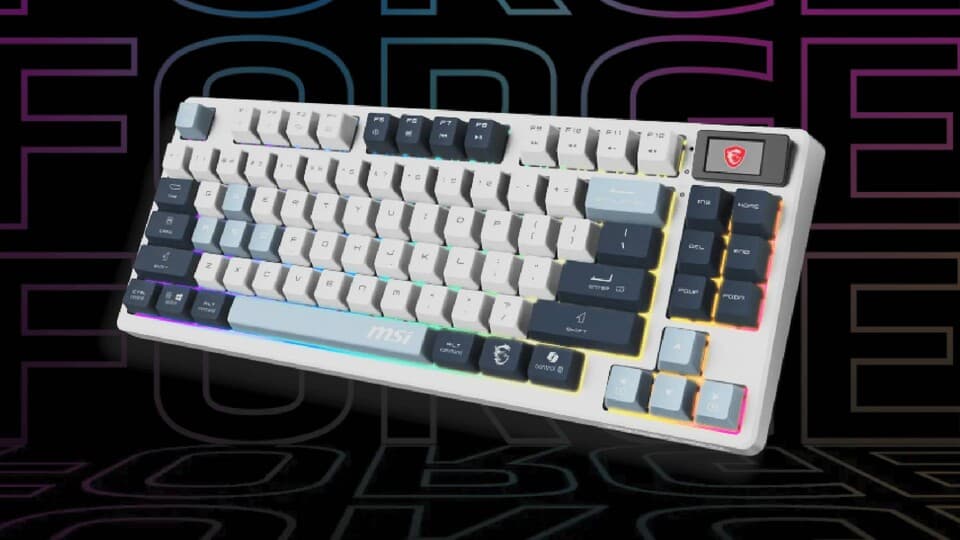
Hell, even if you go with a successor like a GMMK 3 Pro HE or a rival brand’s “creator/gamer hybrid” board, you’re entering a world where hot-swap, proper mounting, and sound-dampening foam are becoming expected instead of rare luxuries.
So if you’ve been sitting on the sidelines thinking custom keyboards are only for Reddit addicts with soldering irons and too much disposable income: that era’s over. You can get 80% of the way there with something like a GMMK Pro and a Saturday afternoon of tinkering.
You don’t need my exact setup – but you do need to stop settling
Let me be clear: I’m not saying you have to copy my build part for part. Cherry MX Ergo Clears might not be your thing. Maybe you love linears. Maybe you want clicky blues that sound like a typewriter in a cathedral. Maybe you hate RGB and want a stealthy, all-black slab.
The point isn’t my taste. The point is that you should have the option to chase yours.
A hot-swap board like the GMMK Pro gives you that freedom. Don’t like your switches? Swap them. Want quieter typing because your roommates are plotting your demise? Try different springs and dampened switches. Hate the font on your keycaps? Replace them. Want a deeper sound profile? Add foam, change plate material, tweak the mounting.
Even if you don’t go as far as I did, a very reasonable starter path looks like this:
- Pick up a solid barebone (GMMK Pro or similar) in the €150–€200 range.
- Buy a set of switches that match your vibe – spend maybe €40–€70 here.
- Grab a decent keycap set that isn’t paper-thin ABS garbage.
- Spend an evening lubing the stabilisers and dropping in a bit of foam.
For less than the price difference between two GPU tiers, you’ve got a board that will outlive at least one full PC generation and make literally everything you do on your machine feel better.
Two years later: the upgrade I still notice every single day
After hundreds of hours of gaming and an obscene amount of typing, the GMMK Pro has basically faded into the background for me in the best possible way. I don’t think about it when I’m using it – I only notice it when I’m forced to use something else.
Every time I hop on a laptop keyboard or a random office board, it feels like trying to play a precision platformer with input lag. Technically functional, but everything is just that little bit worse. Sloppier. Less satisfying.
That’s the real test of a “best” upgrade for me: if you take it away, does everything feel downgraded? In my case, absolutely. Take away the 4K monitor? Annoying, but fine. Drop back a GPU gen? I’ll live. Take away this keyboard and replace it with a rattly plastic RGB billboard? Now we’ve got a problem.
I went into this thinking I was treating myself to a fancy toy. What I actually bought was a daily quality-of-life upgrade that made my entire PC feel more like mine. The custom keyboard space still has its fair share of hype, snake oil, and overpriced nonsense, but underneath that is a simple truth:
If you care about your PC even half as much as you say you do, stop driving it with the cheapest, most generic keyboard you can tolerate. Get something you can tune. Whether that’s a GMMK Pro or one of its many newer rivals, a proper mechanical, customisable board is the upgrade you’ll feel every minute, not just when the FPS counter’s on screen.
Two years on, I’d still pick this keyboard over yet another forgettable GPU spec bump. And for a hardware addict like me, that says everything.
FinalBoss // Gear
Level up your setup
01Graphics cardson Amazon→02Gaming laptopson Amazon→03High-refresh gaming monitorson Amazon→04Discounted game keyson Kinguin→Affiliate links · As an Amazon Associate, FinalBoss earns from qualifying purchases.
Want to Level Up Your Gaming?
Get access to exclusive strategies, hidden tips, and pro-level insights that we don't share publicly.
Ultimate Gaming Strategy Guide + Weekly Pro Tips