
Table of Contents (11)
The Year 2026 Made Me Revisit an “Old” Accessory
In 2026, gaming on a laptop doesn’t feel like a compromise anymore. You can grab something like an MSI Katana or a Lenovo Legion Pro 7i and chew through modern games at QHD without blinking. Apple’s M‑series chips barely get warm in most workloads. On paper, it feels like we’ve outgrown the era of janky plastic laptop cooling pads with blue LEDs.
And yet, people are still buying them in huge numbers. Every time I scroll Amazon’s “gaming accessories” section, laptop coolers are right there, sandwiched between RGB mousepads and vertical GPU stands. So I did what any stubborn hardware nerd would do: I dragged out a couple of modern gaming laptops and actually lived with two very different pads to see if any of this gear still matters.
The short version: generic “two-fan mats” mostly make your thighs less toasty. A purpose-built, sealed-chamber cooler like Razer’s Laptop Cooling Pad can absolutely move the needle, especially if you’re on a compatible Blade 16. But it’s a niche tool, and you need the right laptop and use case to justify the noise, the cost, and the desk space.
My Test Setup: Two Very Different Gaming Laptops
I used two machines that sit on opposite ends of the gaming laptop spectrum:
- Razer Blade 16 – RTX 5090 laptop GPU and a Ryzen 9 HX 370, a slim, premium monster built to run hot and fast.
- MSI Cyborg 15 – a budget-friendly gaming laptop with a much simpler cooling system and more modest power limits.
On both, I’ve done the usual: long sessions of Cyberpunk 2077, Helldivers 2, and a bunch of older stuff while tethered to a 144 Hz monitor. I know exactly where each laptop gets uncomfortably warm, how soon fans spin up, and how they behave once the room temperature creeps up during summer evenings.
For cooling pads, I purposely picked one “old-school” mat and one high-end, purpose-built stand:
- Targus 17” Dual Fan Chill Mat – a lightweight, USB-powered mat with two fans and a mesh top, clearly designed for couch use and lap comfort.
- Razer Laptop Cooling Pad – a hefty desk stand with a single 140 mm fan that can ramp to 3,000 RPM, surrounded by a foam seal that mates with the laptop’s underside. It also supports a special “Hyperboost” mode on recent Blade 16 models.
My testing revolved around two things:
- Thermals – maximum CPU temperature during a repeatable run of 3DMark Time Spy, plus surface temps under my fingers.
- Performance – the Time Spy score itself, which is a good stress test for both the CPU and GPU.
I also paid attention to real-world gaming behavior: how quickly fans spin up, whether clocks stabilize or spiral down after 20–30 minutes, and whether the keyboard deck becomes lava.
Why Basic Cooling Pads Barely Help Most Laptops
The core problem with traditional cooling pads is geometry. Many modern laptops – especially thin productivity machines and MacBooks – only pull air through tiny vents along the hinge, then exhaust it out the sides or back. There’s often no intake directly under the mainboard. Blowing air at a sealed bottom panel does almost nothing for the components above it.
Gaming laptops are the exception. A Razer Blade 16, MSI Raider, Legion Pro, or Alienware x16 usually has visible cutouts on the underside, with fans and heatsinks right below those perforations. In theory, giving those intakes more cool air should help the laptop’s own fans run more efficiently.
The Targus Chill Mat follows the classic formula: two relatively small fans behind a metal mesh plate, some cutouts to avoid totally suffocating your vents, and USB power. On my Blade 16, the bottom vents sat more or less above the fans. On the Cyborg 15, the alignment was messier, but still decent.
Here’s what happened in Time Spy on the Blade 16:
- No cooling pad – Score: 17,942, max CPU temp: 85°C.
- Targus Chill Mat – Score: 18,013, max CPU temp: 85°C.
That’s basically statistical noise. Within normal run-to-run variance, the cheap mat did nothing meaningful for either thermals or performance. Under my fingers, the deck felt almost identical – the usual warm strip along the function row and hinge, nothing night-and-day.
This lines up with every generic mat I’ve used over the past decade. They’re fine for lifting a laptop off a blanket or your legs, and they prevent you from smothering the fans. But they don’t magically bend physics. If the laptop isn’t designed to actually pull in more air from the bottom, you’re basically just adding another fan to your room.
On a MacBook, an ultrabook, or a modern Qualcomm-based Windows machine that already sips power, these pads are overkill. They’ll make more noise than difference.
The Razer Laptop Cooling Pad: When Design Actually Matters
The Razer pad is a completely different beast. Instead of just blasting air in the general direction of your vents, it creates something close to a pressure chamber.
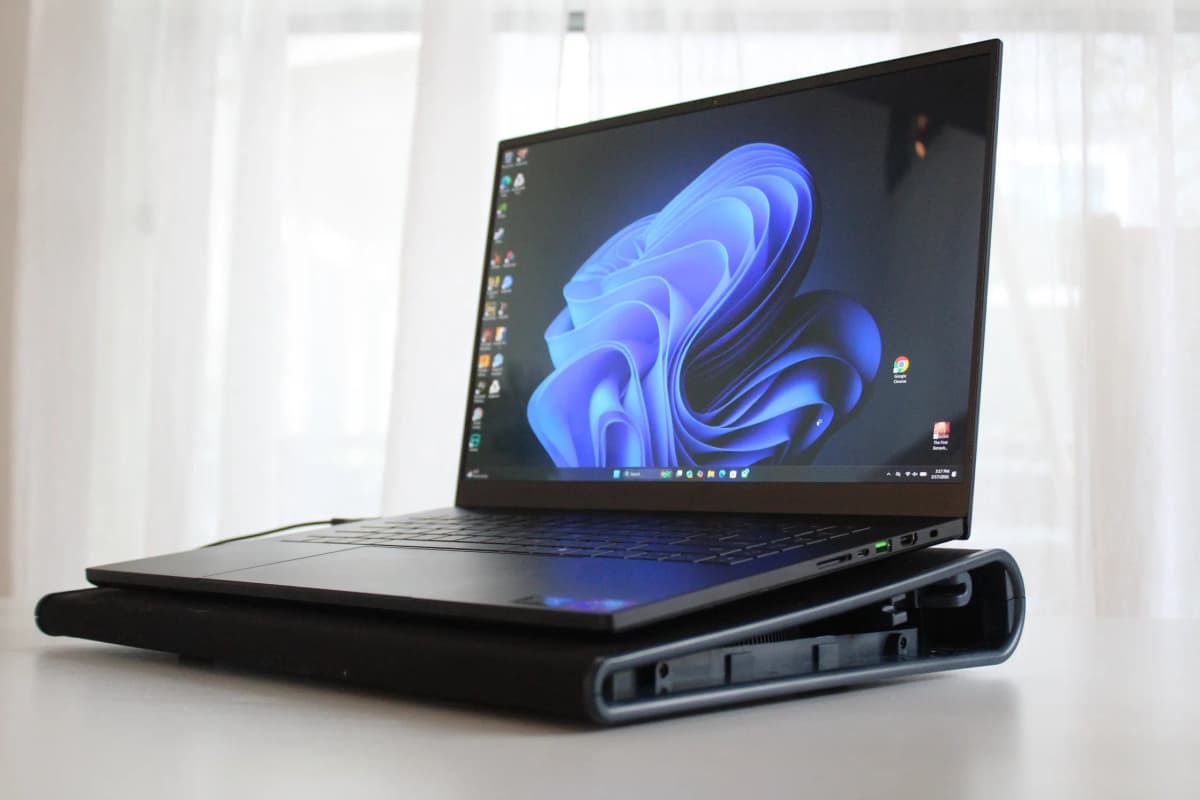
The laptop sits inside a raised frame lined with thick foam. Drop a Blade 16 onto it and the foam presses against the entire underside, forming a rough seal. When that 140 mm fan spins up, air isn’t spilling everywhere; it’s being shoved straight into the intake vents underneath the chassis.
There are two key effects here:
- Directed airflow – More of the fan’s output actually reaches the laptop’s internal heatsinks and fans.
- Noise damping – The foam and the laptop body absorb a lot of the fan’s harsher tones. It’s still pretty loud at full tilt, but the character of the noise is lower and less shrill than a bare fan on a wire frame.
On the Blade 16, I tested three more scenarios:
- Razer pad, fan off – Score: 18,263, max CPU temp: 86°C.
- Razer pad, fan on (no Hyperboost) – Score: 19,058, max CPU temp: 77°C.
- Razer pad, fan on + Hyperboost – Score: 19,542, max CPU temp: 75°C.
The “pad, fan off” result is basically just the Blade sitting on a stand with a slightly different airflow pattern. The extra degree on the CPU feels like normal run-to-run variance.
Once the Razer’s fan kicks in, things change. You’re looking at roughly a 10 percent jump in performance and around a 10°C drop in maximum CPU temperature versus the bare desk. The really interesting part is Hyperboost, which only works with recent Blade 16 generations (2023–2025 at the time I tested). When enabled, the laptop can raise power limits by around 20 watts and dynamically coordinate its own fans with the pad’s fan.
From the driver side, it feels like you’re effectively “unlocking” an extra performance mode that Razer wouldn’t dare ship without that extra airflow. The laptop fans still ramp up, but the CPU sits noticeably cooler, and the GPU has more headroom before anything hits thermal ceilings.
Under my fingers, the difference was immediate. The top row of keys and the metal strip near the hinge, which typically run uncomfortably warm during a long graphics benchmark, settled into the “warm but fine” zone. Not ice cold, but a noticeable step down from the usual gaming-laptop sauna.
What About a Cheaper Gaming Laptop?
I expected the Razer pad to shine on a Blade; that whole combo is essentially co-designed. The more interesting test for me was the MSI Cyborg 15, a simpler, cheaper gaming laptop without any special integration with the pad.
On the Cyborg, the Razer pad could “only” act as a smart, sealed blower. No Hyperboost hooks, no firmware magic – just raw airflow into those bottom vents. Running the same Time Spy loop, I saw roughly a 3 percent improvement in score. That’s barely visible in actual games; you wouldn’t notice in a blind test during normal play.
The thermals, though, told a different story. The maximum CPU temperature dropped by about 20°C.
That’s enormous. On a budget chassis where the internal cooling solution is already doing everything it can with constrained materials and space, suddenly giving it much cooler intake air lets the silicon cruise instead of constantly flirting with its thermal limits.
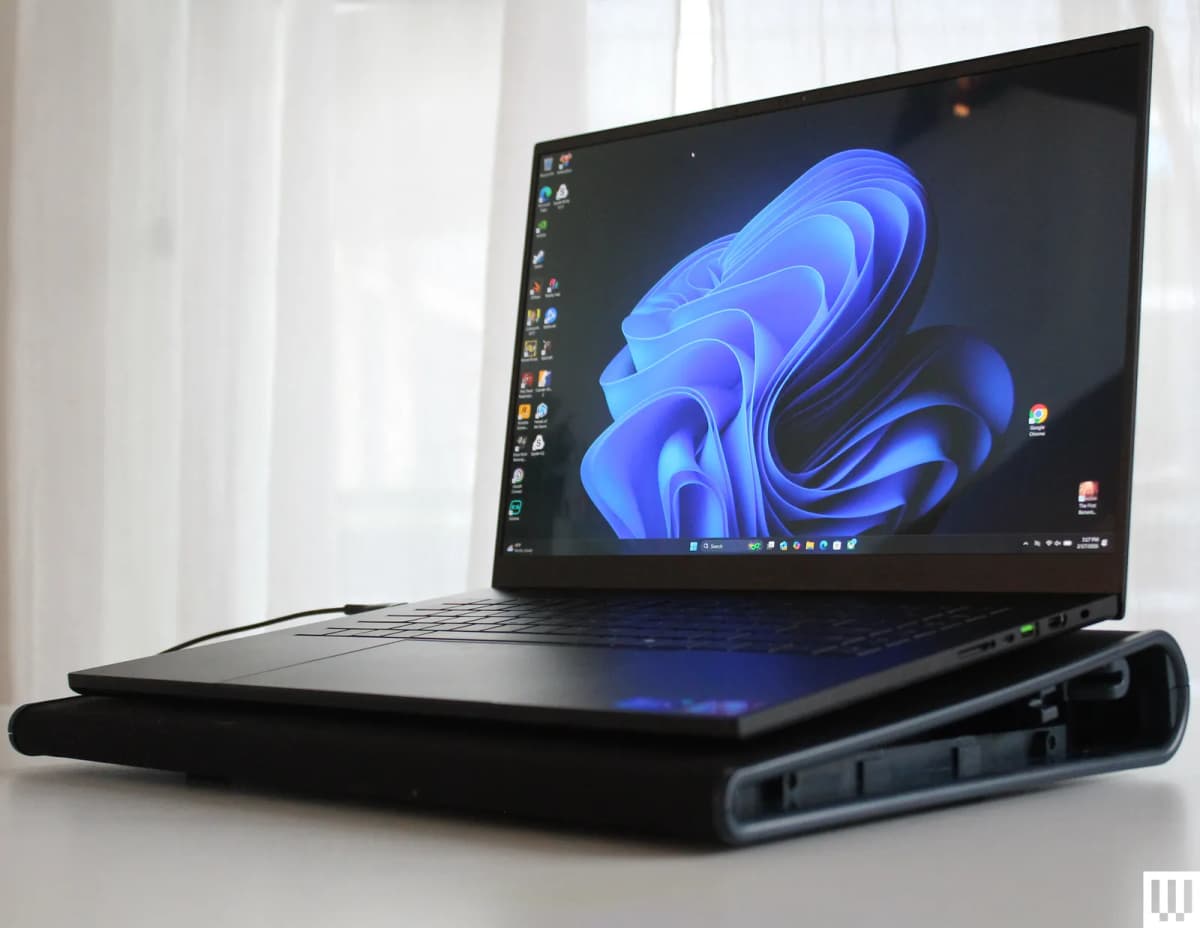
I could feel it during extended gaming sessions. Normally the Cyborg’s deck gets properly toasty after 30–40 minutes in something GPU-heavy. With the pad spinning under it, the keyboard area stayed far more manageable, and fan noise from the laptop itself didn’t spike as sharply because the internal fans weren’t as desperate.
Performance-wise, that’s not a transformative change in the short term. Longevity-wise, it might be. Running a midrange laptop’s CPU 20°C cooler under sustained load is exactly the kind of thing that can slow down long-term wear on the chip, VRMs, and even the battery and fan bearings around them.
Benchmarks vs. Real-World Gaming
3DMark Time Spy is a great way to create repeatable torture scenarios, but I also paid attention to actual games. On the Blade 16, the Razer pad plus Hyperboost didn’t suddenly turn a “barely playable” game into a smooth ride. What it did was tighten the floor.
In GPU-bound titles like Cyberpunk 2077 with ray tracing on, frame rates were more consistent after an hour. The Blade’s clocks just weren’t dipping as often. You’re mainly talking about single-digit percentage gains – enough to keep a 60 fps target more stable or bump you out of the occasional low 50s – not a next-gen leap.
On CPU-heavy games or big open-worlds that hit all cores hard, that 10°C reduction in CPU temperature mattered more for noise than visible frames. The laptop didn’t slam into its thermal caps as hard, so Razer’s internal fan curve wasn’t aggressively hunting up and down. With the pad under it, the noise turned into one steady whoosh instead of spiky jet engines ramping and down every few seconds.
On the Cyborg 15, those big 20°C CPU drops didn’t produce blockbuster performance numbers, but long sessions in things like Apex Legends or Fortnite felt a bit less “edge-of-throttle.” The machine seemed more relaxed. For a budget laptop I’d like to keep alive for four or five years, that’s exactly what I want to see.
Noise, Comfort, and Everyday Use
Here’s the catch: good cooling isn’t free, and on the Razer pad you pay with noise and desk presence.
Even though the foam gasket softens the fan tone, at full speed the pad itself is loud in an office context. If you game with a headset, it fades into the background. If you’re sharing a living room or streaming with an open mic, everyone else will know when you’ve just joined a ranked match.
The Targus mat, by comparison, is modest – both in size and in sound. It slides easily onto a coffee table, lives under a couch when not in use, and its soft fan hum is much easier to ignore. But again, you’re mostly buying it as a lap insulator and a way to avoid smothering your vents on a blanket, not as a real performance tool.
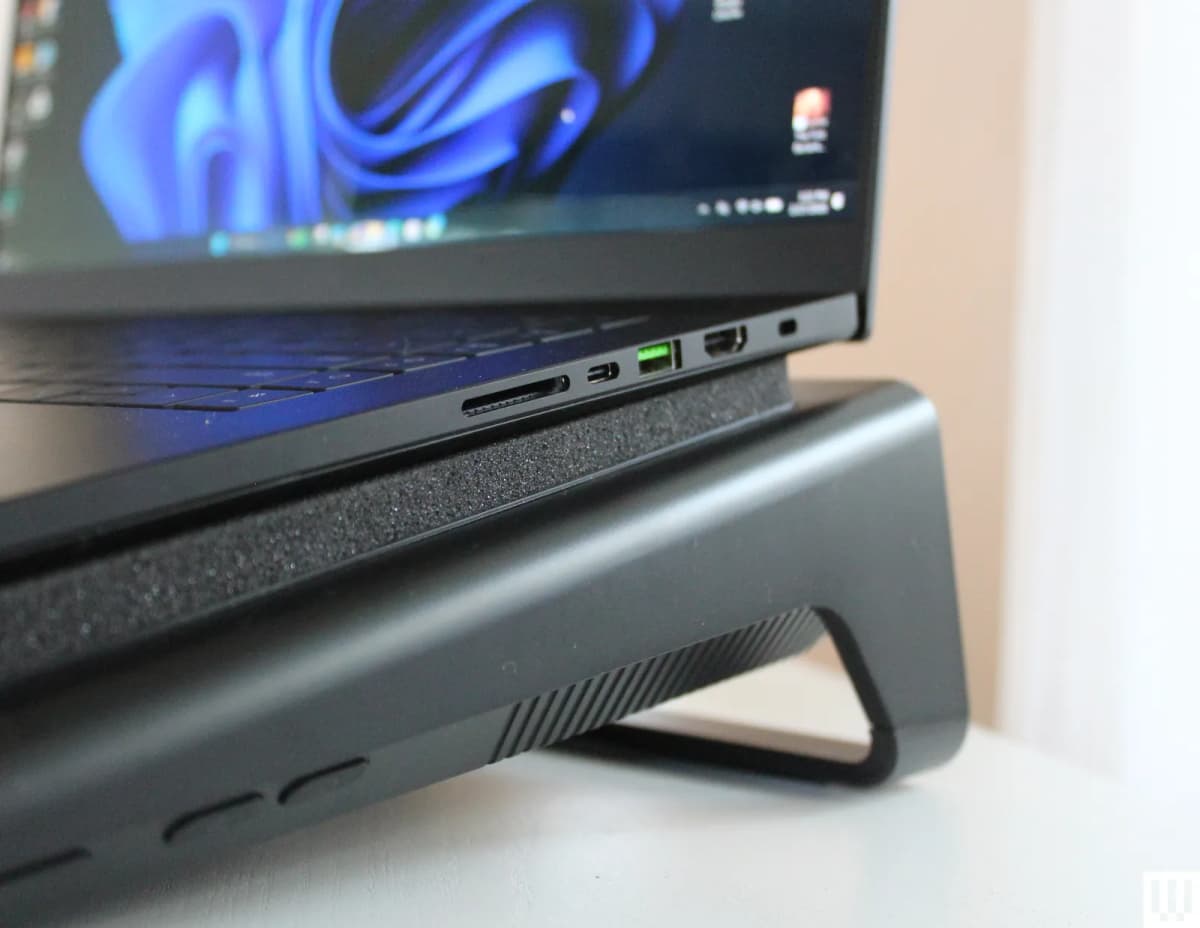
Ergonomically, I liked the Razer stand a lot. It tilts the laptop into a more comfortable typing angle and lifts the display slightly, which is nice if your main monitor sits higher. The downside: it’s very much a desk accessory. You’re not dragging this thing onto the sofa every night.
Who Actually Needs a Laptop Cooling Pad in 2026?
After a couple of weeks swapping these pads in and out, I’d break it down like this.
- High-wattage gaming laptop owners (Blade, Raider, Legion, etc.)
If you’re regularly hammering a big RTX 50‑series GPU and a top-end CPU at 100 percent load, a sealed-chamber style pad like Razer’s can absolutely be worth it. You’ll see genuine temperature reductions and small but measurable performance gains. If you own a compatible Razer Blade 16 and can use Hyperboost, it makes even more sense. - Budget gaming laptops
Machines like the MSI Cyborg 15 don’t suddenly become flagships with a cooler underneath, but they can run much cooler. If your goal is to baby the hardware and squeeze extra years out of it, a good sealed pad is a solid investment. - Couch gamers with hot laptops
If your priority is “I don’t want my thighs to melt” and you’re gaming from the sofa, a simple mat like the Targus is fine. Just don’t expect miracles in frame rates or cooling numbers. - MacBooks, Ultrabooks, and efficient work machines
If your laptop rarely spins its own fans, a cooling pad is overkill. The chips and chassis are already tuned for efficiency; extra airflow won’t change much.
One important side note: Razer isn’t the only company pushing this sealed-chamber design. Brands like Llano have very similar pads that use a foam skirt and single large fan, often at lower prices. If you’re not tied to the Blade 16 and its Hyperboost integration, those alternatives are worth a look — the theory of operation is what matters here, not the logo.
Longevity vs. Instant Gratification
What struck me most after all this testing is that the real reason to care about good cooling pads isn’t the benchmark score bump. It’s the boring stuff: component health and battery life over years, not weeks.
We know that keeping silicon and surrounding components at prolonged high temperatures accelerates degradation. Solder joints, VRMs, memory, fans, batteries — they all hate sustained heat. Dropping a CPU’s sustained load temps by 10–20°C with a proper pad won’t make your laptop immortal, but it stacks the odds in your favor, especially if you’re running long render jobs, AI workloads, or nightly MMO raids.
The downside is that longevity is hard to feel in the moment. It’s far easier to get excited about a shiny new HDR screen or a faster SSD. A cooling pad is the opposite: it’s loud, kind of annoying, and the payoff is a laptop that hopefully dies a few years later instead of earlier.
If you’re the sort of person who keeps a gaming laptop for five-plus years, uses it daily, and treats it as both a workhorse and a primary gaming machine, a high-quality cooler starts to make financial sense. If you swap machines every two years, you probably won’t reap the benefits.
Bottom Line and Rating
After living with both extremes — the budget Targus Chill Mat and Razer’s high-end Laptop Cooling Pad — my takeaway is pretty blunt:
- Generic dual-fan mats are mostly comfort accessories. They keep your legs from cooking and prevent you from suffocating bottom vents on a pillow, but they barely touch internal thermals or sustained performance on modern gaming laptops.
- Purpose-built sealed-chamber pads like Razer’s can materially lower temperatures and, on the right machine, boost performance by around 10 percent while shaving 10–20°C off the CPU under load.
For the kind of person who bought a Razer Blade 16 or a maxed-out MSI Raider and actually uses that power, I’d rate the Razer Laptop Cooling Pad an 8/10. It’s expensive, noisy, and a little overkill-looking – but it does exactly what it’s supposed to do, and the Hyperboost integration with the Blade 16 makes it feel like a hidden “turbo mode” for your laptop.
The Targus 17” Dual Fan Chill Mat lands more around a 5/10 as a performance tool. As a lap saver, it’s perfectly decent, but it doesn’t belong in the same conversation as the Razer pad when you’re talking about actual thermals or frame rates.
If you’re chasing every last frame or you want your gaming laptop to age as gracefully as possible, a proper sealed-chamber cooler is one of the few accessories that can genuinely help. Just go in knowing you’re buying long-term stability and lower temperatures more than you’re buying a flashy new FPS number.
TL;DR
- Laptop chips are more efficient in 2026, but high-wattage gaming laptops still run hot under real load.
- On a Razer Blade 16, the Razer Laptop Cooling Pad cut CPU temps by ~10°C and boosted Time Spy scores by around 10 percent with Hyperboost.
- On an MSI Cyborg 15, the same pad barely increased performance but slashed CPU temps by about 20°C.
- Basic mats like the Targus Chill Mat mostly improve lap comfort and prevent vent blockage; they don’t meaningfully change internal temps or fps.
- Sealed-chamber designs with foam gaskets and large fans are the only pads that really help thermals on gaming laptops.
- Noise is the main trade-off: the Razer pad is loud at full blast, even if the foam softens the tone.
- Heavy gamers and creators on powerful laptops benefit most; casual users and ultrabook owners can safely skip cooling pads.
- Verdict: Razer’s sealed pad is an 8/10 tool for serious gaming laptops; cheap mats are 5/10 lap savers, not performance upgrades.
FinalBoss // Gear
Level up your setup
01Top-rated gaming headsetson Amazon→02High-refresh gaming monitorson Amazon→03Gaming chairson Amazon→04Discounted game keyson Kinguin→Affiliate links · As an Amazon Associate, FinalBoss earns from qualifying purchases.
Want to Level Up Your Gaming?
Get access to exclusive strategies, hidden tips, and pro-level insights that we don't share publicly.
Ultimate Reviews Strategy Guide + Weekly Pro Tips