
Table of Contents (12)
Why your PS5 controller choice matters in 2026
After bouncing between nine different PS5 controllers over the last couple of years – grinding ranked shooters, labbing combos in fighters, and doing long RPG marathons – I learned this the hard way: there isn’t a single “best” pad anymore. The stock DualSense still nails immersion, but once you’ve tried back paddles, Hall effect sticks, or a proper fight stick, it’s really hard to go back.
This guide isn’t a spec dump; it’s the stuff I wish someone had told me before I started impulse-buying “pro” controllers. I’ll walk through what each controller actually feels like to use, who it suits best, and where the trade-offs bite – especially now that we’re in the PS5 Pro era with even more third-party options.
Quick picks by playstyle
- Best overall / immersion: PlayStation DualSense
- Best “all-Sony” competitive option: DualSense Edge
- Best for battery life & cross-play (PS5 + PC): Razer Raiju V3 Pro Wireless
- Best paddles & grip for shooters: Scuf Reflex Pro
- Best anti-drift & tweakability: Nacon Revolution 5 Pro
- Best modular all-rounder + fighters: Victrix Pro BFG
- Best fight pad: Hori Fighting Commander OCTA
- Best fight stick: Victrix Pro FS (plus a leverless note)
- Best for accessibility: PlayStation Access Controller
Use that as a cheat sheet. If you want the “why,” let’s dig into how each one actually handled in real sessions.
PlayStation DualSense – still the default for a reason
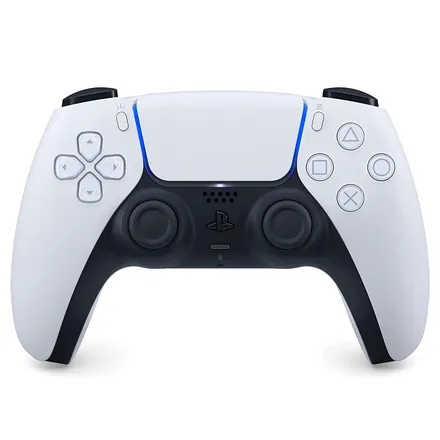
The more time I’ve spent with high-end pads, the more I appreciate how well-rounded the standard DualSense is. For cinematic stuff like Astro Bot, Returnal, or any big Sony exclusive, nothing else touches its combo of adaptive triggers and fine-grain haptic feedback.
Feeling raindrops, bow tension, gun jams – that’s not marketing fluff. When I temporarily swapped to a third-party pad with regular rumble, everything felt flatter and more “last gen.” If you mostly play single-player games and care about immersion, start here.
Real-world downsides:
- Battery: in my testing it’s usually 6–12 hours depending on how heavy the haptics/triggers are in a game. Rogue-likes and shooters tend to chew through it faster.
- Stick drift risk: it uses standard analog sensors, so if you play a lot, drift can creep in after a year or two. When it hits, you’re usually looking at a replacement, not a quick fix.
If you only buy one controller and you’re not a hardcore ranked grinder, grab another DualSense (maybe one of the 2026 special colors or limited editions) and you’re set. Everything else in this guide is more specialized.
DualSense Edge – for competitive players who refuse to lose immersion
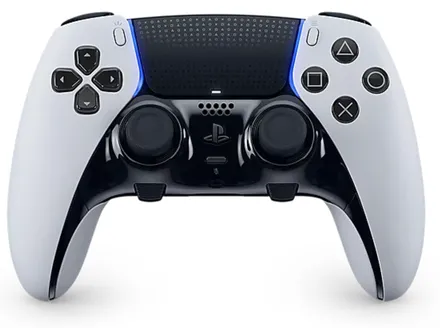
I switched to the DualSense Edge for shooters like Helldivers 2 and Modern Warfare ranked because I wanted paddles and trigger stops without giving up Sony’s haptics and adaptive triggers. That’s exactly what the Edge delivers.
- Back buttons: two rear paddles/buttons. I map jump and reload here so my thumbs never leave the sticks.
- Replaceable stick modules: when drift eventually hits, you can buy a new module instead of a whole controller.
- On-the-fly profiles: the two Function buttons under the sticks let you swap sensitivity and layouts instantly. I keep a “Shooter,” “Racing,” and “Default” profile.
- Trigger stops: you can shorten trigger travel for faster shots, or keep them full-length for racing and immersion.
The big catch, and it’s a real one: battery life is worse than the regular DualSense. I consistently get around 5–6 hours before it needs a charge. If you do long weekend sessions, expect to plug in or rotate with a second controller.
Who it’s for: players who live in competitive modes but still want full DualSense magic in Sony’s first-party titles. If battery life is a bigger deal than immersion, you’re better off with a third-party pro pad.
Razer Raiju V3 Pro Wireless – when you care about battery and clicky precision
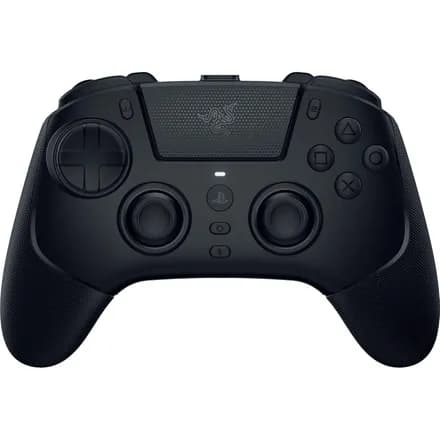
When I knew I had an all-day session coming up – a new season drop, or a long RPG weekend – I reached for the Razer Raiju V3 Pro Wireless. Its battery absolutely embarrasses Sony’s pads: I was routinely seeing close to 40 hours on a charge.
It also feels very different under the fingers:
- Mecha-tactile buttons & D-pad: every face button and D-pad press has a short, crisp click. In timing-heavy games like Clair Obscur: Expedition 33 or racers like F1 23, the faster actuation genuinely helped me clean up inputs.
- Drift-resistant internals: TMR sticks and Hall effect triggers are built to shrug off the typical wear that causes drift.
- Six remappable extra buttons: two up top, four on the back – more than enough to put reload, jump, melee, ability, and more under your fingers.
The trade-offs: on PS5, you’re limited to a 250Hz polling rate and you can’t wake the console from rest with the controller. It also doesn’t support Sony’s adaptive trigger magic or DualSense haptics – you get more traditional rumble instead.
If your top priorities are battery life, durability, and a clicky, esports-style feel, this is one of the easiest pads to recommend – especially if you split time between PS5 and PC.
Scuf Reflex Pro – four paddles and one of the best grips in the game
I used the Scuf Reflex Pro as my main shooter controller for a few months before the DualSense Edge launched. Even now, there are two reasons I still recommend it to sweaty FPS friends: four paddles and fantastic grip.
- Four back paddles: compared with the Edge’s two, having four changes how you play. I bind jump, crouch/slide, reload, and melee, and basically never take my thumbs off the sticks.
- Great non-slip coating: during long sessions my hands stayed locked in; it’s one of the more comfortable competitive layouts I’ve used.
- Adaptive triggers but no haptics: it’s one of the rare third-party pads that still supports Sony’s trigger tech, but it sticks with more basic rumble instead of full DualSense-style haptics.
- Battery: around 8 hours for me – slightly better than the Edge, worse than a stock DualSense.
The downside is that since Sony released the Edge, the Reflex Pro no longer feels as unique; and like most Scuf products, it’s not cheap. But if you want max paddles plus adaptive triggers, this is still a strong pick.
Nacon Revolution 5 Pro – for people who are done with stick drift
Stick drift is what finally pushed me to the Nacon Revolution 5 Pro. This thing uses Hall effect sensors in its thumbsticks, which basically means the sticks read position magnetically instead of grinding physical contacts together. In practice, that massively reduces wear – and with it, drift.
What stood out in daily use:
- Weight tuning: it ships with small weights you can slot into the handles. I added medium weights on both sides and it went from “a bit light” to “perfectly planted” for me.
- Swappable stick toppers & guards: you can change height, shape, and even reduce travel distance for twitchier movement in shooters.
- Built-in Bluetooth 5.2 audio: this is underrated. You can pair Bluetooth headphones directly to the controller, bypassing the PS5’s usual Bluetooth restrictions and adjust volume from the pad.
There are trade-offs like with most third-party options: no adaptive triggers or Sony-style haptics. But if you’ve already burned through a couple of drifting DualSense pads, the peace of mind of Hall effect sticks plus all the physical customization makes the Revolution 5 Pro very easy to justify.
Victrix Pro BFG – the modular all-rounder (and sneaky fighter’s choice)
The Victrix Pro BFG is the controller I recommend most to players who dabble in everything: shooters, fighters, and couch co-op. It’s ultra modular in a way that sounded gimmicky at first, but after a week swapping layouts, it clicked.
- Reversible left module: you can run the classic PlayStation parallel sticks or flip it to an offset “Xbox-style” layout. I use offset for shooters, parallel for everything else.
- Optional fight pad module: on the right side you can swap the standard stick + face buttons for a dedicated fight pad layout with extra shoulder buttons – great for Street Fighter 6 or Tekken 8.
- Four back buttons: easily remappable on the fly, with a profile button on the back to store three different setups.
- Excellent battery: in my experience it comfortably clears 20+ hours per charge.
The catch is the same as other high-end third-party pads: no adaptive triggers or full DualSense haptics. If you can live without those, you get arguably the best competitive-feature set on PS5 right now, especially if you float between genres.
Hori Fighting Commander OCTA – fight stick feel in pad form
For 2D fighters, I play better on a pad than a stick, so the Hori Fighting Commander OCTA became my go-to for games like Guilty Gear Strive and classic collections. It’s wired-only, but that’s exactly what you want for minimum input delay.
- Short-throw analog stick with octagonal gate: quarter circles and 360s lock into place cleanly. I was dropping fewer inputs almost immediately.
- Adjustable circular D-pad: if you prefer pure D-pad play, this is one of the snappiest, clearest-feeling ones on PS5.
- Six face buttons: laid out like an arcade panel, with two shoulder buttons. It makes multi-button specials and EX moves much easier to hit consistently.
- Compatibility: works on PS5, PS4, and PC over USB.
Because it’s so specialized, I wouldn’t use this as my only controller. But if fighters are a big part of your library and you don’t have space or budget for a full stick, the OCTA is an excellent middle ground.
Victrix Pro FS – top-tier fight stick (plus a leverless alternative)
When I decided to properly learn stick for tournaments, the Victrix Pro FS is what I settled on. It’s one of those “buy once, cry once” pieces of gear – expensive up front, but built to last.
- Sanwa Denshi parts: all eight face buttons and the lever use tournament-standard components. The feedback is crisp, predictable, and easy to mod if you ever want different switches.
- Great ergonomics: the angled wrist rest and built-in foam pad mean it sits comfortably on your lap even during two-hour lab sessions.
- Fully PS5-ready: every DualSense system button is there – Touchpad, Create, Options – so you’re never reaching for a separate pad.
If you’d rather go leverless (all buttons, no stick), take a look at newer boards like the Corsair Novablade Pro. It’s a wireless PS5 leverless controller with Hall effect switches, programmable actuation from about 0.1–4.0mm, a 1,000Hz wireless polling rate, and roughly 40 hours of battery life in my experience. It’s heavier and louder than a pad, but if you play a lot of modern fighters, the precision is absurd.
Either way, if you’re serious about fighting games, a dedicated stick or leverless board is one of the biggest upgrades you can make.
PlayStation Access Controller – when standard pads just don’t work
The PlayStation Access Controller isn’t aimed at traditional “pro play,” but it’s one of the most important pieces of PS5 hardware I’ve tested with friends. It’s designed for players with limited mobility or anyone who struggles with the standard DualSense layout.
- 360-degree button layout: large, reconfigurable buttons arranged in a circle so you can place them where your hand naturally rests.
- Swappable stick and button caps: different shapes and heights let you tune it to your range of motion.
- Deep software remapping: you can assign almost any function to any input, create profiles, and pair it with a second Access or a DualSense for hybrid setups.
What finally sold me on it was seeing a friend who could only comfortably use one hand play through action games again by pairing an Access with a standard DualSense. If you or someone you play with finds regular pads painful or impossible to use, the Access is absolutely worth the setup time.
How to choose in under a minute
If you’re still torn, here’s the distilled version of what all that testing taught me:
- Love Sony single-player games and don’t care about paddles? Stick with the DualSense.
- Play a ton of competitive PS5 games but want full haptics and adaptive triggers? Go DualSense Edge (and accept the weak battery).
- Want maximum battery life and a crisp, esports-style feel, and you also play on PC? Choose the Razer Raiju V3 Pro Wireless.
- Need lots of paddles for shooters with abilities and pickups? Scuf Reflex Pro (four paddles) or Victrix Pro BFG (four back buttons plus modular layout).
- Sick of stick drift and love tweaking hardware? Nacon Revolution 5 Pro with Hall effect sticks and weights.
- Into fighters: pad players should look at the Hori Fighting Commander OCTA; stick/leverless players at the Victrix Pro FS or Corsair Novablade Pro.
- Accessibility needs or non-standard grip: start with the PlayStation Access Controller.
The big mental shift for me was accepting that different controllers can live side by side. I keep a DualSense for story games, a pro pad with paddles for ranked nights, and a fight controller for labbing combos. Once you match your controller to your playstyle instead of chasing a mythical “best,” everything just feels better.
If I can save you even one regretted purchase with this, it’ll have been worth all the swapping, charging, and stick testing I went through. Pick the one that lines up with how you actually play, and your PS5 – or PS5 Pro – will feel like a new console again.
FinalBoss // Gear
Level up your setup
01Best-selling PS5 gameson Amazon→02DualSense controllerson Amazon→03PS5 SSD upgrades (M.2 NVMe)on Amazon→04Discounted game keyson Kinguin→Affiliate links · As an Amazon Associate, FinalBoss earns from qualifying purchases.
Want to Level Up Your Gaming?
Get access to exclusive strategies, hidden tips, and pro-level insights that we don't share publicly.
Ultimate Guide Strategy Guide + Weekly Pro Tips