
Table of Contents (11)
Living with two tiny powerhouses: why this showdown matters
Fourteen-inch gaming laptops are my weak spot. I love the idea of something that actually fits in a backpack without becoming a chiropractor’s retirement plan, but still hits proper “sit down and get lost in a game” numbers. For a while it was basically Razer and ASUS playing in this space. Then Acer dropped the Predator Triton 14 AI and suddenly there was a new contender right in that ~$2,500 premium bracket.
Over a couple of weeks, I bounced between a Razer Blade 14 (AMD Ryzen AI 9 365, RTX 5070, 32GB RAM) and an Acer Predator Triton 14 AI (Intel Core Ultra 9 288V, RTX 5070, 32GB RAM), both running the same 14-inch 2880 x 1800 OLED 120Hz panels. Same GPU class, same resolution, near‑identical weight and footprint, almost identical prices. On paper, it should’ve been a knife fight.
Instead, it turned into something a bit more lopsided. The Blade 14 feels like it was tuned first and foremost for gaming sessions. The Triton 14 AI feels like a productivity machine that happens to have a gaming GPU inside it. If you mostly live inside Steam, that difference hits you fast.
Design and build: two stealthy bricks, one slightly sharper
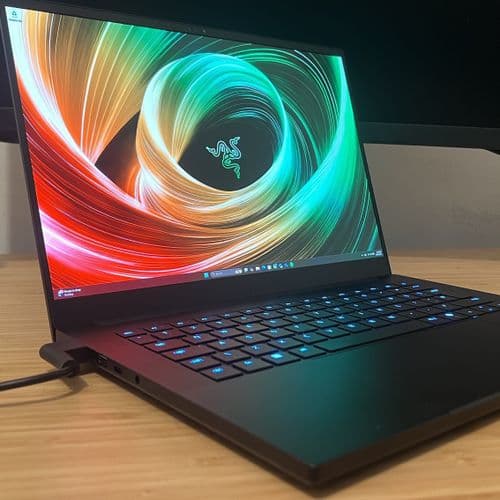
First impression taking both out of the box: Acer has been staring at Razer’s homework. Both machines are matte-black slabs milled from metal, with minimal gamer nonsense. The Predator’s glowing logo is in almost the exact same place as the triple-snake on the Blade. Closed on a desk, they look like cousins.
In the hand, the differences are tiny but noticeable if you obsess over laptops like I do. The Razer Blade 14’s T6-grade aluminum chassis has just a hair more rigidity. When I grabbed each machine by a front corner and flexed, the Triton’s deck gave a little more. It’s not cheap or creaky by any stretch, but the Blade feels denser, like there’s less air inside the metal.
Dimensions are so close they’re basically a wash: the Triton is around 0.64 inches thick, the Blade around 0.68. Weight is ~1.6kg for both. In my backpack, they might as well be the same machine. Battery bricks are reasonably sized; you’re not dragging around a cinder block with either.
Both travel really well. I hauled them between my desk, couch, and a cramped coffee shop table, and never felt like I was wrestling a “desktop replacement.” If portability is your only concern, call this a draw. If you’re picky about that ultra-solid, unyielding feel, the Blade edges ahead.
Keyboards and daily feel: Acer’s surprise win
I didn’t expect to like Acer’s keyboard more. But after a few nights of typing and chatting in Discord, I kept gravitating back to the Triton whenever I had a lot of writing to do.
The Predator Triton 14 AI has slightly larger keycaps and a crisper, more energetic click to each press. It’s still a slim-laptop keyboard, you’re not getting mechanical magic here, but there’s a satisfying pop that makes long typing sessions feel less mushy. If you’re the kind of person who writes code all day and games all night, this matters more than you’d think.
The Razer Blade 14’s keyboard isn’t bad at all; I’d call it “refined but a bit soft.” It’s quieter, and some people will prefer that. I never had issues with missed inputs in games or typing, but compared directly to the Triton, it feels more muted. After a few hours working on both, my fingers felt fresher on the Acer.
RGB-wise, both are in the tasteful zone rather than the “airport runway” category. Razer’s Chroma integration is a bit more polished, with cleaner profiles and easier per-key tuning. Acer’s PredatorSense software gets the job done, but looks like it hasn’t quite escaped its 2016 sci‑fi UI roots.
That 14-inch OLED: gorgeous on both, but one annoying twist
Specs-wise, the displays are identical where it counts: 14-inch OLED, 2880 x 1800, 120Hz. Blacks are inky, colors rich, and the pixel density at this size makes text razor sharp. Playing something like Cyberpunk 2077 at night, with neon reflections dancing off rain-soaked streets, reminded me why OLED has completely spoiled me for LCD panels.
The fork in the road is touch. The Acer Predator Triton 14 AI’s panel is a touchscreen; the Razer Blade 14’s is not.
If you treat this as a productivity and content-creation laptop first, that touch layer is a legit perk. Flicking through timelines, dragging around windows, pinch-zooming photos-these are all nicer with your fingers. Touch-based workflows in Lightroom or even just scrolling through huge PDFs feel natural.
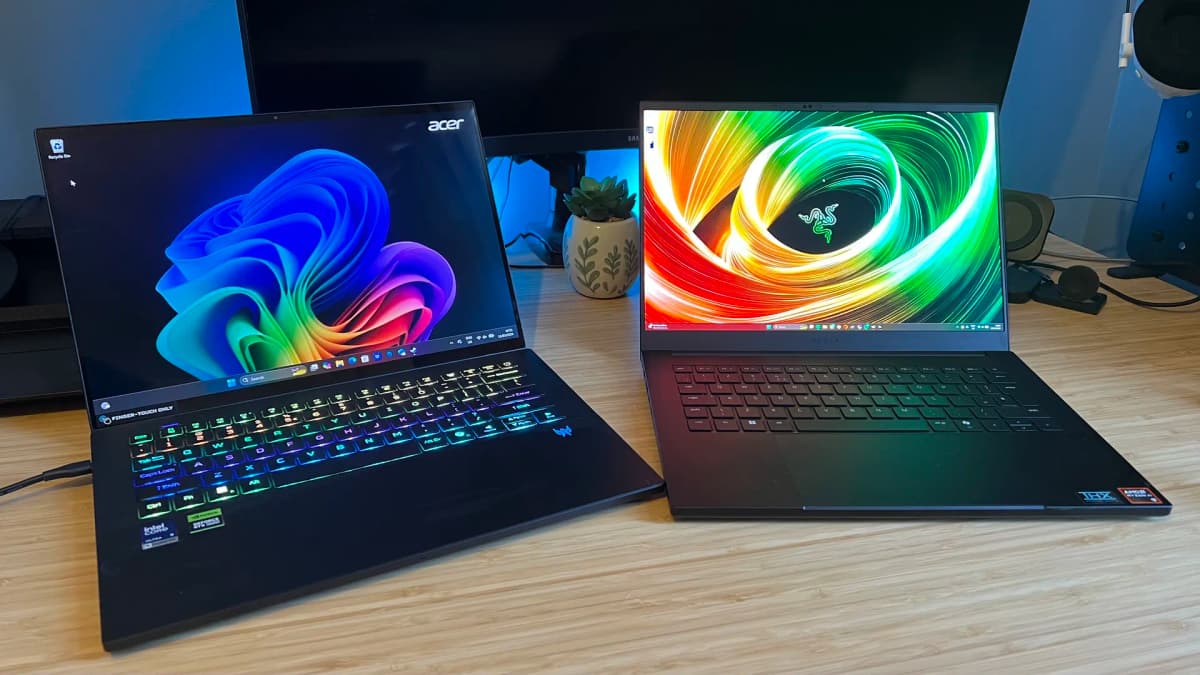
But that touch layer comes with baggage: a faint, visible grid/pixel texture under bright backgrounds. On the Triton 14 AI, I could see this subtle matrix most when browsing the web or editing docs on a white background, and occasionally in bright scenes in games. It’s not a deal-breaker, but for a laptop positioned as a premium gaming rig, it made me pause. If I’m dropping over two grand on an OLED screen, I don’t want anything in the way of the image.
The Razer Blade 14’s non-touch OLED feels just that tiny bit cleaner. Slightly less glare, no touch grid, just pure panel. On both, 120Hz is fast enough that mouse movement and camera pans feel very smooth, though competitive shooter addicts coming from 240Hz+ monitors will still notice the difference.
As someone who games more than I stylus-paint on the couch, I’d pick the cleaner Blade panel every time. If you’re a creator who lives in touch-based apps, Acer’s trade-off might be worth it. For pure gaming? Razer wins this one.
CPU and GPU performance: where the Razer leaves Acer behind
This is where the gap stops being “subtle preference” and becomes “you can feel this in every heavy game.” Both machines use an RTX 5070, but they’re paired with very different brains:
- Razer Blade 14: AMD Ryzen AI 9 365 (with a chunky L3 cache and efficient multithreading)
- Acer Predator Triton 14 AI: Intel Core Ultra 9 288V
On a spec sheet, Intel can wave around a slightly higher turbo clock (around 5.1GHz vs Razer’s 5.0GHz), but that doesn’t tell the full story. The Ryzen chip in the Blade 14 pulls ahead in the real-world mix of multithreaded work and GPU feeding that gaming needs.
In PCMark 10 style productivity-leaning tests, the Triton 14 AI landed about 17% behind the Blade 14. That echoed how both machines felt to use: app launches and heavy multitasking were just a little snappier on the Razer. Nothing “this is broken” on the Acer side, but enough that I noticed when jumping between Chrome with a pile of tabs, Discord, and a video encode.
3DMark Steel Nomad, a modern non-ray-traced GPU test rendered at 4K internally, showed a similar story. In my runs, both machines sat a bit below what thicker RTX 5070 laptops can manage, which is expected given the slimmer cooling. But the Predator Triton 14 AI trailed the Blade by around 17% again, landing in the mid‑2,500s versus the Blade sitting in the low‑3,100s.
That gap doesn’t stay a number on a chart-it shows up in-game. At native 2880 x 1800, maxed settings:
- Shadow of the Tomb Raider: the Triton was roughly 19% slower than the Blade. On the Blade, I could stay comfortably above 90fps with a few tweaks. On the Acer, hitting the same smoothness meant pulling back shadows and post-processing more aggressively.
- Cyberpunk 2077 (no ray tracing, but heavy settings): both machines struggled to hug 60fps at native res, which isn’t shocking at this resolution. But the Blade 14 still held about a 10% lead. To keep the Triton feeling as smooth, I had to step down to 1080p or cut more eye-candy.
Over an evening of testing, a pattern emerged: on the Blade 14, I was usually dropping one setting “tier” to feel good, on the Triton I was dropping two. For example, what felt like a nice balance of “High” on the Blade often needed to be “Medium” on Acer to keep similar framerates.
For esports titles and lighter games, both are absolutely fine. Valorant, Rocket League, Hades II‑style stuff chews through so easily that you’re mostly GPU-bound and the FPS differences are less obvious. But for big cinematic single‑player games, the Razer gives you noticeably more headroom. Less compromise, more “set it to High and forget it.”
Thermals, fan noise, and the long-session test
I care a lot less about short benchmark spikes than how a laptop behaves at hour three of a late‑night binge. That’s where cooling and tuning either make you forget about the hardware, or constantly remind you that you bought a thin-and-light.
Thermals, fan noise, and the long-session test
I care a lot less about short benchmark spikes than how a laptop behaves at hour three of a late‑night binge. That’s where cooling and tuning either make you forget about the hardware, or constantly remind you that you bought a thin-and-light.
🎮 Get This Game at the Best Price
Compare prices instantly and save up to 80% on Steam keys with Kinguin — trusted by 15+ million gamers worldwide.
*Affiliate link — supports our independent coverage at no extra cost to you
Both of these rigs get warm; they’re compact machines pushing serious silicon. But the way they handle that heat feels different.
The Blade 14 runs its Ryzen chip and RTX 5070 confidently without immediately slamming into heat walls. On balanced/high performance modes, I could sit through long Baldur’s Gate 3 sessions with fans audible but not shrill, and the WASD area stayed warm rather than actually hot. The center strip above the keyboard is the toasty zone, as usual, but it never reached “I need to stop” levels.
The Triton 14 AI, in contrast, felt like it had less thermal headroom to play with. Under the same sorts of loads, it jumped to higher fan speeds more often, and subjectively its coil/fan noise leaned slightly higher‑pitched. Nothing insane, but enough that on a quiet night, the Blade blended into background noise more easily than the Predator.
Crucially, those lower Acer benchmark numbers earlier aren’t because it’s just being ultra-conservative and whisper-quiet. Even when I let it off the leash in its performance profile, it still sat behind the Blade’s numbers while being louder more of the time. That’s not a great combo if you’re prioritizing gaming.
Battery life and portability: both good, neither magic
On battery, 14-inch gaming laptops live in the realm of “decent ultraportables with a hungry GPU waiting to ruin everything.” OLED doesn’t help here either.
For my mixed usage test (Wi‑Fi on, 50% brightness, some Chrome, Spotify, and a bit of writing), both laptops could stretch through a light workday if I was careful-think 6-7 hours of real-world “office” use. Streaming video and light productivity is doable on both without hugging a wall socket every second.
Start gaming, though, and the story is the same as every other slim RTX machine: 90 minutes to two hours of heavier 3D, tops, and that’s if you let the frame limiter help out. This is not unique to Acer or Razer; it’s just the tax you pay for cramming this much GPU into a small chassis.
Neither laptop is meaningfully better here; you’re buying them for “portable when closed, powerful when plugged in,” not for train-ride marathons of Cyberpunk.
Ports, Thunderbolt vs USB4, and the “AI” angle
This is where Acer claws some ground back, especially if your life leans more toward docks, drives, and external displays.
The Predator Triton 14 AI brings:
- 2 x USB-A 3.2 Gen 2
- 1 x USB-C 3.2 Gen 2
- 1 x Thunderbolt 4 port
- Wi‑Fi 7 and Bluetooth 5.4
The Razer Blade 14 counters with:
- 2 x USB-A 3.2 Gen 1
- 2 x USB4 Type‑C with DisplayPort and 100W USB‑C charging
- Wi‑Fi 7 and Bluetooth 5.4
For pure gaming, those differences don’t matter much. Plug in a mouse, maybe a controller dongle, maybe an HDMI/USB‑C monitor, and both handle it fine. But if you’re deep into content creation—fast external SSDs, Thunderbolt docks, high‑bandwidth display chains—Thunderbolt 4 on the Acer is a nice safety net. USB4 on the Razer is no slouch, but Thunderbolt still has the cleaner reputation for high‑end docks and professional gear.
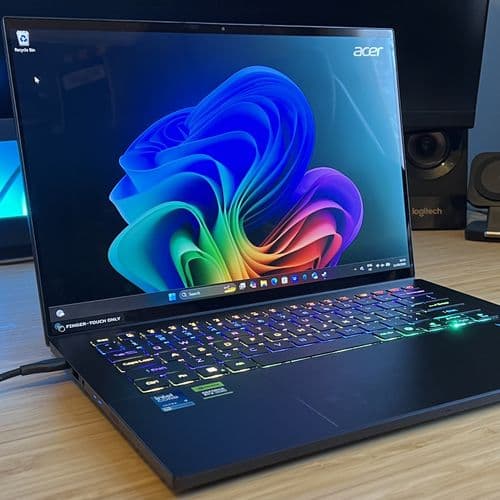
On the AI side, both chips bring NPUs and Windows‑level AI tricks (background effects, video call enhancements, that whole new wave of features). Neither laptop, in actual daily use, felt like an “AI laptop” in the sense of rewriting workflows overnight. It’s more “nice-to-have future‑proofing” than a deciding factor today—especially if your main AI use is cloud-based tools rather than on-device inferencing.
One small but very real quality-of-life note: the Acer’s boot‑up sound. The Predator Triton 14 AI blasts a loud, dramatic startup chime out of its speakers every time it powers on. The first time, I laughed. The third time, early in the morning while everyone was still asleep, I was digging in the BIOS to mute it. Razer, thankfully, keeps things more understated.
So who are these laptops really for?
After living with both, the split in my head is pretty clear.
The Razer Blade 14 is the better machine for most gamers. The Ryzen AI 9 365 gives the RTX 5070 more breathing room, which shows up consistently as 10-20% better performance in modern titles and synthetic tests. The non-touch OLED looks a bit cleaner for games, the build feels slightly more bulletproof, and the fan behavior under sustained load is a bit more pleasant.
It still handles productivity just fine—32GB of RAM and a fast CPU will do that—but the whole package is tuned in a way that clearly puts gaming first without butchering its “work laptop” persona.
The Acer Predator Triton 14 AI feels like it was built for someone who spends 70% of their time in productivity and creative apps and 30% in games. The keyboard is better for long typing, the touchscreen genuinely helps in certain workflows, and Thunderbolt 4 is a real perk if you live on fast docks and external drives.
But you pay for those perks in raw frame rate. The weaker Intel CPU in this configuration keeps it about a generational half‑step behind the Blade 14 in CPU‑bound and GPU‑bound scenarios. At this price, that stings, especially when the whole point of a “Predator”‑branded machine is usually gaming muscle.
FinalBoss // Gear
Level up your setup
01Top-rated gaming headsetson Amazon→02High-refresh gaming monitorson Amazon→03Gaming chairson Amazon→04Discounted game keyson Kinguin→Affiliate links · As an Amazon Associate, FinalBoss earns from qualifying purchases.
Want to Level Up Your Gaming?
Get access to exclusive strategies, hidden tips, and pro-level insights that we don't share publicly.
Ultimate Reviews Strategy Guide + Weekly Pro Tips