
Table of Contents (8)
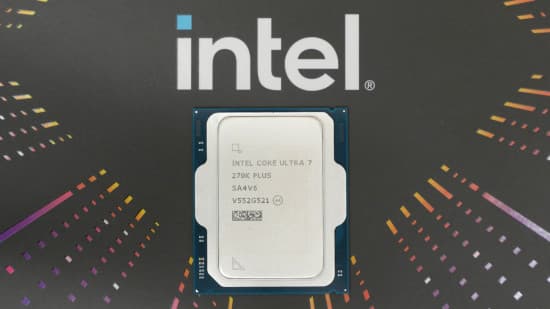
Intel’s Core Ultra 7 270K Plus Is the First CPU in Years That Made Me Rethink “Just Buy X3D”
For the last few years my advice has been embarrassingly simple: if you mostly game, buy an AMD X3D chip and call it a day. The Intel Core Ultra 7 270K Plus is the first $299 CPU that seriously messes with that rule.
I dropped the 270K Plus into my main rig expecting “a slightly less bad 265K.” What I got was a 24‑core brute that behaves like a workstation chip when I’m editing video, while sitting annoyingly close to AMD’s best gaming CPUs in most titles I actually play. It doesn’t win every benchmark, and it runs hotter than I’d like, but the price-to-performance balance is kind of ridiculous.
If you bounce between gaming, streaming, and heavy productivity, this thing is the new bar for what $300 should buy you in a CPU.
The Setup: Swapping Out an X3D for a 24‑Core Intel Monster
To really see what this chip could do, I pulled my everyday Ryzen 7 X3D setup and built around the 270K Plus:
- CPU: Intel Core Ultra 7 270K Plus (24 cores: 8 P‑Cores + 16 E‑Cores)
- Motherboard: Asus Z890 TUF Gaming WiFi (LGA 1851)
- RAM: 32GB DDR5‑7200 (2×16GB, CL34)
- GPU: Nvidia GeForce RTX 4080
- Storage: 2TB PCIe 5.0 NVMe SSD
- Cooling: 240mm AIO (similar to Corsair’s H100‑class)
- OS: Windows 11, current BIOS, latest drivers
I tested most games at 1080p with high or ultra settings, because that’s where CPUs actually show their differences. For esports stuff like CS2 I went lower on the graphics to really push frame rates into silly territory. On the productivity side, I leaned on my usual mix of Premiere Pro, DaVinci Resolve, Blender, and some code compile tests.
Coming from a Ryzen X3D system, my mental baseline was “best‑case gaming FPS, mediocre anything‑else performance.” Swapping to the 270K Plus flipped that in a way I didn’t expect: I barely lost anything in most games, and in productivity it felt like I’d upgraded to an entirely different class of hardware.
Gaming: Close Enough to X3D That Most People Won’t Care
Let’s get this out of the way: if you’re chasing absolute top‑of‑the‑chart FPS and you only care about games, AMD’s latest X3D chips (think 9800X3D, 9850X3D) still pull ahead in a lot of benchmarks. They’re built for that. But the 270K Plus sits closer to them than its price suggests, especially once you step out of esports.
Cyberpunk 2077 (1080p, RT Ultra)
This is usually my “AVX sauna” and CPU limiter. With the 270K Plus, performance landed comfortably behind the best X3D chips, but well ahead of Intel’s own 265K and the older 14900K. The interesting part wasn’t the average FPS; it was the lows. Frame‑time spikes in Night City’s crowded markets were noticeably tamed compared to the 265K. You can feel that faster die‑to‑die interconnect keeping things fed when the game’s streaming and AI systems go wild.
Total War: Warhammer 3 (Mirrors of Madness)
This benchmark is basically a CPU humiliation ritual. Here, the 270K Plus punched harder than I expected. It didn’t dethrone AMD’s very best X3D chips, but it traded blows with them and outpaced some non‑X3D Ryzen 9 parts. More importantly, in real battles with hundreds of units, the pacing felt smoother than on my old 7800X3D rig once large spells and AI calculations kicked in. Those 16 E‑Cores are actually doing work here.
F1 24 (1080p, max settings)
F1 is one of those games where margins get razor thin as everything becomes GPU limited. The 270K Plus floated near the top cluster: slightly behind the very fastest X3D chip I’d tested previously, but ahead of Intel’s 14900K and its own 265K predecessor. If your monitor tops out at 144-165Hz, you’re not going to perceive much difference between the 270K Plus and anything above it.
Counter‑Strike 2 (1080p, competitive settings)
This is where Intel still doesn’t quite catch the X3D magic. With everything dialed down and the RTX 4080 unleashed, my averages on the 270K Plus were firmly “overkill for 240Hz” but not “absolutely maxing a 360Hz+ panel.” Compared to an X3D chip, I saw a couple hundred fewer frames per second at the extreme top end. If you own a 360-480Hz display and live in CS2, Valorant, or League, the 270K Plus works, but it’s not the apex predator.
The key pattern across all of this: the 270K Plus feels “basically high‑end” in games, not “compromise because you wanted cores.” The extra 16 E‑Cores and higher sustained P‑Core clocks don’t drag gaming down the way they sometimes did on older hybrid designs. In most of my library-Cyberpunk, Warhammer, F1, Baldur’s Gate 3, Alan Wake 2-I’d struggle to justify spending $150-$200 more on an X3D just to claw back single‑digit percentage gains in average frame rate.
Productivity: This Is Where It Just Bulldozes X3D
The reason this chip exists is obvious the moment you launch something that isn’t a game.
The 270K Plus packs 24 cores-8 performance cores plus 16 efficiency cores—with high sustained clocks and a much snappier internal interconnect than the 265K. Compared to AMD’s gaming‑focused X3D parts with 8 cores, you’re talking about an entirely different class of throughput.
Premiere Pro & DaVinci Resolve
On my usual 4K YouTube project with multiple tracks, color correction, and a bunch of effects, exports on the 270K Plus were decisively faster than on my 7800X3D box. Scrubbing timelines also felt cleaner once the cache warmed. The X3D chips are fine for editing, but the 270K Plus feels like stepping up a tier—especially when background renders and encodes are hammering all 24 cores.
Blender & 3D Workloads
Blender loves cores, and the 270K Plus feeds it in bulk. The difference against an 8‑core X3D CPU is not subtle: render times drop, viewport interaction stays more responsive while rendering is happening, and you can multitask without your system turning into sludge.
Blender & 3D Workloads
Blender loves cores, and the 270K Plus feeds it in bulk. The difference against an 8‑core X3D CPU is not subtle: render times drop, viewport interaction stays more responsive while rendering is happening, and you can multitask without your system turning into sludge.
🎮 Get This Game at the Best Price
Compare prices instantly and save up to 80% on Steam keys with Kinguin — trusted by 15+ million gamers worldwide.
*Affiliate link — supports our independent coverage at no extra cost to you
Cinebench and synthetic multi‑core tests
In the usual Cinebench multi‑core runs, the 270K Plus walks away from AMD’s 8‑core gaming chips and even edges out some 16‑core non‑X3D Ryzens. It’s exactly what you’d expect from 24 cores with decent clocks, but combined with its gaming numbers, it puts the chip in a weirdly dominant spot for mixed workloads at this price.
If your day looks like “compile code, render or transcode, maybe stream, then game for a few hours,” the 270K Plus makes the pure‑gaming X3D parts look like luxury toys. AMD still owns FPS flexing; Intel quietly owns actually getting work done.
Power Draw, Temperatures, and the Cooling Reality Check
Intel calls this a 125W chip on paper, but with 24 cores and boosted internal clocks, that number is more of a suggestion than a ceiling when everything lights up.
Under heavy all‑core load—think Cinebench loops, Blender renders, or AV1 encodes—the 270K Plus ramped into the mid‑90s °C on my 240mm AIO. That lines up with what you’d expect from a modern high‑end Intel chip: still cooler and less absurd than the old 14900K furnace, but nowhere near “chill.” You absolutely cannot cheap out on cooling; a decent 240mm AIO or a premium air tower like a Noctua NH‑D15‑class cooler feels like the baseline.
In games, it calms down. Most of my gaming sessions had the CPU hovering around 75–80°C, occasionally spiking a little higher in CPU‑heavy sandboxes and strategy titles. It’s warm, but not scary, and a far cry from the “pegged at 100°C” behavior some older Intel flagships were infamous for.

Power efficiency is… fine. It’s not some miracle low‑power chip, but it also doesn’t guzzle electricity the way the 14900K did under full load. In mixed gaming with an RTX 4080 drawing a ton, the extra CPU power draw compared to a Ryzen 7 7800X3D or 9800X3D was measurable but not outrageous. If your PSU and cooling are specced for a modern high‑end GPU, the 270K Plus will fit into that envelope without drama.
Platform, Features, and Intel’s Weird Naming
The 270K Plus still uses Intel’s LGA 1851 socket and works in existing Z890/B890 boards with a BIOS update. If you’re already on a 265K and unhappy with its gaming numbers, this is a straightforward drop‑in upgrade that actually feels like one.
A few details that mattered during my time with it:
- DDR5‑7200 support: Official support up to 7200MT/s is nice. Running a 2×16GB 7200 kit was painless once XMP was enabled; no weird stability drama.
- Binary Optimization Tool: Intel’s new app that can apply per‑game optimizations is still early days and supports a limited list of titles, but the direction makes sense. It didn’t radically change my numbers, but it’s free extra performance where it works.
- Model weirdness: Intel insists on comparing this to the 265K and giving it a “7” badge even though it has the same core count as higher‑tier parts. Ignore the branding. In practice, this behaves like a “pseudo‑9” chip for creators.
Value vs AMD: Who Should Actually Buy This?
At $299, the Core Ultra 7 270K Plus lands in a brutally competitive space—and that’s exactly why it’s so impressive.
Against Ryzen 7 7800X3D
The closest real‑world gaming alternative is still AMD’s older 7800X3D, which usually costs around $350–$370. That chip is a little faster in many games and can be a lot faster in twitch esports at very high frame rates. But in multi‑threaded work, it doesn’t just lose; it gets buried. If you basically live in CS2, Valorant, and Apex and care about nothing else, the 7800X3D is worth the extra money. For anyone who touches serious productivity, the 270K Plus is the smarter purchase.
Against Ryzen 7 9800X3D / 9850X3D
These are AMD’s new halo gaming chips. They’re fantastic for FPS numbers and priced far above $300. In gaming‑only builds with absurd monitors, they earn their keep. But they’re absolutely not the value kings. The 270K Plus gets close in most games, destroys them in multi‑threaded apps, and costs a lot less. “Balanced” isn’t sexy on a chart, but it’s what most people actually need.
Against Ryzen 7 9700X
AMD’s true price‑matched part is the 9700X, and it’s just not that interesting. It loses in gaming and gets blown out in multi‑threaded workloads. The only reason to buy a 9700X is if you’re treating it as a stepping stone to an eventual X3D upgrade on AM5.
That’s the story here: if you care about both gaming and work, Intel finally has a mid‑range chip that doesn’t feel like a compromise compared to AMD’s 3D cache monsters. You’re trading a small slice of peak FPS for a massive leap in productivity, and at $299 that’s a trade that makes sense for far more people than the raw benchmark charts suggest.
FinalBoss // Gear
Level up your setup
01Top-rated gaming headsetson Amazon→02High-refresh gaming monitorson Amazon→03Gaming chairson Amazon→04Discounted game keyson Kinguin→Affiliate links · As an Amazon Associate, FinalBoss earns from qualifying purchases.
Want to Level Up Your Gaming?
Get access to exclusive strategies, hidden tips, and pro-level insights that we don't share publicly.
Ultimate Reviews Strategy Guide + Weekly Pro Tips