
Table of Contents (6)
Why Intel’s New “Shared GPU Memory Override” Actually Caught My Eye
I’ll be honest-most driver updates barely make me blink. The endless parade of “stability improvements” and “better performance in Forza” is background noise at this point. But when I saw Intel’s latest GPU driver (version 32.0.101.6987) lets you carve out up to a wild 87% of your system RAM for VRAM, I had to dig deeper. For budget gaming laptops stuck with integrated graphics (aka iGPU), this could be a quiet revolution… or, let’s face it, maybe just another knob for enthusiasts to obsess over that won’t really change the game. Here’s what matters and what to watch out for.
Key Takeaways for Gamers
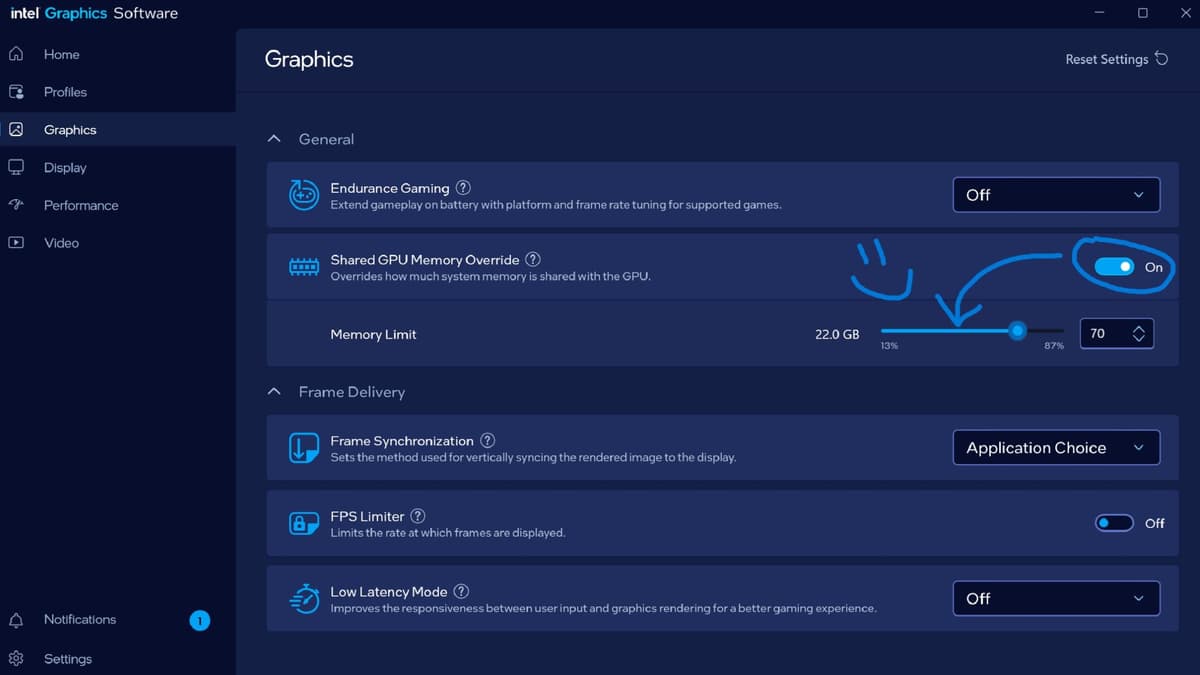
- Intel’s new driver exposes manual VRAM allocation – You can now assign a fat chunk of system memory (up to 87%, seriously!) to act as GPU VRAM for laptops without a dedicated graphics card.
- Only for the latest iGPUs (for now) – Works on Intel Core Ultra (Meteor Lake) officially, but rumor is only Arrow Lake chips are fully supported.
- This isn’t magic-performance gains will vary – Tossing more RAM at the problem helps with VRAM-hungry games, but don’t expect miracles. CPU and GPU capability still matter.
- Balance is key – Giving all your RAM to VRAM might tank your overall system performance. Finding the sweet spot is trial and error.
Breaking Down the “Shared GPU Memory Override”
Let’s get technical. Most gaming laptops with Intel chips don’t have dedicated VRAM like a proper gaming GPU. Instead, they “borrow” system RAM, which is slower and more limited. By default, Windows automates this, but the new feature in Intel’s Arc control panel throws that power to gamers themselves. The catch? You need at least 10GB RAM (an odd threshold-was 8GB too much to ask?), an Intel Core Ultra CPU, and the latest driver.
This isn’t just academic. If you’ve ever watched an iGPU choke in something like Hogwarts Legacy, it’s often because the game demands more VRAM than the system can handle. Now, if you have a (theoretically) beefy rig—say, 16GB or 32GB RAM—you could really beef up GPU memory, maybe finally getting through those demanding scenes without slideshow frame rates. But, of course, you can’t give everything to VRAM or the rest of your system might grind to a halt. It’s a delicate dance.
Why Now? The Real Story Behind the Update
This move has Intel’s fingerprints all over it: grab attention with a feature that theoretically closes the gap with AMD’s more mature integrated graphics. For years, Intel’s iGPUs have been mocked for barely scraping by in modern games. But with Meteor Lake and Arrow Lake, they’ve started pushing boundaries—Arc Graphics is a genuine attempt to matter in gaming. This update leans into that narrative: “Sure, we’re not an RTX, but give us enough RAM and we’ll meet you halfway.”
I’m curious if this “manual VRAM” feature is more than marketing bait. Allocating RAM never moves the needle as much as real VRAM on a dedicated card. System memory is still subject to bandwidth bottlenecks, and Windows’s memory management can get squirrelly under pressure. But for students or travelers gaming on lighter laptops, not chasing the frame-perfect experience, it might just be the edge they need in certain games—especially as modern titles keep ramping up VRAM demands.

The Gamer’s Perspective: Is Manual VRAM Allocation a Win?
If you’re swinging a dedicated GPU, none of this matters; you’ve already got the horsepower. But for the (surprisingly huge) crowd trying to game on iGPUs, this is the first time you’re getting the kind of control PC gamers thrive on. Want to squeeze 10-15% more frames in something like Valorant or Minecraft? Now you can experiment. Have 32GB of RAM for no reason? Sacrifice half to your GPU and see what happens! But let’s not kid ourselves: this isn’t turning an iGPU into a gaming monster. It’s tweaking to survive, not to dominate.
Here’s the real win: power users and tinkering enthusiasts get new dials to spin. For everyone else, it’s just another way to chase playable frame rates—knowing full well there are limits. The most likely outcome? You’ll set it and forget it, but for a subset of the gaming community, having this choice matters. It’s also one more reason to pay attention to Intel’s growing seriousness in the GPU space. As the arms race with AMD and Nvidia ramps up, even small victories like this add fuel to the fire.
TL;DR
Intel’s new driver lets you dedicate up to 87% of your RAM as VRAM for iGPUs. It won’t work magic, but it’s a legit tweak for integrated graphics gamers. Just remember: more isn’t always better when your system RAM is on the line. For enthusiasts, it’s another lever to play with—and another sign that Intel is finally taking gamers seriously.
FinalBoss // Gear
Level up your setup
01Graphics cardson Amazon→02Gaming laptopson Amazon→03High-refresh gaming monitorson Amazon→04Discounted game keyson Kinguin→Affiliate links · As an Amazon Associate, FinalBoss earns from qualifying purchases.
Want to Level Up Your Gaming?
Get access to exclusive strategies, hidden tips, and pro-level insights that we don't share publicly.
Ultimate Gaming Strategy Guide + Weekly Pro Tips