
Table of Contents (10)
Three Months With a Portable RTX 5090
For the last three months, the Razer Blade 18 (2025) has been my main machine for everything: late-night Cyberpunk 2077 sessions, editing 4K footage, writing articles, and, at one point, trying to pretend it was an Xbox thanks to Microsoft’s “Xbox Full Screen Experience.” If a desktop PC and a gaming console had a hulking, RGB-lit child, this would be it.
On paper, the config I’ve been using is absurd:
- Intel Core Ultra 9 275HX (Series 2)
- NVIDIA GeForce RTX 5090 Laptop GPU (up to 175W, 24GB GDDR7)
- 64GB DDR5-5600 RAM
- 4TB PCIe Gen4 SSD
- 18″ dual-mode IPS display: UHD+ 3840×2400 @ 240Hz or FHD+ 1920×1200 @ 440Hz
- 99Wh battery, 400W power brick
- Approx. 3.2kg laptop weight (7.06 lbs)
That spec list screams “desktop replacement,” not “laptop,” and after hauling it through airports and coffee shops, I can confirm: this is a portable desktop that happens to fold shut, not a machine you casually toss in a backpack and forget about.
Design & Build: A Tasteful Tank
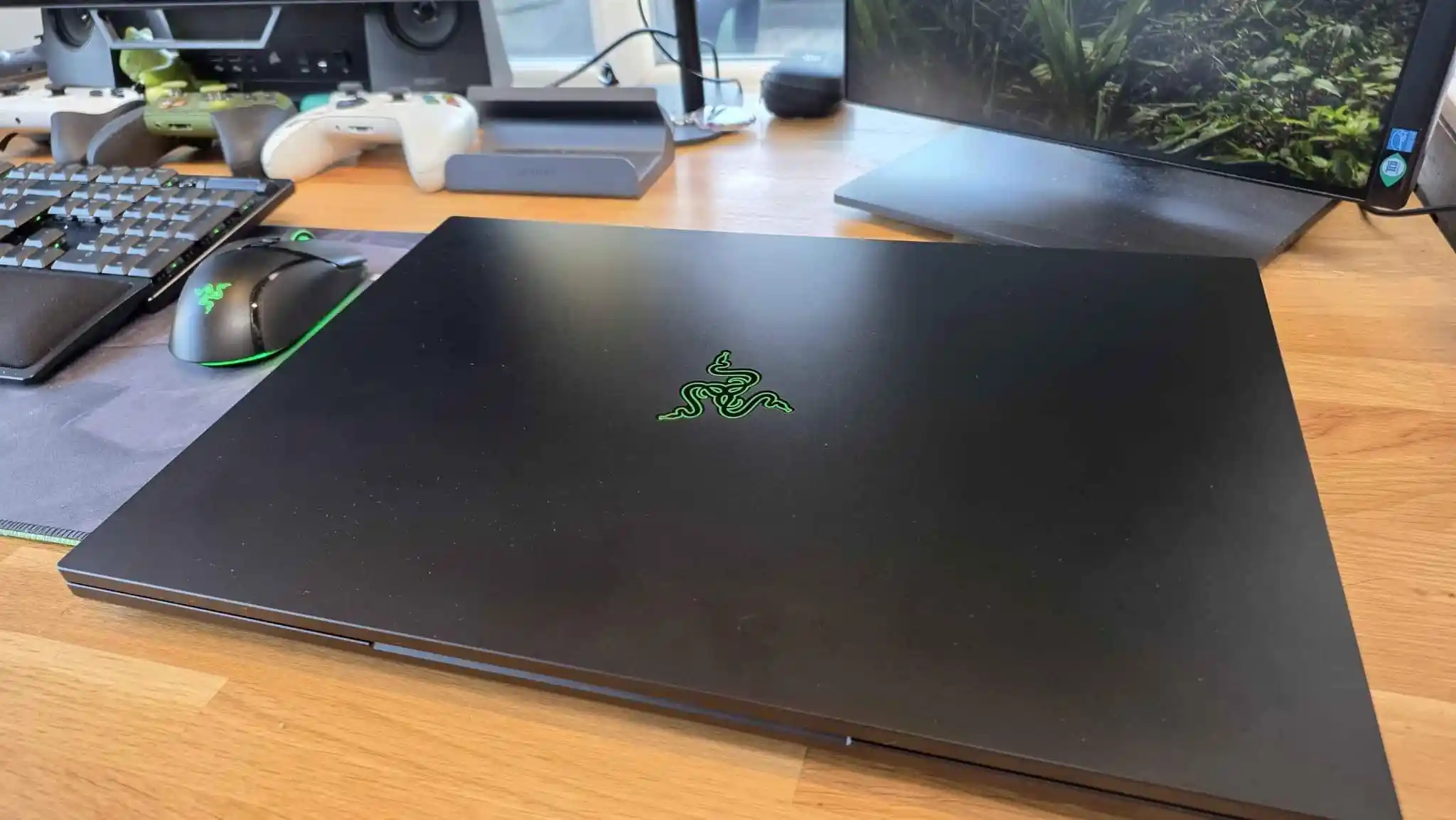
My first impression pulling it out of the box was a weird mix of “damn, that’s gorgeous” and “oh, that’s heavier than it looks.” The Blade 18 keeps Razer’s usual stealthy black aesthetic: anodized CNC-milled aluminium, sharp edges, minimal branding. If you walked into a meeting with it, you’d look like you’re about to present a quarterly report, not frag someone in Apex.
The chassis is thin for what’s inside, but it’s dense in a way that makes you think twice before picking it up one-handed. I tried that once while half-asleep, and my wrist immediately regretted the decision. This is a two-handed machine, the sort of thing you plonk down on a table and then rearrange everything else around it.
Razer being Razer, the minimalist vibe is interrupted by RGB in exactly the ways you’d expect. There’s the glowing triple-snake logo on the lid, the per-key RGB keyboard, and my favourite bit of completely unnecessary excess: an RGB-accented “window” on the bottom that gives you a peek at the vapor chamber.
That vapor chamber, which Razer says covers about 57% of the motherboard, is very much not just for show. Under sustained loads, the Blade 18 absolutely needs every trick in the book to keep that 175W RTX 5090 and Ultra 9 CPU in check. I’ll get to thermals later, but I never felt like the cooling system was purely a spec-sheet bullet point. It’s doing real work.
Ports, Power Brick, and Daily Practicality
One of the quiet joys of big gaming laptops is finally not having to live the dongle life, and the Blade 18 nails this. Across the two sides you get:
- Right: Thunderbolt 5, HDMI 2.1, USB-A 3.2 Gen 2, UHS-II SD card reader, Kensington lock
- Left: 2.5GbE Ethernet, 2× USB-A 3.2 Gen 2, Thunderbolt 4, 3.5mm audio jack, and the barrel power connector
As someone who constantly swaps between controllers, capture cards, external drives, and SD cards, I appreciated not having to choose which two peripherals get to live today. I kept a mouse, an external SSD, and a gamepad receiver plugged in permanently and still had headroom.
The downside is the power brick. It’s a 400W slab that feels like Razer tried to weaponize electricity. In a backpack, the combo of 3.2kg laptop plus this brick transforms “I’ll bring my laptop just in case” into “am I prepared for leg day?” I had one trip where I deliberately left the brick at the hotel for a day of meetings, and the anxiety of knowing I effectively had a 2-hour ticking battery clock in my bag wasn’t fun.
That’s the harsh reality of the Blade 18: yes, it’s technically “portable,” but the moment you treat it like a normal laptop and move around without the charger, it reminds you what it really is.
The 18-Inch Dual-Mode Display: Awesome, with Quirks
The 18-inch 16:10 IPS panel is the part of the Blade 18 I fell in love with the fastest. For work, it’s instant quality-of-life: two proper browser windows side by side, or a timeline, bin, and preview open together while editing, without feeling cramped.
The party trick is the dual-mode setup:
- UHD+ 3840×2400 at 240Hz
- FHD+ 1920×1200 at 440Hz
On paper, that 440Hz mode screams “esports flex,” and yeah, in lighter games like Sektori or indie shooters, the system can basically saturate the refresh rate. But if I’m being honest, I spent 90% of my time in the 4K-ish 240Hz mode. The jump from 240Hz to 440Hz is subtle compared to the jump from 60Hz to 120/144, and I value the extra sharpness more.
Switching between the modes is supposed to be simple via Razer Synapse, and the toggle itself works fine, but Windows 11 doesn’t always take the hint. Several times, after jumping from UHD+ to FHD+, text scaling went weird and I had to manually dive into Display settings to get everything looking sane. If you like flipping modes per game, be ready for some fiddling.

The bigger bummer is the lack of HDR. At this price, and on a halo “look at this monster” machine, the fact that you’re limited to SDR stings. Colour, brightness, and viewing angles are all solid for IPS, but once you’ve used mini-LED or OLED panels on other high-end laptops, you can feel what’s missing when watching movies or playing games with heavy contrast. The image is sharp and smooth, just never quite “wow, this pops” in darker scenes.
Keyboard, Trackpad, and Everyday Feel
I’m picky about laptop keyboards, and the Blade 18’s is one of the few I’d happily type on all day. Key travel is 1.5mm with a 63g actuation force, and it hits a nice middle ground between crisp and cushioned. It feels more like a good low-profile desktop keyboard than the usual mushy laptop fare.
Razer squeezes in a numpad, which made my spreadsheet brain very happy, though it is a bit squished. Still, after a week of use, muscle memory adjusted, and I stopped mis-hitting Enter. The per-key RGB is classic Razer: loud if you want it, subtle if you dial it in. I liked the little touches, like keys lighting up contextually when you hold Fn or Shift to highlight secondary functions.
The trackpad is huge. It covers almost the entire lower third of the chassis and feels precise and smooth, with no weird dead zones or mis-clicks in my time with it. Windows gestures worked exactly how I wanted. I did occasionally brush it with my palm during intense typing or gaming sessions, but palm rejection did a decent job of ignoring that. With a machine like this, I mostly used a mouse anyway, but it’s nice knowing the trackpad isn’t an afterthought.
Audio is handled by a six-speaker setup, and for a laptop, it’s respectable. There’s some spatial separation, and with Razer’s EQ profiles in Synapse, I could quickly swap between a punchier game-focused profile and something flatter for Netflix. It won’t replace even a mid-range pair of headphones, and bass is limited as usual, but it never felt tinny or hollow. Importantly, at moderate volumes it can overpower the fans a bit, which you’ll appreciate once those really spin up.
Gaming Performance: “Just Throw It at the Blade”
This is why you buy a Blade 18 with an RTX 5090: to stop asking “can I run this?” and start asking “how ridiculous do I want the settings to be?” For three months, I basically used the Blade as my “everything maxed” benchmark machine.
Cyberpunk 2077 has become my go-to pain test for GPUs. Using the in-game benchmark at UHD+ with a mix of high/ultra settings, ray tracing features, and DLSS/Frame Generation enabled, I was seeing average framerates hovering around 90 FPS. It looked absurdly good, played smoothly, and genuinely felt closer to my desktop than any laptop I’ve owned before.
High on Life 2 didn’t even make the machine break a sweat. With every RTX feature I could sensibly justify switched on, it held high, stable frame rates and the image quality stayed sharp with NVIDIA’s upscaling tech doing its thing in the background. Whether you love or hate “fake frames,” the end result is clear: it feels silky in motion.
In REANIMAL, which leans heavily on Unreal Engine’s fancy lighting and geometry tech, performance was more than enough to push well into three digits while still looking crisp. Unreal’s usual “my GPU is on fire” moments were there, but the Blade’s framerate barely flinched once settings were dialed in.
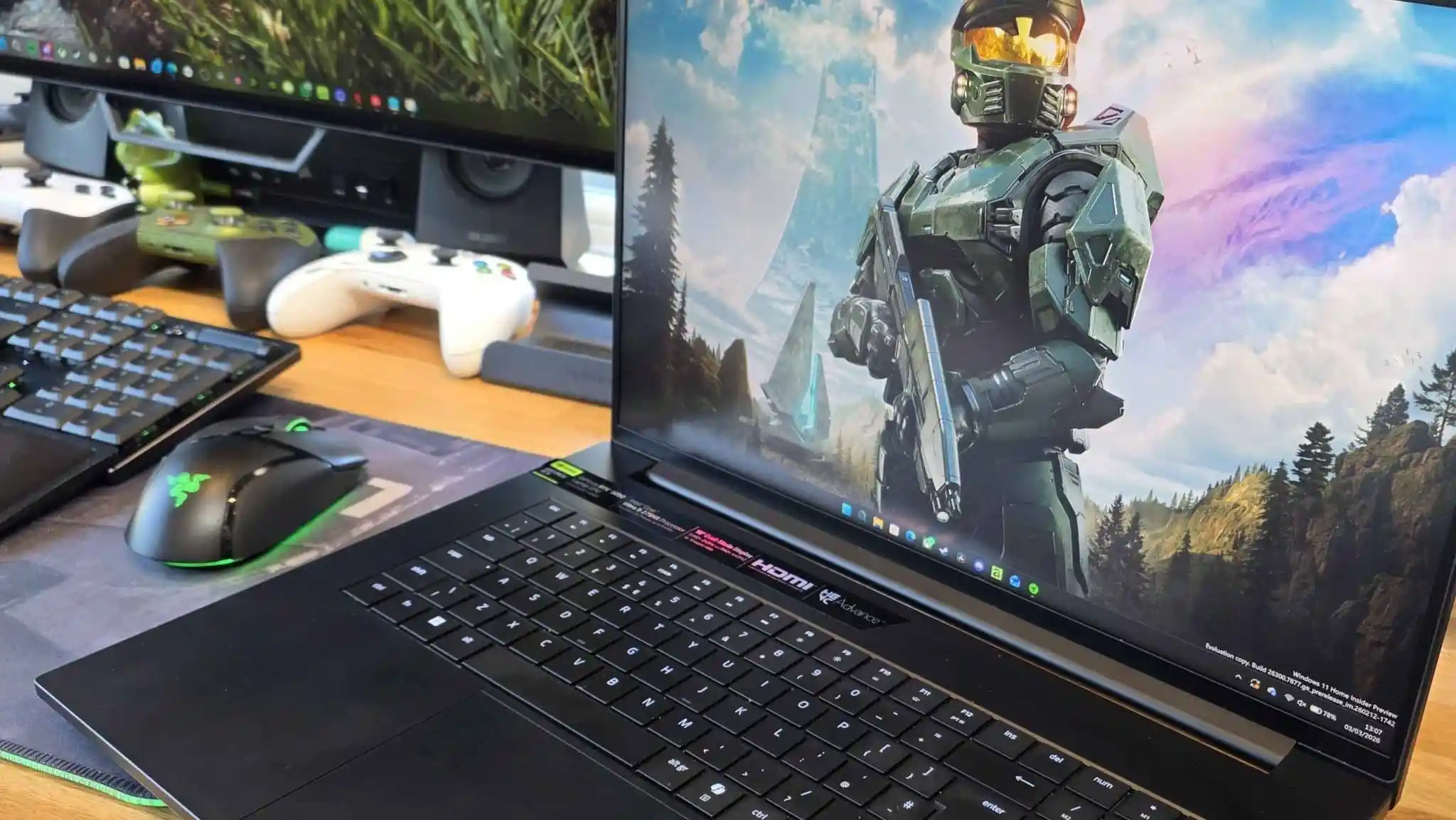
And then there’s stuff like Sektori and other lightweight shooters and roguelikes. These were the games where I actually tried to justify switching to 440Hz FHD+ mode. The laptop pretty much pinned the framerate to the ceiling, resulting in comically smooth motion. I can’t claim it magically made me better at the game, but it did feel snappy in a way that’s hard to go back from.
The catch? Under sustained heavy loads, the fans go from “audible” to “this sounds like takeoff.” With headphones, it’s fine; with speakers, it’s tolerable but ever-present. The pitch isn’t the worst I’ve heard on a gaming laptop, but if you’re used to quieter 14-16-inch machines, it’ll be an adjustment.
Content Creation and Work: Overkill in a Good Way
Gaming is only half the story for a machine like this. I pushed the Blade 18 through my usual content-creation routine: 4K footage in DaVinci Resolve, light After Effects work, heaps of Chrome tabs, Discord, Spotify, OBS for capture, and various launchers all running in the background.
The Ultra 9 275HX and 64GB of DDR5 meant I never worried about RAM or CPU headroom. Timelines stayed smooth, scrubbing through H.265 footage didn’t hitch, and background exports didn’t bring the system to its knees. I could encode a video while playing something relatively light on the side and still have the machine feel responsive, which is wild for a portable device.
Storage-wise, the 4TB PCIe Gen4 SSD is fast enough that game load times and project file transfers felt instant. Coming from a laptop with a cramped 1TB drive, it was a relief not having to constantly shuffle games and footage around. Realistically, you’ll still want external backup drives, but as a working drive, this config feels properly high-end.
The Blade 18 also felt fantastic as a pure “work” laptop when I wasn’t stressing it with GPU-heavy tasks. Writing, browsing, and running a couple of VMs at once all felt snappy. That said, the thermal profile of the machine is clearly tuned with gaming and high-performance workloads in mind, not quiet, ultra-efficient office use.
Thermals, Noise, and Battery Life: The Bill Comes Due
All that power has a cost, and you pay it in heat, noise, and battery life.
In games and heavy creative workloads, the chassis gets warm but not skin-melting. The palm rest stays comfortable; the top deck around the function row gets toasty. I never hit thermal throttling in a way that tanked performance, but you can feel the cooling system working hard. Fans ramp up quickly under load and stick around for a while even after you close a game.
Fan noise is the big trade-off. In “Balanced” or “Performance” modes, any 3D-heavy game, especially at UHD+, turns the Blade 18 into white-noise generator territory. It’s not unbearable, and it’s roughly in line with other huge 18-inch performance-first laptops I’ve tried, but this isn’t the machine you quietly game on in a library corner.
Battery life is where the fantasy of “desktop performance you can take anywhere” really crashes into reality. With the 99Wh battery and everything set to a reasonably sensible “on the go” profile-UHD+ at 60Hz, brightness around 50%, battery saver on, no dedicated GPU usage-I was getting about two hours of web browsing, writing, and light app usage before I started nervously eyeing the percentage. Push it harder, or forget to force the iGPU, and the battery melts.
Gaming on battery is basically a party trick. You can do it, and I tried a few times out of stubborn curiosity. But once you see the projected runtime plummet to sub-60 minutes, it stops feeling practical. Power limits drop off a cliff when unplugged too, so performance takes a hit on top of that. In other words: treat the battery as a short-term UPS and convenience feature, not a real gaming option.
Trying to Use It Like a Console
One of my personal experiments with the Blade 18 was trying to treat it as an oversized Xbox. I installed Microsoft’s “Xbox Full Screen Experience,” plugged in a controller, and parked the laptop under the TV for a few evenings.
When it worked, it was kind of magic: console-like front-end, absurdly better performance, and access to my full PC library. But the friction added up quickly. Waking the laptop reliably with a controller was hit-and-miss, and Windows still loves throwing background pop-ups and notifications over the top of whatever pretend-console interface you’re running.
The experiment convinced me of two things: first, the Blade 18 absolutely has the power to double as a console replacement, especially if you’ve got it docked most of the time. Second, Windows and the current Xbox overlay software just aren’t quite there yet for it to feel seamless. If your dream is “one device to rule them all under the TV,” prepare to tinker.
Price and Who This Is Actually For
Let’s talk money, because it’s impossible to ignore. The Razer Blade 18 line starts at around $3,499, and the configuration I’ve been using-Ultra 9, RTX 5090, 64GB RAM, 4TB SSD—lands at a frankly wild $5,199.99.
If that number instantly makes you scoff, that’s your answer: this laptop is not for you, and that’s okay. You can build an insane desktop plus a solid secondary laptop for that price. Plenty of more affordable gaming notebooks with mid-tier GPUs hit a very nice performance/price sweet spot.
The Blade 18 is for a narrower slice of people:
- Creators who genuinely need near-desktop performance on the road—event coverage, on-site editing, 3D work, that kind of thing.
- Enthusiasts who want one machine that does everything: gaming rig, workhorse, travel system, and don’t want to deal with a separate desktop tower.
- People who value Razer’s design and build quality enough to pay the premium over chunkier, more aggressive-looking 18-inch competitors.
I fall somewhere between the first two groups, which is probably why I ended up weirdly attached to it despite all my complaints. Being able to go to an event, plug in at the hotel, and have “my full PC” there—same projects, same games, same performance level—felt luxurious. I just never forgot I was carrying it.
FinalBoss // Gear
Level up your setup
01Graphics cardson Amazon→02Gaming laptopson Amazon→03High-refresh gaming monitorson Amazon→04Discounted game keyson Kinguin→Affiliate links · As an Amazon Associate, FinalBoss earns from qualifying purchases.
Want to Level Up Your Gaming?
Get access to exclusive strategies, hidden tips, and pro-level insights that we don't share publicly.
Ultimate Reviews Strategy Guide + Weekly Pro Tips