
After spending a couple of evenings bashing my head against Traxus’ Equitable Distribution contract in Marathon, I realised the biggest problem wasn’t the difficulty – it was how vague and misleading the objectives are. Timers don’t work how you expect, locations are described badly, and two different stages pretend you’re under more pressure than you actually are.
This guide breaks down Equitable Distribution 1-4 exactly how I now run it: clear routing, what really is and isn’t timed, and the precise spots you need on Perimeter and Dire Marsh. If you follow these steps, you should be able to clear the full contract chain reliably instead of gambling an entire raid on bad assumptions.
Table of Contents (16)
Before You Start Equitable Distribution
Equitable Distribution is a four-part Traxus priority contract that unlocks early in the faction track, and you have to finish it to push Traxus reputation further. A few quick prep tips that saved me a lot of pain:
- Use sponsored/free kits where possible. You’re going into hot POIs like Hauler, Station, and Algae Ponds. Losing top-tier gear to a timer failure feels awful; free kits make mistakes cheap.
- Bring extra ammo and some range. Stages 2 and 4 (drone and Commander) get much easier if you can comfortably engage at mid-long range.
- Learn the DCON rooftops on Perimeter. There are DCON units in each map corner. Knowing roughly where they are before you start Stage 1 and 3 simplifies the routing massively.
- Don’t stress about doing all four in one go. Each numbered stage (1/4, 2/4, etc.) must be done in a single raid, but Stage 3’s sub-objectives can be spread across multiple runs.
Equitable Distribution 1/4 – Self-Erasing Data Drive & DCON
This is your introduction to DCON units and your first “fake” time pressure. The game doesn’t tell you exactly where the data drive is or how far the DCONs are spread across Perimeter, so most people lose their first attempt to poor routing. I did too.
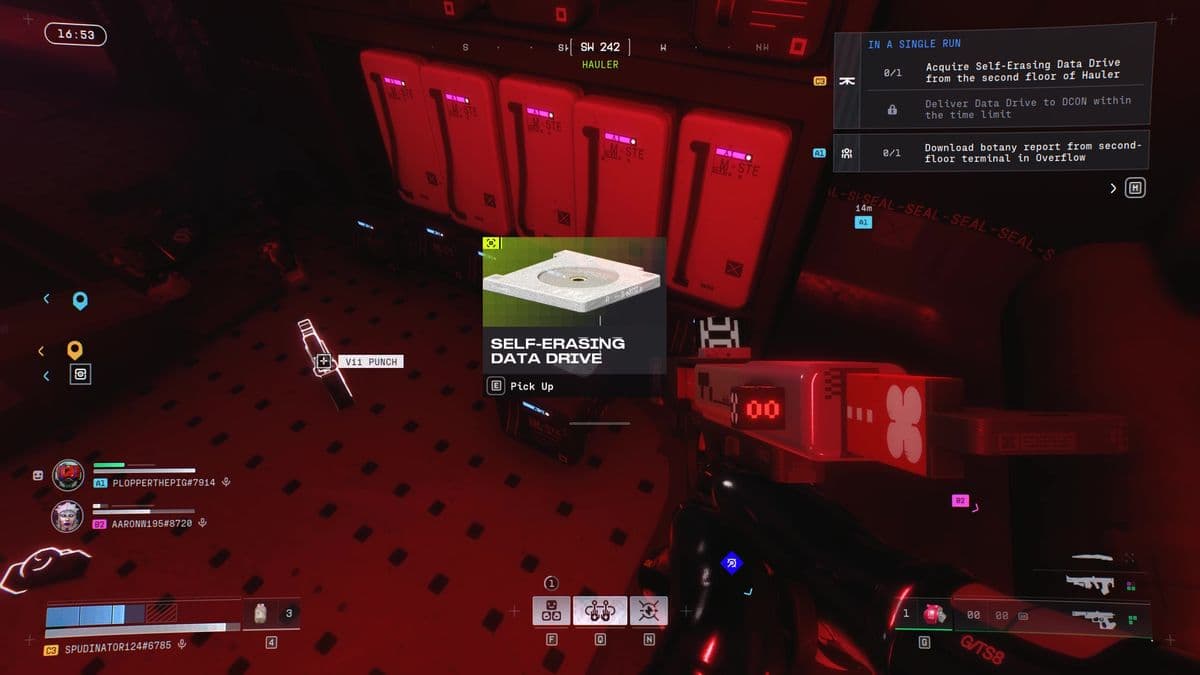
Step 1: Grab the Self-Erasing Data Drive at Hauler
Head to Hauler, the massive wreck in the west of Perimeter.
- Enter the Hauler and make your way to the second floor. You can either:
- Take the stairs up from the main interior, or
- Climb up from the garage area onto the ledge and into the upper section.
- Look for a server room along the west wall (roughly the mid-section of the vehicle).
- You’ll find some server racks with a searchable drawer. Interact with the drawer to spawn the Self-Erasing Data Drive on the floor.
- Pick up the drive – this starts a three-minute timer.
Don’t do what I did on my first run: I grabbed the drive instantly and then opened the map to decide where to go. Plan your DCON target before you ever touch the drive.
Step 2: Choose and Reach a DCON in Time
Once you have the drive, you’ve got three minutes to reach any DCON on Perimeter. All DCONs sit on small rooftop structures:
- North Relay DCON – Slightly northwest of the North Relay POI.
- Station DCON – Northeast of Station, just past a large pipe near the northern walkway.
- Overflow DCON – West of Overflow, close to the cliffs, not far from the main building.
- South Relay DCON – In the southern hills beyond Columns; the furthest from most POIs.
Pick whichever DCON lines up best with your spawn and a nearby extraction. Personally, I usually route from Hauler to either Station’s DCON or the Overflow one – South Relay is a long sprint and risky if you’re already under fire.
At the DCON:
- Climb up to the rooftop unit.
- Interact to open its inventory.
- Move the Self-Erasing Data Drive into the DCON inventory.
- Close the menu and wait a few seconds while it “sends” the data.
Once the upload completes, Stage 1/4 is done. You can die or extract; it doesn’t matter. The only failure is letting the three-minute drive timer run out before depositing it.
Equitable Distribution 2/4 – Transport Drone in Dire Marsh
Stage 2 moves you to Dire Marsh and asks you to summon and shoot down a special Transport Drone, then extract with the loot. The contract never explains the delay between hacking the console and the drone appearing, which is where I almost thought mine bugged out.
Step 1: Hack the UESC Security Terminal at Algae Ponds
Go to Algae Ponds, roughly in the middle of Dire Marsh.
- Enter the main building (the one directly south of the “LG” in “Algae Ponds” on the map).
- Head up to the second floor.
- Pass through the control-room area into a lab-like room.
- Find and interact with the UESC security terminal to “Summon Transport Drone”.
After the hack, nothing obvious happens for a minute or two. That’s normal. The Transport Drone spawns in and starts moving along the elevated roadway to the north of the building.
Step 2: Identify and Shoot Down the Right Drone
This is where things get messy: the Transport Drone looks like a regular UESC drone from a distance, and I’ve had a normal drone spawn in alongside it before. To avoid the confusion I ran into:
- After hacking, reposition to where you can watch the roadway to the north of Algae Ponds.
- Wait a couple of minutes; watch for drones moving along the road overhead.
- The correct Transport Drone will have a green quest marker once it’s close enough.
- Open up on it with a decent mid-range weapon as it passes overhead. Drones can take some punishment, so don’t be stingy with ammo.
Be aware that shooting a drone is loud and visible; other runners love to third-party here. I usually position where I have hard cover and some escape options rather than standing in the open underneath.
Step 3: Loot and Extract Safely
Once the Transport Drone goes down, close in and loot the wreck:
- UESC Drone Manifest – priority contract item, 1 slot.
- UESC Drone Supplies – priority contract item, takes up 4 inventory slots.
Make sure you have at least five free slots before you shoot the drone, or you’ll end up playing inventory Tetris while everyone on the map heard the explosion. Once you’ve grabbed both items, all you need to do is extract alive with them in your inventory.
Pick the nearest exit and avoid taking unnecessary fights; dying on the way out means redoing the entire stage.
Equitable Distribution 3/4 – Scanning Drones & Unstable Gunmetal
This is the stage I found most confusing. The UI makes it feel like both steps must be done in one raid, but you don’t. You can scan the drones in one run and deliver the Unstable Gunmetal in a later run (or vice versa), and progress will stick.

Part A: Scan the Drones in Station’s Underground Lab
Head to Station in the northeast of Perimeter. You’re aiming for the tunnels and garages under the facility.
- From outside, face the main building and find the south-side garage with an orange door.
- You can:
- Go inside Station and take stairs down towards the garage area, or
- Break the vent near a stack of boxes in the lower section to drop into the tunnels.
- From the garage, follow the hallway heading south into a drone lab.
Inside the lab you’ll see several drones stored around the room. Three of them are marked for the contract – you must interact with each one to “scan” it (shooting doesn’t count; that mistake cost me an extra trip).
- Drone 1 – Immediately on your right as you enter, low enough that you can jump onto it and interact.
- Drone 2 – Up on a crane in the northwest corner. Climb the oddly-shaped white structure beneath it, then jump onto the crane to reach the drone.
- Drone 3 – On a high shelf in the southeast corner. Use nearby crates and ledges to climb up.
Watch for AI and players using these tunnels as flanking routes. I like to clear the garage first, close doors behind me where possible, then take a minute to climb and scan each drone methodically.
Part B: Gather & Deposit Seven Unstable Gunmetal
Next, you need to find and deliver 7× Unstable Gunmetal to any DCON. The important bit: this can be done across multiple raids; the contract tracks your total.
From my runs, Unstable Gunmetal drops pretty consistently from:
- Countertops and benches in industrial interiors (like Station and Hauler).
- Random containers and lootable props around major facilities.
Once you’ve collected at least seven units (they stack in your inventory), head to any DCON – the Station-adjacent DCON to the northeast is usually the easiest from here.
- Climb to the DCON rooftop unit.
- Open its inventory.
- Deposit 7 Unstable Gunmetal. You can drop more, but seven completes the objective.
As soon as both “Scan drones” and “Deliver Unstable Gunmetal” are ticked, Equitable Distribution 3/4 is done, even if you die afterwards.
Equitable Distribution 4/4 – Hunting the UESC Commander
The last stage is a two-step boss hunt on Perimeter: trace the UESC Commander’s location from a secured building, then race across the map to kill them before you lose the marker. This is where I finally stopped treating the timers like hard fail states and started using them properly.
Step 1: Breach the Secured Building South of Columns
First, you need to “trace” the Commander at a fortified structure in the far south of the map, past Columns. This is also where the southern DCON lives, but it’s not right next to South Relay despite what the objective text suggests.
- Approach from the front and you’ll see traps and energy barriers everywhere.
- Take the orange pipe to the left side of the building; it leads underneath to a lower entry point.
- Inside, shoot the tripwires from a safe distance to clear a path. Don’t try to sprint through – one bad wire cost me half my health on my first attempt.
In the main interior room you’ll find a central console surrounded by active security barriers. You need to disable those first.
- Look around the walls and ceiling for four power batteries or nodes.
- Shoot all four; each one powers down part of the barrier setup.
- Once they’re destroyed, the central console becomes usable.
Step 2: Start the Trace and Sprint to the Commander
Interact with the central console to begin tracing the Commander. This starts a four-minute timer.
Here’s the critical detail I wish I’d understood immediately:
- The four-minute timer is for the quest marker, not the Commander’s life.
- When the timer ends, the marker disappears, making the Commander very hard to track down if you’re not already there.
- As long as you reach them before the timer expires, you can take however long you need to actually kill them.
After activating the console, check your map: you’ll see a marker at one of the major POIs. For me it’s often been North Relay, but it can vary from run to run.
Immediately leave the secured building and beeline for the marker:
- Stow your weapon while sprinting to gain extra speed.
- Use water and safer routes to manage heat and avoid getting bogged down in open fights.
- Ignore side loot – if you miss the four-minute window, you’ll have to restart from the console step.
Step 3: Kill the Commander and Grab the Credentials
At the marked location you’ll find the UESC Commander with backup. It’s not a full raid boss, but you should still treat it like a serious firefight.
- Use cover and angles – don’t run straight into the middle of the squad.
- Thin out the adds with grenades or headshots before focusing the Commander, or they’ll melt you while you tunnel-vision.
- Watch for flanks; AI buddies love to wrap around buildings while you’re unloading on the main target.
When the Commander goes down, loot the body for the UESC Credentials priority contract item. You do not need to extract alive with it – once you’ve picked it up, Equitable Distribution 4/4 is complete even if you die seconds later.
After Equitable Distribution – Pushing Traxus Reputation
With all four stages cleared, Traxus will gate your next priority contracts behind level 10 reputation. From here, your best strategy is to combine normal looting with Traxus-friendly activities:
- Run Traxus repeatable missions whenever you can slot them in.
- Prioritise looting Arms Lockers, Tool Carts, and Transport Drones, which often feed Traxus progression.
- Join Convoy and Lockdown events when they’re nearby – they’re risky, but the reputation and loot are worth it if you’re geared.
- Extract with Traxus-tagged valuables instead of dumping them early in the raid.
Equitable Distribution looks intimidating on paper, but once you know where everything is and how the timers actually behave, it becomes a manageable checklist rather than a nightmare. If I can go from repeatedly failing the data drive timer to clearing the whole chain in a couple of sessions, you can too – and the Traxus reputation boost is absolutely worth the effort.
FinalBoss // Gear
Level up your setup
01Top-rated gaming headsetson Amazon→02High-refresh gaming monitorson Amazon→03Gaming chairson Amazon→04Discounted game keyson Kinguin→
Affiliate links · As an Amazon Associate, FinalBoss earns from qualifying purchases.
Want to Level Up Your Gaming?
Get access to exclusive strategies, hidden tips, and pro-level insights that we don't share publicly.
Ultimate Guide Strategy Guide + Weekly Pro Tips