
Table of Contents (10)
Why Amiibo Matter in Tears of the Kingdom (And Why I Became Obsessed)
After spending dozens of hours exploring every corner of Hyrule in Tears of the Kingdom, I finally caved and pulled out my growing Amiibo collection. I’ll be honest: at first, I thought scanning figures was just a gimmick for extra apples and maybe a cool sword. But after I unlocked my first exclusive paraglider fabric, I realized just how much Amiibo can actually change your gameplay experience-if you know what to scan and how to maximize it. Here’s everything I wish I’d known from the start.
Setting Up Amiibo Support: Don’t Skip This Step
The breakthrough came when I finally took the time to enable Amiibo support in-game. It’s not activated by default! Here’s how I do it now-don’t make my mistake of searching for the Amiibo menu for 10 minutes every session:
- Hold the left shoulder trigger (L) to open the abilities radial.
- Use the right stick to select the Amiibo rune (looks like an Amiibo symbol-never obvious at first glance!).
- When prompted, press right stick in (R3) to confirm selection.
- Tap your Amiibo figure to the NFC point on your Switch Pro Controller, Joy-Con, or Switch itself.
Pro tip: The NFC reader on the Pro Controller is dead-center on the top of the controller, just above the USB port. On Joy-Con, use the right stick. On handheld, it’s just above the right joystick.
The Daily Scan Limit (and How to Work Around It)
Each Amiibo can only be scanned once per real-world day—and yes, I learned this the hard way when I tried to grind for Epona mounts and unique fabrics back-to-back. If you’re trying to maximize drops, adjusting your Switch’s date in system settings will reset the scan limit. I use this sparingly, mostly when I’m hunting for the last few exclusive glider fabrics and not just spamming for apples and arrows.
Warning: The date trick is tempting, but overusing it can make your rare loot feel cheap, and it can complicate some in-game time events. I stick to one or two “bonus” scans per farming session at most.

Understanding Loot Tables: What You’ll Actually Get (and What’s Just Hype)
I spent plenty of time chasing rumors online: “Guaranteed Biggoron Sword from Ocarina Amiibo!” or “Every Amiibo drops unique armor!” The truth is more nuanced. Most Amiibo give common resources—think random meats, grains, or bog-standard weapons—but they each have a chance at special themed rewards. Here’s what I consistently pull from my scans:
- Unique paraglider fabrics: Each Zelda Amiibo provides a one-of-a-kind fabric for glider customization (my favorite cosmetic treat).
- Themed weapons/shields: Like the Ancient Blade from Guardian Amiibo or Biggoron’s Sword from Link Ocarina of Time. Expect them to drop at a lower rate.
- Nostalgic armor pieces: Classic tunics, boots, and masks from mainline Zelda games. These are rare, but so satisfying.
- Lots of cooking ingredients and standard gear: Don’t underestimate the survival value of a daily meat/veggie supply if you play in Hero Mode.
What finally worked for me was treating Amiibo as a slow-burn bonus—a way to complement my organic loot, rather than a guaranteed shortcut to endgame gear.
My Favorite Amiibo Rewards (and How to Target Them)
After weeks of testing scans, here are the drops that genuinely changed my playthrough. If you can only borrow or buy a few Amiibo, these are my priorities:
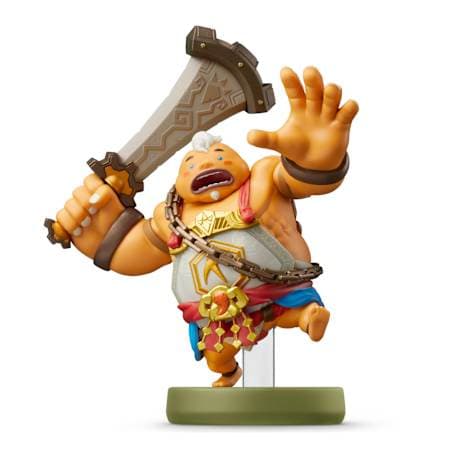
- Link (Super Smash Bros): Epona can drop—not every time, but it’s the easiest way to add the best horse to your stable. Also unlocks Twilight-themed gear.
- Link (Ocarina of Time): Chance at the Biggoron Sword (still the coolest-looking two-hander in my book), alongside classic Ocarina armor.
- Guardian (Breath of the Wild): Ancient Blade drop and Sheikah-themed fabric. Not reliably a shield, which threw me for a loop at first.
- Link (Skyward Sword): Skies tunic set and Spirit of the Sword fabric—rare, but looks awesome gliding across Hyrule Field.
- Urbosa & Mipha (Breath of the Wild): Their scans can yield themed divine helm armor, unique weapons, and glider fabrics. Super handy for resistances.
And remember: Most Amiibo armor sets can also be found in-game in hard-to-reach chests (I wasted hours farming Amiibo for outfits before learning this!). However, the paraglider fabrics and some weapons remain exclusive.
Efficient Scanning Routine: How I Save Time & Avoid Frustration
Once my collection grew past four Amiibo, I had to get efficient. Here’s my optimized daily process to avoid endless menu cycling and missed scans:
- Line up all your Amiibo (or NFC cards!) before starting the game. Keep them within arm’s reach—feels silly, but you’ll thank yourself.
- Start the scan process out in the open (not near cliffs or enemies)—drops can scatter wildly, and I’ve lost materials to a sudden Moblin raid.
- Scan your must-have Amiibo (themed rewards) first, then follow with food/resource types. That way, if you forget later, you don’t miss the rare stuff.
- If you’re aiming for a specific fabric/weapon, don’t be afraid to skip a day or two—sometimes it’s RNG cooldown manipulation, but mostly to prevent burnout.
Don’t make my mistake: I once did 15 scans in a row during rain and watched half my wheat float away in a river. Weather and terrain matter when you’re grabbing free loot!
Advanced Tips: Maximizing the Amiibo Advantage
Now that I rely on Amiibo for certain mats and cosmetics, I’ve found a few advanced tricks that really make the most of each scan:
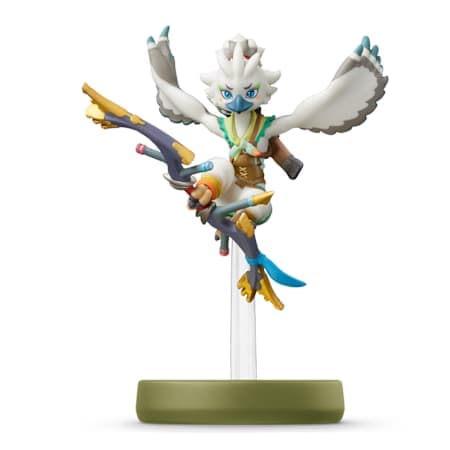
- Fuse Let’s Play: Use the unique weapons (from Amiibo) as fuse bases. Even “weak” nostalgic swords become monsters with proper fusion.
- Resource stacking for survival: If you’re prepping for late-game bosses, scan for food/fairies daily to save on rupees and shopping runs.
- Disappointment insurance: If you don’t get the exclusive drop after several days, try after a major quest or blood moon; I’ve had better luck post-reset (maybe just RNG, but worth trying).
Also, combine Amiibo scanning with shrine warping: scan as soon as you arrive at a safe shrine, nab your loot, and then start your challenge. This keeps your inventory topped up, especially on tough runs.
Troubleshooting and Common Pitfalls (From Painful Experience!)
Here are classic mistakes I made, so you don’t have to:
- Not enabling the Amiibo ability in-game—no prompts will appear until you manually select it.
- Standing on sloped terrain: Loot can roll out of reach or off cliffs.
- Forgetting to claim loot: Sometimes you need to pick up what drops before scanning again, or items disappear.
- Expecting instant rare drops: Many rare items require patience and multiple days; don’t waste time doing endless date cycling unless you’re chasing a true must-have.
Final Thoughts: Make Amiibo a Fun Bonus, Not a Grind
I admit, once I started down the Amiibo rabbit hole, it was hard to stop. But Amiibo rewards feel best when you treat them as fun surprises that enhance (not replace) your playthrough. Ultimate tip: focus on unlocking your favorite glider fabric and a handful of weapons, and let the other resources come as they may. With a good scanning routine, a dash of patience, and a bit of luck, you’ll open up a side of Tears of the Kingdom that’s both nostalgic and genuinely useful.
If you run into a frustrating streak of common loot, don’t stress—almost everything Amiibo offers can be replaced with a little extra adventuring. The glider swag, though? That’s worth every scan!
TL;DR Checklist
- Enable Amiibo in-game from the ability menu—
L→ select Amiibo. - Scan each Amiibo once per day for themed loot, gear, and exclusive paraglider fabrics.
- If you’re desperate, use system date adjustment to reset daily scans (sparingly).
- Most armor can be found in-game, but some Amiibo-only cosmetics and weapons are truly unique.
- Keep it fun—most rewards are icing on the cake, so don’t burn out!
Good luck, and may your next scan finally get you that legendary fabric!
FinalBoss // Gear
Level up your setup
01Top-rated gaming headsetson Amazon→02High-refresh gaming monitorson Amazon→03Gaming chairson Amazon→04Discounted game keyson Kinguin→Affiliate links · As an Amazon Associate, FinalBoss earns from qualifying purchases.
Want to Level Up Your Gaming?
Get access to exclusive strategies, hidden tips, and pro-level insights that we don't share publicly.
Ultimate Guide Strategy Guide + Weekly Pro Tips