
Table of Contents (15)
Why Craftable Name Tags Matter (And Why I’m So Happy About Them)
After years of raiding dungeons, villager trading halls, and AFK fishing farms just to get a handful of name tags, the Tiny Takeover update finally fixed one of my quietest Minecraft frustrations. Being able to craft name tags with basic materials has completely changed how I handle pets, farms, and long-term worlds.
Before this update, I’d hoard name tags for “important” mobs only-hardcore world pets, iron farm zombies, that one perfect villager. Now, in my current survival world (Java on PC, keyboard and mouse), every cow, wolf, and utility mob that matters gets a proper name because the recipe is cheap and fast.
This guide walks you through exactly how to:
- Craft name tags from scratch using just a nugget and paper
- Rename them with an anvil without wasting XP
- Apply them correctly to mobs (and avoid losing them by accident)
- Use fun special names and practical tricks for farms and bases
If you’ve ever mixed up wolves with your friend’s wolf, or lost a key mob because it despawned, this new system fixes that-once you know how to use it properly.
Step 1: Make Sure You’re on the Tiny Takeover Update
Craftable name tags are part of the Tiny Takeover update (the big baby-mob / 26.1 era update). In older versions, you still can’t craft them.
- Java Edition: Use
F3in-game and check the version in the top-left corner. It needs to be Tiny Takeover / 26.1+ or a newer snapshot. - Bedrock (Console & Mobile): On the title screen, look at the bottom-right version number. Make sure your game is updated to the Tiny Takeover build or later.
If you’re on a server or realm that hasn’t updated yet, you won’t see the recipe. I wasted about 10 minutes the first day of the snapshot trying to “bug report” a recipe that just wasn’t in that world’s version yet-don’t repeat that mistake.
Step 2: Gather Materials for Your First Name Tag
The best part of this change is how early you can realistically start naming mobs. You only need:
- 1× Metal nugget – iron, gold, or copper (any one will work)
- 1× Paper
How to get a metal nugget quickly
You can use any of these:
- Iron nugget: Smelt down iron gear you find in chests, or craft from 1 iron ingot (place the ingot anywhere in a crafting grid to get 9 nuggets).
- Gold nugget: Smelt golden tools/armor or craft from 1 gold ingot.
- Copper nugget: Same idea—craft from 1 copper ingot, or use whatever copper junk you’ve got.
From experience, iron nuggets are usually the easiest early on—you’ll probably have spare iron ingots before you seriously use copper or gold. But since the outcome is identical, I just burn whatever I have the most of. The metal type doesn’t change how the name tag looks or works.
How to get paper if you’re just starting out
- Find sugar cane along rivers, lakes, or ocean shores.
- Break it and replant some near your starter base.
- Craft 3 sugar cane in a row (horizontal) into 3 paper.
One quick sugar cane run will usually give you enough paper for maps, books, and a stack of name tags. In my current world, I had my first paper within the first in-game day, so realistically you can name a pet by night one or two.
Step 3: Crafting a Name Tag (Inventory Recipe)
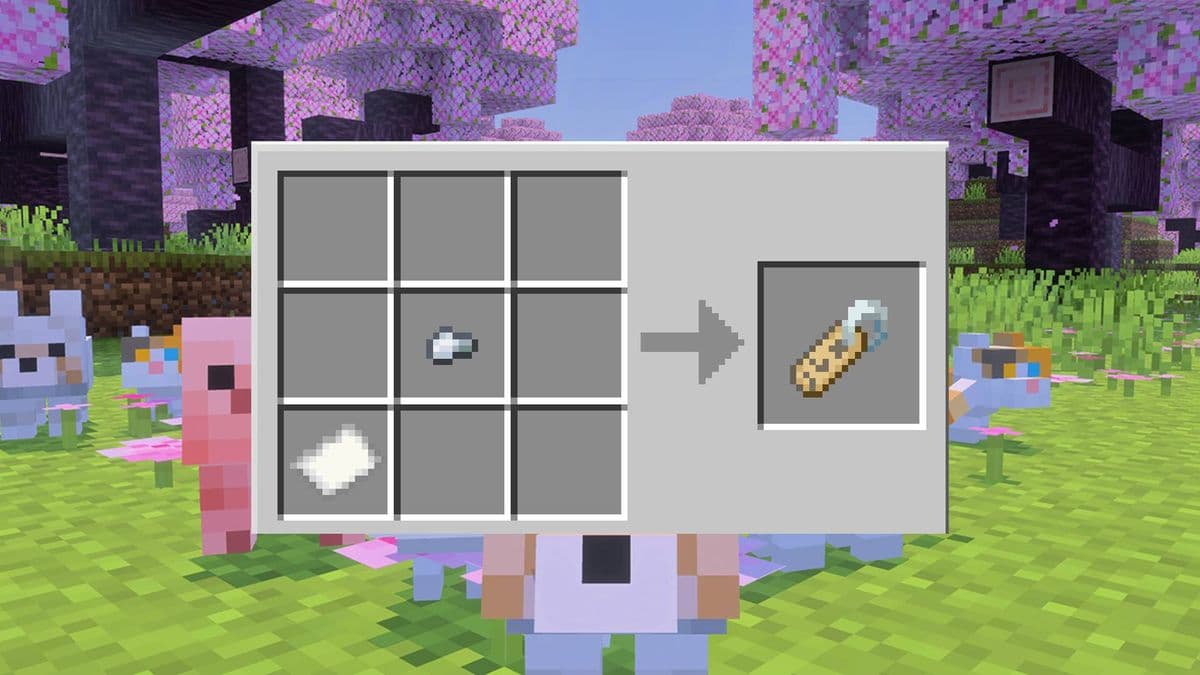
This is where Tiny Takeover really shines: you don’t even need a crafting table. The recipe fits inside your 2×2 personal crafting grid, but it also works on a full 3×3 table.
Exact name tag recipe layout
The recipe is shaped, not shapeless, which is what tripped me up at first. You must place the items in specific slots of the 2×2 or 3×3 grid:
- Put 1 metal nugget in the top-left or top-right slot.
- Put 1 paper in the bottom-left slot.
If you’re using only the 2×2 inventory grid, think of it like this:
- Top-left: nugget, Bottom-left: paper → works
- Top-right: nugget, Bottom-left: paper → works
- Any other configuration → doesn’t craft
When placed correctly, a blank name tag appears in the output slot. Drag it into your inventory.
Don’t make my initial mistake of assuming it was shapeless and just tossing nugget + paper anywhere. I burned a good couple of minutes thinking my world was bugged before I paid attention to the shape.
Once you’ve done it once, it becomes muscle memory. I personally keep a stack of nuggets and paper in a chest near my anvil so I can whip up tags on demand.
Once you’ve done it once, it becomes muscle memory. I personally keep a stack of nuggets and paper in a chest near my anvil so I can whip up tags on demand.
🎮 Get This Game at the Best Price
Compare prices instantly and save up to 80% on Steam keys with Kinguin — trusted by 15+ million gamers worldwide.
*Affiliate link — supports our independent coverage at no extra cost to you
Step 4: Renaming a Tag on the Anvil (Costs 1 XP Level)
A crafted name tag is blank—you can’t use it until you give it a name via an anvil. This step hasn’t changed from older versions, but the constant supply of tags makes it more relevant than ever.
- Place an anvil (3 iron blocks + 4 iron ingots to craft, if you don’t have one).
- Right-click the anvil (
Usebutton on console). - Put the blank name tag in the left input slot.
- Click the text box at the top and type your desired name (up to 35 characters).
- Confirm—your renamed tag appears in the right output slot.
- Take the renamed tag out. This consumes 1 XP level.
If the output slot stays empty when you type a name, you probably don’t have enough XP. You need at least one full level, not just a bit of XP bar. I’ve had to go punch a couple of mobs or smelt some ores more than once because I forgot I’d just used my last level on an enchant.
Pro tip: You can stack multiple blank name tags on the anvil at once and give them all the same name in a single operation, still for just 1 level. Very handy if you’re naming a whole wolf pack or a villager trading hall with matching labels.
Step 5: Using Name Tags on Mobs (And What You Can’t Name)
With your renamed tag in hand, it’s time for the satisfying part: actually naming things.
- Hold the renamed name tag in your hotbar.
- Look directly at the mob you want to name.
- Press
Right-clickon PC /LT / L2/ tapUseon mobile. - The name appears above the mob’s head, and the tag is consumed.
Once used, that specific tag is gone forever. To change a mob’s name, you need another tag with a new name. Don’t do what I did and accidentally name a random sheep in your base because you were trying to open a chest behind it—aim carefully.
Which mobs can (and can’t) be named?
- Can be named: Almost all regular mobs—pets (wolves, cats, horses), farm animals, villagers, hostile mobs like zombies and skeletons, utility mobs like snow golems and iron golems, and many special-case mobs.
- Cannot be named: The Ender Dragon and other players. If you try, nothing happens and you just risk mis-clicking onto something else.
Another huge reason I use name tags constantly: a named mob won’t naturally despawn. That means:
- Your rare pet or horse is safe.
- That zombie holding a weapon in your iron farm won’t vanish.
- Special villagers for trading halls can be locked in place for good.
In my worlds, every key farm mob gets a name, even if it’s something lazy like “IronFarmZ1”. That one extra step has saved me so many rebuild headaches after despawns.
Fun Easter Eggs and Naming Ideas
If you like messing around with Minecraft’s little secrets, some names have special effects when used on certain mobs (these still work with crafted tags):
- Dinnerbone or Grumm – Flip the mob upside down.
- jeb_ (with underscore) – Makes a sheep cycle through rainbow colors.
- Johnny – Applied to a vindicator, makes it aggressively attack almost any mob.
- Toast – Applied to a rabbit, changes it to a special texture.
Now that tags are cheap to craft, it’s way more reasonable to play around with these effects without feeling like you’re wasting a rare item. I usually keep a few “jeb_” tags around just for fun whenever I build a new base.
Common Mistakes and How to Avoid Them
Here are the main pitfalls I hit (or watched friends hit) when using the new system:
- Putting items in the wrong slots: Remember the recipe is shaped. Nugget must be top-left or top-right; paper must be bottom-left.
- Not having enough XP: If the anvil output is blank, go get at least 1 XP level before trying again.
- Mis-clicking the wrong mob: Especially in crowded barns, crouch and carefully position your crosshair before using the tag.
- Forgetting they’re single-use: Once you click, that specific tag is gone. Double-check the spelling and the target before applying.
- Trying to name the Ender Dragon or players: The game just doesn’t allow it; don’t waste time troubleshooting that.
One last subtle thing: anvils have durability. If you’re running a busy naming operation (like I did when I labeled every villager in a trading hall), keep some extra iron on hand for replacement anvils.
Advanced Uses: Making the Most of Infinite Name Tags
Once I stopped treating name tags like rare treasures, a few quality-of-life ideas opened up:
- Organized trading halls: Name villagers by job and key trade, e.g., “Librarian – Mending” or “Farmer – Carrots”. Saves tons of time later.
- Farm labeling: Name your iron farm “core” zombie or drowned so you instantly know which mob is critical if something breaks.
- Pet management: Give consistent naming schemes—“ScoutWolf-1”, “ScoutWolf-2”, etc.—so you remember who you took exploring.
- Display builds: Use invisible named mobs with certain tricks (like armor stands or invisible item frames if you play with commands) to label rooms without signs.
Because the crafting cost is so low—literally a single nugget and a piece of paper—there’s really no reason not to name any mob that matters in your world.
Wrap-Up: Tiny Recipe, Big Quality-of-Life Upgrade
After spending way too many hours in older versions grinding for random loot chest name tags, this new recipe feels almost like cheating—but in the best way. The loop is simple:
- Craft blank tags with 1 nugget + 1 paper (shaped recipe).
- Rename them on an anvil for 1 XP level.
- Right-click a mob to apply—tag is consumed, mob is named and safe from despawning.
If you take a few minutes to set up a tiny sugar cane patch and keep some spare nuggets, you’ll never have to ration name tags again. Your pets get real names, your farms get reliable anchor mobs, and your world instantly feels more “yours.”
If I can break my old habit of hoarding name tags and start casually naming every important mob, you can too—especially now that Minecraft finally lets us craft them.
FinalBoss // Gear
Level up your setup
01Top-rated gaming headsetson Amazon→02High-refresh gaming monitorson Amazon→03Gaming chairson Amazon→04Discounted game keyson Kinguin→
Affiliate links · As an Amazon Associate, FinalBoss earns from qualifying purchases.
Want to Level Up Your Gaming?
Get access to exclusive strategies, hidden tips, and pro-level insights that we don't share publicly.
Ultimate Guide Strategy Guide + Weekly Pro Tips