
Table of Contents (11)
Living with the MSI Vector 16 HX: Affordable QHD power, noisy attitude
I have a soft spot for slightly scruffy, value-focused gaming laptops. The ones that do not chase razor-thin chassis or RGB overload, but try to cram as much performance-per-euro into a plastic shell as possible. The MSI Vector 16 HX is exactly that kind of machine.
MSI loaned me a Vector 16 HX for this review. The configuration I spent time with is one of the cheaper SKUs that keeps popping up in Europe for under €2,000: Intel Core Ultra 7 255HX, NVIDIA RTX 5070 Ti, 16 GB RAM and a 512 GB SSD, all behind a 16‑inch 2560 x 1600 IPS display running at 240 Hz. MSI had no say in this review and did not see it before publication.
Over a couple of weeks I used the Vector 16 HX as my main gaming machine, plugged into power most of the time, bouncing between Cyberpunk 2077, Helldivers 2 and a bit of Baldur’s Gate 3. In that time one thing became clear very fast: this laptop runs like a near‑high‑end desktop, but it screams about it the entire time and hoards storage like a dragon.
Key takeaways after a few weeks
- Excellent QHD (2560 x 1600) gaming performance for the money, especially when discounted under €2,000
- Very fast 240 Hz IPS panel with good brightness and color coverage, but no HDR and not as punchy as OLED or Mini‑LED
- Intel Core Ultra 7 255HX + RTX 5070 Ti combo hangs right with pricier RTX 5070 laptops in real games
- Cooling keeps performance high, but fan noise is loud and not particularly pleasant under load
- Base SSD is only 512 GB, which feels cramped in 2026, though it is user‑replaceable
- Mostly plastic chassis is thick and clearly “gaming”, but solid enough and not covered in ridiculous RGB
- A strong buy at around €1,699-€1,799, less attractive closer to €2,000 if competitors are on sale
Design and build: unapologetically a gaming brick
My first impression when I pulled the Vector 16 HX out of the box was that this is not pretending to be an ultraportable. At around 28.6 mm thick, it looks and feels like a classic gaming notebook. Not absurdly chunky, but you notice the heft compared to thinner 16‑inch machines.

The chassis is mostly plastic, with a metal lid. That lid helps a bit with rigidity, while the base is clearly a cost‑saving measure. Flex is present if you deliberately twist the body, but day to day it never felt cheap or creaky. The finish is a matte dark grey that hides fingerprints reasonably well.
MSI kept the gamer aesthetic under control. There is no aggressive RGB strip on the back, no weird angular spaceship nonsense. The only real flash comes from the keyboard backlight and the transparent WASD keys, which I will get to later. I actually appreciated this restraint, because it makes the laptop easier to blend into a work environment.
Port layout is very practical. MSI spreads ports across both sides and the rear, but the side ports are pushed far enough back that a mouse has room to breathe. It sounds minor, but it matters in daily use when you are flicking around in shooters and not catching your cable every few seconds.
The 16‑inch 240 Hz display: fast, sharp, and bright enough
The heart of this laptop is not just the GPU, but that 16‑inch QHD+ display. It is a 16:10 IPS panel with a resolution of 2560 x 1600 and a maximum refresh rate of 240 Hz. On paper it hits the sweet spot for modern gaming laptops, and in practice it is a big reason the Vector 16 HX feels so satisfying in play.
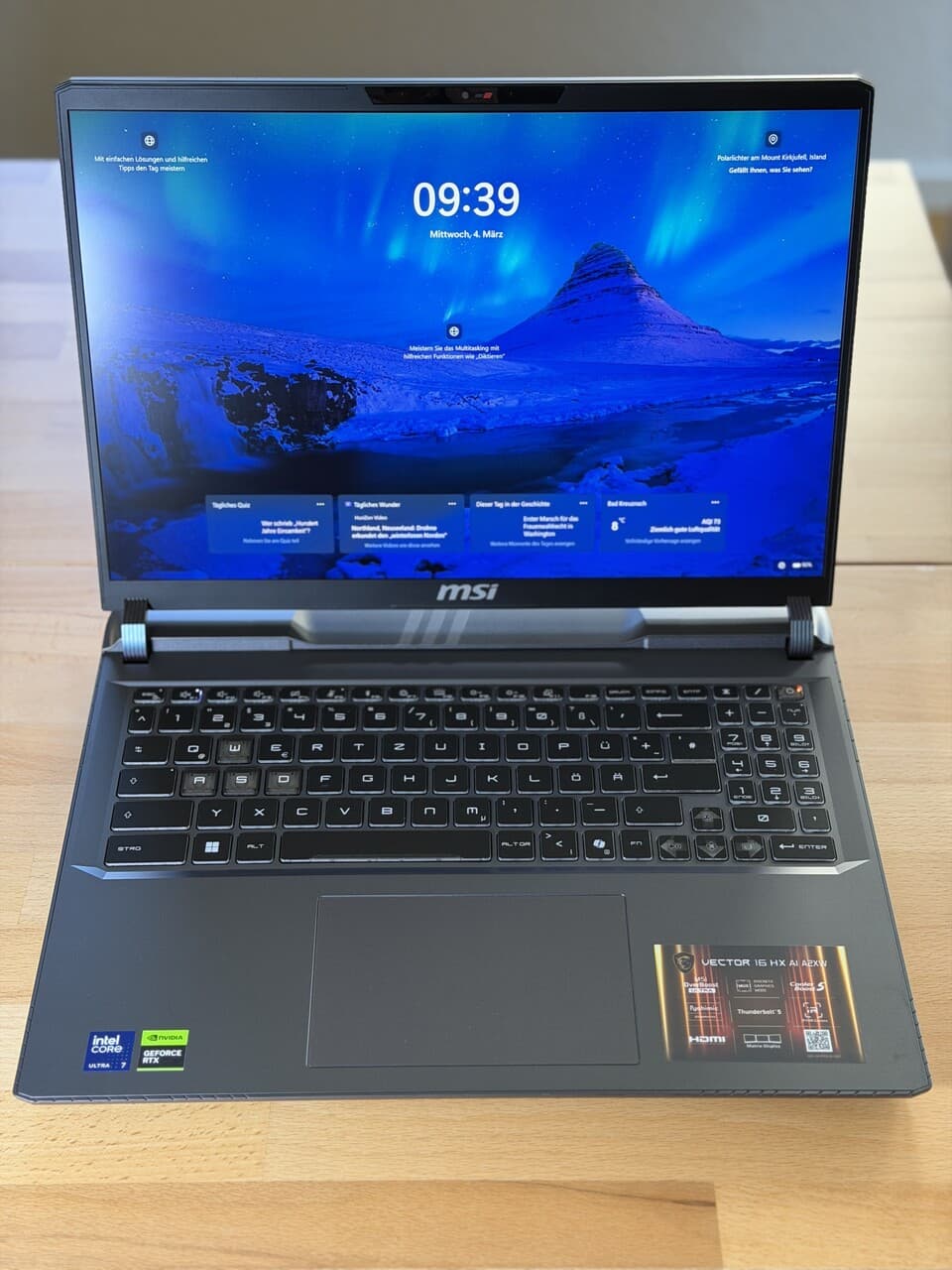
The panel is matte, which helps a lot with reflections. I measured around 412 cd/m² of peak brightness, which is enough for bright indoor rooms and a bit of daylight near a window. This is not a display designed for outdoor coffee‑shop gaming marathons, but in realistic scenarios it stays legible and does not wash out badly.
MSI claims 100% DCI‑P3 coverage. Subjectively the colors look vivid and rich without veering into neon oversaturation. Skin tones in cutscenes look natural, and games like Cyberpunk with bold neon palettes really pop. Coming from an OLED desktop monitor, I still noticed the difference in contrast and black levels. Dark scenes have that typical IPS glow instead of inky blacks, and there is no HDR support here at all.
The 240 Hz refresh rate is where things click. Even when a game is running between 90 and 140 FPS, motion feels buttery and inputs feel immediate. Fast‑moving shooters and action games benefit massively from that high refresh, and even just scrolling around the desktop feels smooth in the way that only high‑Hz panels can deliver.
For a laptop that aims to be the cheapest way into an RTX 5070 Ti, this panel is surprisingly strong. It is not a creator‑caliber Mini‑LED screen, but for gaming it hits the right balance of speed, resolution, and color for the price bracket.
Keyboard and trackpad: perfectly serviceable, with one odd choice
The keyboard on the Vector 16 HX is better than it looks at first glance. Key travel is decent, actuation is crisp, and I had no trouble hitting my usual typing speed after an hour or so. The deck does flex a bit in the middle if you press hard, but in normal typing or gaming I barely noticed it.
The most obviously “gamer” flourish is the transparent WASD cluster. It looks cool with RGB glowing through, but there is a catch. Depending on the backlight color, the legends on those keys can become hard to read. If you play with your fingers anchored there, this is not a huge deal, but it is a style choice with a small usability cost.
I used the laptop both for gaming and for writing, and the keyboard never annoyed me, which is already a win. It is not in the same league as high‑end mechanical‑feel laptop keyboards from some premium lines, but it is far from the mushy, rattly boards you still find on cheaper machines.
The trackpad gets the job done. It tracks accurately, gestures are responsive, and the click mechanism is on the slightly stiff side but consistent. Anyone serious about games will plug in a mouse, and the Vector 16 HX does nothing here to get in the way of that.
Performance: near‑flagship speed where it matters
Under the hood, the Intel Core Ultra 7 255HX and NVIDIA RTX 5070 Ti combo is the main draw. The short version from my testing and synthetic runs is that this pair holds up extremely well in 2026, even next to machines with beefier CPUs or RTX 5080 GPUs.

In CPU‑bound tests like Geekbench and Cinebench, the 255HX trails Intel’s 275HX by roughly 10% in multithreaded workloads and about 21% behind the top‑end 285HX. In single‑core runs, all three are effectively neck and neck. Translated into real‑world use, that means the Vector 16 HX feels snappy in everyday tasks and content creation, and only heavy multithreaded rendering workloads really expose the gap to the most expensive chips.
On the GPU side, the RTX 5070 Ti in this chassis performs better than I expected. In Geekbench’s GPU tests, it edged out an XMG Pro 16 with the same GPU by around 8%, and in 3DMark Time Spy the two machines were basically tied. A more expensive MSI Raider with an RTX 5080 came in roughly 13-25% ahead in synthetic scores, which is consistent with its higher‑tier GPU and overall thermal budget.
The more important story is the gaming experience at the native QHD+ resolution. Using Cyberpunk 2077 as a torture test at 2560 x 1600, Ultra settings, no silly compromises, the Vector 16 HX and the XMG Pro 16 landed just above 80 FPS on average. That tracks with the synthetic numbers and confirms what it feels like in play: this laptop is made for QHD high‑detail gaming.
The more important story is the gaming experience at the native QHD+ resolution. Using Cyberpunk 2077 as a torture test at 2560 x 1600, Ultra settings, no silly compromises, the Vector 16 HX and the XMG Pro 16 landed just above 80 FPS on average. That tracks with the synthetic numbers and confirms what it feels like in play: this laptop is made for QHD high‑detail gaming.
🎮 Get This Game at the Best Price
Compare prices instantly and save up to 80% on Steam keys with Kinguin — trusted by 15+ million gamers worldwide.
*Affiliate link — supports our independent coverage at no extra cost to you
Across my time with it, most modern games were perfectly playable at high or max settings at 1440p class resolutions. When performance dipped in particularly heavy scenes or in poorly optimized titles, DLSS and Frame Generation were an easy escape hatch, provided you are comfortable with those technologies. Cyberpunk with DLSS Quality and FG felt smooth and responsive while still looking fantastic on the 240 Hz panel.
In short, if your target is 1440p gaming with high settings in 2026, the Vector 16 HX does not feel compromised. It gives up a chunk of headroom to RTX 5080 laptops on paper, but in practice it delivers exactly the kind of near‑high‑end experience that sits in the sweet spot of cost and performance.
Thermals and noise: cool enough, but loud and rough around the edges
The flip side of this performance is the cooling system, and this is where compromises become obvious. The Vector 16 HX is thick for a reason. There is clearly enough space inside for a robust cooling solution, and thermally it does its job: clocks remain stable in long gaming sessions and the laptop does not throttle aggressively under extended load.
The problem is the noise profile. Under gaming or heavy synthetic load, the fans ramp to a level that is simply loud. Even with a headset on, I could still hear the whoosh and higher‑pitched elements of the fan noise. The character of the sound is what made it tiring over time, not just the raw volume.
In lighter tasks, things calm down. Browsing, video, or basic work keeps the fans at a low, unobtrusive level, and there are quieter profiles in MSI’s software for office use. Once you fire up a game at QHD with the GPU working hard, though, you need to be ready for a constant audible companion.
This is a classic tradeoff. MSI chose to prioritize sustained performance at the cost of acoustics. The laptop rewards that choice with strong, consistent frame rates, but if you are sensitive to fan noise or plan to use this in a shared space, the Vector 16 HX can quickly become a bad neighbor.
Storage, RAM and upgradability: cramped but fixable
Here is where the budget‑minded nature of this configuration bites a little. The unit I tested ships with 16 GB of RAM and a 512 GB SSD. The RAM amount is acceptable in 2026 for gaming and everyday use, but on the lower bound of what I would consider comfortable, especially if you like to keep a lot of browser tabs and background apps open alongside your games.
The 512 GB SSD, though, feels cramped almost immediately. Cyberpunk 2077, Helldivers 2, Baldur’s Gate 3, Windows and a handful of tools were enough to put the drive uncomfortably close to full. You can work around this with selective installs or external storage, but on a machine in this performance tier, a 1 TB drive really should be the baseline.
The saving grace is that the SSD is user‑replaceable. If you are comfortable opening the chassis, you can drop in a larger NVMe drive and fix the biggest weakness of this configuration. RAM upgradability will depend on the exact SKU and regional model, but the overall impression is that MSI at least did not lock the machine down completely.
Component prices are still somewhat volatile, with RAM and SSDs having climbed since late 2025 according to most market reports. That context explains why MSI and retailers are pushing this cheaper 512 GB SKU so hard, especially when they can market it as “RTX 5070 Ti for under €2,000”. From a buyer perspective, it means you should mentally budget for a bigger SSD if you plan to build a sizable library.
Value against the 2026 competition
In the current 2026 landscape, RTX 5070 and 5070 Ti laptops occupy a very attractive middle ground. They tend to undercut RTX 5080 machines by several hundred euros or dollars while still delivering performance that is very close to the high end when actually playing at QHD.
The MSI Vector 16 HX leans hard into this positioning. In many EU stores it regularly appears around the €1,699-€1,799 mark on sale, and at those prices it is often the cheapest way to get an RTX 5070 Ti, a fast 240 Hz QHD+ panel, and a modern HX‑class Intel CPU in a single package.
It does face stiff competition, though. Machines like Acer’s Nitro V16 with an RTX 5070, or other midrange 16‑inchers, can hit similar price points when discounts are active. Some rivals offer quieter cooling or larger default SSDs, while giving up a bit of GPU headroom or panel speed.
The Vector 16 HX earns its place in that mix by being very straightforward about its deal. You get a strong CPU and GPU combo, a legitimately great gaming display, and you pay with louder fans, mostly plastic build and a small SSD. Whenever its price drops under €1,800, that trade can be compelling for players who care more about frames than finesse.
Who this laptop is really for
After a couple of weeks, a clear picture formed of the kind of person who will be happy with the MSI Vector 16 HX.
- PC gamers who want near‑high‑end QHD performance without paying flagship laptop prices
- Players who usually game with a headset on and are less sensitive to fan noise
- Anyone comfortable swapping out the SSD later to fix the 512 GB limitation
- People who value a fast, color‑rich 240 Hz panel over fancy build materials or ultra‑thin design
On the other hand, this is not the right machine for everyone.
- If you need quiet operation for shared spaces or late‑night gaming in a bedroom, the fan noise will be an issue
- If you want a premium metal chassis, super‑slim profile or creator‑grade HDR display, this is not it
- If you hate the idea of opening a laptop to upgrade storage, the 512 GB drive will become frustrating fast
FinalBoss // Gear
Level up your setup
01Graphics cardson Amazon→02Gaming laptopson Amazon→03High-refresh gaming monitorson Amazon→04Discounted game keyson Kinguin→Affiliate links · As an Amazon Associate, FinalBoss earns from qualifying purchases.
Want to Level Up Your Gaming?
Get access to exclusive strategies, hidden tips, and pro-level insights that we don't share publicly.
Ultimate Reviews Strategy Guide + Weekly Pro Tips