
Table of Contents (9)
Living With the MSI MPG 341CQR QD-OLED X36: Hype, Anxiety, and 360Hz Reality
The first night I set up the MSI MPG 341CQR QD-OLED X36, I had two competing thoughts fighting for attention. One: “This is the smoothest mouse cursor I’ve ever seen.” Two: “Am I about to burn a permanent Chrome tab bar into a four-figure monitor?”
I’ve been on the OLED fence for PC use for years. I love OLED TVs. I adore OLED handhelds. But a primary PC monitor that shows static UI for 8-10 hours a day? That’s where the horror stories about burn-in start whispering in the back of my head.
So I treated the 341CQR like a science experiment for two weeks. I gamed on it hard (Valorant, Apex, Fortnite, Diablo IV, a bit of Assetto Corsa), then punished it with the boring stuff: Chrome, Premiere, long stretches of VS Code and Word with the same windows parked in the same spots. In other words, exactly the use case OLED used to be terrible for.
The short version: this is the first time an OLED ultrawide has felt genuinely practical as a daily driver for both high-refresh gaming and real productivity. But it’s not a slam-dunk for everyone, and 360Hz is a weirder upgrade than the number suggests.
Specs That Actually Matter in Daily Use
On paper, the MPG 341CQR QD-OLED X36 is easy to pitch:
- 34-inch curved ultrawide QD-OLED panel
- 3440×1440 resolution
- 360 Hz refresh rate
- Fifth-generation QD-OLED with an RGB-stripe subpixel layout
- DisplayHDR True Black 500 certification
- Inputs: DisplayPort 2.1a, two HDMI 2.1 ports, USB-C with up to 98W power delivery
- VRR support: HDMI 2.1 VRR, Nvidia G-Sync, AMD FreeSync Premium
- MSI OLED Care 3.0: pixel shift, regional dimming for UI, pixel refresh, plus an AI presence sensor
- New “Dark Armor” anti-reflective coating and improved blacks
If you’ve been following MSI’s OLED push, this fits right into their recent lineup of high-refresh QD-OLED displays. Compared to the earlier 34-inch and 32-inch models, this one is all about three things: higher refresh (360Hz), better text rendering (RGB stripe), and more aggressive, smarter burn-in mitigation (OLED Care 3.0 with AI).
Numbers aside, what struck me immediately was how balanced this particular combo feels. 3440×1440 at 34 inches is still the sweet spot for ultrawides in my book: sharp enough for text, light enough to actually hit high frame rates in modern games without needing a $2,000 GPU, and immersive without feeling ridiculous on a regular desk.
Gaming at 360Hz: More Subtle Than the Marketing, Still Addictive
I used to think 240Hz was my personal ceiling. I could feel the jump from 60 to 120 immediately, and 120 to 240 was still very noticeable in shooters. 240 to 360, though, is more of a “my brain adjusts after a day, then going back feels wrong” kind of upgrade.
In Valorant and CS2, locked around 300-360fps at low settings on a high-end GPU, the 341CQR feels absurdly responsive. Not “I suddenly got better at the game” level, but mouse micro-corrections and flick stops just feel more exact. Tracking targets at mid-range looked almost unnaturally stable, helped along by OLED’s virtually instant pixel response. There’s effectively no motion smear; enemies just glide.
The kicker is that this smoothness bleeds into everything. Even just flinging Windows around or scrolling a long web page feels weirdly “solid” and physical. 240Hz is already good at that; 360Hz just adds another layer of hyper-fluidity.
The catch is obvious, though: 360fps at 3440×1440 is not guaranteed in modern big-budget games. In Fortnite and Marvel Rivals, hitting a full 360 is possible if you’re willing to accept lower settings and lean heavily on upscalers and, where supported, frame generation. Fortunately, the VRR combo (HDMI 2.1 VRR, G-Sync, FreeSync Premium) makes the monitor perfectly happy even when you’re hovering between 150-260fps. It still feels very smooth, just not “might as well be reality” smooth.
And if you mostly play slower third-person stuff, RPGs, or strategy titles? 360Hz is nice to have but far from essential. Diablo IV at 150–200fps on this panel looks stunning, but it doesn’t feel <emfundamentally< em> different from 240Hz in the way CS2 does. So a lot of the refresh headroom ends up as overkill for more cinematic games.
So yes, 360Hz is real, it feels great, and it absolutely benefits twitch shooters – but it’s also very dependent on your GPU and your game library. If most of your hours are spent below 200fps, this panel’s other features become more important than the headline number.
OLED Image Quality: Blacks, HDR, and the New Dark Armor Coating
The main reason to care about this monitor is still the fact that it’s OLED. The first time I loaded up a dark map in Cyberpunk 2077 and panned across a neon-lit street, it was that familiar “oh right, that’s why OLED ruined LCD for me” moment.
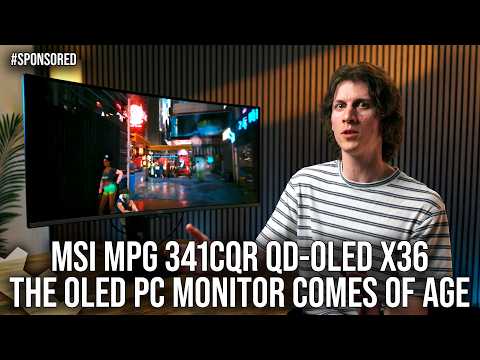
Blacks are genuinely black. Not “very dark gray, but don’t look too closely” – actually black. No blooming, no halo around bright HUD elements on dark backgrounds. For games with a lot of high-contrast scenes, that alone makes this a different class of display from even very good mini-LEDs.
The Dark Armor coating is the quieter hero here. QD-OLED panels have historically had that slight purple tint in reflections, which always reminded me I was looking at a “panel” rather than an image. MSI’s new coating noticeably deepens the perceived black level in brighter rooms and shifts those reflections closer to neutral. You still get some reflection – this isn’t a matte IPS slab — but it’s less distracting, and the panel looks less “milky” in daylight than earlier QD-OLEDs I’ve used.
On the HDR side, True Black 500 puts it in the middle of the OLED monitor pack: highlights pop much harder than any SDR LCD, shadow detail is excellent, and small bright elements (like spell effects or headlights) stand out brilliantly against dark scenes. Compared to high-end mini-LEDs with thousand-zone backlights, you lose some full-screen punch — those can hit much higher overall brightness — but you also lose the annoying halo artifacts they bring.
If your room is sunlit all day and you game with the lights blazing, a super-bright mini-LED might still make more sense. In a typical dim room, though, the 341CQR’s HDR looks fantastic, and the infinite contrast of OLED wins out for me.
Text Clarity Finally Feels “Normal” Thanks to RGB Stripe
The biggest reason I’ve bounced off previous QD-OLED ultrawides as daily drivers has been text. That older triangular/BGR-style subpixel layout is fine on a TV across the room, but right in your face on a 34-inch monitor it can give thin fonts a colored fringe or a slight softness, especially in Windows.
This fifth-generation QD-OLED panel moves to a proper RGB-stripe subpixel layout, and the difference is obvious the moment you open a code editor or a long document. After tweaking ClearType, text on the 341CQR looks… like text should. Sharp, clean edges, no weird green-red shimmer on diagonals, no nagging sense that you’re slightly out of focus.
I spent full workdays editing video in Premiere, writing in Word, and staring at walls of code in VS Code without the old QD-OLED eye-twitch. You can still tell it’s not quite as razor-edged as a top-tier 4K IPS at 32 inches, but for a 3440×1440 ultrawide it’s more than good enough. This is the first OLED ultrawide I’d genuinely trust for mixed gaming and proper office work, not just “gaming plus the occasional email.”
OLED Care 3.0: AI Sensor, Pixel Tricks, and My Burn-in Anxiety
Burn-in is still the elephant in the room for any OLED monitor. MSI’s OLED Care 3.0 doesn’t magically erase the laws of physics, but it does enough that, for the first time, I stopped micromanaging my usage.
There are three classic protections you’ll find on many OLEDs:
- Pixel shift: the image subtly shifts by a few pixels over time so no UI element sits in the exact same spot forever.
- Screen dimming: after a period of inactivity or static content, the whole screen gently dims.
- Panel/pixel refresh: a maintenance cycle that equalizes pixel wear after long usage sessions.
On the 341CQR, all of these are configurable in the OSD or via MSI’s desktop app. The panel refresh is set by default to run after 24 hours of accumulated on-time (up from 16 hours on earlier models), which is less intrusive if you’re someone who keeps your PC on all the time.
Where the monitor gets smart is the PC-specific protections. It can selectively dim static UI regions like the Windows taskbar, application icons, or split-screen window borders. You choose how aggressive these are on a 1–4 scale. In practice, I barely noticed it happening; the taskbar just looked a touch less bright after a while, but it never got in the way of using it. It feels like the right kind of invisible protection.
The headline feature, though, is the built-in AI presence sensor tucked under the display. It uses a 75° field of view and some on-board processing to figure out if you’re actually in front of the monitor and looking at it.
In real use, that played out like this: I’m editing a video, someone walks into the room, I turn my chair and start talking. After about 10 seconds, the screen gently dims. A bit later, if I wander off to grab coffee, the screen goes fully off after a user-defined delay, then wakes instantly when I sit back down.
This sounds tiny, but if you’re OLED-anxious, it’s weirdly calming. I didn’t feel compelled to mash the power button every time I stepped away. The monitor babysat itself.
It’s not flawless. Once or twice, during a late-night session with the lights low, the dimming triggered while I was slouching at an angle and reading long-form text without moving much. I had to wave a hand to “remind” it I was there. You can lengthen the timers to avoid that, but then you reduce the protective effect.
After two weeks of heavy mixed use, I saw no hint of retention or uneven wear, which isn’t long enough to declare victory but is encouraging given how aggressively I kept taskbars and apps fixed just to stress-test it. More importantly, I stopped obsessing over it. That’s the real win of OLED Care 3.0: not that it guarantees immortality, but that it makes OLED feel viable without treating your desktop like a minefield.
Connectivity, Console Use, and Everyday Ergonomics
In terms of I/O, MSI basically checked every modern box. The DisplayPort 2.1a input is what you’ll want for high-refresh PC use, especially if you’re aiming at 3440×1440 at 360Hz with full chroma. The HDMI 2.1 ports are handy for consoles and secondary PCs; they handled VRR from both a PS5 and an Xbox Series X without any drama, though of course you’re limited to 1440p ultrawide or 16:9 modes depending on the game’s support.
The USB-C port with up to 98W power delivery is the star of productivity. Plugging in a laptop and having it charge while driving this gorgeous panel — and optionally using the monitor’s USB hub — makes the 341CQR double as a dock. I bounced between a desktop gaming rig and a work laptop with a single cable swap, which was painless enough that I actually used the feature instead of ignoring it.
The curve is on the moderate side for a 34-inch ultrawide: enough to gently wrap your peripheral vision in games, not so aggressive that Excel sheets look like they’re printed on a cylinder. For gaming and general use, it felt natural very quickly. If you’re doing truly color-critical design or rely on straight lines staying geometrically perfect, a flat display is still safer, but for typical creative and productivity tasks it’s fine.
The one area that didn’t wow me was the physical design. It’s “gamer nice” — angular stand, some RGB, acceptable cable management — but nothing about the chassis screams premium the way the panel does once it’s on. Height, tilt, and swivel adjustments are there, though; I never struggled to get a comfortable setup.
Is It Actually Good for Productivity, or Just Tolerable?
This is where my feelings stayed pleasantly mixed. The old narrative with OLED monitors has been: “amazing for gaming, tolerable for desktop, maybe risky long term.” With the 341CQR, it flipped to: “genuinely good for desktop, still a bit nagging in the back of the mind.”
The RGB stripe fixes text. The ultrawide aspect ratio is excellent for timelines, dual documents, and side-by-side apps. The AI sensor and regional dimming mean I don’t have to baby it. And the color and contrast are just a joy for any kind of media work.
But you never fully forget you’re on OLED. I still caught myself nudging YouTube windows around occasionally, or auto-hiding the taskbar, or changing dark themes every now and then. The difference is that with this monitor, those tweaks feel like light habits rather than survival tactics.
If you want a display where burn-in is such a non-issue you literally never think about it — for example, a monitor that lives in an office, showing the same dashboards 9–5 for years — a traditional IPS or mini-LED is still the safer, simpler answer. For a home PC that splits its time between games, work, and general browsing, the 341CQR gets close enough to “safe” that the OLED benefits finally outweigh the worry.
Who This Monitor Makes Sense For
After living with the MPG 341CQR QD-OLED X36, I keep circling back to a pretty specific sweet spot of people it serves well:
- Competitive and fast-paced gamers who can actually push above 240fps in their main titles and care about latency and motion clarity.
- PC users who split time between gaming and real work and want one monitor that can do both without text looking weird or burn-in anxiety ruling their day.
- People who value contrast and HDR impact over brute-force brightness, and who mostly play in dim or moderately lit rooms.
- Laptop-first setups where USB-C with charging and a single-cable desktop experience is genuinely useful.
If you’re a pure single-player enjoyer who rarely breaks 120fps and mostly plays cinematic games, you’d probably be just as happy with a 240Hz OLED or even a good 165Hz model — and save some money. If your main concern is absolute, sustained brightness in a sun-drenched office, a top-tier mini-LED might still be a better fit.
FinalBoss // Gear
Level up your setup
01Top-rated gaming headsetson Amazon→02High-refresh gaming monitorson Amazon→03Gaming chairson Amazon→04Discounted game keyson Kinguin→Affiliate links · As an Amazon Associate, FinalBoss earns from qualifying purchases.
Want to Level Up Your Gaming?
Get access to exclusive strategies, hidden tips, and pro-level insights that we don't share publicly.
Ultimate Reviews Strategy Guide + Weekly Pro Tips