
Table of Contents (12)
Building on the MEG X870E Ace Max: First impressions from an overkill AM5 rig
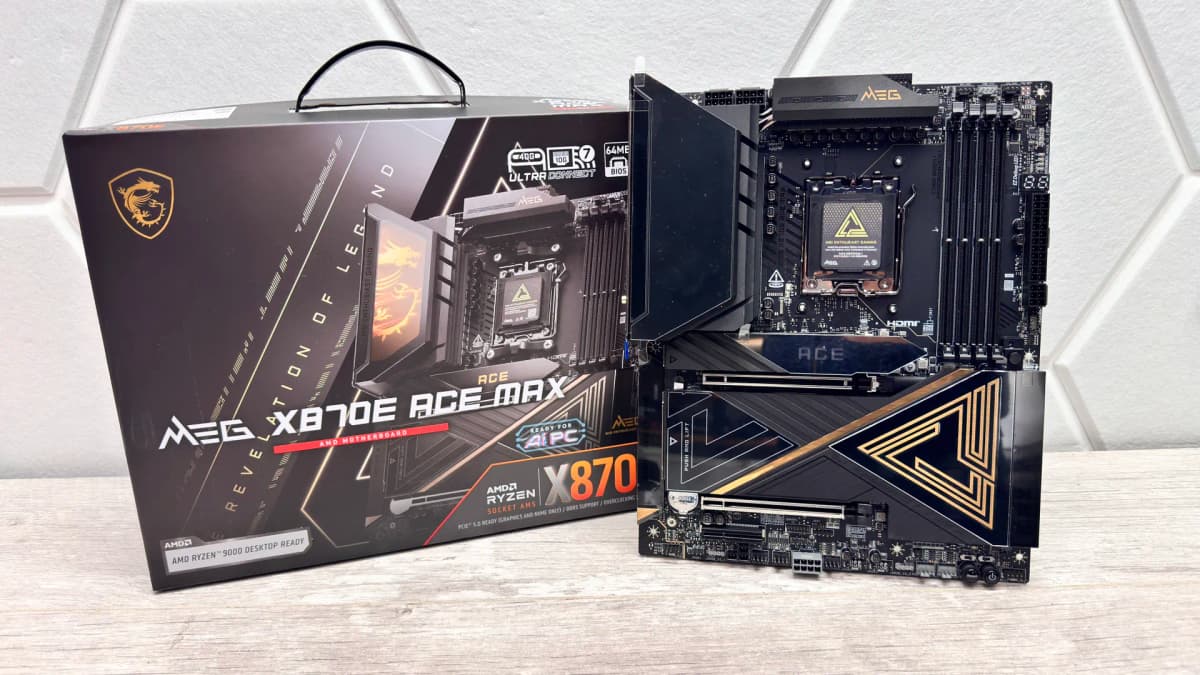
The moment I pulled MSI’s MEG X870E Ace Max out of the box, it felt like someone had taken the Godlike series, shaved a big chunk off the price, and quietly asked enthusiasts not to look too closely at the MSRP. Thick, interlocking heatsinks, a holographic plate over the VRMs, dual-sided M.2 cooling everywhere, and more rear USB than I have devices for. It is one of those boards that makes you rethink whether the case really needs a side panel.
I dropped it into an open test bench with a Ryzen 9 9900X, a chunky 360 mm AIO, 32 GB of DDR5-6000, and a PCIe 5.0 SSD, then spent a weekend pushing it far harder than any sane daily build needs. Between the 10GbE, dual PCIe 5.0 M.2 support, USB4 Type-C ports and a genuinely overbuilt 18+2+1 phase VRM, the Ace Max feels like someone finally built a “Godlike-lite” tier for people who care more about bandwidth and thermals than e-peen bragging rights.
Key takeaways after living with the MEG X870E Ace Max
- Flagship-level platform features (10GbE, USB4, dual PCIe 5.0 M.2, Wi‑Fi 7) without climbing into full Godlike pricing.
- Excellent thermals: VRMs hovered around 60 °C even with a Ryzen 9 under load on an open bench, SSD temps stayed safely away from throttling.
- Tons of I/O: two USB4 Type-C on the rear, nine 10 Gbps Type-A ports, and a 60 W front USB-C header for fast charging and docks.
- Overbuilt 18+2+1 VRM with heavy heatsinks makes overclocking or PBO tuning feel trivial rather than risky.
- Nice quality-of-life touches: GPU release button, tool-free M.2, debug buttons and headers galore, but Windows software feels slow and clunky.
- Best suited to high-end AM5 builds with serious GPUs and speedy SSDs; midrange rigs are better off with cheaper X870E or B850 options.
Aesthetics and layout: Godlike energy, Ace price
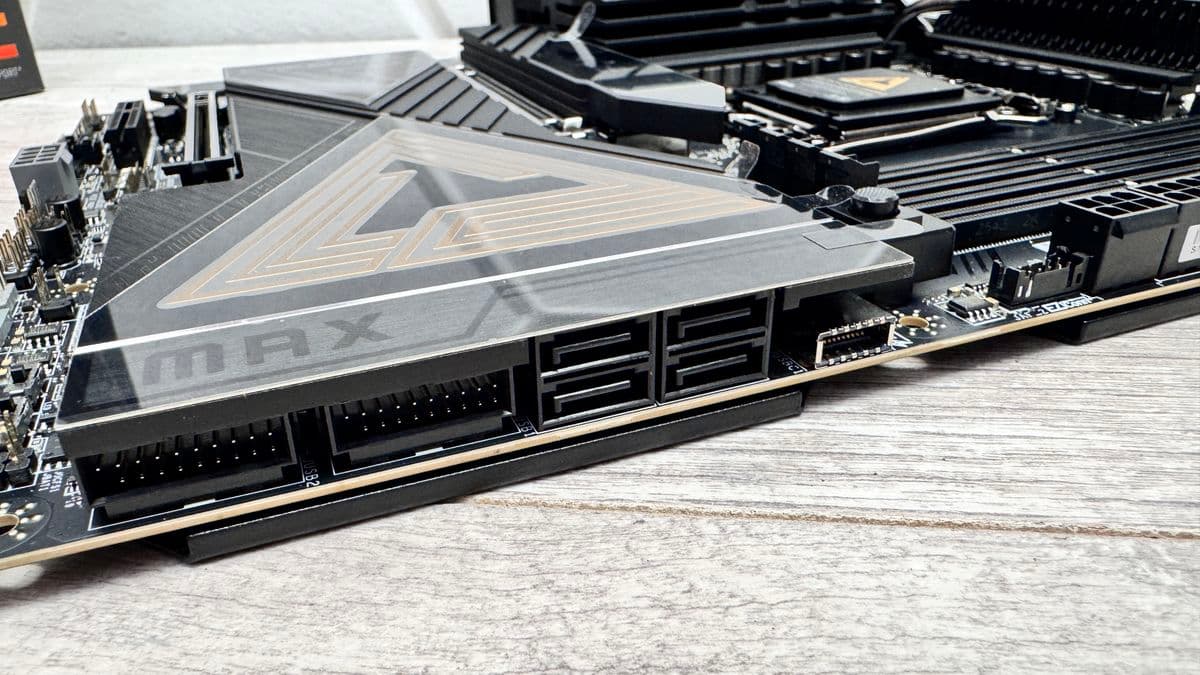
On the table, the Ace Max looks and feels unapologetically high-end. The VRM heatsinks are thick slabs of metal bridged with a heatpipe, capped by a holographic, RGB-lit plate that catches light in a way photos do not really convey. The topmost M.2 heatsink has an illuminated Ace logo that ties the whole aesthetic together. There is a lot of black metal and just enough lighting to look premium without descending into carnival territory.
The ATX layout is sensible in a way some hyper-premium boards forget. The 24-pin, USB-C front header and most fan headers sit exactly where cable management in a modern case expects them. The PCIe slot spacing left my triple-slot GPU with breathing space, and the primary x16 slot is steel-reinforced as usual. There are five M.2 slots in total, all under chunky heatsinks, and four SATA ports tucked neatly on the side for slower bulk drives.
The board is dense, but it is not chaotic. Nothing felt like an afterthought. Even the little things, like the GPU release button tucked along the PCB edge, made swapping graphics cards far less rage-inducing than digging for the latch behind a three-slot cooler.
Connectivity overload: USB4, 10GbE, Wi‑Fi 7 and more
The rear I/O is where the Ace Max plants its flag as a long-term platform rather than a short-lived toy. Two USB4 Type-C ports sit at the top of the stack, each capable of 40 Gbps and DisplayPort output. Below them, you get nine 10 Gbps Type-A ports plus another two 10 Gbps Type-C. There is no slow USB here; even the “basic” ports are fast.
Plugging in a fast external SSD over USB4 and seeing transfer speeds that comfortably saturate what the drive can handle is satisfying in a way that never really gets old. Running a dock through one of those USB4 ports for extra screens worked cleanly, helped by display output support over Type-C plus the lone HDMI port for basic iGPU rigs or quick troubleshooting.
Networking is similarly overkill in a very intentional way. There is a Marvell-based 10GbE port for creators and NAS enjoyers, plus a 2.5GbE fallback. Alongside that sits Wi‑Fi 7, which is obviously overqualified if the rest of the home network is still limping along on older gear, but it sets the board up to age gracefully as routers catch up over the next few years.
On the front-panel side, the USB-C header runs at 20 Gbps and, with an extra PCIe power plug connected, can push up to 60 W of power delivery. That translated to actual fast charging for my laptop and power banks, not the token trickle some boards pass off as “fast.” For anyone who drops a USB-C monitor or dock on their desk and expects their PC to behave like a modern hub, this matters a lot more than yet another decorative RGB strip.
Storage and PCIe 5.0 quirks: fast, cool, and slightly conditional
The Ace Max offers dual PCIe 5.0 M.2 slots, but there are trade-offs attached. To run a PCIe 5.0 SSD in the second slot, the USB4 Type-C ports need to be disabled, and the first PCIe 5.0 M.2 slot expects the third PCIe slot to remain unused for full-speed operation. There is enough bandwidth on X870E to juggle a lot, but not everything can run flat-out at once.
For my build, I ran a single PCIe 5.0 drive as the OS and game library, with a PCIe 4.0 SSD and a couple of SATA drives for bulk storage. That configuration never triggered any conflicts. Even when I tried deliberately awkward setups to stress shared lanes, the board behaved predictably; the manual actually explains what is shared with what, which feels almost old-fashioned in a good way.
Thermally, the M.2 cooling is excellent. My PCIe 5.0 SSD hovered around the high 60s °C under sustained heavy writes, comfortably away from throttling. Every M.2 slot has heatsinks on both sides, something cheaper boards love to skip. In practical terms, that meant I could hammer the drive with transfers and synthetic tests without watching speeds plummet after a minute.
Power delivery and thermals: 18+2+1 phases that barely break a sweat
The VRM setup is a chunky 18+2+1 power stage array, and the heatsinks sitting on top of it are not just for show. With a Ryzen 9 9900X locked into an all-core heavy load on an open test bench and only minimal directed airflow, VRM temps sat around 60 °C. In a real case with even halfway decent case fans, that leaves a lot of thermal headroom for Precision Boost Overdrive or manual overclocks.
The X870E chipset and its companion sit under a single, relatively small heatsink compared to some ludicrous flagships, yet temperatures held around the low 60s °C in long gaming and synthetic runs. Nothing about this board felt thermally marginal. It had the quiet confidence of something built for higher TDP CPUs and future chips that might squeeze the socket harder.
Against that, overall system power draw in games and heavy loads was entirely in line with other high-end X870E boards I have played with. The Ace Max is not magically more efficient than the best of its peers, but it does not waste power either. At stock settings, CPU package power in games landed roughly in the 120 W region with the 9900X, which is perfectly normal for that class of chip.
BIOS, overclocking and quality-of-life features
MSI’s new Max series brings two things that matter for tinkerers. First, a 64 MB BIOS chip, which leaves more space for future AGESA updates, CPU support and UI frills without forced feature cuts later. Second, independent base clock adjustment with physical jumpers. That last one is niche, but for people doing BCLK-based experiments, it is far nicer to have hard switches than rely purely on software sliders.
The UEFI itself is excellent. The layout is clean, the dark theme does not burn out your eyes at 2 a.m., and the fan control is genuinely deep. Creating multiple temperature-based fan curves is straightforward, and the board responded immediately to tweaks without random ramping quirks. Compared with some rivals that bury half the options three menus deep, this interface feels like it was actually used by someone who builds PCs regularly.
Physical controls are generous. Power and reset buttons live on the PCB, along with voltage read points and headers for external thermal sensors. The rear I/O adds buttons for CMOS clear, USB BIOS Flashback and a configurable “smart button” that defaults to reset but can be reassigned in the firmware. For bench testing, firmware updates or just recovering from an over-ambitious overclock, these things shave real time off the pain of trial and error.
There are nine fan headers in total, plus multiple ARGB headers, a water flow header for custom loops, and MSI’s EZ Conn-Cable that splits a single board header into RGB and fan connections for tidier routing. It felt like the board actively wanted me to plug in more fans and sensors rather than fighting me for every header.
Software: functional, but not fun
MSI’s Windows-side software gets the job done but lacks the polish the hardware screams for. Fan tuning and RGB control both work, and the suite recognises the board correctly, but the UI feels sluggish and occasionally unresponsive. Some settings pages took a couple of seconds to fully populate, and there is a mild sense of “launch, wait, tweak, close” rather than something you want to leave running in the background.
The good news is that the firmware-based fan control is strong enough that you can configure everything there and uninstall most of the Windows tools. RGB can be left on a simple preset or handed off to whatever broader ecosystem you run for the rest of the case. The hardware never felt held back by the software, but the contrast between the board’s premium feel and the slightly clunky app experience is noticeable.
Everyday experience and the “overkill” question
In actual gaming and daily desktop use, the Ace Max behaved exactly like a high-end X870E board should. Frame rates matched what I expect from a Ryzen 9 paired with a top-tier GPU, and nothing in the system felt like it was starving for bandwidth. To be blunt, at stock in-game performance, most $300+ AM5 boards live in the same ballpark. The Ace Max stands out less in raw fps and more in how much it makes everything around those frames feel effortless.
Pounding a PCIe 5.0 SSD with game installs while copying large files from a NAS over 10GbE, sitting on a USB4 hub with displays and peripherals, and streaming music over Wi‑Fi 7 all at once made the system feel more like a workstation than a standard gaming tower. Nothing fell over, nothing throttled into oblivion, and nothing required babysitting in the process.
For a midrange build, though, the board is clearly overkill. Pairing it with something like a Radeon 7700 XT or an RTX 4060-class card and a single budget SSD would be like bolting race tires onto a family hatchback. The Ace Max only makes sense when the rest of the spec list is equally ambitious: RTX 5090 or equivalent, high-capacity fast NVMe, serious storage plans, maybe a 10GbE NAS in the mix.
Value, competition and who this board is actually for
At roughly $699 / £599 / AU$1,322, the MEG X870E Ace Max is nowhere near cheap, yet it undercuts MSI’s own Godlike line by a meaningful amount while keeping most of the features enthusiasts actually use. Compared with something like the ASUS ROG Crosshair X870E Hero or Gigabyte’s X870E Aorus Master X3D Ice, it lands right in the same financial pain zone, trading blows on niceties and aesthetics more than on fundamental capabilities.
Above it, the Godlike and similar halo boards mostly add even more ornamental design, extra screens, and one or two fringe features. Below it, you start losing 10GbE, USB4, or some of the PCIe 5.0 flexibility, and the power delivery tends to step down a bit. The Ace Max clearly targets builders who want the high-end platform story without paying what is essentially luxury tax for bragging rights.
For someone building a long-lived AM5 platform, planning to ride Ryzen 9000 and whatever follows, and pairing it with top-tier GPUs and a stack of fast SSDs, the Ace Max feels like a sweet spot. For anyone focused on hitting a sensible price-to-performance curve, boards based on B850 or lower-tier X870E options will usually make more sense. Money saved on the motherboard often does more for frame rates when shifted into the graphics card or storage budget.
Bottom line and score
MSI’s MEG X870E Ace Max feels like a course correction for the company’s AM5 stack. It plugs the gap between the approachable Carbon series and the unattainable Godlike monsters, pulling down almost all the platform features that matter: 10GbE, Wi‑Fi 7, USB4, dual PCIe 5.0 M.2, a robust VRM and a BIOS built for tinkerers.
The thermals are excellent, the layout is smart, the build quality inspires confidence, and the feature list has enough headroom to stay relevant through multiple CPU and GPU upgrades. The Windows software drags its feet and the PCIe lane sharing rules for dual PCIe 5.0 SSDs add a small layer of planning, but those are annoyances rather than deal-breakers.
As a foundation for an unapologetically high-end AM5 build, the MEG X870E Ace Max earns its place on a short list. It is not cheap, yet compared to the halo-tier markup above it, this is the first time in a while I have looked at a near-flagship AM5 motherboard and felt the word “sensible” trying to sneak into the conversation.
TL;DR
- Serious AM5 motherboard with Godlike-adjacent features at a meaningfully lower price than MSI’s own halo line.
- Two USB4 Type-C ports, 10GbE plus 2.5GbE, Wi‑Fi 7, and a stacked rear I/O make it ideal for high-end gaming and creator rigs.
- Dual PCIe 5.0 M.2 slots and excellent dual-sided heatsinks keep next-gen SSDs fast and cool, albeit with some lane-sharing caveats.
- Overbuilt 18+2+1 VRM and hefty heatsinks keep VRM temps around 60 °C under heavy loads with a Ryzen 9, leaving big room for PBO and OC.
- BIOS is clean and powerful; Windows tuning and RGB software work but feel slow and dated.
- Best for builders already planning an over-the-top GPU, fast storage, fast networking and a long AM5 lifespan, not for budget-conscious midrange rigs.
FinalBoss // Gear
Level up your setup
01Top-rated gaming headsetson Amazon→02High-refresh gaming monitorson Amazon→03Gaming chairson Amazon→04Discounted game keyson Kinguin→Affiliate links · As an Amazon Associate, FinalBoss earns from qualifying purchases.
Want to Level Up Your Gaming?
Get access to exclusive strategies, hidden tips, and pro-level insights that we don't share publicly.
Ultimate Reviews Strategy Guide + Weekly Pro Tips