
Table of Contents (10)
Why Ninja Time Codes Matter (and What’s New in March 2026)
After spending a few evenings just rerolling clans and elements instead of actually questing in Roblox Ninja Time (formerly The Time of Ninja), I realized how much of your progression is gated by Spins and Tokens. Good clan, family, and element rolls can easily be the difference between struggling on early bosses and cruising through them.
The recent March 2026 update dropped a bunch of fresh codes, including a big Anniversary! code that, on current builds, is giving a massive pile of spins across all three types. Because codes can quietly expire or have their rewards adjusted, this is one of those times where redeeming everything as soon as you log in is absolutely worth it.
This guide pulls together the working codes I’ve been using myself, walks you step-by-step through redeeming them, explains why some codes seem “bugged”, and shows you how to stay on top of new code drops without having to check ten different sites every day.
Step 1 – Know What You’re Redeeming: Spins, Tokens & “Across the Board”
Before you start spamming codes, it helps to understand what you’re actually getting. When I first played, I just saw the numbers go up without really knowing what each currency did.
- Clan Spins – Used to reroll your clan.
- Element Spins – Used to reroll your elemental affinity.
- Family Spins – Used to reroll your family (another stat/ability layer).
- Tokens (Clan / Family / Element Tokens) – Premium-style currency you can spend in their respective menus for more controlled upgrades rather than pure RNG.
Most code descriptions use the phrase “Spins across the board”. In practical terms, that means:
“15 spins across the board” → 15 Clan Spins + 15 Element Spins + 15 Family Spins.
So a big code like Anniversary! being listed as “100 spins across the board” is enormous – that’s effectively 300 total spins if your server is using the current reward values. Some older guides still list that same code at only 15 spins; that’s because rewards on a few codes have changed over time. When in doubt, treat the in-game reward pop-up as the final word.
Step 2 – How to Redeem Ninja Time Codes (PC, Mobile, Console)
I wasted a stupid amount of time digging through menus the first time I tried to redeem a code because older guides still used the “The Time of Ninja” UI descriptions. Here’s the current flow that works reliably in March 2026:
- 1. Launch Ninja Time on Roblox.
From the Roblox home screen, start Ninja Time and wait until you can move your character around in the world (most codes won’t work from the loading splash, but a few older ones only work on the main menu – more on that below). - 2. Open the main menu.
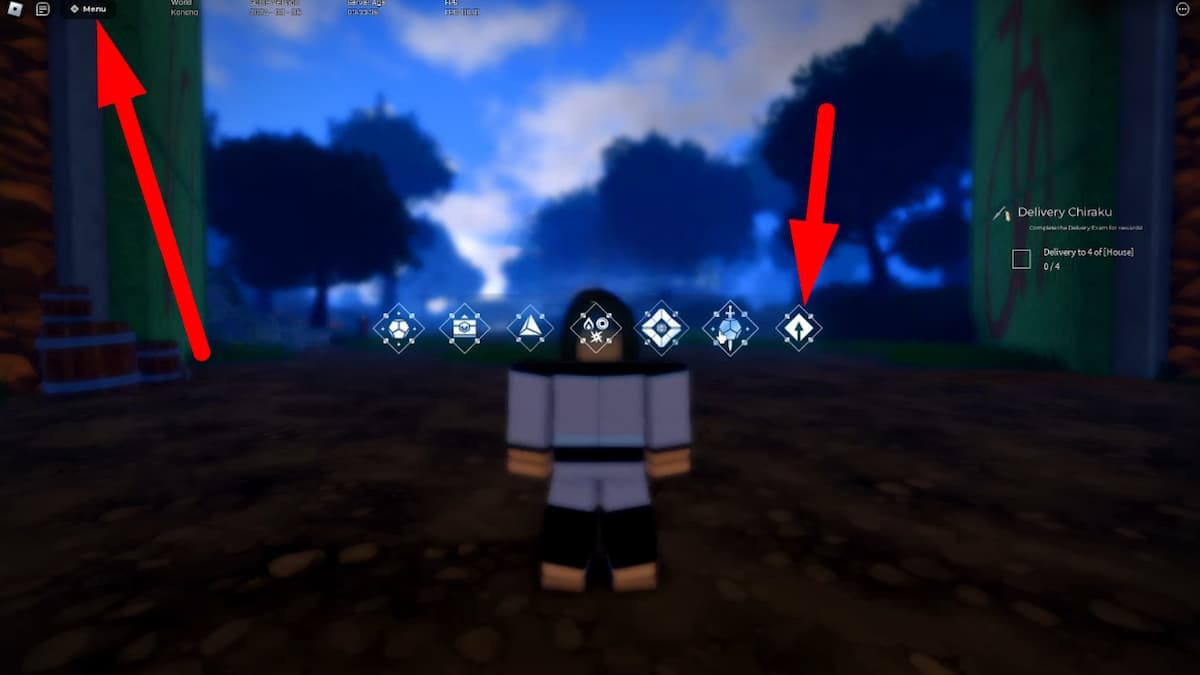
Look at the top center-left of your screen and click/tap the Menu button. - 3. Open the Extra Menu.
In the menu bar that appears, click the far-right button with the up-arrow icon (this is the “Extra” menu). On controller, move your cursor over it and press the confirm button. - 4. Go to the Codes screen.
In the Extra menu, click the icon that looks like a bird (it’s usually associated with “Twitter” in Roblox games). This opens the code input box on the left side of your screen. - 5. Enter a code exactly as shown.
Click the text box, paste or type a working code (for exampleAnniversary!) and press Enter or click the Redeem/Enter button. - 6. Watch for confirmation.
If it works, you’ll see a brief success pop-up and your spin/token counters will increase. If you see a red error (“Invalid code” or “Code used”), that code is either expired, already redeemed on your account, or mistyped.
Pro tip: Some older codes like DelayCode! only work from the main menu before you hit Play. If a code is listed that way in this guide and it gives you an error in-game, back out to the main menu and try again.
Step 3 – Working Ninja Time Codes (March 2026)
This is the part you’re really here for. Below are the codes I’d prioritize as of March 2026. Remember that codes can expire or be silently adjusted, so rewards might shift slightly over time.
High-Priority Spin Codes (Use These First)
These give the biggest value for rerolling your build. All “across the board” codes grant the listed amount of Clan, Element, and Family spins each.
Anniversary!– 100 Spins across the board (currently the biggest code; some older guides still list it as 15, but on current servers it’s 100).PastOfShuraku!– 15 Spins across the board (NEW)OneTailsStage2!– 15 Spins across the board (NEW)CustomMasksSoon!– 15 Spins across the board (NEW)SorryAbtDelay– 10 Spins across the board (NEW)NewYearTime!– 50 Spins across the boardChristmasTime!– 35 Spins across the boardWinterPart2!– 20 Spins across the board
Tip: If you’re starting on a fresh account, redeem all of these before you roll anything. That way you can do long rolling sessions instead of burning a few spins and then coming back later.
More Spin Codes Still Worth Redeeming
These are smaller but they add up quickly. I usually clear the whole batch in one sitting whenever a new update drops.
QoL!– 15 Spins across the boardBugFixes!– 15 Spins across the board (note there are multipleBugFixes!codes historically; if you get “already redeemed,” that’s normal)ShadowSetting!– 15 Spins across the boardIronSand!– 15 Spins across the boardGoldDust!– 15 Spins across the boardMobileQOL!– 12 Spins across the boardAwakeningSkip!– 12 Spins across the boardSandPart2Soon!– 12 Spins across the boardSorryForDeDelay!– 12 Spins across the boardSnowRelease!– 15 Spins across the boardLetItSnow!– 15 Spins across the boardSorryForRevert!– 15 Spins across the boardSorry!– 15 Spins across the boardEvent!– 15 Spins across the boardDelayedChristmasGift!– 15 Spins across the boardRoamingSquads!– 15 Spins across the boardFixedFixes!– 8 Spins across the board1000%– 8 Spins across the boardDelayTime!– 25 Spins across the boardSandWeapons!– 25 Spins across the boardFixes!– 25 Spins across the board (there is also an olderFixes!that gave fewer spins; if your reward pop-up shows less, that’s why you may see conflicting numbers in other guides)DelayCode!– 12 Spins across the board (main menu only)
Important: There are also codes like QOL! and QualityOfLife! (all caps vs mixed caps). They are case-sensitive and may be treated as separate codes by the game. If one says “invalid,” double-check that you’ve matched the exact capitalization shown here.
Token-Focused & Mixed Reward Codes
If you’re more interested in Tokens for direct purchases than in raw rerolls, prioritize these:
SORRYFORTERRAIN– Tokens (Primarily useful if you’re low on clan/family tokens; still worth trying as of March 2026)Confia!– 20 Clan Tokens, 12 Family Tokens, 3 Element TokensCONFIABRASIL!– 20 Clan Tokens, 12 Family Tokens, 3 Element TokensHYGON– 10 Clan TokensSUPERLUXINN– 10 Clan Tokens115KLIKES– 6 Clan Tokens195KFAVS– 6 Family Tokens35MVISITS– 6 Family Tokens150KMEMBERS– 6 Element TokensLUXINN– 32 Clan Tokens, 12 Family Tokens105KLIKES– 6 Clan, 6 Family, 6 Element TokensMENUREVAMP– 6 Clan, 6 Family, 6 Element Tokens25MVISITS– 6 Clan, 6 Family, 6 Element Tokens100KLIKES– 12 Clan, 12 Family, 12 Element Tokens
There are a lot of older “free rewards” codes as well (for example dialoguefixes!, bestfixever!, stupidnetwork, and many more). I treat those as bonus attempts: redeem them if you have time, but don’t be surprised if some of them have finally expired by 2026, especially ones that had explicit dates attached in their original descriptions.
Step 4 – Troubleshooting: Why Your Ninja Time Codes Aren’t Working
This is where most players get stuck. I’ve hit every one of these issues at least once:
- 1. You’re on an outdated server.
Ninja Time updates frequently, and new codes sometimes only work on updated servers. If a fresh code (especially from a new patch or anniversary) shows as invalid:- Leave the game and rejoin from Roblox so you get a newer server.
- If you have access, join a friend’s server or a private server – these are usually on the latest build.
- 2. Typo or extra spaces.
Most codes are case-sensitive and punctuation-sensitive. Common mistakes I’ve seen:- Missing or extra
!at the end (for example typingAnniversaryinstead ofAnniversary!). - Using lowercase when the code is uppercase (or vice versa).
- Accidentally copying a trailing space when copy-pasting from chat or a website.
Fix: Always copy the code directly and paste it, then check for extra spaces before and after.
- Missing or extra
- 3. Code already redeemed.
If you get an error but you’re sure the code used to work, you may simply have redeemed it months ago. Ninja Time doesn’t let you reuse codes on the same account. - 4. Code quietly expired or nerfed.
Some of the oldest codes in this guide are now hit-or-miss. In some cases, the code still works but gives smaller rewards than it did at launch. That’s why different guides sometimes disagree on spin counts – they’re looking at different snapshots in time. - 5. Wrong place in the UI.
Remember that:- Most modern codes work in-game after you’ve pressed Play.
- A few specific legacy codes (like
DelayCode!) only work from the main menu before loading into the world.
If you’re stuck, try both.
If you’ve double-checked everything and a specific code still won’t redeem, it’s very likely just expired. Focus on the newest ones at the top of this guide first; those historically have the shortest lifespan.
Step 5 – How I Keep Up with New Ninja Time Codes
When I first got into these Naruto-style Roblox games, I’d just wait for a friend to DM me a code. That works, but you’ll miss a lot of short-lived event drops. Here’s what’s actually worked for staying up-to-date with Ninja Time specifically:
- Watch for big updates and events.
Every time the game gets a visible update (new modes, new elements, seasonal events), I’ve noticed at least one new code in the same window. If you see a big “Update” banner in the game’s thumbnail or description, assume there’s a fresh code to hunt down. - Check the game description on Roblox.
The developers often put one or two current codes right in the experience description. It takes five seconds to scroll and can easily be 50+ free spins. - Join the official Discord / social channels.
Most Roblox devs push codes in:- A
#codesor#announcementschannel on Discord. - Posts on X (Twitter) or community posts.
Search for “Ninja Time Roblox Discord” or check the Roblox game page for social links.
- A
- Follow active content creators.
YouTube creators focused on Ninja Time (for example, channels that do “all working codes” videos around each update) are surprisingly fast at testing which codes still work. I usually cross-check what they show on screen with my own account before I update my personal list. - Keep your own mini list.
I keep a simple text file with:- Codes I’ve already used (so I don’t keep re-testing them every month).
- New ones I see floating around Discord or comments that I haven’t tried yet.
Every big patch, I just run down that list once and clear it.
Wrapping Up – Spend Those Spins Before They Rot
Once you get through all of the codes in the “High-priority” and “More spin codes” sections, you’ll likely be sitting on hundreds of total spins plus a healthy stash of tokens. At that point, don’t hoard everything forever like I did at first – pick a goal (for example, a specific clan rarity tier) and commit a big rolling session to chasing it.
The big takeaway from the March 2026 batch is that Anniversary! and the newer spin codes are extremely generous but almost certainly temporary. Between silent nerfs (the reason some guides still show lower spin amounts) and full expirations, waiting “until later” is the fastest way to miss free value.
Redeem everything that’s still active, keep an eye on new update announcements, and you’ll spend way more time actually playing Ninja Time – and way less time stuck with bad rolls wishing you’d grabbed that anniversary code while it lasted.
FinalBoss // Gear
Level up your setup
01Mobile gaming controllerson Amazon→02Top-rated gaming headsetson Amazon→038BitDo controllerson Amazon→
Affiliate links · As an Amazon Associate, FinalBoss earns from qualifying purchases.
Want to Level Up Your Gaming?
Get access to exclusive strategies, hidden tips, and pro-level insights that we don't share publicly.
Ultimate Guide Strategy Guide + Weekly Pro Tips