
Nintendo’s Switch 2 Compatibility Checker Is Smart, Honest—And A Little Alarming
Nintendo finally gets transparent about Switch 2 backward compatibility
This caught my attention because I’m sitting on a messy hybrid library of Switch carts and eShop buys-like a lot of you-and Nintendo doesn’t exactly have a spotless track record with backward compatibility. The company has launched a public, searchable database that tells you, game by game, whether your Switch titles run on Switch 2, and if there are caveats. It’s the rare Nintendo move that feels genuinely player-first: clear statuses, accessory notes, and the promise of updates as patches land.
Key takeaways
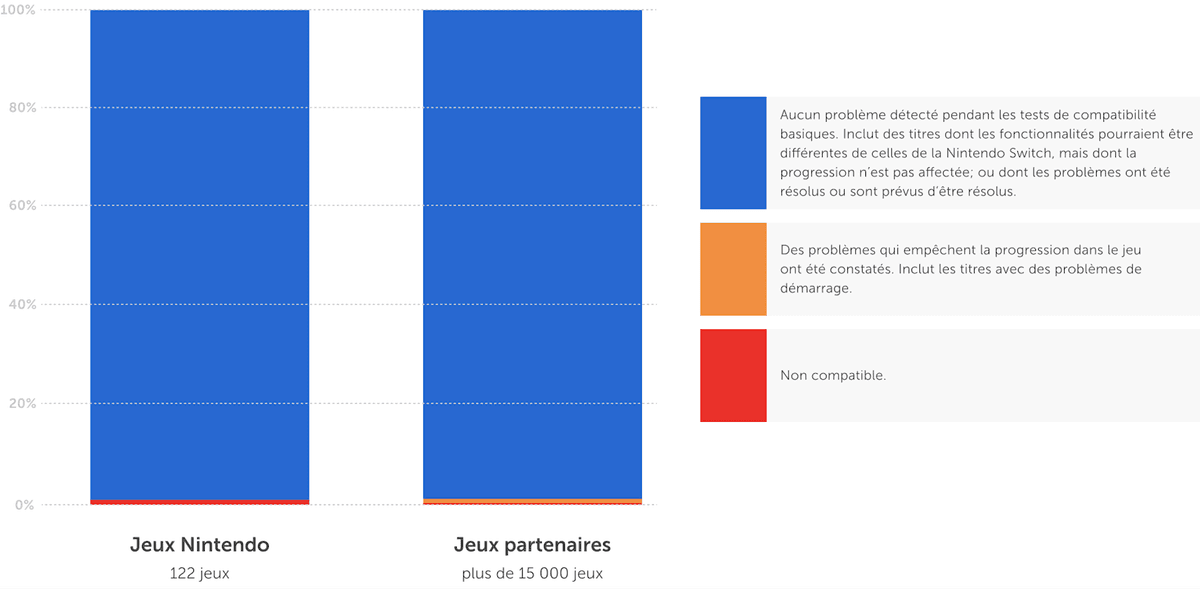
- Most of the Switch catalog is listed as compatible on Switch 2-good news for carts and digital libraries.
- A handful of games are flagged as non‑compatible or problematic, including Nintendo Labo VR, Kill la Kill IF, and In My Shadow.
- Accessory caveat: some titles need original Joy‑Con; the new controllers aren’t universally supported.
- Nintendo will update entries as patches roll out, but edge cases may never be fixed.
Breaking down the announcement: what the tool actually does
Search your game, get a result: compatible, partially compatible (with limitations), or incompatible. If there are gotchas—like “requires original Joy‑Con” or “features disabled”—they’re called out on the game’s page. It’s simple, direct, and the exact sort of pre‑purchase sanity check we’ve had from Sony and Microsoft for a while. Nintendo being this upfront is refreshing, and honestly overdue.
The headline is encouraging: the “vast majority” of Switch games are good to go. But that short list of exceptions matters. Nintendo Labo VR being flagged makes sense; it leans on cardboard Toy‑Con dimensions and the original Switch’s form factor in ways a new shell or dock can break. Kill la Kill IF and In My Shadow getting red or amber lights are the kind of third‑party edge cases you always see during a generational pivot—engine quirks, middleware, or input assumptions that don’t survive the jump without code changes.
The real story for players: accessories and oddities
Here’s where the fine print bites. Some Switch 2 pack‑in controllers won’t behave exactly like your old Joy‑Con, and the database calls that out. If you’re planning to revisit anything that relies on IR camera tricks, HD Rumble nuance, or specific motion profiles—from Labo to niche rhythm and party games—it’s smart to keep your original Joy‑Con charged and paired. Likewise, fitness gear like Ring Fit Adventure and any title built around specialty peripherals may need the legacy setup to feel right.
On the digital side, your purchases aren’t magically upgraded—they’re simply playable if the entry says they’re playable. That’s fine. What I like is that Nintendo is surfacing feature differences: some games note limited functionality, and you’ll see mentions of new platform features (like local sharing options) only when they’re supported. It’s not marketing fluff; it’s a heads‑up.
Industry context: a rare moment of Nintendo clarity
Historically, Nintendo’s backward compatibility has been all over the map. The Wii U ran Wii discs; the 3DS line played DS carts; the original Switch severed ties entirely with Wii U and 3DS because of a hardware and input paradigm shift. With Switch 2, we’re in a middle lane: same overall ecosystem, new silicon, and a commitment to carry the library forward—mostly. That’s closer to Sony’s PS5/PS4 stance and Xbox’s “it just works” ethos than the Nintendo of old.
The database itself is the interesting part. It acknowledges reality: compatibility isn’t binary. Some games boot but lose features. Some need patches that may or may not come, especially for smaller third‑party titles where budgets are thin and sales tails are short. If you’re hoping Labo VR gets a miracle fix, I wouldn’t hold my breath—Nintendo’s cardboard experiment was cool but always felt like a time‑boxed initiative.
Want to Level Up Your Gaming?
Get access to exclusive strategies, hidden tips, and pro-level insights that we don't share publicly.
Ultimate Gaming Strategy Guide + Weekly Pro Tips
What you should do before moving to Switch 2
- Run your top 20: Search the database for the games you actually replay—your staples, your party go‑tos, that one JRPG you still haven’t finished.
- Keep the OG Joy‑Con: If a listing hints at accessory limitations, plan on pairing the original controllers for a faithful experience.
- Update everything: Patch your games before testing on Switch 2; a lot of “partial” flags will flip as updates roll out.
- Expect minor quirks: UI scaling, timing windows, or photo modes might behave slightly differently even in “compatible” titles.
- Test saves and transfers calmly: Don’t assume cross‑system file movement is instant. Follow the prompts, double‑check cloud statuses, and verify per game.
Why this matters now
Backwards compatibility isn’t just a bullet point anymore; it’s how ecosystems retain players. If Switch 2 had biffed this, a lot of us would have parked our carts and stuck with the original hardware. Instead, Nintendo’s delivering a mostly smooth handoff with blunt honesty about the rough edges. That’s the right move—and it sets a bar they’ll need to maintain as more post‑launch patches land and the database evolves.
TL;DR
Nintendo’s Switch 2 compatibility checker is the rare, no‑nonsense tool that tells you exactly what works, what doesn’t, and why. Most of your library is safe, but keep those original Joy‑Con handy and expect a few stubborn outliers—especially anything built around Labo VR or quirky peripherals.