
This caught my attention because the DLSS narrative keeps swinging between genuine technical progress and headline-grabbing hype. DLSS 4.5 is an incremental, interesting step – but it’s not suddenly turning 240p into native 720p magic that previous versions couldn’t approach in the right conditions.
Table of Contents (5)
Nvidia DLSS 4.5: Model M arrives in the App – better quality, not a new miracle
- Available now in the stable NVIDIA App via DLSS Override for 400+ games; Model M is the new Super Resolution model.
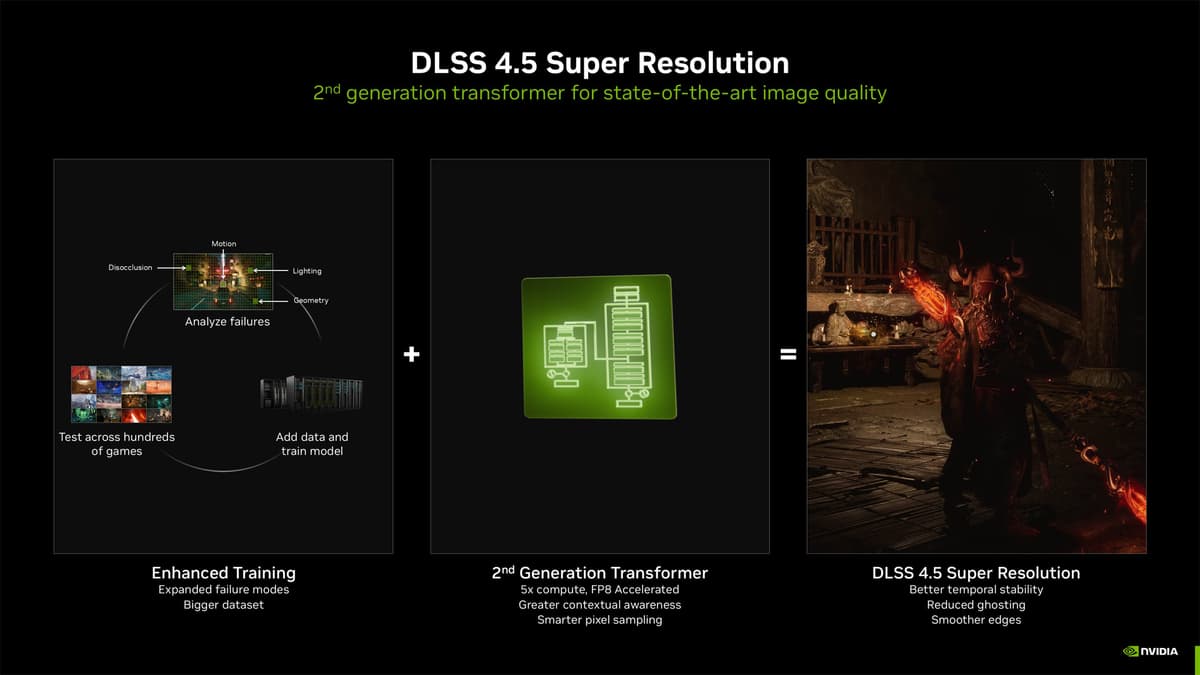
- Model M uses a second‑generation Transformer (5× the compute of the original) and a larger training set – you’ll see finer edges and improved motion clarity, but gains are subtle over DLSS 4.
- Expect a small performance cost, especially on older RTX cards — Tensor cores are doing more work.
- Viral demos of 240p→720p look impressive, but that capability isn’t entirely new — earlier DLSS/FSR/XeSS could already produce strong results in favorable scenes.
{{INFO_TABLE_START}}
Publisher|NVIDIA
Release Date|2026-01-15
Category|Upscaling / Graphics / PC Gaming
Platform|PC (NVIDIA App, RTX GPUs)
{{INFO_TABLE_END}}
Main analysis — what Model M actually brings
DLSS 4.5’s headline is Model M, a second‑generation Transformer Super Resolution model unlocked through the NVIDIA App’s DLSS Override feature. Technically, it’s an evolution rather than a revolution: NVIDIA says the model uses roughly five times the compute budget of their original Transformer and was trained on a much larger, high‑fidelity dataset. That translates into measurable refinements — crisper edges, cleaner lighting transitions, and a small lift in temporal/motion clarity.
From a practical perspective, the improvements are visible if you pixel‑peep, but they’re not day‑and‑night. DLSS 4.0 already marked a major jump by moving from a CNN to Transformer architecture; Model M tightens that work. Where NVIDIA leans into marketing is the implication that 4.5 unlocks new “miracle” upscaling from ultra‑low base resolutions like 240p. Viral demos of a 240p Red Dead Redemption 2 clip upscaled to 720p look impressive, but that kind of dramatic visual recovery was already possible in carefully chosen scenes with DLSS 4, DLSS 3’s CNN, and even AMD/Intel upscalers in the right circumstances.
There’s also a practical cost: more compute on the Transformer model means a slightly higher load on Tensor cores. On a modern RTX 4080 Super I saw negligible differences; on older 30‑series or 20‑series cards, expect modest frame‑rate drops compared with older DLSS presets. That’s the tradeoff: improved quality at a small performance price, particularly on hardware with fewer Tensor/Tensor‑like resources.
Why the override feature matters
The DLSS Override in the NVIDIA App is one of the most interesting parts of this rollout. It lets you force DLSS Super Resolution into games that don’t ship with native DLSS support — expanding the practical reach of these models across hundreds of titles. For enthusiasts who like to tweak settings across older or unsupported games, that’s a real value add.
What this means for you
– If you have an RTX 40‑series card or newer: try Preset M (Model M). You’ll likely appreciate modest image upgrades for a small performance tradeoff. Test in a few of your regular titles to confirm the balance you prefer.
– If you’re on older RTX hardware: be cautious. The quality uplift may be real, but the Tensor‑core cost could reduce frame rates slightly, so keep DLSS 4 (Preset L) or earlier presets handy.
– If you follow viral upscaling demos: remember they’re curated. Upscalers can do remarkable work, but results vary by scene, motion, and source detail. Don’t expect uniformly transformative results on every game or all camera views.
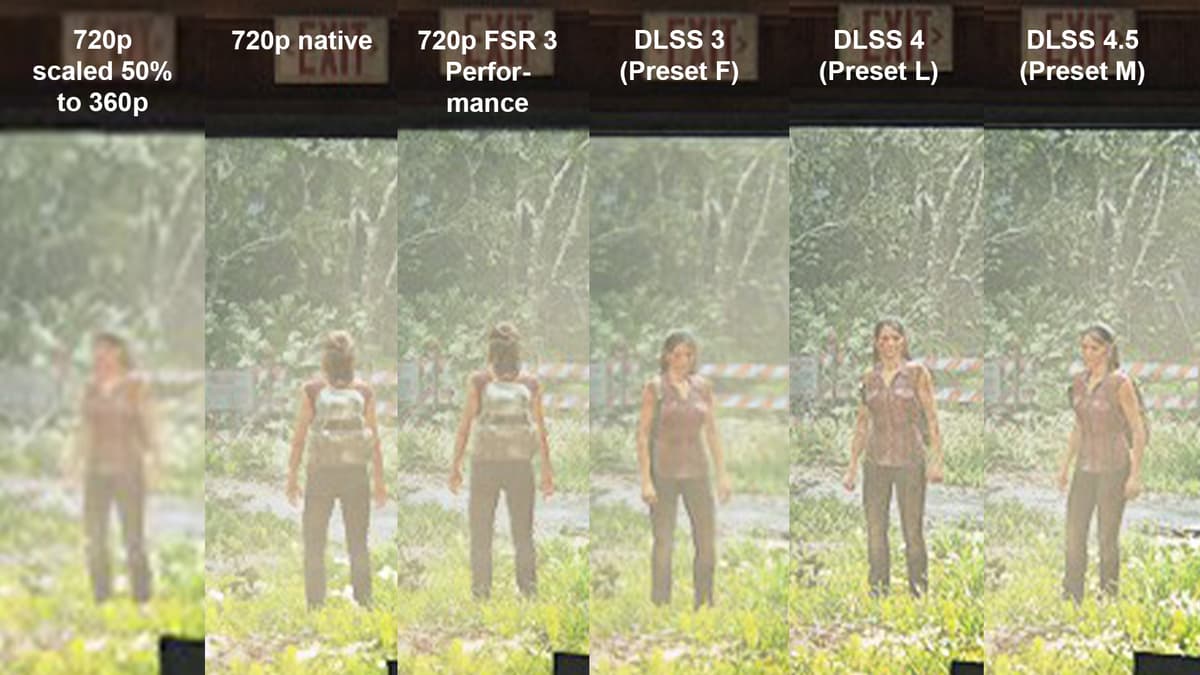
To try it today: update the NVIDIA App, go to Graphics > Global Settings and choose “DLSS Override – Model Presets.” Preset M is Model M (DLSS 4.5), Preset L maps to DLSS 4, and earlier presets correspond to prior DLSS Super Resolution versions.
TL;DR
DLSS 4.5’s Model M is a meaningful, technical refinement — better edges, motion clarity and lighting — unlocked for 400+ games via the NVIDIA App override. It isn’t a mystical new ability to resurrect unusable low‑res footage that previous systems couldn’t handle; rather, it’s a tighter Transformer model that trades a bit more compute (and a small perf hit on older cards) for subtly improved image quality. The bigger headline changes NVIDIA teased — 6x frame generation and dynamic frame generation — aren’t part of this immediate release, so for now Model M is the practical takeaway: try it, but calibrate expectations.
FinalBoss // Gear
Level up your setup
01Graphics cardson Amazon→02Gaming laptopson Amazon→03High-refresh gaming monitorson Amazon→04Discounted game keyson Kinguin→
Affiliate links · As an Amazon Associate, FinalBoss earns from qualifying purchases.