
Table of Contents (12)
Nvidia G‑Sync Pulsar: The First Time in Years a Monitor Announcement Made Me Stop and Rethink LCDs
The moment I saw Nvidia claim that a 250Hz LCD with G‑Sync Pulsar can feel like a 1,000Hz display, my first reaction was basically: “Okay, that’s pure marketing… but I kind of believe them.”
I’ve been down the backlight-strobing rabbit hole for years. ULMB, ELMB Sync, DyAc – if a monitor had some obscure motion-blur reduction mode buried three menus deep, I’ve probably tried it, squinted at UFO tests, and then argued with myself about whether the brightness hit was worth it. Most of the time, these features felt like neat tech demos with annoying trade-offs, not something I’d leave on 24/7.
G‑Sync Pulsar is the first time in a long while I’ve looked at LCD gaming monitors and thought, “Wait, this might actually move the needle again.” Not just another bump from 240Hz to 360Hz, but a different way of driving the panel that steals a page from CRTs and tries to sidestep some of LCD’s fundamental weaknesses.
And crucially, it tries to fix the biggest historical problem with strobing: having to choose between low blur or variable refresh rate. Pulsar’s pitch is basically: why not both?
What G‑Sync Pulsar Actually Is (Beyond the Buzzwords)
At a high level, G‑Sync Pulsar is Nvidia’s new flavor of G‑Sync that merges two things:
- Classic G‑Sync variable refresh rate (VRR) – syncing the monitor’s refresh to the GPU’s frame output to kill tearing and reduce stutter.
- Advanced backlight strobing / scanning – turning the backlight off and on in a carefully controlled pattern to slice away motion blur and LCD smear, in a way that mimics CRT scanlines.
We’ve had both ideas individually for years. VRR is basically standard now across G‑Sync, FreeSync, and generic adaptive sync. And strobing or black frame insertion has been a niche “for enthusiasts only” feature on certain LCDs. The headache was that, most of the time, you couldn’t have both.
Turn on ULMB or some other blur-reduction mode? VRR gets disabled. Want tear-free adaptive sync? Say goodbye to the crisp, CRT-like trail-free motion.
G‑Sync Pulsar’s whole reason to exist is to break that trade‑off. It’s an Nvidia-controlled G‑Sync module plus a new way of driving the backlight in “rows” that lets the monitor still vary its refresh timing while also pulsing the light in a way that slashes motion blur.
Nvidia is launching G‑Sync Pulsar with four 27‑inch esports‑oriented displays. Exact specs will vary by model, but here’s the big picture of what we’re getting at launch.
Specifications
Compared to the usual “here’s another 27-inch 1440p 240Hz IPS” wave we’ve seen for years, the raw specs here aren’t the headline. The interesting part is how they’re driven.
The CRT Trick: Why Backlight Strobing Matters So Much
If you’ve never messed with backlight strobing or black frame insertion, it can sound like pointless sorcery. “Why would I turn the screen off between frames? Isn’t that worse?”
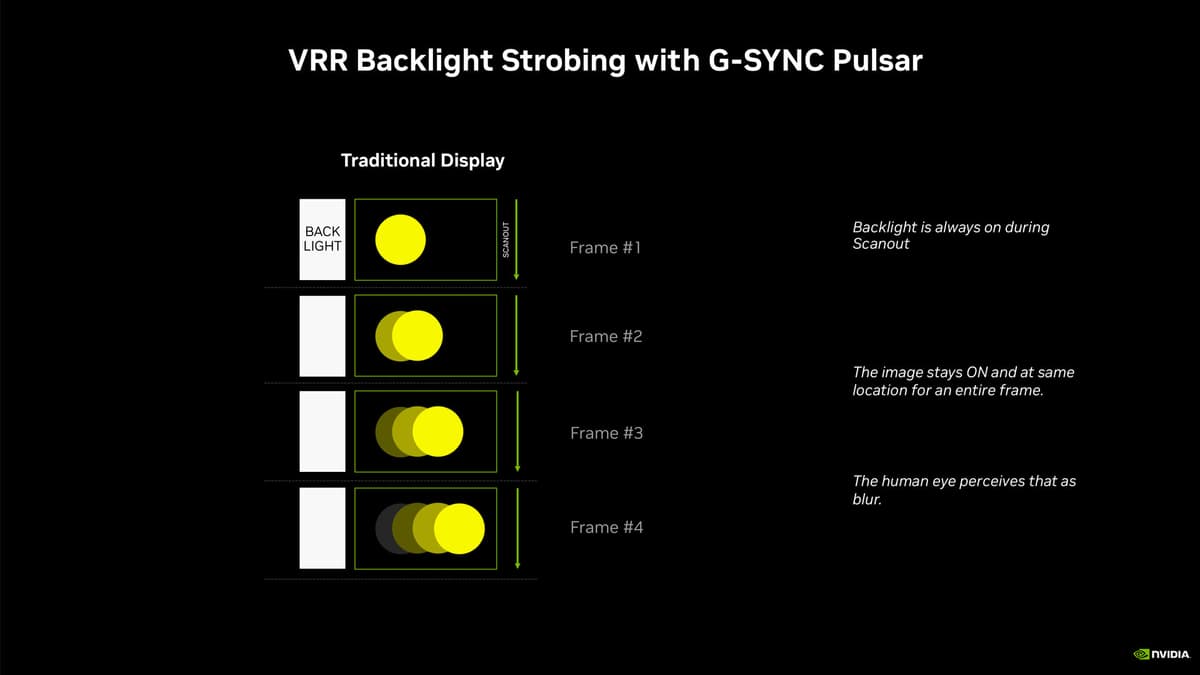
The key idea is this: motion blur on LCDs isn’t just about how fast the pixels change; it’s mainly about how long each frame is visible to your eyes. That’s called persistence. LCD and OLED panels are “sample-and-hold”: they show a frame and hold it there until the next one arrives. Meanwhile, your eyes are tracking moving objects across the screen.
Your eye expects the object to move smoothly, but the display is just showing a series of static images. As your gaze pans, your brain averages those static frames into a blurred smear. That’s eye-tracking motion blur, and even a near-instant pixel response won’t fully fix it.
CRT displays solved this in a completely different way: they blasted a bright sweep of light across the phosphors in a tiny time window, then the phosphors decayed quickly. Each frame only existed for a brief flash. Persistence was low, so motion looked incredibly clear even at “only” 85–120Hz.
Strobing and black frame insertion are LCD’s attempt to fake that behavior. If you show a frame then turn the backlight off for part of the refresh window, each frame is visible for less time, which shrinks the blur your eyes see while tracking motion.
The trade-offs have always been nasty:
- Brightness loss – you’re turning the light off part of the time, so the whole image gets dimmer.
- Flicker risk – some people are more sensitive to strobing; long sessions can cause fatigue.
- VRR incompatibility – most older strobing modes only worked at fixed refresh rates, so you had to disable VRR and accept some tearing/stutter.
- Crosstalk / artifacts – if the LCD pixels haven’t fully finished transitioning when the backlight fires, you get double images or halos.
I run a 240Hz IPS panel on my main rig, and every time I toggle its basic strobing mode on, I get that immediate “wow, that’s so much clearer” on test patterns and fast strafing. Then I notice the dimmer image, slight flicker, and the fact that VRR is gone, and I end up turning it off again. The tech has always felt 80% there.
What Makes Pulsar Different: Row‑Based Scanning & 4 Pulses Per Frame
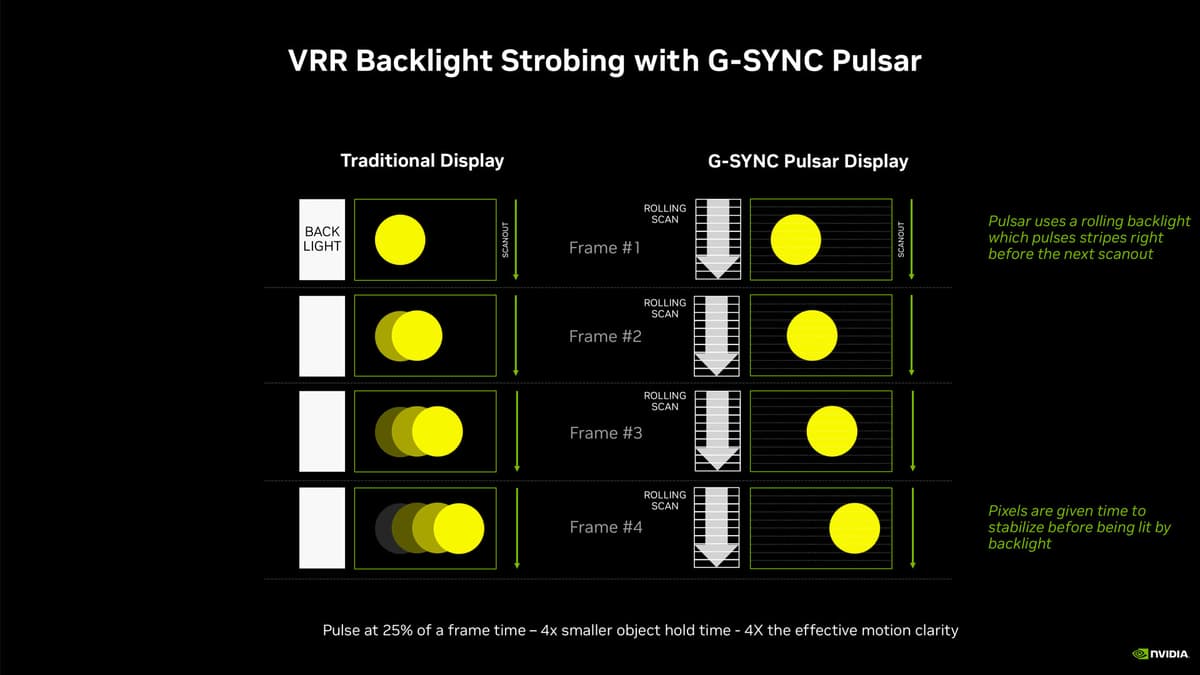
Pulsar keeps the core idea of strobing but gets a lot more granular about it. Instead of just flashing the whole backlight on and off like a light switch, it splits the backlight into rows and pulses them multiple times per frame.
Think of the panel as being divided into horizontal zones. During each single frame, those zones light up in sequence – four pulses per frame – mimicking the way a CRT’s electron beam would sweep across the screen. Nvidia calls this a “scanline-like” effect, and that’s not just aesthetic: it’s about controlling when each part of the screen is visible relative to when the pixels finish their transitions.
Done right, this does two very important things:
- Hides LCD transition smear more effectively – by only lighting a row when its pixels are ready, you dramatically reduce the ghosting and “dirty” afterimages that many strobing modes still show.
- Reduces perceived motion blur beyond what the refresh rate suggests – because the visible window for each line of pixels is shorter, your eye sees sharper positions for moving objects, like they would on a CRT.
That’s how Nvidia arrives at the bold line: a 250Hz LCD running Pulsar can feel like 1,000Hz. Not because it suddenly pushes 1,000 distinct frames per second in the usual sense, but because the motion clarity and persistence are approaching what you’d need a four-figure refresh rate to mimic without strobing.
This is the same basic reason why a well-tuned 120Hz CRT can look “clearer in motion” than a 240Hz LCD in some cases. It’s not just about the number; it’s about how the light hits your eyes over time.
The part that really clicked for me was the “four pulses per frame” bit. Most older blur reduction modes do a single strobe per refresh and hope the LCD keeps up. Pulsar’s more granular scanline-style approach gives the monitor more opportunities to time those flashes exactly when each region is ready, which should mean less double imaging and fewer compromises.
Where VRR Fits In: No More Choosing Between Smooth Frames and Sharp Motion
The other big story is that Pulsar is designed from the ground up to keep G‑Sync’s key strength: variable refresh. Your refresh rate still tracks your frame rate, instead of being locked to a single value like 240Hz or 360Hz.
Historically, you had to make an ugly choice:
- Turn on strobing: great motion clarity, but fixed refresh, potential tearing or massive stutter if your GPU can’t lock that frame rate.
- Stick with VRR only: tear-free, smooth delivery, but more eye-tracking blur compared to strobing.
Asus tried to bridge that with ELMB Sync (their blur reduction + VRR combo) and it was genuinely cool to see in action. But it was limited to a handful of models, and the tuning quality was hit-or-miss depending on exact refresh ranges and frame rates.
G‑Sync Pulsar is Nvidia’s answer at the platform level. Because it’s tied to a real G‑Sync module and tight GPU–monitor communication, it can coordinate refresh timing and backlight scanning per frame with extremely fine control. At least, that’s the theory.
If this works as advertised, you get the holy grail combo: no tearing, reduced stutter in variable frame rate scenarios, and motion clarity that legitimately feels more like a high-end CRT than a typical “fast IPS” panel.
Why Pulsar Is LCD‑Only (and How It Compares to OLED)
Nvidia is very clear about one thing: G‑Sync Pulsar is for LCDs, not OLEDs.
On paper, that sounds weird. OLED has near-instant pixel response times and has been the golden child of “good motion” for a while now. But remember, pixel response time isn’t the same as persistence. OLED screens are still sample-and-hold by default: each frame is lit continuously until the next one arrives.
TV manufacturers have experimented with OLED black frame insertion, and when it works, the clarity boost is immediately obvious. But it’s hard to combine that nicely with VRR, and it tends to hammer brightness (and potentially make flicker more noticeable).
LCDs, on the other hand, have a full-blown backlight you can treat as a separate component. Pulsar abuses that backlight in a highly controlled way. By dividing it into rows and pulsing them multiple times a frame, you can time the flashes around when each region’s pixels have mostly settled.
Nvidia’s claim that a 360Hz LCD with Pulsar can feel smoother than a 360Hz OLED makes sense in that context. The OLED will still have extremely fast transitions, but with sample-and-hold persistence, you’re still limited by how long each frame sits there while your eyes move.
Is an OLED still going to have better contrast, black levels, and overall HDR punch? Absolutely. I’m not ditching my OLED TV for an LCD anytime soon. But if your obsession is pure motion clarity in fast games, Pulsar LCDs suddenly look a lot more interesting than another incremental refresh-rate bump on an OLED gaming monitor.
What This Means in Real Games: CS2, Valorant, Apex and Beyond
The obvious target audience here is competitive FPS players. If you live in CS2, Valorant, Apex Legends, or any twitchy shooter where you run uncapped or near-capped frame rates, Pulsar is directly speaking your language.
Think about typical movement in those games: super-fast strafes, micro-corrections, tracking a target across your field of view while everything else whips past. Traditional 240Hz+ IPS displays already feel very good here, but you still see that slight smearing on thin edges or high-contrast objects when you really pay attention.
Backlight scanning like Pulsar’s attacks exactly that type of blur. Objects remain more “solid” in motion, so your brain doesn’t have to work as hard to resolve their position. That’s where you get that weird sensation of “this feels way smoother than the number on the box.”
There’s a reason CRTs are still fetishized by some fighting game and old-school FPS players: not nostalgia, but clarity and latency. Pulsar is Nvidia trying to drag some of that feel into the LCD era.
Outside pure esports, I can see this being insanely good for racing sims and fast third-person action. I remember the first time I tried a strobing mode in Trackmania at 144Hz: the sense of clarity on the track edges and signage was almost disorienting at first, like the game had suddenly become more “real” in motion. Pulsar is essentially that effect, turned up, and without forcing you to give up VRR.
For slower cinematic games, strategy titles, and RPGs? You’ll notice it, but I’m not convinced it’s the kind of life-changing upgrade that justifies being a first-wave adopter. For that crowd, OLED’s contrast and HDR or just a good 1440p 144–165Hz panel at a lower price are still probably the better play.
The Catch: Brightness, GPU Demands, and Nvidia Lock‑In
None of this comes for free. Pulsar may be clever, but it doesn’t defy physics.
1. You’re still chopping up the backlight.
Even with fancy row-based scanning, the display simply isn’t lit 100% of the time. That means some reduction in effective brightness. Nvidia and its partners will try to offset this with powerful backlights and smarter duty cycles, but if you’re used to running your monitor at 80–100% brightness, expect to make a trade.
2. Flicker sensitivity is highly personal.
At very high refresh rates (250–360Hz), strobing flicker is much less noticeable than at 100–144Hz, but it’s still there in principle. Some people are more sensitive to it than others. If you’re one of those folks who can’t stand certain PWM-dimmed monitors or low-frequency BFI on TVs, you’ll want to try Pulsar in person before committing.
3. You need the GPU to keep up.
Yes, Pulsar supports VRR, so it’s not like you suddenly need to hard-lock 360fps at all times. But the tech is clearly tuned for high-frame-rate use. If you’re hovering at 70–90fps in heavy AAA titles, a Pulsar monitor is going to be heavily underutilized compared to someone running 200–300fps in lighter engines or esports titles.
4. This is Nvidia’s kingdom.
G‑Sync Pulsar lives on G‑Sync modules and expects an Nvidia GPU on the other end. Plug in an AMD graphics card and you’ll almost certainly just get generic adaptive sync – no Pulsar magic. If you’re the type who switches between GPU vendors generation to generation depending on who’s ahead, this is a form of ecosystem lock-in.
5. Price is “better, but not cheap.”
Starting at $599 for a 27‑inch 1440p esports monitor is… okay. Not insane like some early G‑Sync launches that felt like luxury tax experiments, but still very much premium. These aren’t budget bangers; they’re targeted at people who measure smokes and peek timings in milliseconds.
The Four Launch Monitors: How I See Them Fitting In
I haven’t had hands-on time with these specific models yet, so I’m not going to pretend I know which one has the best overdrive tuning or OSD layout. But even from the names and positioning, you can read the intent pretty clearly.
- Acer Predator XB272U FS – Acer’s Predator line tends to hit that “serious but not ridiculous” gamer segment. Expect a clean design, decent ergonomics, and a lot of people picking this as their first Pulsar display.
- AOC Agon Pro AG276QSG2 – Agon Pro is AOC’s way of saying “we’re going after esports and tournament setups.” Wouldn’t be surprised if this ends up in LAN events or sponsored team setups where G‑Sync Pulsar can be shown off.
- Asus ROG Strix Pulsar XG27AQNGV – Asus slapping “Pulsar” directly into the name tells you exactly what they think the hero feature is. ROG gear often throws in the most aggressive feature sets, RGB flourishes, and extras in this category.
- MSI MPG 272QRF X36 – MSI’s MPG line usually walks the line between “gamer” and “semi-premium mainstream.” The X36 suffix screams “high refresh” and competitive focus to me.
They’re all 27-inch, all 1440p, all chasing the same slice of the market: players who actually notice the small differences between 144Hz, 240Hz, and 360Hz, and care more about input latency and clarity than OLED blacks.
As someone who runs a 27-inch 1440p 240Hz IPS right now, this is exactly the segment that would tempt me to upgrade, but only if I’m convinced Pulsar really does what Nvidia claims without wrecking brightness or comfort.
Is This Enough to Make “Real G‑Sync” Relevant Again?
For years, I’ve mostly told people: unless you have a very specific use case, just grab a good FreeSync / adaptive sync monitor that works well with both Nvidia and AMD. The dedicated G‑Sync module tax rarely felt worth it once VRR went mainstream.
G‑Sync Pulsar is the first time in a while Nvidia has a genuinely strong argument for bringing that proprietary module back into the conversation. You simply can’t bolt this kind of tightly coordinated backlight scanning onto a random adaptive sync panel with a firmware update. It needs the deeper control over timing that the G‑Sync ecosystem provides.
The cynical way to read Pulsar is: Nvidia found a way to make G‑Sync special again, so they can justify higher-end monitor SKUs tied to their GPUs. The more generous reading – and the one that matches my experience with backlight strobing – is that they’re actually solving a real, unsolved problem in a clever way.
Both can be true at once. And honestly, if it means we finally get a semi-standardized way to enjoy CRT-like motion clarity with VRR instead of constantly choosing one or the other, I’m okay with that trade.
Who Should Actually Consider a G‑Sync Pulsar Monitor?
This is the part where the tech fan in me and the practical buyer in me usually end up arguing. So here’s how I’d break it down from my own perspective.
You’re in the target zone if:
- You mainly play competitive shooters or racers at very high frame rates.
- You already own or are planning to buy a recent Nvidia GPU and don’t plan to jump to AMD next gen.
- Motion clarity genuinely matters to you – you notice ghosting, you’ve tried ULMB/ELMB/DyAc and liked the effect but hated the compromises.
- You’re happy to live in 27-inch 1440p land, which is still the best “clarity vs performance vs cost” sweet spot for PC gaming in my view.
If that’s you, a G‑Sync Pulsar monitor might actually give you something more tangible than “20% better HDR” or “10% wider color gamut.” You’ll feel this tech in every mouse swipe and strafe.
You’re probably better off skipping (for now) if:
- You mostly play cinematic AAA games at modest frame rates where GPU horsepower is the bottleneck.
- You care more about deep blacks and HDR than you do about absolute motion clarity – in which case, an OLED might be a better splurge.
- You’re on AMD GPUs or switch GPU vendors frequently.
- Your budget is limited and you’re planning a full system or GPU upgrade – your money will almost always go further spent on faster hardware first.
Honestly, the main thing stopping me personally from calling this a must-have is that it’s still first-generation. I want to see how well the four launch monitors handle crosstalk, how aggressive the brightness hit is in real use, and whether any of them nail that sweet spot where you can just leave Pulsar on for hours without fatigue.
FinalBoss // Gear
Level up your setup
01Graphics cardson Amazon→02Gaming laptopson Amazon→03High-refresh gaming monitorson Amazon→04Discounted game keyson Kinguin→Affiliate links · As an Amazon Associate, FinalBoss earns from qualifying purchases.