
Table of Contents (10)
A palm-sized 4K powerhouse that keeps asking for flagship money
The Obsbot Tiny 3 gave me whiplash in the first 24 hours. I unboxed it, laughed at how ridiculously adorable it looked, clipped it to my laptop, and immediately went, “Oh. This thing is serious.” Then I checked the price-$349 / £299-and that warm fuzzy feeling turned into a raised eyebrow, especially once I remembered the Tiny 3 Lite sits at $199.
I’ve now lived with the Tiny 3 for a couple of weeks across my usual mix of PC gaming, streaming tests, work calls, and trainside coffee-shop “remote office” sessions. It’s the smallest, most travel-friendly webcam I’ve ever used, and in low light it absolutely embarrasses most of the cams I own. But every time I found myself thinking, “Okay, maybe it is worth it,” a flubbed voice command or slightly clumsy AI flourish snapped me back to reality.
This is very much a “maximum features in a tiny shell” gadget. The question is whether those features-and that excellent sensor—actually justify paying a premium when the cheaper Tiny 3 Lite exists, and when most people are still just trying to look half-decent on Zoom.
Design and portability: the most travelable webcam I’ve used
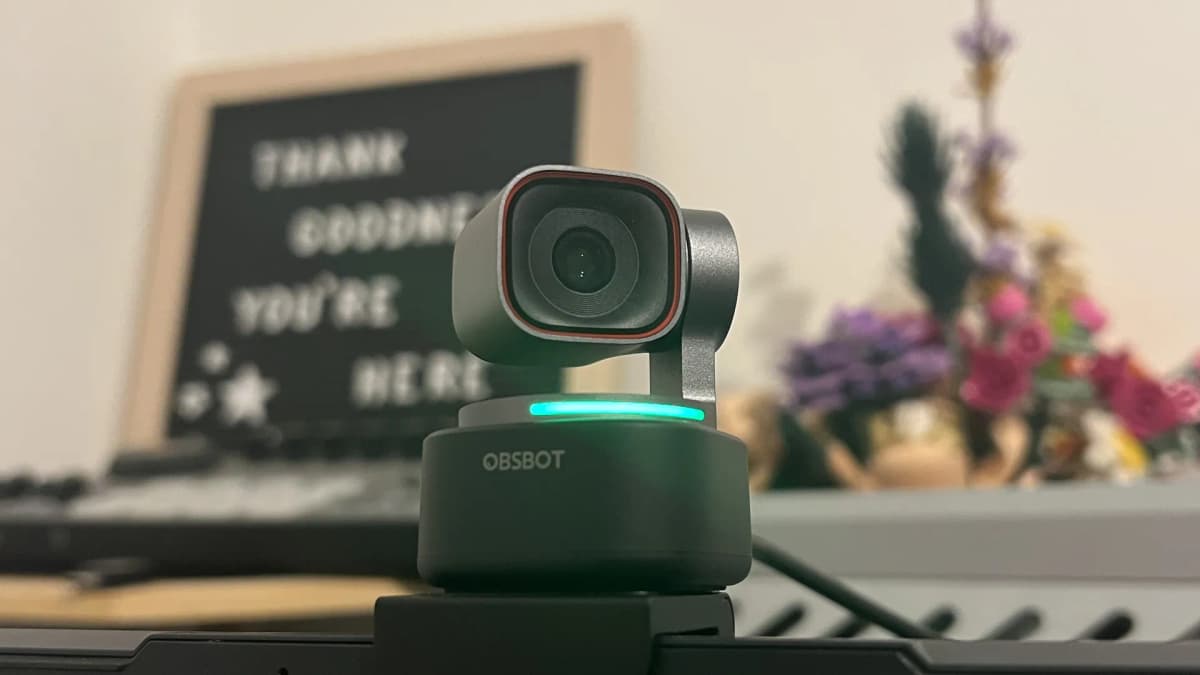
On paper, the Tiny 3’s stats don’t sound that crazy. In person, it’s almost comic. The whole camera body is roughly 37 x 37 x 49 mm and weighs just 63 g (88 g with the mount). On my desk it looks like a shrunken PTZ conference camera. On top of an ultrabook, it looks like a toy someone forgot to pack away.
The gimbal-style head sits on a tiny base that magnetically snaps into the included mount. That mount perches securely on a monitor or laptop screen and can also be popped onto a standard tripod thread if you want more flexibility. I used it both on my gaming monitor and clipped to a thin MacBook lid; in both cases it felt surprisingly stable, even when I was hammering away on WASD.
Obsbot clearly had frequent travelers in mind. The rigid, palm-sized carry case holds the Tiny 3, the mount, a USB-C to USB-C cable, and a USB-C to USB-A adapter. I threw it into my everyday backpack for a few days of commuting and it barely took up more space than a chunky power bank. For someone who bounces between home, office, and the occasional hotel room setup, that’s a big deal.
Setup is dead simple: plug the USB-C cable into your PC, Mac, or USB-C-friendly tablet, and it shows up as a standard UVC webcam and mic. You don’t have to install anything, but the Obsbot Center software is basically mandatory if you want to touch AI tracking, framing, or any of the more advanced modes. On my Windows tower and my M1 MacBook, installation and firmware updates were painless—no driver drama, no weird conflicts with OBS or Discord.
Image quality: a legitimately impressive 4K sensor in a tiny shell
Let’s start with the thing the Tiny 3 absolutely crushes: image quality. It packs a 50MP 1/1.28-inch CMOS sensor—roughly in the same league as recent high-end smartphone sensors—and you can feel that immediately.
- Resolution: Up to 4K at 30 fps, or 1080p at 120 fps
- Sensor: 1/1.28-inch CMOS, 50MP
- Field of view: 82.4° (4:3), 74° (16:9)
- Connection: USB Type-C
- Mic: Integrated omnidirectional mic array
In daylight or a well-lit room, the Tiny 3 produces a level of detail that frankly feels wasted on your average Google Meet. Skin texture, hair, fabric—you see it all. That may or may not be a blessing depending on how you feel about your pores. The autofocus is quick and confident, jumping from my face to something I hold near the lens (a gamepad, a mug, a GPU box) in a beat or two without the jitter or constant refocusing I still get from some older Logitech cams.
Where the sensor really earns its keep is low light. I did a night-time test with my only illumination coming from my monitor and a dim floor lamp across the room. My laptop’s built-in camera turned the whole scene into a smeared watercolor. An older Logitech C920 softened everything into a noisy blur. The Tiny 3, by contrast, kept my face sharp, rolled with the higher ISO, and kept noise surprisingly under control.
If you stream games in a darker room or often join calls in less-than-ideal lighting, that’s the kind of real-world difference that’s hard to go back from. Colors are a little punchy out of the box, but you can dial them down easily in Obsbot Center, along with exposure, contrast, and white balance. I ended up with a slightly warmer profile than default and just left it there for the rest of my testing.
I had the chance to test the Tiny 3 side by side with the Tiny 3 Lite and the older Tiny 2 Lite. The Tiny 2 Lite looked like last-gen hardware immediately—muddier details, worse handling of contrasty scenes. Between Tiny 3 and Tiny 3 Lite, things were interesting: in good light, I had to freeze frames and zoom in to see more than incremental gains. But once light levels dropped, the Tiny 3 pulled ahead with cleaner shadows and less chroma noise. If you mainly stream or call in bright rooms, that difference starts to look more like “nice to have” than “must have.”
And yes, 1080p at 120 fps works as advertised. It’s overkill for most meetings, but for quick slow-motion product shots or B-roll in a tight space it’s genuinely fun, especially when paired with the gimbal’s smooth motion. I used it to capture a controller and mouse flicks for a clip, and while it’s not a cinema camera, it’s surprisingly usable footage.
AI Tracking 2.0: the gimbal that mostly keeps up with you
The other big selling point is Obsbot’s AI Tracking 2.0, baked into a motorized gimbal that can pan and tilt to follow you around. This isn’t “fake” digital crop-only tracking; the camera physically moves to keep you framed, then layers digital zoom on top when needed.
In practice, tracking me as I moved around my office worked really well. I paced while talking on a Discord call and the Tiny 3 kept me centered without swinging wildly. Even in an evening test with a single lamp behind me, the tracking stayed locked on my face. When I deliberately scooted right to the edge of frame and leaned in and out, it took a split second but recovered gracefully instead of snapping or hunting.
Object tracking is hit-or-miss depending on what you ask of it. Holding up a coffee mug, a gamepad, or even a pen and tapping to track in the software worked; the cam followed those objects as I waved them around like a YouTuber doing product shots. Where it started to stumble was when I set the tracking speed too low in Obsbot Center. Then it lagged behind quick gestures, so the onus is on you to tweak those settings for how much you move.
Specialty modes are tucked away in the software. Desk Mode rotates the gimbal down toward the table, perfect for quick unboxings or showing a keyboard. I actually used this to show someone a stick drift issue on a controller during a call, and it saved me from juggling a second camera. Whiteboard Mode locks onto a large, flat surface and keeps it centered while you move around it. It worked technically, but in 2026, between screen share and digital whiteboarding apps, I struggled to find a real reason to use it beyond curiosity.
Gesture and voice controls: fun party tricks that don’t always listen
To keep you from diving into the app every five minutes, Obsbot gives the Tiny 3 a set of gesture and voice commands. In theory, it’s brilliant: raise your hand to start or stop tracking, make an L-shape with your fingers to zoom in or out, or just say “Sleep, Tiny” and have it politely bow its head and mute.
In reality, the gesture controls are decent but inconsistent. When I was framed against a textured background (bookshelf, curtains), the camera picked up my raised palm and L-shapes most of the time. Once I moved in front of a plain white wall, recognition tanked. Some of that is down to my own complexion and lighting, but that’s the whole point: webcams need to handle unfriendly, everyday environments. Waving at the camera three times before it responds stops being “clever” very quickly.
Voice controls are more frustrating. I’m Irish, but my accent is relatively neutral. Even so, the Tiny 3 seemed to understand me about half the time. I tried speaking closer and further, with different levels of background noise, and even after a factory reset and firmware update, the responsiveness never felt dependable. When I put on a corny, over-enunciated pseudo-US game show host voice, things improved, but I’m not performing a bit every time I want the webcam to zoom.
The irony is that the mics themselves are clearly hearing me just fine, because people on calls could hear every bit of my ranting about the voice system. It’s the command recognition layer that’s flaky. Once I accepted that and went back to the software controls and an occasional gesture, I was much happier, but it makes one of the headline “AI” features feel more like a demo than a tool you can rely on day-to-day.
Microphone quality: surprisingly good, but not a studio replacement
The Tiny 3’s integrated omnidirectional mic array is way better than I expected. Webcams are notorious for tinny, boxy audio, but this one is easily “good enough” for most meetings and casual streams, and a big step up from typical laptop mics.
There are five audio modes in the software, tuned for different scenarios—things like directional focus and AI noise reduction. The catch: if you’re capturing or streaming at 1080p or above, you’re locked into Smart Omni mode. That’s the one Obsbot recommends for group calls, and to be fair, it does an okay job of balancing room sound.
In my tests, colleagues noticed a clear improvement in fullness and clarity compared to my laptop’s microphone. that said, the Tiny 3 picked up more background noise than I’d like. Birds outside my window sounded almost soothing; cars and the occasional motorbike, not so much. Even in modes that are supposed to prioritize voice and apply noise reduction, traffic hum still snuck through.
For serious streaming or content creation I’d still pair this webcam with a dedicated USB or XLR mic. But as an all-in-one travel solution—especially if you take calls from hotels or co-working spaces—it’s legitimately handy. You can absolutely get through meetings and casual Twitch streams with just this camera and be presentable on both audio and video fronts.
Beauty filters and extras: powerful, but a bit uncanny
Buried in Obsbot Center is a “Beauty” tab that lets you reshape and retouch yourself in real time. Skin smoothing, slimming, eye enlargement, virtual makeup—the works. Out of morbid curiosity, I cranked every slider to 100% and watched myself morph into a waxy, porcelain-faced influencer clone. Convincing in a horror-movie way, maybe.
Dialed back to low levels, the filters are more subtle and closer to what you see on things like smartphone beauty modes. But I found myself turning them all off after a day. Between the uncanny valley and the mental-health side of literally distorting your own face before every call, it’s not a feature I’d lean on—especially when the underlying image quality is already flattering when you get your lighting halfway right.
Performance, software, and reliability
On the technical side, the Tiny 3 behaved well. On my Windows PC, I ran it at 4K/30 in OBS while gaming, and it didn’t noticeably impact my system’s performance. In OBS, Discord, Zoom, and Chrome-based video calls, it showed up like any standard webcam. I didn’t hit any compatibility issues on macOS either; it happily slotted into Zoom and browser calls there too.
Obsbot Center is where you control most of the smarts: AI tracking, presets, image adjustments, Beauty filters, audio modes, and firmware updates. The interface is fairly clean once you figure out where things live, though there are some slightly odd labels and submenus that took me a minute to memorize. After my first setup session, though, I mostly just hopped in to toggle tracking and tweak framing.
I didn’t encounter crashes or major bugs, and the firmware update I applied early on installed without drama. The only “reliability” complaints I had were squarely about gesture and voice recognition, not stability. As a core camera, it felt solid and predictable day after day.
Value vs Tiny 3 Lite and the rest of the webcam world
Here’s where things get uncomfortable for the Tiny 3. At $349, it’s a premium webcam in a market where “good enough” has gotten very cheap. The Tiny 3 Lite is $199 and offers the same core resolution options (4K/30, 1080p/60), a very similar AI tracking experience, and broadly comparable image quality in decent lighting.
In my side-by-side tests, the Tiny 3’s main advantages over the Lite were:
- Cleaner low-light performance with less noise and better shadow detail
- More flexible ISO range that handles tricky lighting (backlit windows, mixed color temperatures) a bit more gracefully
- Slightly snappier autofocus in edge cases
Those are real, tangible improvements, especially if you stream in a darker room or you flat-out refuse to deal with proper lighting. But are they $150 of improvement? That’s a much tougher sell. Once you’re already in “nice webcam” territory, you get diminishing returns fast, especially when most platforms you’ll be using—Zoom, Meet, standard Discord—are going to compress or even downscale your feed anyway. A 4K webcam shines most when you’re recording locally or streaming to platforms that respect higher bitrates.
Zoom and Google Meet still don’t meaningfully embrace 4K for most users, and Discord caps non-Nitro folks at 1080p. So if your life is 90% meetings and 10% side projects, the Tiny 3’s sensor feels almost wasteful. In that scenario, I’d push you toward the Tiny 3 Lite or even a much cheaper 1080p cam instead, and you’d be perfectly fine.
Once you factor in the inconsistency of voice controls and the slightly fussy nature of gestures, the Tiny 3 starts to look like the classic “max spec” version of a gadget that most people don’t need to max out. Its value proposition is mixed: undeniably high-end performance in a lot of ways, but priced into a niche that only a specific slice of users will fully appreciate.
Who the Obsbot Tiny 3 is actually for
After living with it, here’s where I think the Tiny 3 genuinely makes sense—and where it doesn’t.
- Great fit if:
- You’re a content creator or streamer who travels a lot and wants a tiny, self-contained 4K setup with solid low-light performance.
- You record talking-head videos, tutorials, or B-roll at your desk and want reliable AI tracking and a flexible gimbal in minimal space.
- You often work in dodgy lighting and don’t want to fuss with extra lights or DSLR-style setups.
- Bad fit if:
- You just need a straightforward webcam for calls and the occasional screen share.
- You hate messing with software, sliders, and presets and just want strict plug-and-play behavior.
- Your budget is tight and you’re already wincing at anything above $150.
FinalBoss // Gear
Level up your setup
01Top-rated gaming headsetson Amazon→02High-refresh gaming monitorson Amazon→03Gaming chairson Amazon→04Discounted game keyson Kinguin→Affiliate links · As an Amazon Associate, FinalBoss earns from qualifying purchases.
Want to Level Up Your Gaming?
Get access to exclusive strategies, hidden tips, and pro-level insights that we don't share publicly.
Ultimate Reviews Strategy Guide + Weekly Pro Tips