
Table of Contents (12)
How I Learned to Match GPU Power to Resolution
After spending way too much money on the wrong graphics cards over the years, I finally forced myself to sit down and match my builds to one simple question: What resolution and frame rate am I actually going to play at? Once I did that, my upgrades got cheaper, smoother, and a lot less frustrating.
This guide walks through how I now plan every gaming PC: I pick my target resolution (Full HD, WQHD, or 4K), decide on a realistic FPS target, and then choose the GPU tier and VRAM based on that. I will also explain why 8K is still more marketing than reality for normal gaming in 2026.
Step 1 – Decide Your Target Resolution and FPS
This is the step I used to skip, and it’s why I ended up with a 4K monitor driven by a mid-range GPU that could barely handle 1440p. Do not repeat that mistake. Pick one combination and build around it:
Full HD (1080p) – Still the Competitive Standard
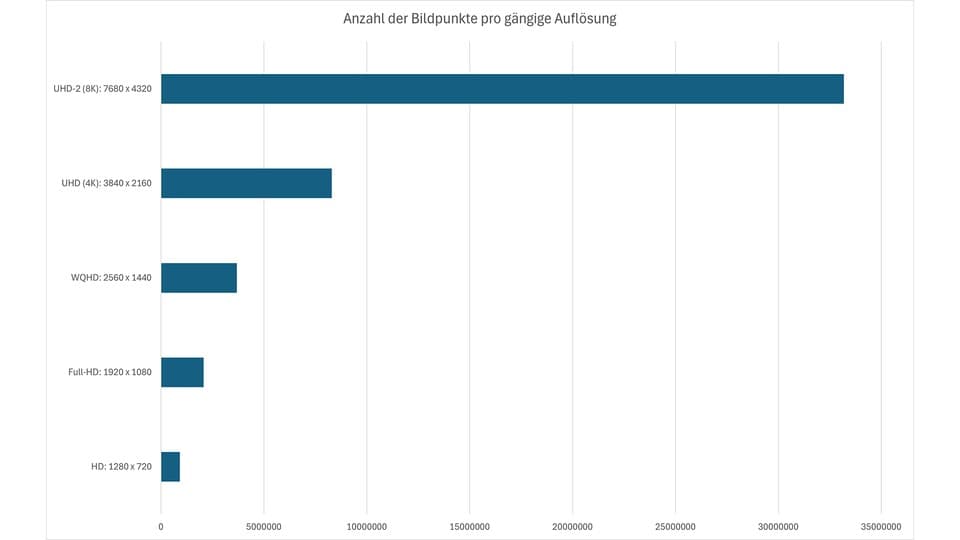
Full HD means 1,920 × 1,080 pixels. That’s about 2.1 million pixels per frame. If you aim for 60 FPS, your GPU pushes ~126 million pixels every second; at 144 FPS in shooters, it’s more than double that.
According to recent usage stats, a clear majority of PC players are still on 1080p. The main reasons match my own experience:
- Much lower GPU requirements
- Cheaper monitors with high refresh (144-240 Hz)
- Easier to sustain high FPS in competitive titles
1080p is ideal if: you mainly play competitive shooters, MOBAs or battle royales and care more about 144–240 FPS than ultra graphics.
WQHD (1440p) – The 2026 Sweet Spot
WQHD is 2,560 × 1,440 pixels, about 3.7 million pixels per frame. That’s roughly 1.7× the pixel count of 1080p. When I first jumped to 1440p, the sharpness upgrade on a 27–32″ monitor was immediately obvious, even on the desktop.
The catch is that your GPU has to work that 70% harder every single frame. That means you move out of pure budget territory and into proper mid-range or upper mid-range.
1440p is ideal if: you want noticeably sharper visuals than 1080p, still care about 100–165 FPS in many games, and are willing to invest in a stronger GPU.
4K (2160p) – Maximum Detail, Maximum Demands
4K is 3,840 × 2,160 pixels, or around 8.3 million pixels per frame. That’s about 4× 1080p. The jump from 1440p to 4K is big enough that I immediately noticed finer details in textures and foliage, even on a 32″ screen.

The cost is brutal: you need a serious GPU and plenty of VRAM if you want modern AAA titles above 60 FPS at high or ultra settings.
4K is ideal if: you prioritise image quality, play a lot of single‑player and cinematic games, and are fine with 60–90 FPS instead of 144+ in the newest titles.
Step 2 – GPU & VRAM Recommendations by Resolution
Once you know your resolution and FPS target, you can choose a GPU tier instead of guessing. Below I summarise what has worked reliably for me and for friends’ builds in 2026.
GPUs for Full HD (1080p)
For 1080p, the goal is usually high FPS, not insane detail. The good news: you can get there with relatively affordable GPUs if you are smart about settings.
Pixel load: ~2.1M pixels per frame – modern entry and mid-range cards handle this well.
Typical VRAM target: 8 GB is still fine for 1080p if you are willing to tweak a few heavy settings; 12–16 GB is more future-proof if you keep cards for many years.
NVIDIA picks I’d use for 1080p:
- GeForce RTX 5060 Ti 8 GB – Good for high FPS at high settings in esports and medium/high in heavy AAA titles.
- GeForce RTX 5060 Ti 16 GB – Same raw speed, but the extra VRAM keeps big texture packs and newer games smoother.
AMD picks I’d use for 1080p:
- Radeon RX 7600 8 GB – Budget‑friendly 1080p card; just be ready to dial back textures in some new AAA games.
- Radeon RX 7600 XT 16 GB – Great balance of price and longevity at 1080p.
- Radeon RX 9060 XT 8/16 GB – Solid for maxed‑out 1080p and even entry 1440p if you tweak settings.
From experience: I ran 1080p on an 8 GB card for years. It was fine until newer games appeared with ultra‑high‑resolution textures. Then I started getting stutters when the VRAM filled. If you want a card to last 4–5 years, I now lean toward 12–16 GB even for 1080p.
GPUs for WQHD (1440p)
At 1440p, you are firmly in mid-range territory. This is where I currently game the most because it hits that sweet spot between sharp image and manageable GPU cost.
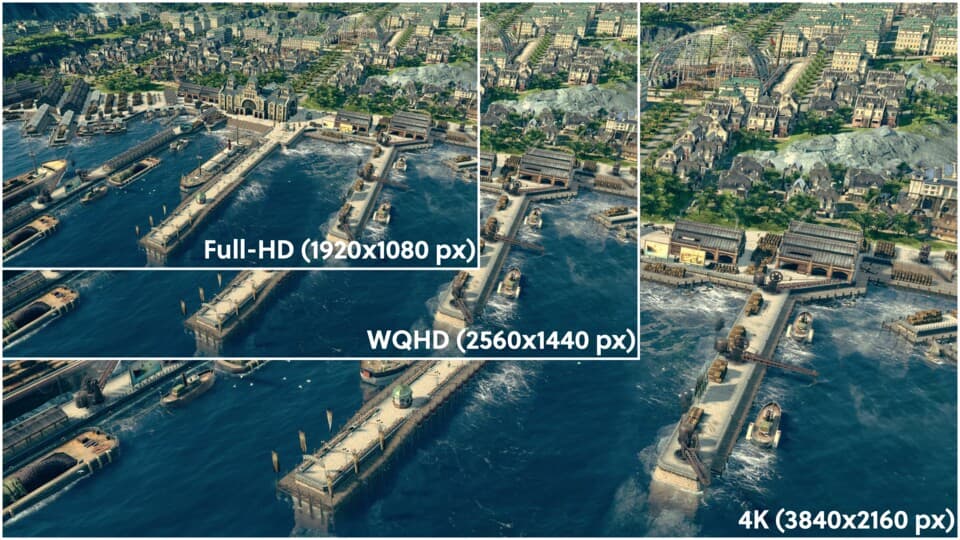
Pixel load: ~3.7M pixels per frame – about 1.7× 1080p, so your GPU FPS will drop accordingly compared to 1080p.
Typical VRAM target: 12–16 GB. I would not buy an 8 GB card now if 1440p is the long‑term goal, except on a strict budget.
NVIDIA picks I’d use for 1440p:
- GeForce RTX 5060 Ti 16 GB – Entry‑level 1440p; good for high settings at 60–90 FPS with upscaling.
- GeForce RTX 5070 12 GB – Very solid for 1440p high refresh; can push 120–165 Hz in many modern games with tuned settings.
- GeForce RTX 5070 Ti 16 GB – Great all‑rounder for 1440p ultra + ray tracing in many titles using DLSS.
- GeForce RTX 5080 16 GB – Overkill for 1440p in some cases, but perfect if you want 144–240 Hz and heavy ray tracing.
AMD picks I’d use for 1440p:
- Radeon RX 9060 XT 8 GB – Works at 1440p with tweaked textures; I’d only pick it if the price is very good.
- Radeon RX 9060 XT 16 GB – Much safer bet; handles high settings and heavier VRAM loads.
- Radeon RX 9070 16 GB – Strong 1440p performer; great for 120 Hz gaming.
- Radeon RX 9070 XT 16 GB – Ideal for high refresh 1440p with room to dabble in 4K via upscaling.
From experience: My breakthrough at 1440p came when I stopped insisting on native ultra in everything. With a 5070‑class or 9070‑class card, using DLSS/FSR on “Quality” and turning down only the heaviest options (RT shadows, extreme distance detail) made 120 FPS achievable in far more games than I expected.
GPUs for 4K (2160p)
4K is where people most often overspend or get disappointed. I spent months trying to “make do” with an upper mid‑range GPU at 4K and ended up playing at 1440p scaled anyway. At this resolution, you either commit proper high‑end silicon or you accept heavy compromises.
Pixel load: ~8.3M pixels per frame – about 4× 1080p. Every extra frame of ray‑traced lighting costs a lot.
Typical VRAM target: 16–24 GB. Some top cards now even go to 32 GB for maximum headroom with ray tracing and high‑res textures.
NVIDIA picks I’d seriously consider for 4K:
- GeForce RTX 5080 16 GB – Entry point for “real” 4K: 60 FPS+ at high settings in most games, using DLSS for the most demanding titles.
- GeForce RTX 5090 32 GB – For those who want 4K, max settings, heavy ray tracing and still aim above 60 FPS.
AMD picks I’d use for 4K:
- Radeon RX 9070 XT 16 GB – Can do 4K high in many games, but sometimes needs reduced RT or slightly lowered settings.
- Radeon RX 7900 XTX 24 GB – Very capable 4K card with plenty of VRAM; great for native or lightly upscaled 4K.
From experience: The biggest mindset shift for me at 4K was to treat upscaling (DLSS/FSR) as standard, not a crutch. Native 4K ultra is often not worth the 30–40% FPS loss versus a good upscaling mode that looks 95% as sharp in motion.
Step 3 – Upscaling, Ray Tracing and the 8K Reality Check
Modern GPUs lean heavily on upscaling and smart rendering to make higher resolutions playable. Ignoring these features is another mistake I made for too long.
DLSS (NVIDIA) and FSR (AMD) render the game at a lower internal resolution and upscale it to your display. In practice:
- Quality mode – Best image; great for 1440p and 4K. I use this by default.
- Balanced/Performance – Higher FPS, more noticeable artifacts; useful for competitive or very heavy games.
- Frame generation – Interpolates extra frames for smoother motion; latency‑sensitive gamers should use it carefully, but it’s excellent in slower titles.
Ray tracing is another FPS killer if you are not on a high‑end GPU. At each resolution tier I now follow a simple rule:
- 1080p: Light ray tracing is fine on mid-range cards, but I prioritise FPS first.
- 1440p: I enable RT only when paired with upscaling and accept a bit lower FPS.
- 4K: I treat full RT as a luxury feature for 5080/5090 and 7900 XTX class cards only.
Why 8K is still impractical: 8K pushes about 33 million pixels per frame – 4× more than 4K and 16× 1080p. Even top 2026 GPUs struggle to drive that natively. To make 8K remotely workable, you would rely almost entirely on aggressive AI upscaling, at which point you are no longer truly playing “native” 8K. That is why, for now, I ignore 8K marketing entirely and focus on getting a clean 1440p or 4K experience.
Step 4 – Budgeting and Avoiding Common Pitfalls
Once you know your resolution and a sensible GPU tier, you can budget without wasting cash where it does not help.
How I usually split a gaming PC budget:
- 1080p / 1440p builds: ~40–50% of the budget into the GPU.
- 4K‑focused builds: ~50–55% of the budget into the GPU, because the graphics card is the limiting factor.
Common mistakes I learned the hard way:
- Buying a 4K monitor with a mid‑range GPU. You end up running games at 1440p or lower anyway. If you already have the monitor, budget for at least a 5080 or 7900 XTX‑class card.
- Overbuilding for 1080p. Spending 4K‑GPU money just to play at 1080p/60 is wasteful. Put that money into a better monitor or SSD instead.
- Ignoring VRAM. A fast 8 GB card can feel worse in new games than a slightly slower 12–16 GB card once textures start swapping.
- Chasing ultra settings blindly. Dropping shadows, volumetrics and RT quality a notch often looks almost the same but saves 20–40% FPS.
- Pairing a monster GPU with a weak CPU. Especially at 1080p and high refresh, the CPU can become the bottleneck. A modern 6–8 core gaming CPU is a safe baseline in 2026.
Every time I have helped friends upgrade, the biggest gains came from simply matching expectations with hardware: choosing the right monitor, then a GPU and VRAM tier that makes sense for that resolution, and finally tuning settings instead of maxing everything by default.
Summary – Quick Resolution & GPU Cheat Sheet
To wrap it up, here is the simplified version of what has actually worked in my own rigs and builds I have done for others:
- 1080p competitive (144–240 Hz): RTX 5060 Ti 8/16 GB or RX 7600 XT / RX 9060 XT. Prioritise FPS, use medium–high settings and light RT at most.
- 1440p all‑round (100–165 Hz): RTX 5070 / 5070 Ti or RX 9060 XT 16 GB / RX 9070 / 9070 XT. Use DLSS/FSR Quality, tweak RT and heavy effects.
- 4K cinematic (60–90 Hz): RTX 5080 / 5090 or RX 9070 XT / 7900 XTX. Plan on using upscaling almost always, treat max RT as optional.
- 8K: Ignore it for now unless you are testing tech for fun. It depends on aggressive AI upscaling and does not bring proportional visual gains over 4K on normal‑sized screens.
If you lock in your resolution and FPS target first, picking the right GPU suddenly becomes straightforward. That is how I finally stopped chasing specs for their own sake and started building PCs that actually feel great to play on. If I can get that right after years of mismatched upgrades, you can absolutely dial in a setup that fits your games, your budget, and your screen.
FinalBoss // Gear
Level up your setup
01Graphics cardson Amazon→02Gaming laptopson Amazon→03High-refresh gaming monitorson Amazon→04Discounted game keyson Kinguin→Affiliate links · As an Amazon Associate, FinalBoss earns from qualifying purchases.
Want to Level Up Your Gaming?
Get access to exclusive strategies, hidden tips, and pro-level insights that we don't share publicly.
Ultimate Guide Strategy Guide + Weekly Pro Tips