
Table of Contents (9)
Key takeaways after living with the Mchose L7 Pro+
- 43 g, genuinely ultralight, with no honeycomb holes and full wireless/Bluetooth support.
- PixArt PAW3395 sensor and up to 8,000 Hz polling make it fully tournament‑grade on paper.
- Deep, surprisingly nerdy software (browser or local) with settings you rarely see at this price.
- Shape is clearly tuned for claw and hybrid grips; full palm grippers may never quite click with it.
- Clicks feel a bit stiff on release, and battery life is “fine” rather than amazing.
- At $60, the value is borderline ridiculous if the shape and click feel work for you.
How a $60 “clone” mouse muscled into my high‑end rotation
I went into the Mchose L7 Pro+ expecting a fun little side project: test a cheap ultralight, confirm it feels cheap, go back to my usual high‑end mains. Instead, this 43 g budget mouse ended up wedging itself between my $150+ flagships and stubbornly refusing to leave.
I’ve been on the competitive mouse treadmill for years. Logitech G Pro X Superlight, Razer Viper line, Pulsar’s X2 series, magnesium‑framed oddities-it’s a blur of small, lighter, faster, pricier. When your current mouse costs around $180, you subconsciously start assuming that’s just the price of serious performance.
Then this $60 Mchose arrives with a PixArt PAW3395, tri‑mode connectivity, PTFE feet, and legitimately deep software. On paper, it’s almost rude. In practice, it’s even ruder, because most of the things that matter mid‑fight-tracking, latency, control-feel right up there with the big names.
There are compromises. The main clicks have more resistance than I’d like, the hump in the back keeps reminding you it’s there, and you’re not getting marathon battery life. But after a couple weeks of Valorant scrims, CS2 deathmatch, and late‑night Diablo IV runs, I kept coming back to a pretty wild thought: this thing is 60 bucks.
Shape, grip, and that ever‑present hump
Let’s start with the bit that will make or break this mouse for a lot of people: the shape.
The L7 Pro+ is clearly inspired by the Pulsar X2 CrazyLight Medium. Same general size, same back‑biased hump, same competitive‑FPS silhouette. But living with both side by side, the differences matter. Mchose’s take is narrower toward the front and the hump feels more pronounced and “peaky.” It’s a shape that screams claw grip first, everything else second.
My natural grip is a lazy palm-claw hybrid: most of my palm is on the shell, but my fingers arch up a bit. With the Pulsar, I can get away with that without thinking. With the L7 Pro+, that hump keeps making conversation. Not painfully, not in a deal‑breaking way—it just never completely disappears. After a few hours, I always knew exactly where the back of that shell was pressing into my palm.
Friends of mine who are more “textbook claw” actually loved it. One of them took one look, pinched in with a pure claw grip, and immediately went, “Oh yeah, this is the stuff.” The sharper hump gives your palm a clear anchor point while your fingers dance the aim game at the front. If that’s how you hold a mouse, this shape makes a lot more sense.
There are two size options: the L7 and the L7 Pro+, with the Plus being the larger shell aimed at medium and larger hands. My hands are around 19 x 10 cm, and the Plus felt appropriate—if anything, I was glad it wasn’t smaller. If you’ve got smaller hands or prefer a more compact shell, going for the non‑Plus is likely the better move.
What this isn’t, at least in my experience, is a palm mouse. You can palm it in a relaxed way if you really want to, but the narrower front and that pushy hump don’t flatter a full palm grip. If you’re coming from something like a classic Ergo (think Razer DeathAdder or a big Corsair), this will feel like you’ve just jumped into a different sport.
On the flip side, that narrow front and 43 g weight combined with proper PTFE feet give it a “glide on rails” feel that’s ridiculously easy to redirect. On my old faithful SteelSeries QcK and a faster hybrid pad, the L7 Pro+ felt like a scalpel—especially at low sens. I briefly tried it on a glass pad too, where it felt incredible, though I didn’t push that too far; PTFE on glass is a quick way to chew through feet.
43 g and still solid (mostly)
At 43 g (measured), this is proper ultralight territory. No honeycomb cutouts, no weird skeletal shell—just a clean body that, somehow, still fits a PAW3395 sensor, a 2.4 GHz radio, Bluetooth, and a battery inside. It’s not the absolute lightest mouse on the market, but it’s right there with the elite few.
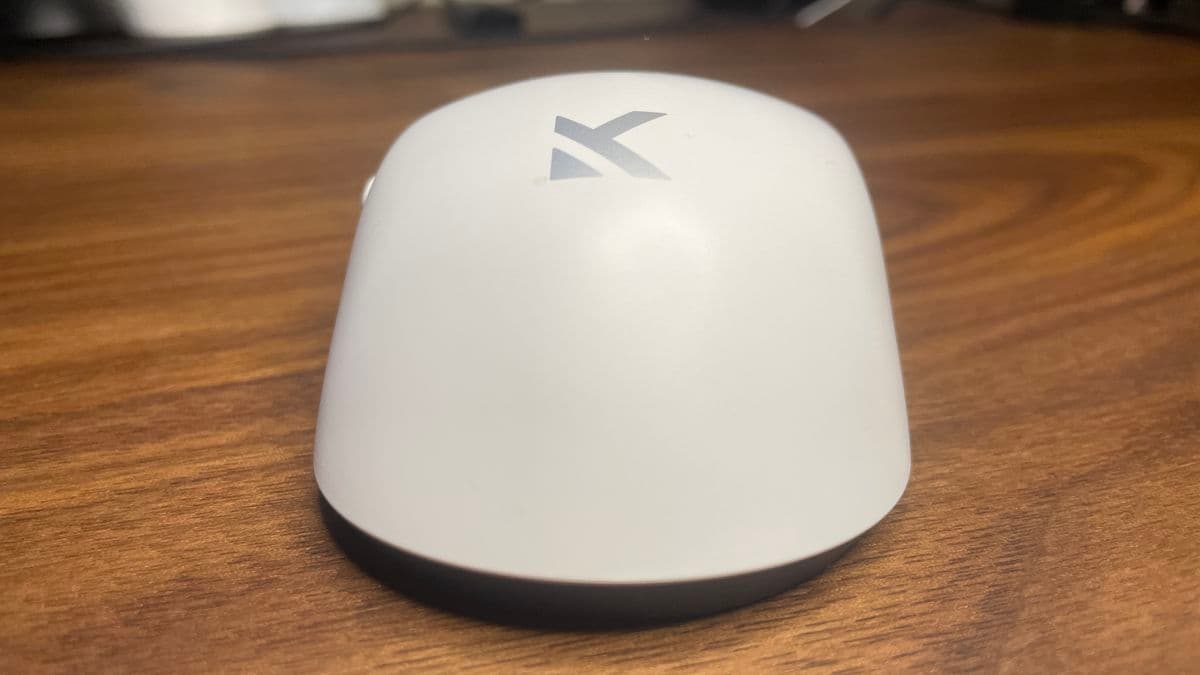
There is a trade‑off if you deliberately go looking for it. Squeezing the sides with an unhealthy amount of force, I could coax a bit of creak out of the shell. Not crackling, not scary, just a reminder that this is tuned for grams first and tank‑like solidity second. In normal use, including some tense “please don’t peek me” moments where I definitely wasn’t gentle, it felt perfectly sturdy.
The PTFE feet are well‑cut and decently thick. I didn’t feel any scraping or overlap, even on a harder pad. They’re not boutique aftermarket skates, but they don’t feel like an area where Mchose cheaped out to hit its price. Out of the box, glide is very smooth and consistent.
Sensor and wireless performance: PAW3395 still feels “endgame”
Underneath, the L7 Pro+ runs a PixArt PAW3395 sensor. If you follow mouse nerd discussions at all, you already know the 3395 is basically the gold standard from the last couple of years. Some newer gear is pushing PAW3950, but in real use the differences (slightly higher max DPI, slightly lower lift‑off) are academic for most people.
Specs are suitably ridiculous: up to 26,000 DPI (I stuck to my usual 800-1600), 650 IPS tracking speed, and 50 G acceleration tolerance. More importantly, I didn’t see any acceleration, spin‑outs, or weird jitter in my normal settings. Flicks in CS2 landed where I expected, micro‑corrections in Valorant felt natural, and long tracking beams in Overwatch stayed locked in.
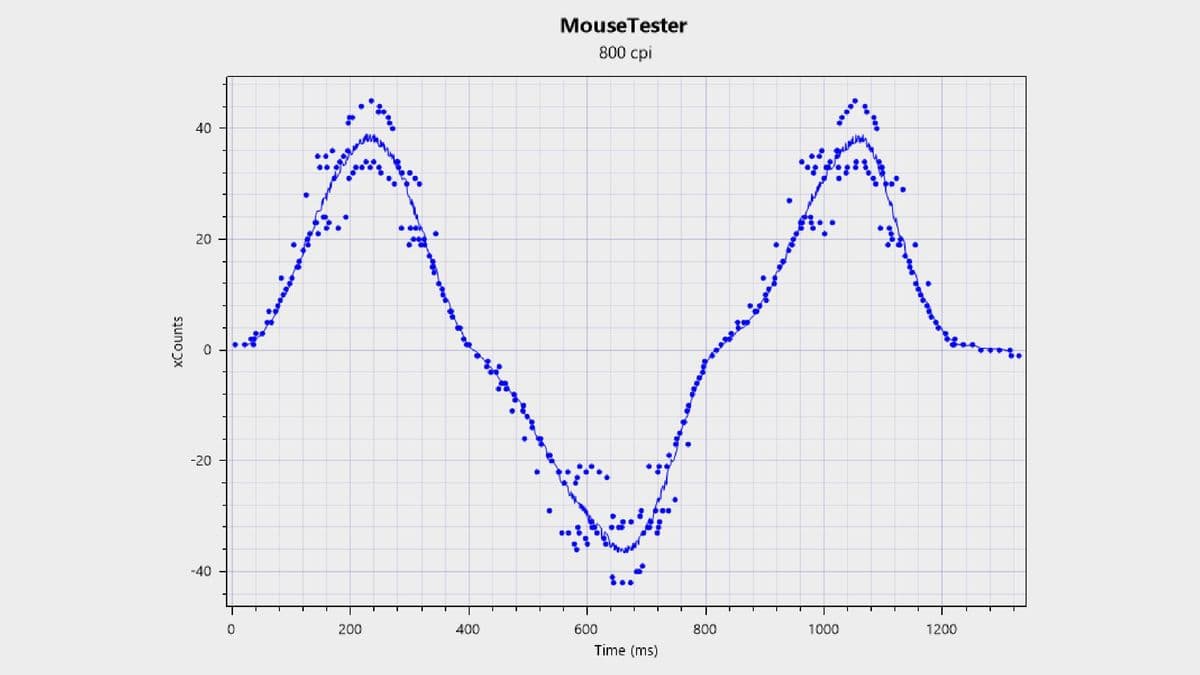
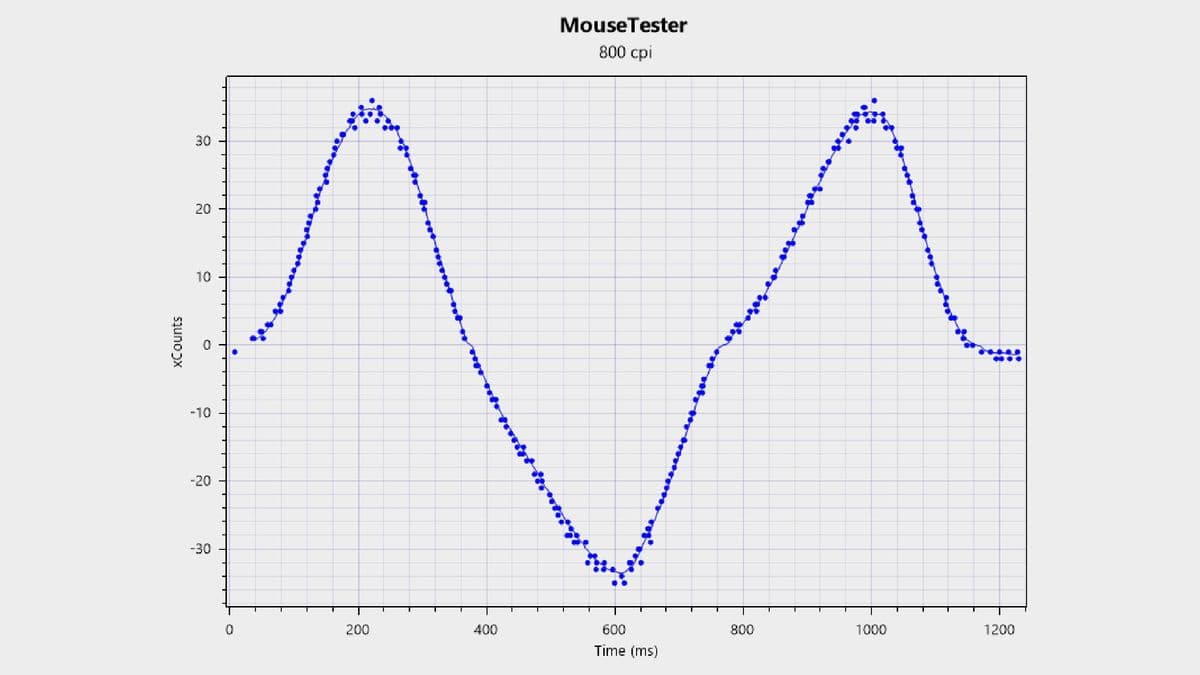
I ran a few tests both wired over USB‑C and on the 2.4 GHz dongle. In synthetic testing tools, you can see a tiny difference in line stability between wired and wireless—nothing dramatic, just the kind of variance I’ve seen on plenty of wireless mice. In actual gameplay, I couldn’t feel it. Latency felt competitive with my much more expensive mains, and I never had a moment where I thought, “That shot missed because of the mouse.”
Polling rate goes all the way up to 8,000 Hz if you want to flex. I did most of my time at 1,000 Hz and some at 2,000 Hz. Above that, you’re in serious diminishing returns territory unless you’re chasing the most extreme smoothness and your PC is up for the extra overhead. Still, having the option at this price is impressive; some pricier mice cap out lower.
Bluetooth is here as well for laptops and couch use. I used it a bit for general desktop stuff and it was totally fine, but I wouldn’t recommend it for competitive play—just like every other gaming mouse, really. 2.4 GHz or wired is where you want to be when the ranked queue pops.
Clicks, scroll, and why the buttons won’t be for everyone
The main criticism I have of the L7 Pro+ lives in the clicks. You can get it with either Omron optical switches or Kailh Black Green Dot opticals; mine had a stiff, snappy feel that clearly favours intentional presses over feather‑light taps.
The press itself feels fine—no mush, no “tinny” rattle like you sometimes get on cheaper shells. The problem is the release force. Compared to something like Logitech’s G Pro line or even the Pulsar X2, there’s noticeably more resistance as the switch pops back up. It’s not heavy to the point of being fatiguing, but it is heavier than I’d like for spammy left‑click tasks or rapid jitter movement.
After a few days, my fingers adjusted and I stopped actively thinking about it, but whenever I swapped back to a lighter‑feeling click (especially after using a premium mouse with ridiculously easy actuation), it was obvious. If you love ultra‑hair‑trigger clicks for things like fast building or rhythmically tapping shots, this might bug you. If you prefer a bit of firmness and hate accidental presses, you may actually like it.
The side buttons are in a good spot, with a clean, crisp action and no noticeable wobble. They’re not giant, but I never had trouble finding them mid‑fight. The scroll wheel is pleasantly muted with distinct steps—no cheap‑toy rattle, no weird inconsistencies. Middle click needs a little force, but nothing out of the ordinary.
Battery life: acceptable, not marathon
Here’s where the realities of ultralight design show up. Mchose quotes around 70+ hours at 1,000 Hz, and that more or less matches my experience. With the polling at 1,000 Hz, no RGB to worry about, and using it for work during the day plus a couple of hours of games at night, I got about a week on a charge.
When I bumped the polling to 2,000 Hz for ranked nights and kept it there more often, that dropped to just a few days. Not terrible, but if you’re coming from chunkier wireless mice that can stretch to triple‑digit hours (like some 55 g “only 1 kHz” competitors), you’ll notice you’re plugging this in a bit more.
Charging is via USB‑C at the front, and you can use it wired while it charges—no nonsense there. The dongle has a neat little LED that slides from green down to red as the battery depletes, which is more useful than I expected; it’s a quick visual check without opening any software.
The one annoyance is the battery readout in the app. It only shows in 10% steps, so you bounce from 40% to 30% with no finer granularity. Not a deal‑breaker, but I’d love a bit more detail if they ever update the software.
Software: surprisingly “enthusiast” for a budget mouse
I wasn’t expecting the software to be one of the highlights, but here we are. Mchose offers both a browser‑based configuration tool and a regular local app. That’s already a win in my book: if you hate installing yet another peripheral suite, you can just tweak settings in your browser; if you’re worried about connectivity, grab the offline app.
The UI is clean and, crucially, responsive. I had none of the lag and bloat you sometimes get from big‑brand packages. You can remap buttons, set up multiple profiles, and adjust DPI steps exactly how you’d expect.
The real fun is in the Performance tab. Here you can tweak:
- Polling rate (up to 8,000 Hz)
- Lift‑off distance
- Debounce time
- Motion sync / sensor behaviour
- Sensor tilt alignment
Then there’s a mysterious trio of modes: Performance, Gaming, and Extreme. Digging deeper, these control the sensor’s internal scanning frame rate—the effective FPS at which it reads the surface. You don’t usually see that exposed in consumer software, especially not at this price. I can’t honestly say I felt a big difference swapping between them in real matches, but the point is: the mouse lets you try.
Between this, the DPI tuning, and the separate wired/wireless profiles, the L7 Pro+ feels less like a budget mouse and more like something designed by people who lurk in mouse‑tuning Discord servers. If you enjoy tinkering, you’ll be very at home here.
Who should actually buy the Mchose L7 Pro+?
After a couple of weeks swapping it in and out of my regular lineup, this is where the L7 Pro+ landed for me.
- Competitive FPS players on a budget: If you’re grinding Valorant, CS2, Apex, or Overwatch and want a genuinely high‑end sensor with ultralight weight without paying flagship money, this is dead in the sweet spot.
- Claw and hybrid grippers: The shape really comes into its own in claw and aggressive hybrid grips. If that’s you, the hump becomes a helpful anchor instead of a nagging presence.
- Settings tinkerers: If you like pulling apart every last performance setting and playing with polling, LOD, and sensor modes, the software is a treat.
On the other hand:
- Palm grippers: If you like to smother your mouse with your whole hand, you’re likely to fight the shape more than you enjoy it.
- Click‑sensitive players: If you’re very picky about super‑light main clicks, the heavier release tension here may annoy you.
- Battery‑life maximalists: If you want to charge once a month and forget about it, there are heavier mice with bigger batteries that will suit you better.
FinalBoss // Gear
Level up your setup
01Top-rated gaming headsetson Amazon→02High-refresh gaming monitorson Amazon→03Gaming chairson Amazon→04Discounted game keyson Kinguin→Affiliate links · As an Amazon Associate, FinalBoss earns from qualifying purchases.
Want to Level Up Your Gaming?
Get access to exclusive strategies, hidden tips, and pro-level insights that we don't share publicly.
Ultimate Reviews Strategy Guide + Weekly Pro Tips