
Table of Contents (11)
Lag made my Quest 3 unplayable with normal earbuds – then I tried the PrismXR Vega T1
The first time I tried to play Pistol Whip on my Meta Quest 3 with “normal” Bluetooth earbuds, I genuinely thought I’d broken something. Gunshots were landing a beat after I pulled the trigger, music was half a second behind the action, and my brain just went, “Nope.” I ripped them out and went back to the built-in speakers like it was 2019 again.
That’s been my life with wireless audio on Quest 3: pairing works, Netflix is fine, YouTube is fine… and the instant you fire up a game, Bluetooth latency steamrolls the experience. I’ve tried a few so-called “gaming earbuds” to work around it, but they’re either stupidly expensive or not actually that low-latency when it counts.
The PrismXR Vega T1 earbuds are the first sub-$100 pair I’ve used that actually fix the problem properly. After a week of using them as my main buds on Quest 3, PC, Steamlink, and my phone, they’ve quietly become part of my everyday setup. They’re not perfect-bass-heavy tuning, no ANC, no app-but for $69.99, they hit a very sweet spot for VR and gaming audio.
Quest 3 audio is great until you care about precision
I don’t hate the Quest 3’s speakers. For casual sessions, they’re actually pretty solid: clear enough, and they save you the hassle of putting anything on your ears. But once you start playing horror games, rhythm shooters, or anything competitive, those open speakers become a problem. Everyone in the room hears what you’re doing, and immersion goes out the window.
The natural instinct is to throw your usual Bluetooth earbuds at the problem. And that’s where the Quest setup falls apart. Movies and music are fine because your brain tolerates a bit of lag. In games, though, even a small delay between what you see and what you hear feels wrong. Beat-based stuff like Pistol Whip or reaction shooters feel mushy, like you’re constantly half a step behind.
The “proper” fix is to use something with a dedicated low-latency wireless link via a dongle. The catch? Most of those live in headset land, or they’re buds from big names like Razer or SteelSeries that regularly creep past the $100 mark. The Vega T1 slots into a rare niche: a $69.99 pair of wireless earbuds with a USB-C dongle that behaves like a gaming headset receiver, but also doubles as everyday Bluetooth buds for your phone.
Design and comfort: light in the ear, clumsy in the pocket
In-ear comfort is the bit you only notice when it’s bad, and VR makes that twice as important. You’re already wearing a plastic brick on your face; you do not want your ears suffering at the same time. The PrismXR Vega T1 get this mostly right.
The buds themselves are lightweight and use a familiar stem-style design that hangs down from your ear rather than plunging deep inside it. Compared to more intrusive in-ear monitors (think something like the Razer Moray style of “I live in your ear canal now”), the Vega T1 feel relaxed and unobtrusive. I could wear them under the Quest 3 for a couple of hours without that aching, pressurized feeling you get from more aggressive tips.
PrismXR includes multiple silicone ear tips, so I was able to get a decent seal without cranking them uncomfortably tight. Isolation is purely passive—no ANC here—so you’re relying entirely on that seal, but for blocking out most household noise during VR, they were good enough.
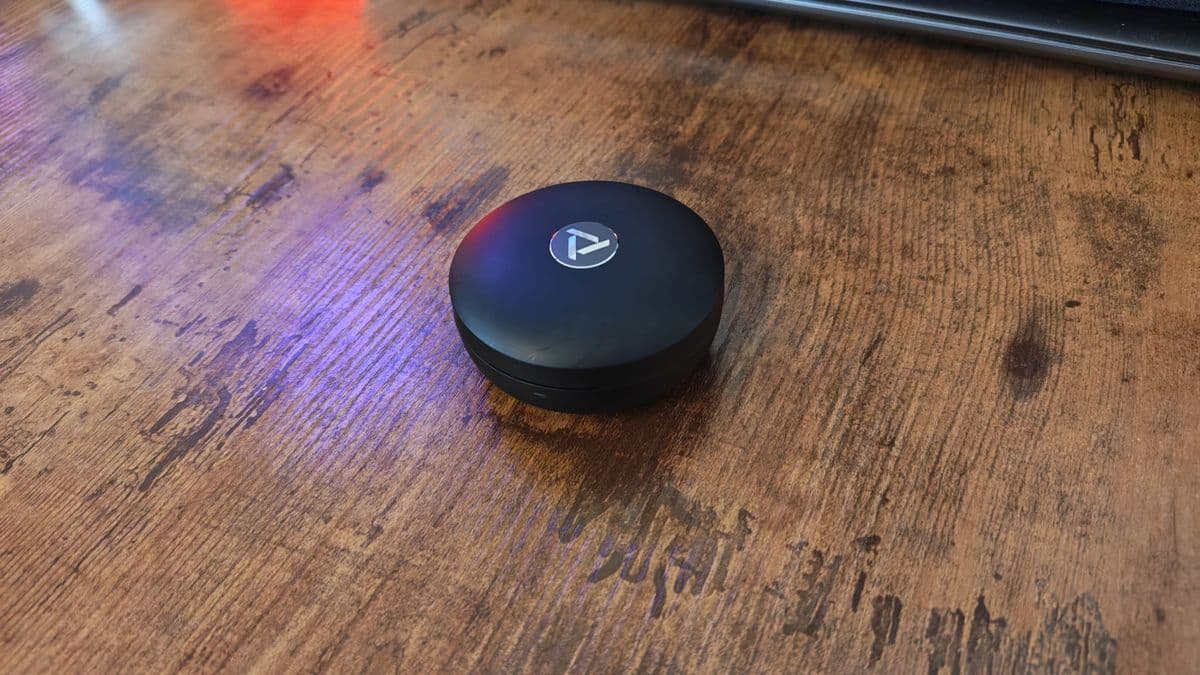
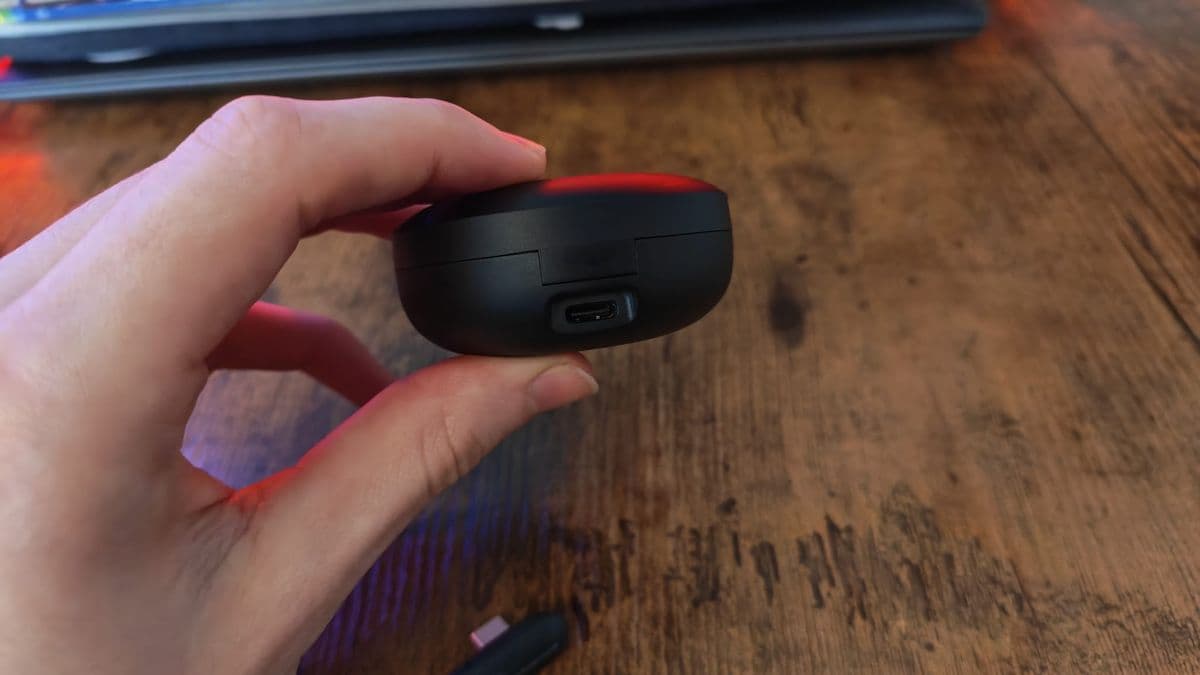
The case is where the design stumbles. It’s a circular puck with a nice logo on top, but the hinge and opening aren’t obvious at all. More than once I pulled it from my pocket and spent a few seconds rotating it like a confused raccoon until I found the right angle to pry it open. The USB-C charging port eventually becomes your “compass,” but it’s not an intuitive shape the way a standard pillbox case is.
The secret weapon: a USB-C dongle with passthrough
Pop open the case and you see what makes the Vega T1 special: alongside the two earbuds, there’s a tiny USB-C dongle nestled in its own slot. This is the low-latency magic ticket. Instead of relying on standard Bluetooth, you plug the dongle into your Quest 3, 3S, PC, handheld, or USB-C device and the audio link switches to a dedicated wireless connection that feels effectively lag-free.
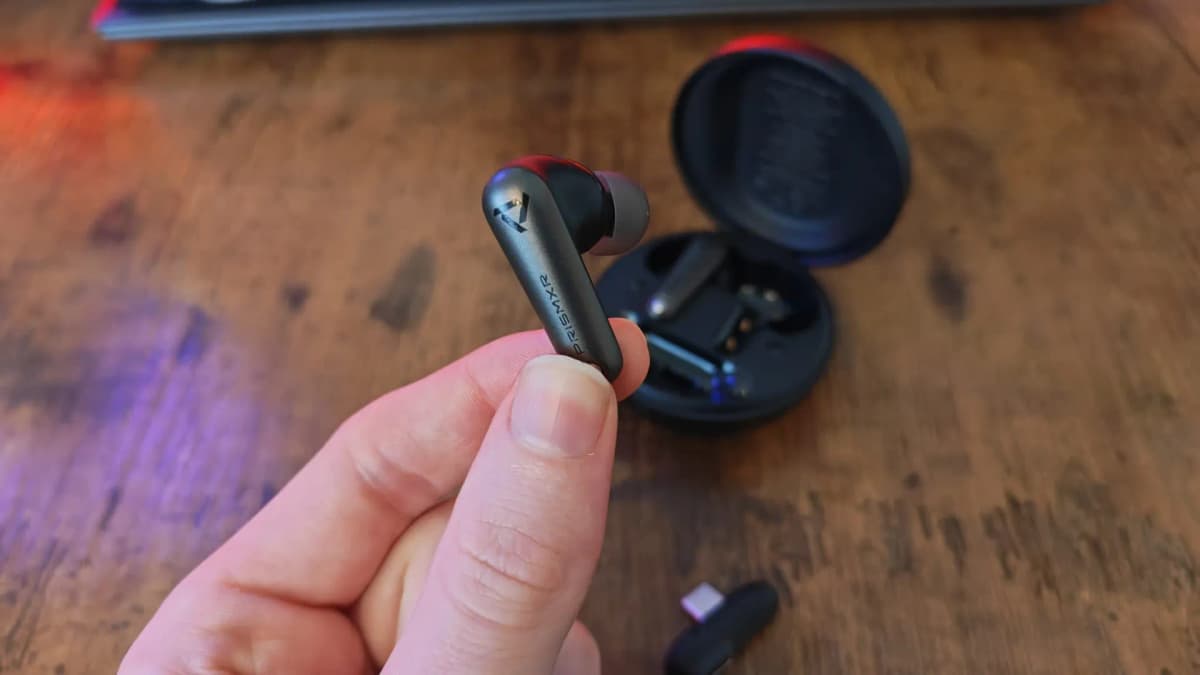
Even better, the dongle has a passthrough USB-C port on the back. That sounds boring on paper, but in practice it’s huge. So many USB-C dongles block the only port you actually want to use—especially on slim laptops, handhelds, or the front of a PC. With the Vega T1, you can plug the dongle into the Quest 3 and still chain a battery headstrap, link cable, or charging belt into that passthrough. It plays nice with the rest of your setup instead of hijacking it.
You still get normal Bluetooth for your phone and tablet, of course. There’s support for connecting via Bluetooth and USB at the same time, though I didn’t lean heavily on that beyond basic testing—it’s more of a “nice to have” than a cornerstone feature. Both earbuds have microphones on board, which are fine for in-game chat and quick calls, but you’re not going to be hosting a podcast on them.
Where the feature set feels barebones is control and customization. There’s no companion app, no EQ presets, no way to remap gestures. Touch controls on the buds can handle the basics (play/pause, etc.), but the touch area isn’t clearly defined and I found them inconsistent. I gave up and used my phone or PC for most controls, which is far from a deal-breaker, just not very polished.
VR performance: MaestroVR, Pistol Whip, and finally zero lag
The real test was simple: could these things keep up with VR rhythm and reaction games on Quest 3 without turning everything into an off-beat mess?
I started with MaestroVR, standing on the virtual conductor’s podium, baton in hand. A few months back I’d tried two different sets of regular Bluetooth earbuds with this exact game and gave up because the audio was always just out of time. This time, with the Vega T1 dongle plugged into my Quest 3, I tapped the baton, raised my arms, and cued the orchestra into “Duel of the Fates.” It all lined up. Visuals, motion, and audio felt like a single moment instead of three desynced layers.
Then I went back to Pistol Whip. It’s not a pure rhythm game, but so much of the flow depends on feeling the beat as you dodge and fire. With normal Bluetooth buds I was forever a note behind; with the Vega T1, shots landed exactly where my brain expected them to. That “mushy” feeling disappeared, and I could actually play for score instead of fighting the hardware.
Even more impressive: streaming via Steamlink. I was half expecting that adding another layer—PC to Quest over Wi-Fi, then audio to earbuds—would reintroduce lag. But playing PC games through Steamlink with the dongle in the Quest 3 still felt tight. My PC immediately grabbed the Vega T1 as its active audio device, to the point where Slack notifications cheekily chimed right in the middle of my virtual conducting session.
In short: for VR, the Vega T1 deliver the low-latency audio link Meta’s own Bluetooth stack refuses to. I didn’t encounter noticeable lag in native Quest 3 titles or while streaming, and I stopped thinking about it—which is exactly how audio should be.
PC, Steamlink, handheld, phone: one pair of buds for everything
Once I was confident they worked for VR, I pulled the dongle from the Quest 3 and jammed it into my desktop. The Vega T1 instantly became my PC gaming earbuds. I ran a mix of games on them, from the chaos of Towerfall Ascension to the tense, methodical hunting in Hunt: Showdown.
Directional cues and positional audio came through clearly enough that I’d happily take them into sweaty Hunt sessions outside of testing. Footsteps, distant shots, that horrible ring in your ears after an explosion—none of it felt smeared or lost. They don’t have the sheer soundstage or openness of a good over-ear headset, but for a tiny pair of earbuds they pulled their weight.
On my Asus ROG Ally X and Android phone, I mostly ran them over Bluetooth. For video, latency was fine; lipsync never bothered me. For mobile gaming, they were perfectly playable, though if you’re ultra-sensitive, the dongle route is still the gold standard. The nice thing is, I didn’t feel like I was swapping to a “worse” backup pair when I moved away from VR—these handled daily use just fine.
Sound quality: gaming-first tuning with a bass-heavy tilt
All the latency magic in the world doesn’t matter if the actual sound is trash. Thankfully, the Vega T1 land in “genuinely decent” territory—especially considering they’re clearly tuned with gaming in mind first.
The overall profile is noticeably bass-heavy. Explosions, gunfire, and low-end thumps hit with satisfying weight, which is great in shooters and action games. The midrange is reasonably clear, so dialogue and positional audio details don’t vanish under the boom, but there’s definitely a tilt toward warmth rather than clinical precision.
The trade-off is at the top end. Treble can feel a little rolled off and less detailed than similarly priced “music-first” earbuds I’ve used. If you’re an audiophile who obsesses over the air and sparkle in hi-hats, strings, or ambient textures, you’ll probably notice that the Vega T1 smooth some of that out. For gaming, that’s often an advantage—harsh highs can be fatiguing—but in music listening sessions I occasionally missed that extra bit of clarity and separation.
Without active noise cancelling or an EQ app to tweak the sound, what you hear is basically what you get. I did a bunch of walking and commuting with them as everyday Bluetooth buds and enjoyed everything from metal to synthwave to podcasts, but when I swapped back to a more audio-focused pair from a brand like EarFun in the same price bracket, the music step-up was clear. The Vega T1 are “good enough” for general use, but they don’t punch above their weight the way some music-centric buds do.
What’s missing: ANC, an app, and more reliable controls
The compromises are pretty straightforward. There’s no ANC, which would have been nice for flights, commuting, or just blocking out a noisy household. Passive isolation is okay with the right tips, but it’s not going to rival proper noise-cancelling earbuds or closed-back headsets like a SteelSeries or Beyerdynamic gaming headset.
No companion app is the other big omission. You can’t fine-tune EQ, update firmware, or customize controls. In a world where even mid-range earbuds often come with an app full of toggles and sliders, the Vega T1 feel a bit old-school on that front. Combined with touch controls that are finicky at best, you can tell PrismXR prioritized getting the core latency-free experience right over layering on software extras.
The case design quirk is a smaller annoyance, but it adds friction to everyday use. When you’re reaching for earbuds multiple times a day, that extra “where the hell does this open?” beat gets old fast.
Who the PrismXR Vega T1 are really for
If you mostly want earbuds for music, travel, and daily life, and gaming is a secondary concern, there are better-balanced options around this price that include ANC and apps with EQ. The Vega T1’s bass-heavy tuning and barebones feature set won’t win over picky music listeners.
But if you’re a Quest 3 or 3S owner who’s sick of Bluetooth latency ruining VR games, and you also dabble on PC, Steamlink, or handhelds, these make a ton of sense. You’re getting a genuinely low-latency solution tailored for VR that doubles as a versatile set of wireless earbuds for everything else, without spending the $100-$180 that bigger gaming brands often ask for similar dongle-based setups.
Bottom line: finally, a sane-priced fix for Quest 3 audio lag
After a week of using the PrismXR Vega T1 as my main audio solution for Quest 3, PC, Steamlink, and my phone, they’ve earned a permanent spot in my kit. They’re not the best-sounding earbuds I own, and they’re not the most feature-rich, but they solve a very specific, very annoying problem better than anything else I’ve tried anywhere near this price.
If you’re chasing perfect, audiophile-grade sound or you need ANC, look elsewhere. If you just want your VR games to sound good and be in sync without dropping triple digits on a big-brand headset or earbuds, the Vega T1 nail it. For $69.99, that’s enough for me to call them an easy recommendation for Quest 3 owners and PC gamers alike.
Rating: 8/10 – A smart, affordable low-latency audio fix for Quest 3 and beyond, held back slightly by bass-heavy tuning and missing quality-of-life features.
TL;DR
- What it is: A $69.99 pair of wireless gaming earbuds with a USB-C dongle designed to deliver low-latency audio on Meta Quest 3, PC, Steamlink, handhelds, and phones.
- What it does well: Virtually lag-free audio on Quest 3 and PC; comfortable, lightweight fit under a VR headset; USB-C dongle with passthrough so you can still charge or use accessories; versatile enough for everyday Bluetooth use.
- Where it stumbles: Bass-heavy sound that can dull treble detail, no ANC, no companion app or EQ, inconsistent touch controls, and a slightly awkward puck-shaped case.
- Best for: VR and PC gamers who are sick of Bluetooth latency and want a single, affordable pair of buds that work across Quest 3, PC, Steamlink, and mobile without breaking $100.
- Avoid if: You care more about music quality and ANC than low-latency gaming, or you want deep software customization and rock-solid touch controls.
FinalBoss // Gear
Level up your setup
01Meta Quest 3on Amazon→02PSVR2 accessorieson Amazon→03Gaming chairson Amazon→Affiliate links · As an Amazon Associate, FinalBoss earns from qualifying purchases.
Want to Level Up Your Gaming?
Get access to exclusive strategies, hidden tips, and pro-level insights that we don't share publicly.
Ultimate Reviews Strategy Guide + Weekly Pro Tips