
Table of Contents (8)
The tiny “Mini” mouse I didn’t expect to fall for
I went into the Pulsar X3 CrazyLight Mini with a bit of baggage. My last “Mini” experience was the Pulsar X2H CrazyLight Mini, and that thing and my grip style hated each other. Huge rear hump, ambi shell, everything about it felt wrong for my hand. So when another Pulsar box showed up with “Mini” printed on the front, I was already bracing for disappointment.
Then I noticed another line on the box: “For palm and relaxed claw grip.” That’s basically my life story. I’m a hybrid palm-claw / relaxed-claw player: palm resting on the back of the shell, fingers slightly arched, not that ultra-aggressive fingertip twitchiness a lot of pros swear by. My hand size is around 19 x 10 cm, which puts me dead in the “average male gamer hand” range.
Within the first evening of using the X3 CrazyLight Mini, I realized this wasn’t a repeat of the X2H fiasco. It felt weirdly natural right away. Not perfect, not magic, but there was this subtle “oh, my wrist isn’t fighting the mouse anymore” moment that crept in over a few hours. By the end of the week, I was seriously eyeing my main Logitech G Pro X2 Superlight 2 (Superstrike) and thinking, “Yeah, you might be benched for a while.”
The X3 CrazyLight Mini is a right-handed ergonomic mouse that leans hard into comfort and lightness: a central ergo hump, about 45 g on the scales, flagship Pulsar XS-1 sensor, optical switches, 2.4 GHz wireless, USB-C, and no RGB nonsense. It’s also $156 / £130, which puts it well into premium territory, especially with how many great sub-$70 ultralights exist now.
So the real question I kept circling back to over a week of work, editing, and a frankly irresponsible amount of Counter-Strike 2 was simple: is this thing good enough, comfortable enough, to justify the price and its not-amazing wireless consistency and battery?
Shape, size, and comfort: built for relaxed claw, not fingertip freaks
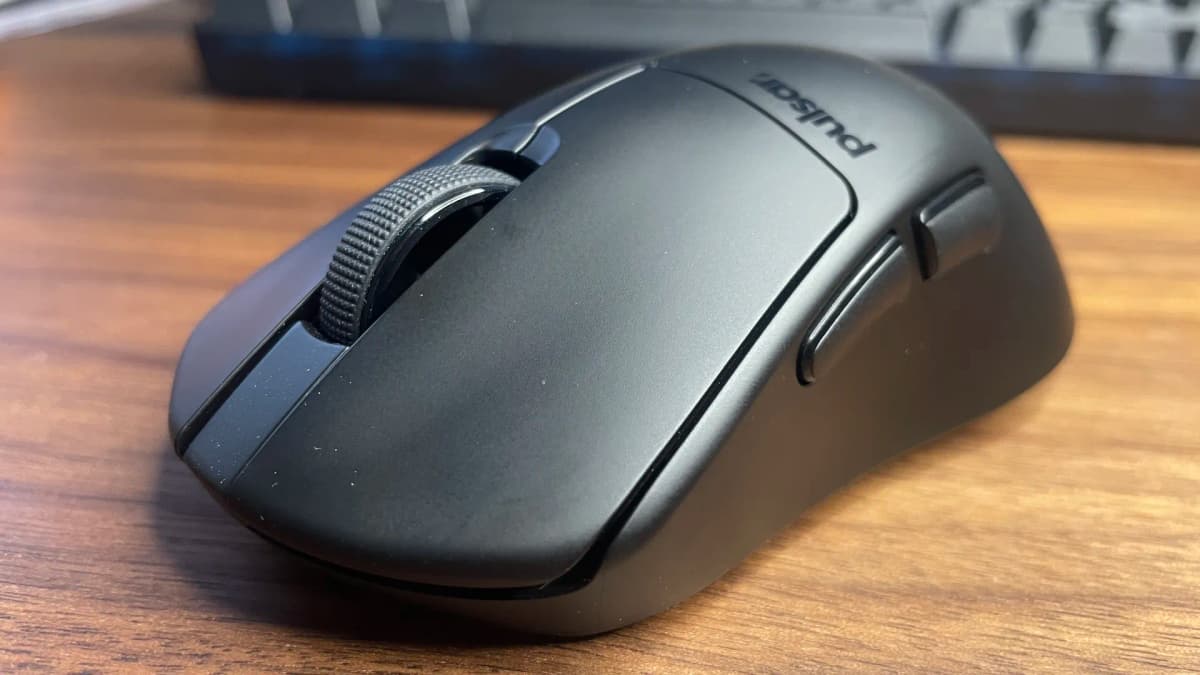
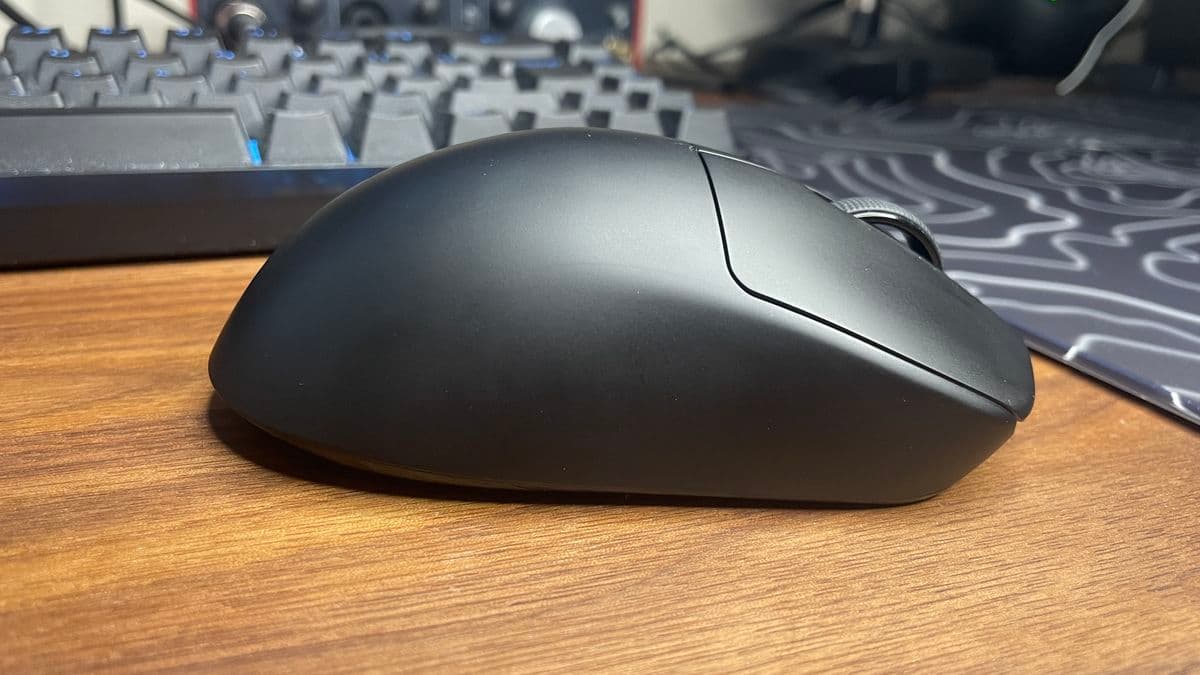
The shape is where the X3 CrazyLight Mini quietly destroys a lot of its competition. Pulsar calls it an “ergo hump” design, and that actually describes it pretty well: the hump sits roughly in the center along the length but is pushed off to the right side, with a gentle inward curve on the left for your thumb. If you’ve used something like a Logitech G703, imagine a slightly smaller, more dialed-in version of that twist.
The magic, for me, is in how that hump and side slope let my hand naturally fall into place. My palm rests over the back third of the mouse, and the right edge lets the outside of my hand slope downward instead of forcing it to stay flat. That translates to less tension in the wrist and less of that “hovering” feeling you get with a lot of symmetrical shells where your hand never quite relaxes.
With my 19 x 10 cm hands, the “Mini” label almost feels wrong. It’s compact, sure, but it never feels cramped. I don’t have to curl my fingers into some weird claw to keep control, and I’m not falling off the back of the shell either. If anything, I’m glad I didn’t go for a larger size; I think it would start to feel too long for this grip style.
Comfort-wise, this might be the comfiest non-vertical mouse I’ve used so far. After a full working day of editing and browsing, then swapping straight into a few hours of CS2 and Valorant, I didn’t get the usual tightness in the top of my hand that I do with more neutral, ambidextrous shapes.
But that comes with a big caveat: this shape heavily favors palm and relaxed claw. If you’re a fingertip player-palm floating off the mouse completely-this hump is going to get in the way. It eats into the vertical space you’d want for big flicks and quick repositions. Aggressive, high-arched claw grippers might also find the hump feels a bit too “in the middle” compared to something more rear-loaded.
There’s also a mirrored left-handed version, which is rare enough in this niche that it deserves a nod, but I can only speak for the right-handed model. If your grip style matches the words “relaxed claw” or “hybrid palm,” this shape is absolutely worth shortlisting.
Build quality and feel: premium in hand, crazy light on the scales
Pulsar lists the X3 CrazyLight Mini at 43 g ± 1 g. On my kitchen scales, it settles at around 45 g. Either way, the headline is the same: this thing is stupidly light for an ergonomic shell that doesn’t feel hollow or toy-like.
The underside is where Pulsar pulls their usual CrazyLight trick: a honeycomb of holes that keeps the top shell smooth and solid while shaving grams from the bottom. I’d rather have holes on the underside than a cheese-grater top any day, and in use I never felt flex or heard creaks even when squeezing the shell harder than I ever would in-game.
The coating is a matte black that feels smooth but not greasy. It does pick up fingerprints, like pretty much every black mouse, but it hasn’t turned slick during long sessions. I used it on a humid evening and didn’t feel like I was fighting sweat to hold on, which is always my fear with super-light mice.
The stock PTFE feet are thin, pure white skates that glide easily on cloth pads. They’re not the thickest or most luxurious feeling skates I’ve used, but they are fast and consistent. They’ll probably need a swap sooner than chunkier feet from something like Tiger Ice, but that thin profile is part of how Pulsar hits the weight target. In the box, you also get PTFE dot skates if you want to tune it for a glass pad or shave off another gram or two.
Fitting the dots was a bit of a faff because of the asymmetrical bottom: with the hump and lopsided skate layout, I had to experiment with placement. I ended up using more dots than I usually would just to avoid introducing any wobble on tilt. Once dialed in, it felt good, but I’ll be honest: I’ll probably swap to my usual aftermarket feet (X-Raypad style) when the stock ones wear down.
The real star of the show here is the click feel. Pulsar is using optical switches, and these are among the best-sounding and best-feeling opticals I’ve used. There’s very little pre-travel, basically no mush, and the main buttons don’t have that cheap side-to-side wobble you still find even on some big-name mice. They’re crisp without being fatiguing and only need a light actuation, which feels great for spammy tap-firing in CS2 or fast build inputs in Fortnite.
The scroll wheel is almost exactly where I like it: not ultra-heavy, not buttery free-spin, just defined, reasonably firm steps that you can reliably use for jump binds without landing between notches. The middle click has a clean, reassuring resistance that doesn’t feel like it’s going to die after a few months of weapon switching.
XS-1 sensor and in-game performance: flawless tracking, imperfect wireless graphs
On paper, the Pulsar XS-1 is absolutely in the “flagship” class:
Specs snapshot: 32,000 DPI, 750 IPS max speed, 50 G acceleration, up to 8 kHz polling over 2.4 GHz, and no built-in smoothing nonsense at realistic DPI ranges. It’s their in-house answer to sensors like PixArt’s PAW3395, and in practice it feels right up there.
I spent time with the X3 CrazyLight Mini both in Kovaak’s and Aim Lab and in live games (CS2, Valorant, Overwatch 2). Over a week, I never once noticed angle snapping, random jitter, or bizarre micro-corrections. Flicks felt crisp, and tracking targets in Valorant deathmatches was as natural and predictable as with my G Pro X2 or any PAW3395-based ultralight I’ve used recently.
I spent time with the X3 CrazyLight Mini both in Kovaak’s and Aim Lab and in live games (CS2, Valorant, Overwatch 2). Over a week, I never once noticed angle snapping, random jitter, or bizarre micro-corrections. Flicks felt crisp, and tracking targets in Valorant deathmatches was as natural and predictable as with my G Pro X2 or any PAW3395-based ultralight I’ve used recently.
🎮 Get This Game at the Best Price
Compare prices instantly and save up to 80% on Steam keys with Kinguin — trusted by 15+ million gamers worldwide.
*Affiliate link — supports our independent coverage at no extra cost to you
Where things get a little less clean is when you stick the mouse under a microscope-literally, in this case, with tools like MouseTester. Just like with Pulsar’s earlier X2 series, the X3 CrazyLight Mini’s wireless signal isn’t the smoothest line in the world. There are slightly more inconsistencies in the polling graphs than I’ve seen on some competitors.
But, crucially, I didn’t feel those inconsistencies in any meaningful way while actually playing. At 1,000 Hz polling, which is what most people will sensibly use for a balance of battery and performance, the experience in-game was rock solid. I wasn’t overshooting flicks I normally hit, and my spray control didn’t suddenly fall apart. If you’re the type who lives in testing graphs more than in games, this might bug you. For me, it never once cost a round.
Wired performance is, as expected, completely clean. If you plug in via the included USB-C cable, you’re getting effectively perfect behavior from the sensor. I only did that for testing, though—running a 45 g mouse wired kind of defeats the whole point.
Wireless, battery life, and Bibimbap: good enough, not god-tier
The X3 CrazyLight Mini connects over 2.4 GHz with a dedicated dongle or via USB-C if you want to go wired. There’s no Bluetooth here, which I don’t miss at all on a performance-focused mouse, but if you like hopping between laptop and PC without moving a dongle, keep that in mind.
At 1,000 Hz polling, with the RGB-free design and light shell, I was hoping for genuinely excellent battery life. What I got instead was: fine. With a mixed day of work, browsing, and a couple hours of gaming each evening, I was getting a few days per charge. Think in the ballpark of three-ish days of heavy use before I started seeing the warning and plugging it in overnight.
That’s not bad, but it’s nowhere near the “forget your mouse even has a battery” tier that some other wireless mice hit. Some budget models with PAW3395 sensors and decent efficiency can last noticeably longer for significantly less money. If you crank the polling rate up beyond 1 kHz, battery drains faster, as expected.
On the software side, Pulsar’s Bibimbap configuration tools were a pleasant surprise. I’d previously only bothered with their downloadable app, which is okay but pretty barebones. The web-based Bibimbap interface is genuinely nicer to use: clean, responsive, and—most importantly—feature-rich in the right places.
Being able to tweak sensor rotation directly in the browser was a quiet game-changer for me. I normally lean on third-party tools like RawAccel or driver hacks for that kind of thing; with Bibimbap I could nudge the sensor angle a couple degrees to match how my wrist actually rests on the pad and then forget about it. You can of course handle the usual suspects too: DPI stages, polling, lift-off distance, debounce, and basic button remapping.
The nice thing is you get both worlds: local software if you don’t want to depend on web access, and the slick web UI if you do. Once I’d dialed everything in on day one, I basically didn’t have to touch it again.
Who this mouse actually suits (and who should skip it)
After a week living with the X3 CrazyLight Mini, it’s pretty clear who this thing is built for:
- Relaxed claw / hybrid palm players with average-ish hands are the sweet spot. If your palm rests on the rear and your fingers float slightly arched, the central hump and side slope feel incredibly natural.
- Pure palm grippers with smaller to medium hands will probably enjoy it, especially if you’ve liked stuff like the G703 but wanted something lighter and a bit smaller.
- Fingertip players should absolutely look elsewhere. The hump and overall volume get in the way of that full freedom of movement you want when your palm never touches the shell.
- Aggressive, high-arch claw grippers might find the hump position a bit awkward compared to something more exaggerated at the rear.
Also worth noting: if your priority list is “battery life first, comfort second,” this probably won’t be your endgame. Similarly, if you’re chasing pure value, there are ultralights under $70 with excellent PAW3395 sensors and solid build quality that make this $156 price tag feel steep purely in terms of raw specs.
Price, competition, and where the X3 CrazyLight Mini fits
At $156 / £130, the Pulsar X3 CrazyLight Mini is squarely in flagship territory. You’re paying Logitech/Razer money here, and you can absolutely get technically “similar” hardware for much less: featherweight shells, PAW3395 sensors, optical or high-end mechanical switches, 1-4 kHz wireless, the works.
The difference is that very few of those alternatives nail this specific combination of ergo shape, ultra-low weight, and genuinely premium feel. Some cheap ultralights can match the raw tracking and polling specs, but then you start getting shell flex, weird click feel, or mediocre QC. Others, like some “cute gimmick” mice with screens or unusual features, are light on paper but feel creaky or middling in practice.
Compared to big-brand options, the X3 CrazyLight Mini feels like an answer to a question Logitech and Razer haven’t quite tackled: “What if a proper ergonomic shape had the weight of our esports ambi flagships?” Stuff like the G703 or DeathAdder V3 Pro are super comfortable, but they don’t dip into the low-40-gram range while still feeling this sturdy.
So no, it’s not the best value-per-dollar mouse you can buy in 2026. Far from it. But if you care more about day-to-day comfort and feel than squeezing the most features out of every dollar, the price starts feeling more like an entry fee to a very specific, very cozy niche.
FinalBoss // Gear
Level up your setup
01Top-rated gaming headsetson Amazon→02High-refresh gaming monitorson Amazon→03Gaming chairson Amazon→04Discounted game keyson Kinguin→Affiliate links · As an Amazon Associate, FinalBoss earns from qualifying purchases.
Want to Level Up Your Gaming?
Get access to exclusive strategies, hidden tips, and pro-level insights that we don't share publicly.
Ultimate Reviews Strategy Guide + Weekly Pro Tips