
Table of Contents (7)
Living with the Nyxi Flexi: A $50 modular pad that almost nails it
The Nyxi Flexi is the first “budget modular” controller that’s actually stuck around on my desk instead of going back in the box after a week. I’ve been using it across PC and Nintendo Switch for around three weeks, bouncing between Hunt: Showdown, GTA V, Cyberpunk 2077, Cairn, and way too many rounds of Towerfall Ascension.
At $50, it’s trying to do a very specific thing: give you the feel of those fancy modular controllers like the Victrix Pro BFG or Thrustmaster Eswap, but at a third of the price and without the tool kits and fiddly parts. And in one very important way, it absolutely succeeds – I can swap between PlayStation-style symmetrical sticks and Xbox-style offset sticks in seconds, no screwdriver, no menu diving, nothing.
The problem is that the Flexi feels like a half-finished idea. It gets the comfort and the core gimmick right, then kind of shrugs and walks away when it comes to software and long-term customization. I really liked using it; I also kept thinking about what a “Flexi 2” could be while I played.
First impressions: Big, comfy, and unapologetically loud
My first 30 minutes with the Flexi were just me spinning it around in my hands and going, “Huh, this is way nicer than $50 usually buys.” It’s a chunky controller – wide shoulders, long handles, a bit more “hero shot” than an official Xbox pad. If you’ve got larger hands or just hate cramped Switch controllers, this is good news.
The standout, visually, is the RGB. Instead of a tiny ring around the sticks or a logo that glows once and disappears under your thumb, Nyxi carved honeycomb grilles into the grips and pushed the lighting out under your palms. When I booted up Cyberpunk in a dark room, I had neon blues and purples bleeding out from under my hands like I was holding a tiny sci-fi engine. It’s dramatic, borderline silly, and honestly pretty fun.
Importantly, the RGB is actually usable. You can cycle modes and colors with button combos on the pad; you don’t need to open an app just to stop it from doing a seizure-inducing rainbow chase. I settled on a chilled single-color glow pretty quickly and left it there.
Build quality is solid for the money. The shell doesn’t creak, the grips don’t feel oily or cheap, and the triggers have a nice angular shape that reminded me a bit of some “pro” Xbox pads. It’s not in the same league as a $150 controller when you start nitpicking materials, but nothing about it screamed “budget bin” in the hand.
The modular trick: Tool-free, fast, and sadly one-sided
The Flexi’s whole pitch is simple: do you want PlayStation-style sticks (symmetrical), or Xbox-style (offset)? You don’t have to buy two controllers or argue with your muscle memory – you just rip off the faceplate and flip the left module.
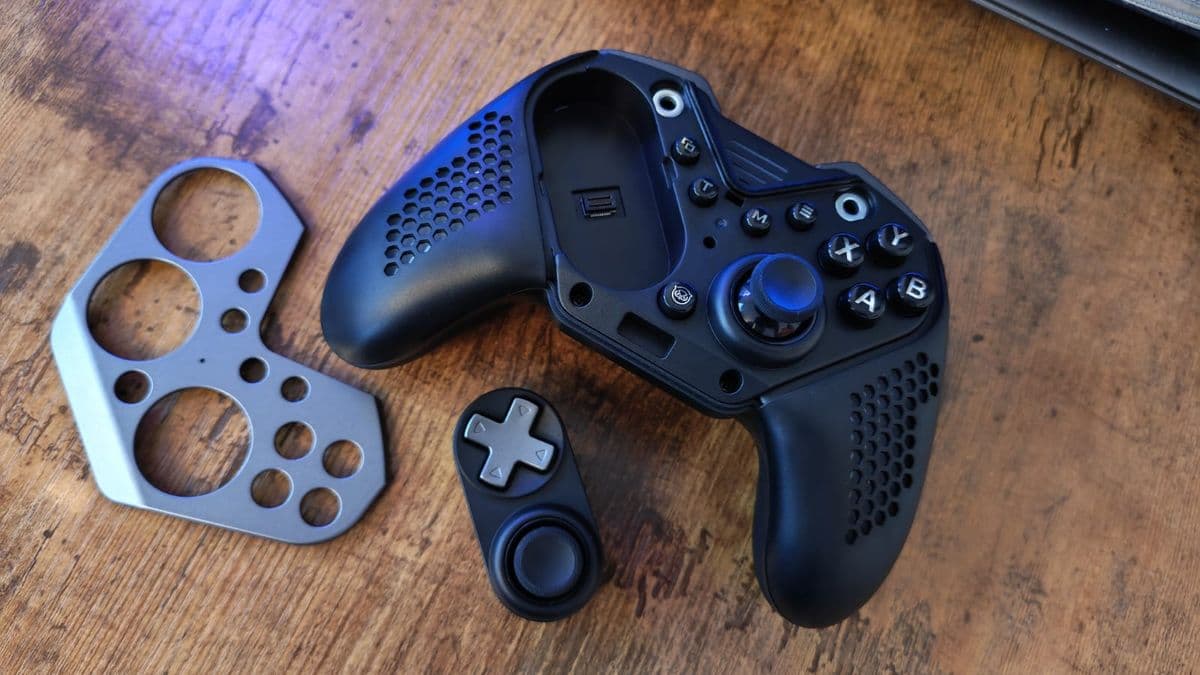
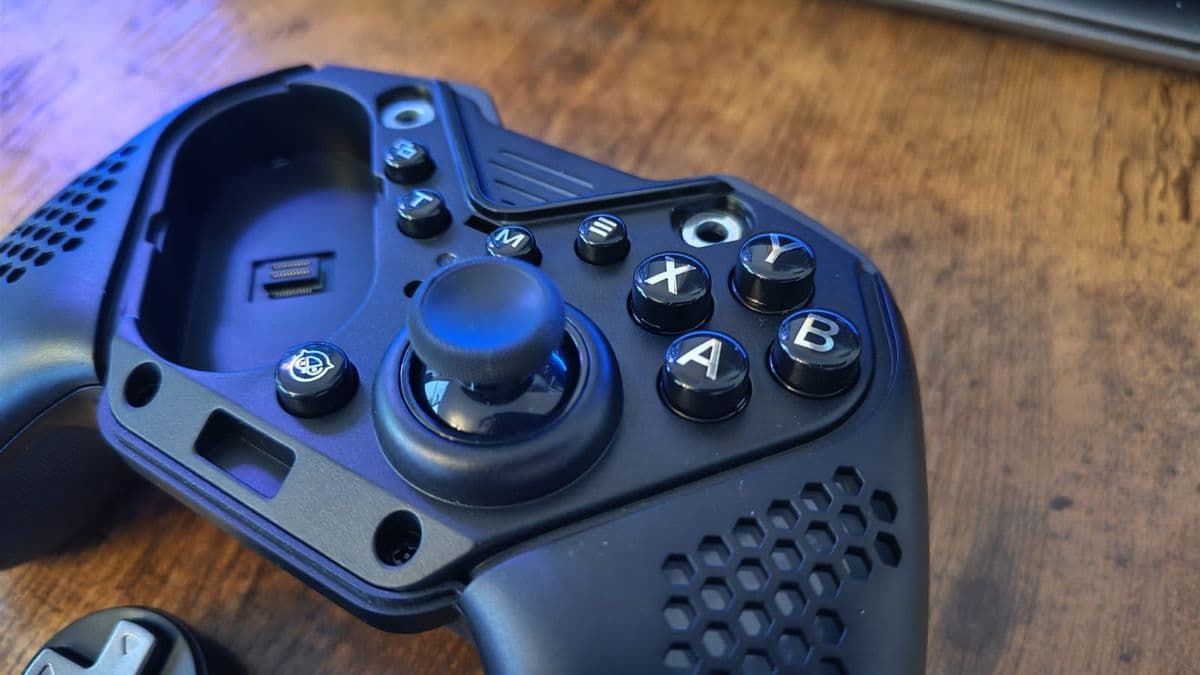
The left side of the pad hides two circular sockets under a glossy magnetic faceplate. The left stick and D-pad live on a small module that can snap into either socket. Want Xbox layout? Stick at the top, D-pad at the bottom. Want PlayStation? Pop it out, flip it, and now the stick sits across from the right stick.
The entire process is dangerously quick. Mid-match in Hunt: Showdown, I realized my aim felt off because I’d been bouncing between a DualSense and Xbox pad that week. Between loading screens I pulled the faceplate off, tugged the left stick module out, flipped it, and slapped everything back on. No tools, no tiny screws to lose, no software profile swap. It genuinely took less time than changing an in-game loadout.
The magnets are strong enough that I never had a module slip out during play, but the faceplate itself is a bit too polite for my taste. When you put it back on, it doesn’t always give that satisfying “snap” that tells your brain, “Yeah, that’s seated.” A couple of times I had to press it down again because I wasn’t sure the first click actually locked it into place. It never popped off mid-game, though, so this is more about feel than function.
The bigger disappointment is that only the left side is modular. The right stick and face buttons are fixed. Once you get over how clever the left-side swap is, you start imagining alternate right modules, different stick heights, or even fighting game layouts – and then remember you can’t swap any of that. This is “half-modular” in the most literal sense.
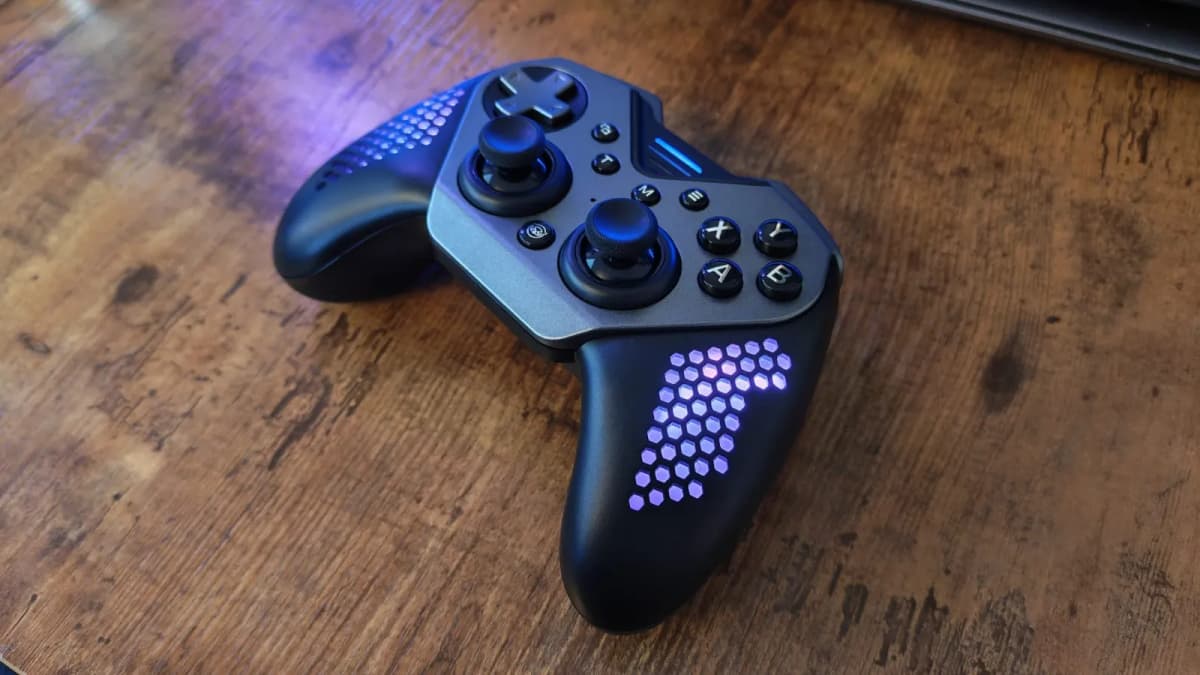
For $50, I’m not expecting a suitcase full of parts like the Victrix Pro BFG, but even a second left module with a different D-pad shape, or a taller stick, would’ve gone a long way. As it stands, the Flexi gives you exactly one trick: layout swap. It’s a good trick, but it’s the only one.
Features and the annoying lack of a proper PC app
Under the hood, the Flexi is surprisingly modern for its price bracket. Both sticks and triggers use Hall sensors, which means no physical potentiometer to wear out and far lower risk of stick drift over time. That’s become the trendy spec for third-party pads lately, but it’s still nice to see at this price.
You get:
- Hall sensor thumbsticks and triggers
- Four programmable back buttons
- Gyro/6-axis motion (on Switch)
- Vibration
- Turbo function
- Wireless dongle for PC/Switch plus a USB cable in the box
The face buttons are clicky microswitches rather than the soft, rubber-dome mush you get on a lot of cheap pads. They feel closer to a mouse switch or mechanical key – short travel, crisp actuation. I liked them for action games, though if you’re used to the pillowy feel of a DualSense or Switch Pro, it might take an hour to adjust.
The Flexi lets you swap button labels between Xbox-style and Switch-style layouts, which is helpful if your brain refuses to remember where “A” is on Nintendo hardware. Behind the scenes, you can also remap buttons using software – and here’s where things start to wobble.
If you want to tweak stick deadzones or fine-tune response curves, you don’t get a dedicated Windows app. Instead, you have to download a mobile app and connect the controller to your phone via Bluetooth just for configuration. Once you’ve done your tweaks, those settings live on the pad, so it’s a one-time pain rather than a constant one, but I still hated this flow on PC.
On my desktop setup, that meant this dance: unplug the dongle, pair to my phone, open app, test changes in a blank stick-monitor screen with no game feedback, then reconnect to the PC and see how Hunt actually felt. Repeat as needed. It’s better than having no customization at all, but a tiny, barebones Windows app would’ve made this so much less clunky.
The bright side is that you don’t need the app for everything. RGB modes and the four rear paddles can be handled directly on the controller with simple button combos. The back-button programming is especially painless: hold a function combo, tap the input you want to copy, tap the back button. Done. No profile menu, no PC dependency.
How it actually plays: Third-person and FPS heaven, 2D platformer meh
Comfort-wise, the Flexi shines in third-person games and shooters. The long handles give you a really solid anchor point, and the triggers are angled in a way that lets you rest your index fingers without feeling cramped.
In GTA V and Cyberpunk 2077 on PC, the combination of those Hall triggers and the pad’s chunky shape just felt right. Feathering gas and brake while weaving through traffic had a smooth, predictable feel – no gritty trigger wobble, no dead spot before the game actually responds. Vibration is understated rather than ridiculous; I got enough feedback to feel explosions and gunfire, but it never turned the whole controller into a buzzing beehive.
Where the Hall sticks really earned their keep was in more precise games. I was testing Cairn – a climbing game that absolutely punishes sloppy inputs – and I found myself preferring the Flexi over the Asus ROG Raikiri II I’d been using the previous week. Out of the box, the Raikiri’s deadzones felt a bit too floaty, like I had to move the stick more than I wanted before my climber’s hands would actually adjust. The Flexi, by contrast, gave me a tighter, more immediate response. When I planted a grip just a hair to the left, that’s exactly where it landed.
In FPS games, especially Hunt: Showdown, the Flexi held up surprisingly well. I mapped jump, crouch, reload, and melee to the four rear buttons and forced myself to play a few nights without touching face buttons mid-gunfight. The underlying layout for the paddles is clever: they sit higher up the back shell than usual, so I could hit both upper and lower paddles with just my middle fingers if I wanted, or bring my ring fingers in if things got frantic.
Pulling off quick scope flicks with a sniper felt natural, and I didn’t hit any obvious deadzone weirdness or turbo-jitter. Would I still like a richer PC configurator to dial in custom curves specifically for Hunt or Valorant? Absolutely. But for a “plug in and play” shooter pad, the Flexi is way better than its price suggests.
Where the controller started to disappoint me was 2D and retro-style platformers. The same broad body and deep hand position that feel great in Cyberpunk make fast, precise D-pad work feel a bit clumsy. Playing Towerfall Ascension – a game I’ve dumped hundreds of hours into on a DualShock 4 – felt slightly off even after I switched to symmetrical sticks to mimic a PlayStation layout.
It’s not that the D-pad is unusable, it’s just not very snappy. The whole controller feels tuned for analog stick play, and the ergonomics reflect that. After an hour of Towerfall, I quietly swapped back to a slimmer pad for that specific niche.
On Switch, gyro works as expected for games that support motion aiming, and the extra weight of the Flexi versus Joy-Cons or a cheap wireless pad actually made it easier for me to hold small adjustments without wobbling. If you like motion-assisted aiming in games like Splatoon or any shooter that supports it, the Flexi does the job, though I still prefer Nintendo’s own Pro Controller for pure “Nintendo feel.”
What holds it back: Half-modular, half-supported
After a couple of weeks with the Flexi, two things annoy me enough that they’re baked into how I think about the controller:
- Only the left side is modular
- No proper PC configuration app
The first one limits how far this “Flexi” idea can actually stretch. There’s no ecosystem to grow into, no right-side modules, no alternative sticks or D-pads to order later. You’re buying a cool party trick, not a platform. If Nyxi had made both sides swappable, even in a basic way, this could’ve been a real budget rival to Turtle Beach and Thrustmaster’s expensive modular lines.
The second issue mainly hits PC players who like to tinker. For someone like me, who compulsively adjusts deadzones and ramp curves across different games, being forced to route everything through a phone app is just clumsy. I don’t want to drag my main controller off my desk and pair it with my phone every time I switch from a slow, deliberate shooter to a twitchy arena game.
If you’re more “set it and forget it,” you might never care about this. You can happily live with the default feel and just use RGB and back-button mapping on-device. But know going in: on PC, this doesn’t feel like a first-class citizen in terms of software support. It feels like a Switch-first pad that happens to work on PC very well in-game, but not so well in the configuration layer.
Who the Nyxi Flexi is actually for
After using the Flexi across a bunch of genres, I’d say it fits a pretty specific crowd:
- Players who bounce between Xbox and PlayStation layouts and want one controller that can feel “right” for both without overthinking it.
- PC and Switch owners who mostly play 3D games-third-person action, shooters, racers—and care more about comfort and decent sticks than ultra-precise D-pads.
- People curious about modular pads but not ready to drop $150+ on a Victrix Pro BFG or similar “pro” monster.
If you live in 2D platformers, bullet-hell shmups, or fighting games that demand a god-tier D-pad, I’d look elsewhere. If you’re a hardcore PC tweaker who wants per-game profiles and a deep configuration suite, you’ll be frustrated.
But if you’re hunting for a comfortable, feature-rich controller with Hall sticks, back buttons, gyro on Switch, and that genuinely slick tool-free stick layout swap, $50 is a very tempting price tag.
FinalBoss // Gear
Level up your setup
01Best-selling Xbox Series X|S gameson Amazon→02Xbox controllerson Amazon→03Top-rated gaming headsetson Amazon→04Discounted game keyson Kinguin→Affiliate links · As an Amazon Associate, FinalBoss earns from qualifying purchases.
Want to Level Up Your Gaming?
Get access to exclusive strategies, hidden tips, and pro-level insights that we don't share publicly.
Ultimate Reviews Strategy Guide + Weekly Pro Tips