
Table of Contents (10)
A $599 Mac That Had No Right To Feel This Nice
The first 30 minutes I had with the MacBook Neo were supposed to be “quick setup before bed.” Instead, I ended up on the couch installing Death Stranding and seeing how far a “budget Mac with an iPhone chip” could be pushed before it embarrassed itself.
It never really did. It stumbled, sure, especially when its tiny 8GB of unified memory ran out of patience. But for a $599 aluminum Mac that runs on a binned A18 Pro smartphone SoC, the Neo punches far, far above what its price and spec sheet suggest. This thing is basically an iPhone 16 Pro brain in a cheap-but-classy MacBook Air cosplay, and that combination turns out to be way more interesting than I expected.
I’ve been using the 512GB model (the one with Touch ID) as my main writing, browsing, and “let’s see if this can actually game” machine for a week. Coming from an M2 MacBook Air and a pile of gaming hardware, the Neo landed in a weird sweet spot: clearly compromised, surprisingly competent, and occasionally hilarious when you remember it costs less than some high-end graphics cards by itself.
Design & Vibes: iBook Soul, iPhone Heart
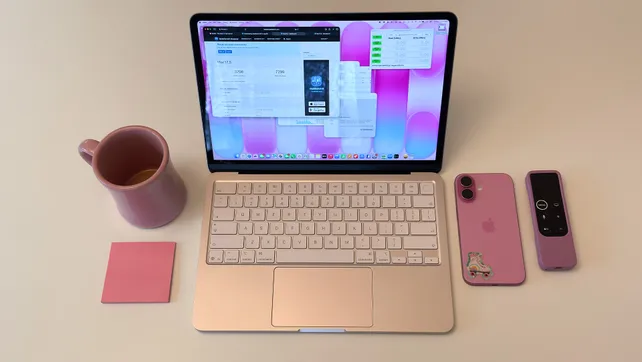
When I pulled the Blush Neo out of the box, I immediately got flashbacks to the old iBook G3 days. It’s not as playful or saturated as those translucent clamshells, but Apple finally loosened up the grayscale death grip: you can get the Neo in Blush (pinkish, sometimes almost lavender), Citrus (yellow-green), Indigo (dark blue), or plain Silver.
I wish Apple had gone harder on the colors. The Blush unit I used shifts personality depending on lighting—sometimes pink, sometimes almost silver. It’s more subtle than the candy-colored iMacs, but still way more fun to look at than another anonymous grey slab. At $599, I expected flexy plastic; instead you get a legit aluminum chassis that feels closer to a MacBook Air than to the cheap Windows and Chromebook crowd this is priced against.
The lid opens one-handed with that gentle “Apple thump” as the rubber edge meets the bottom case. The deck doesn’t flex when you’re hammering the keys. The display hinge doesn’t wobble when you jab at the trackpad. If you’ve used budget laptops where the whole chassis shivers when you type, the Neo feels like cheating.
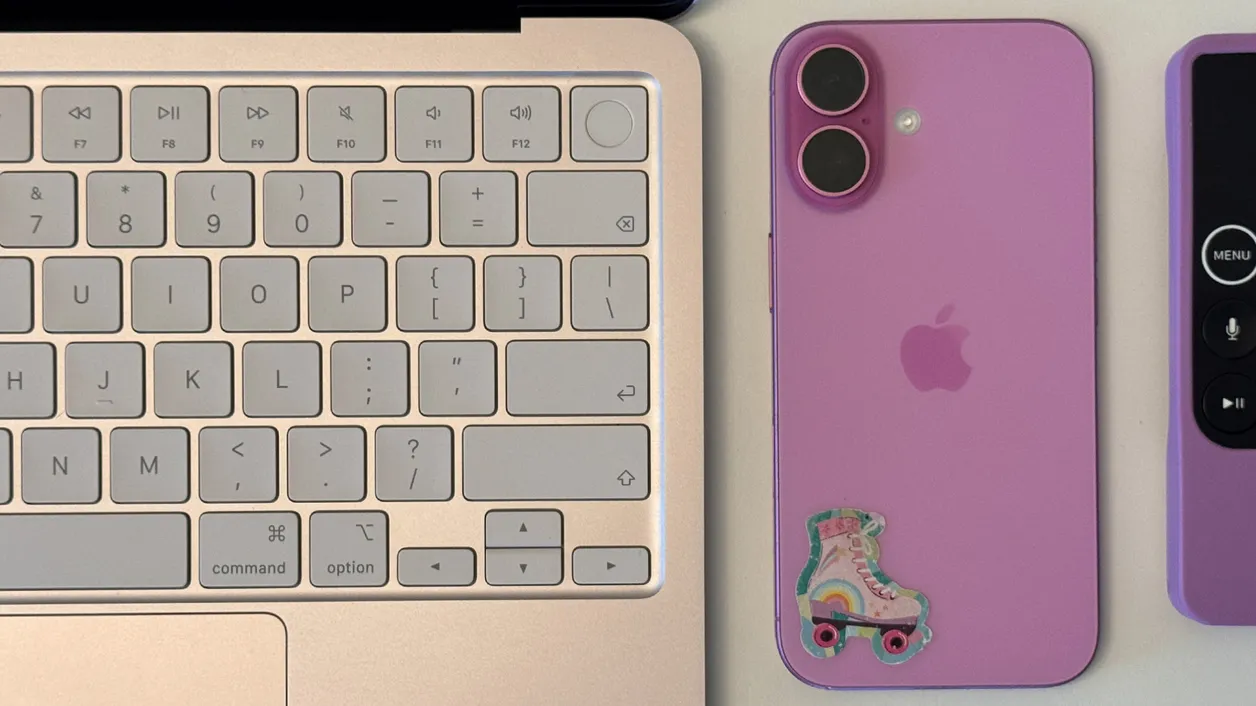
The keyboard itself is basically the modern Apple layout, just a touch mushier compared to my M2 Air. Still, I adapted in minutes and happily wrote long sessions on it. The big compromise is that it’s not backlit. That’s the one place where the Neo screams “cheap” in day-to-day use: late-night writing sessions turn into either “type by feel” or “bump the screen brightness way up.” If you mostly use it in well-lit rooms, it’s fine. If you live in dim gaming caves like I do, you’ll notice.
The trackpad is where Apple got crafty. It looks like the usual haptic trackpad you get on pricier Macs, but it’s actually mechanical. The click has more travel and a louder thunk, but you can still click anywhere on the surface, top to bottom. Given how many Windows laptops cheap out with bottom-only click zones or small pads, this felt like Apple doing a budget move the right way.
Ports are simple: two USB-C, one 3.5mm headphone jack. No MagSafe, no SD card slot, no HDMI. One USB-C port (the rear one) runs at USB 3 speeds (up to 10Gbps), good enough to drive a 4K display at 60Hz; the other is plain USB 2. Both handle charging. Apple tosses a 20W charger in the box, but the Neo can drink up to 30W if you have a stronger brick lying around. It’s basic, but for the price and target audience, it covers the essentials.
Display, Speakers, And The Stuff You Actually Stare At
The Neo’s 13-inch display surprised me more than the performance did. It’s 2408 x 1506 at 500 nits, which works out to 219 pixels per inch—aka “classic Retina.” Text is crisp, UI elements look clean, and you don’t get that fuzzy, bargain-bin panel vibe you sometimes still see under $700.
Apple markets it as covering the sRGB color space, not the wider P3 used by MacBook Airs. I flipped between color profiles and tossed up a wide-gamut test page side-by-side with my M2 Air. If you’re not doing color-critical work, you’re never going to notice the difference. It’s not OLED-level contrast, and it’s locked to 60Hz, but that’s also true for Apple’s own $1,599 Studio Display. For writing, browsing, and watching video, the Neo’s screen just looks good.
It even handles HDR formats like HDR10+, Dolby Vision, and HLG for video playback. Don’t expect the kind of eye-searing HDR highlights you get from a high-end OLED TV, but Netflix and Apple TV+ content looked punchy enough that I never felt like I was slumming it on a “budget” panel.
Speakers are side-firing instead of being tucked into the hinge like on the Air, and yet they’re… honestly solid. The soundstage is narrower, and if you A/B it with an M1 or M2 Air you’ll hear that immediacy difference, but on its own the Neo sounds way better than most laptops anywhere near this price. There’s a hint of bass, voices are clear, and game audio doesn’t turn into a tinny mess. Apple claims Dolby Atmos support; I wouldn’t call it immersive, but I also never felt the need to immediately reach for headphones.
The 1080p webcam is lodged in a chunky bezel instead of a notch. Image quality is fine for meetings; think: less flattering than an iPhone selfie camera, but absolutely serviceable. In a world full of terrible 720p laptop webcams, being “fine” is already a win.
Everyday Performance: When An iPhone Chip Pretends To Be A Mac
Under the hood, the MacBook Neo is powered by a binned version of the A18 Pro—the same family of chip Apple uses in the iPhone 16 Pro and Pro Max. You get a 6-core CPU and a slightly cut-down 5-core GPU instead of the full 6-core GPU configuration in the phones.
On paper, that sounds like a recipe for “feels like an overgrown iPad.” In reality, macOS on this thing feels closer to an M1 Air than I ever expected. In Geekbench 6, the Neo’s single-core score lands comfortably ahead of the original M1 MacBook Air, while multicore sits just behind it. For a sub-$600 fanless machine, that’s ridiculous, especially when you remember the base 2019 Mac Pro started north of $6,000 and this little Neo can beat it in some single-core tests.
Benchmarks aside, the day-to-day experience is simply snappy. My normal workload is a disaster of tabs across Safari and Arc, plus a writing app, Discord, Slack, and a couple of lightweight photo tools like Pixelmator or Photos for quick crops and color tweaks. The Neo didn’t blink at any of that. Swapping between desktops feels instant, scrolling through heavy pages is smooth, and I didn’t see any weird stutters unless I were deliberately provoking it.
The one place where I could feel the system tightening its belt was video editing. Light 4K work is okay, but once I started layering multiple 4K clips with transparency and effects, scrubbing the timeline got choppy. At that point, though, the A18 Pro itself isn’t the main problem—it’s the tiny memory pool and slower SSD, which is where the Neo’s compromises really show up.
The 8GB Wall And The Slow SSD
Apple only sells the Neo with 8GB of unified memory. No upgrade path, no build-to-order, nothing. For light or moderate use, that’s still enough in 2026, but the second you start piling on pro apps, big Photoshop files, or a heavy VM, that 8GB ceiling appears fast.
The 8GB Wall And The Slow SSD
Apple only sells the Neo with 8GB of unified memory. No upgrade path, no build-to-order, nothing. For light or moderate use, that’s still enough in 2026, but the second you start piling on pro apps, big Photoshop files, or a heavy VM, that 8GB ceiling appears fast.
🎮 Get This Game at the Best Price
Compare prices instantly and save up to 80% on Steam keys with Kinguin — trusted by 15+ million gamers worldwide.
*Affiliate link — supports our independent coverage at no extra cost to you

When RAM runs out, macOS starts leaning on swap memory—basically using the SSD as an emergency extension of RAM. On my M2 Air, I can dip into swap and not really notice unless I go hunting for it in Activity Monitor. On the Neo, you feel it because the SSD just isn’t that quick.
In disk benchmarks, the Neo’s internal storage hovered around 1.7GB/s for sequential reads and writes, with significantly lower random performance than my M2 Air, which pushes close to 3GB/s. File transfers are noticeably slower, and when the system is hammering swap under a big workload, you can feel brief hitches as it shuffles data around.
To be clear, it never made the Neo unusable. I could tell when I’d tipped it into swap, but it didn’t leave me staring at frozen windows. It’s more like the difference between cruising and driving uphill in a higher gear: you’re still moving, just not as effortlessly. That’s the line you walk with this machine—it’s brilliant for what it costs, as long as you don’t expect it to pretend it’s a 32GB M3 Pro MacBook Pro.
Gaming On MacBook Neo: “Wait, This Actually Works?”
Alright, onto the fun part. Neo is obviously not marketed as a gaming laptop, but I was more curious about this than anything else. Apple’s been trying to talk up macOS gaming with Metal upscaling, Game Mode, and better controller support; the Neo felt like the perfect “stress test the dream” machine.
First up: Death Stranding. I ran it at 1080p with Apple’s Metal upscaling from 1440 x 810 and pushed most settings as high as the game would let me. In the opening mountainous area, frame rates bounced between 30fps and the mid-40s. That’s not “competitive shooter” smooth, but for a cinematic, slow-burn game like Death Stranding, it felt totally playable. Dropping the upscaling but keeping settings high left things in the mid-20s, still workable if you’re less picky.
Then I moved to Resident Evil Village, which is much nastier on hardware. At native 1080p, max settings, no upscaling, the Neo just couldn’t keep up: cutscenes turned into slideshows with audio racing ahead of the visuals. But once I turned Metal upscaling on and massaged the settings—maxing things like Mesh and Ambient Occlusion, setting shadow quality to medium, leaving bloom and lens flare on—frame rates generally lived in the low 30s, occasionally climbing up toward 50fps.
Is this replacing a dedicated gaming laptop? No. Is it absolutely wild that a $599 fanless Mac with an iPhone chip can deliver a legitimately playable experience in modern AAA ports if you’re willing to tweak? Yes. Compared to a Steam Deck or similar handhelds, you’re in the same “30-ish fps with smart settings” ballpark, but on a bigger, sharper screen and much better keyboard and trackpad.
The bigger limitation isn’t the chip; it’s the platform. MacOS still doesn’t have the game library that Windows enjoys. There are some standout AAA ports now, a ton of indies, and the whole library of iOS/iPadOS games, plus Apple’s own subscription stuff. But if your library lives on Game Pass and anti-cheat-protected shooters, the Neo won’t magically fix that. When games are available, though, this little laptop handles them far better than it has any right to.
Thermals, Battery Life, And Noise (Or Lack Of It)
The Neo is completely fanless, which I was half-expecting to become a problem during extended gaming or when chewing through heavier workloads. Instead, it was mostly a pleasant non-event.
Even after long sessions in Death Stranding and Village, the chassis got warm but never uncomfortable. Because there’s no fan, there’s also no whine, no ramp-up when a game launches, no sudden jet engine takeoff in the middle of a boss fight. It just passively sheds heat and quietly does its thing. You can tell the chip is throttling a bit during sustained loads, but not in a way that ruins the experience.
On the battery side, Apple squeezed a relatively modest pack into the Neo compared to the Air, and the A18 Pro is tuned more for phones and tablets than all-day workstation loads. In practice, for my writing, browsing, and music sessions, I could make it through a typical workday without babysitting the battery indicator. Extended gaming absolutely chews through it faster (no shock there), so think of it more as “light couch gaming between charges” than “all-day unplugged LAN party.”
Who The MacBook Neo Is Actually For
After a week, I stopped thinking of the Neo as “cheap Air” and started thinking of it as “console-plus-iPad kid that grew up weird.” It’s not the right machine if you’re rendering 3D scenes, cutting hours of 4K footage, or living inside Xcode with giant projects. The 8GB RAM cap and slower SSD will fight you the whole way.
But as a first Mac, a student machine, a second couch laptop, or a living room “light gaming and media” device? It’s shockingly easy to recommend. You get:
- A legitimately premium-feeling aluminum chassis
- A bright, sharp 13-inch display that doesn’t look budget
- Good-enough speakers and a solid 1080p webcam
- Performance that hangs with or beats older M1-class Macs in many everyday tasks
- Surprisingly capable gaming for the few modern titles that support macOS
If you know you’re going to be juggling heavy creative workloads, multiple external displays, or you absolutely need more than 8GB of RAM, you should skip this and move up to a MacBook Air or Pro. But if your world is browsers, docs, streaming, Discord, some indie titles, and the occasional AAA port experiment, the Neo gives you way more Mac than its price suggests.
FinalBoss // Gear
Level up your setup
01Top-rated gaming headsetson Amazon→02High-refresh gaming monitorson Amazon→03Gaming chairson Amazon→04Discounted game keyson Kinguin→Affiliate links · As an Amazon Associate, FinalBoss earns from qualifying purchases.
Want to Level Up Your Gaming?
Get access to exclusive strategies, hidden tips, and pro-level insights that we don't share publicly.
Ultimate Reviews Strategy Guide + Weekly Pro Tips