
Lenovo’s Legion laptops have snuck into my life in a way few gaming notebooks manage. I still have an older Legion on a shelf that refuses to die, and it’s become my go-to “you can borrow this” machine for friends because I trust it not to overheat, whine, or fall apart.
So when the new Legion Pro 7i with Intel Core Ultra 9 275HX, RTX 5080, and a 16-inch 2560×1600 OLED at 240 Hz showed up, I had pretty high expectations. On paper it reads like a checklist of “ideal 16-inch gaming laptop in 2026”: high-end GPU, fast OLED, big battery, vapor chamber cooling. The question was whether it would actually feel that way once I dragged it through long workdays and late-night gaming sessions.
Lenovo provided the review unit, but they didn’t see this text before publication and had no say in what I’m about to write. Over a few solid weeks, I used the Legion Pro 7i as my main machine: docked to a monitor for work, on the couch for Netflix, and on the desk for hours of Cyberpunk 2077, Assassin’s Creed Valhalla and Shadows. By the end, I’d gone from “this is a nice spec sheet” to “this might actually replace my desktop.”
Table of Contents (10)
First impressions: stealth bomber with fingerprints
Pulling the Legion Pro 7i out of the box, the first thing that hit me was how solid it feels. The chassis is mostly matte black aluminum, and it has that cold, dense feel that’s closer to a workstation than a toy. The rear exhausts look like the thrusters of a small jet, and the slightly angular design leans into that “stealth bomber” aesthetic without going full RGB carnival.
The second thing that hit me: fingerprints. This matte black finish looks fantastic in photos, but in normal use you’ll be constantly wiping it down if you care about cleanliness. After a day of use, the lid and palm area had that “crime scene” look, so just accept you’ll want a microfiber cloth nearby.
My sample actually arrived with a noticeable dent in the display lid. Judging by the packaging, that’s on the courier, not Lenovo, but it did give me an unintentional stress test: even with that hit, the lid didn’t flex grotesquely or affect the panel. The rest of the chassis is impressively rigid, with one notable exception-the palm rest.
The top deck is metal, but the palm rest area is plastic and can be pushed in with firm pressure. You won’t trigger it accidentally while typing or gaming, but if you press down hard you can definitely feel the flex. I suspect Lenovo chose plastic to keep surface temperatures lower during long sessions, and to be fair, it works: even during hour-long benchmarks, my palms never felt uncomfortably hot. Still, at this price, a stiffer palm rest would be very welcome.
Port selection is one of the areas where the Legion Pro 7i just quietly nails it. You get:
- 1× HDMI
- 1× USB-C (USB 3.1)
- 1× USB-C (Thunderbolt 4)
- 2× USB-A (USB 3.0)
- 1× USB-A (USB 3.1)
- 3.5 mm audio jack
- RJ45 LAN
- A physical eShutter switch to disable the webcam
No dongle hell, no “why is there only one USB-A” nonsense. Being able to plug in a mouse, keyboard, capture card and Ethernet without reaching for a hub made it feel much closer to a desktop replacement than a “thin and light that happens to have a GPU.”
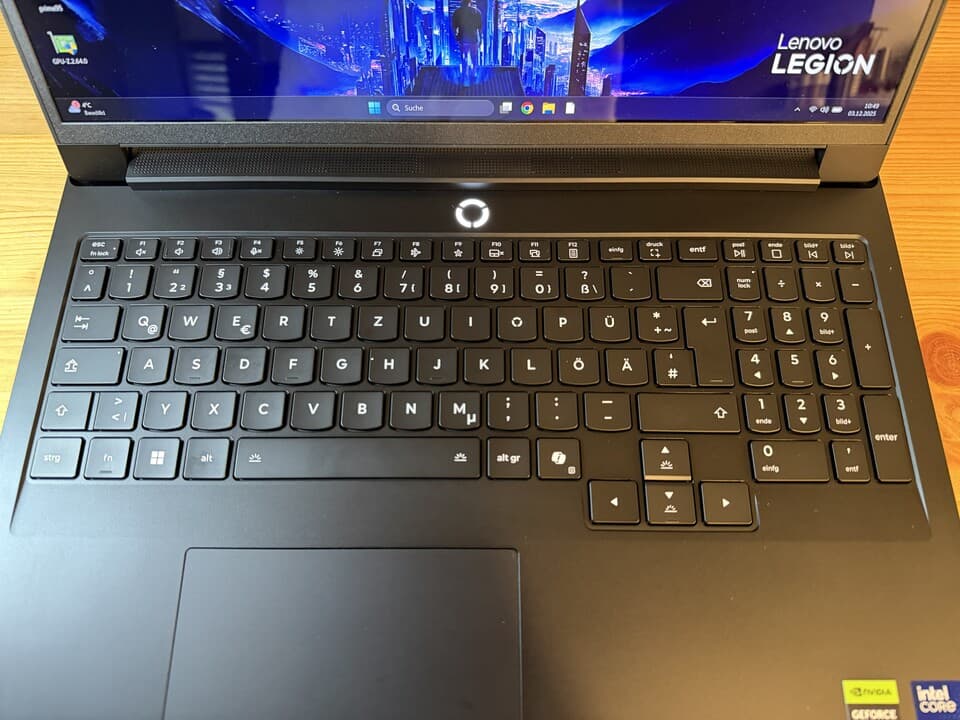
Keyboard and touchpad: built for gaming, but writers won’t hate it
I’m picky about laptop keyboards. If the keys feel mushy or the deck flexes, I notice it within minutes and end up plugging in a mechanical board. The Legion Pro 7i’s keyboard survived my abuse.
Key travel sits in that sweet “medium” territory: enough depth to feel satisfying, but not so deep that it feels slow. The actuation is crisp and well-defined, with a clear tactile moment when a key registers. The main deck doesn’t flex under normal typing; only the number pad area shows a <emtiny< em> bit of give if you deliberately push down. During actual use, it never bothered me.
The arrow keys are full-sized, which is rarer than it should be on 16-inch laptops, and they’re properly separated, so hitting them in games feels predictable instead of mushy. After a full day of writing and an evening of Hades-style key mashing, my fingers were happy.
The touchpad, on the other hand, is… fine. At 12 × 7.5 cm, it’s on the small side for a 16-inch machine. Lenovo definitely could’ve gone bigger given the available space. The surface is plastic instead of glass, but tracking is smooth and precise, and it reliably picks up inputs even at the edges and corners.
Realistically, though, this is a gaming laptop. I used a mouse 99% of the time. The touchpad is totally serviceable for browsing and office work, it just won’t blow anyone away.
The 16-inch 240 Hz OLED: once you see it, IPS is ruined
The real star of the Legion Pro 7i is the display. It’s a 16-inch OLED panel at 2560×1600, 16:10 aspect ratio, with a 240 Hz refresh rate. On paper, that’s impressive. In practice, after a few hours with it, going back to a normal IPS panel feels like stepping back a generation.
Lenovo claims 500 cd/m² brightness in SDR; the unit I tested hit around 485 cd/m², which is close enough that I had no issues using it in a bright room. Flip on HDR and peak brightness jumps to roughly 678 cd/m². Combined with OLED’s perfect blacks, HDR games like Cyberpunk 2077 look incredible-neon signs float in inky darkness, and shadow detail doesn’t get crushed into gray soup.
The panel covers 100% of DCI-P3 according to Lenovo, and subjectively it’s extremely vibrant without looking cartoonish. I did some light photo editing and grading on it, and while hardcore colorists will always demand calibration and external monitors, this is one of the first gaming laptop screens where I didn’t immediately think “this is only for games.” It’s legitimately usable for semi-professional content work.
Motion handling is exactly what you’d expect from a fast OLED: near-instant pixel response, no obvious ghosting, and that 240 Hz refresh makes everything feel absurdly smooth. Even just scrolling through a browser window looks cleaner than on 144 Hz IPS laptops. In competitive shooters, the combination of high refresh, low response time, and deep contrast is genuinely an advantage-tracking movement in dark environments is easier when blacks are actually black.
There is one catch: the panel is glossy. In darker rooms it’s gorgeous, but in bright environments you will see reflections, especially on dark content. The brightness helps fight it, but if you’re constantly working under harsh overhead lighting, be prepared to fiddle with screen angles more than on a matte IPS panel.
Under the hood: RTX 5080 performance that punches above its weight
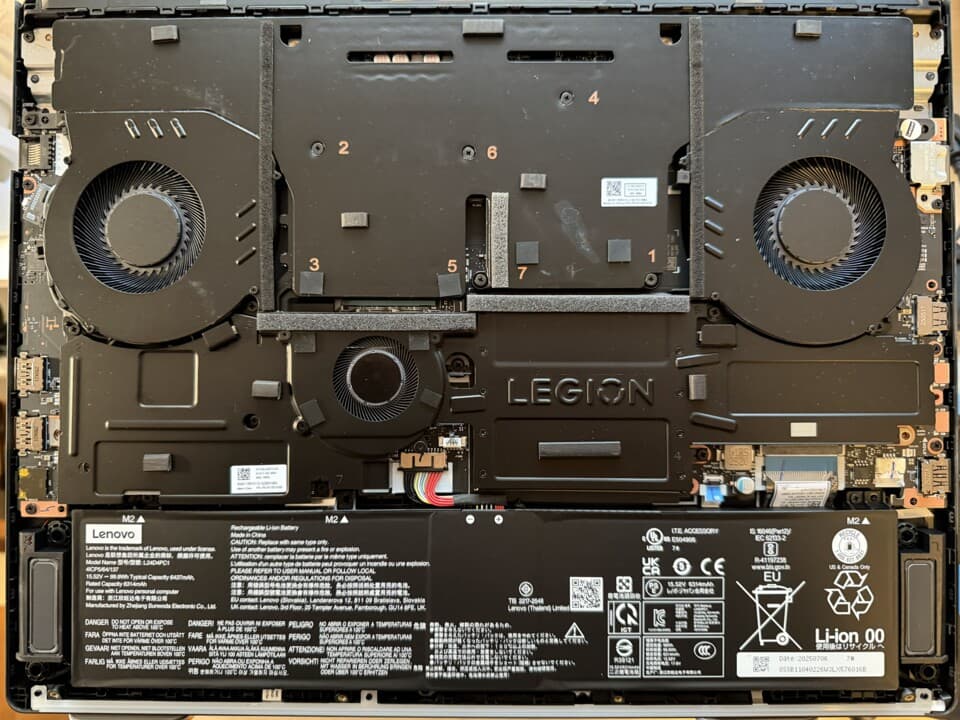
Inside, this configuration pairs an Intel Core Ultra 9 275HX with an RTX 5080 mobile GPU, backed by a large vapor chamber and three fans. Open the bottom panel and you’ll see just how seriously Lenovo treats cooling: roughly 75% of the available space is dedicated to heatsinks, fans and metal covers over the SSD, RAM, and Wi-Fi module. The remaining quarter is the big 99.9 Wh battery, which is essentially the legal maximum for flights.
I had two comparison points on hand (and in recent memory): an XMG Neo 16 (2025) with the same CPU and an RTX 5080 at 175 W, and Alienware’s hulking Area 51 with an RTX 5090. In CPU-bound tests like Geekbench, all three machines sat very close together, with the Legion Pro 7i occasionally edging ahead slightly in multi-core, and Cinebench 2024 putting the XMG a hair in front instead.
Where things got interesting was GPU performance. In 3DMark Time Spy, the Alienware with RTX 5090 is the expected king of the hill. But the Legion Pro 7i managed to be about 8% faster than the XMG Neo 16 despite having the same CPU and GPU class. It’s not a night-and-day difference, but it’s enough to show that Lenovo is letting the RTX 5080 really stretch its legs.
That advantage carried over into real games. In Cyberpunk 2077 at QHD, the Legion consistently came in a few percent ahead of the XMG—roughly 3-8% depending on settings—while the Alienware’s RTX 5090 was another 16-19% quicker again. Assassin’s Creed Valhalla told a similar story: the Legion slightly ahead at lower resolutions, parity or small leads for the XMG in 4K. In Assassin’s Creed Shadows, the XMG pulled ahead in QHD and 4K, but the Legion reclaimed the lead at 1080p.
In practice, what this meant for me was simple: in demanding AAA games at 2560×1600, the Legion Pro 7i was reliably delivering “high settings plus high framerates” without compromise. Cyberpunk 2077 at high settings with sensible upscaling sailed comfortably into three-digit FPS territory. Valhalla and Shadows were no problem at that resolution either. RTX 5090 machines will still win the “maximum benchmark score” contest, but the Legion Pro 7i gets uncomfortably close while being smaller, cheaper, and paired with a far better screen than many competitors.
Performance modes: where “Balanced” actually means something
Like most gaming laptops, Lenovo ships the Legion Pro 7i with multiple performance modes. What surprised me is how well tuned they are.
In its maximum performance mode, running Cyberpunk 2077 at QHD, the Legion Pro 7i landed around 103.8 FPS in my tests. Switch to the Balanced profile and you lose roughly 37% performance, but noise drops by around 7 dB—which is more noticeable than the numbers suggest. In the Quiet preset, performance plunges by about 89% vs full power, but fan noise drops to around 43.5 dB, making it genuinely unobtrusive.
Over time, I gravitated toward Balanced for most single-player games and daily use. It still pushes high frame rates in modern titles on the OLED panel, but it doesn’t immediately spin the fans into jet-engine territory. For competitive FPS, I’d flip it to full performance, lock in the highest refresh rate, and just accept the noise. Quiet mode is perfect for late-night Netflix or writing sessions where you just don’t want the background hum.
Thermals and noise: warm hardware, surprisingly tolerable surfaces
With a triple-fan, giant-vapor-chamber setup, you might assume the Legion Pro 7i runs cool. It doesn’t. Under sustained load, internal temperatures climb to the warm side, and even at idle the readings could stand to be lower. The important bit, though, is that they remain within safe, non-throttling ranges, and performance stayed consistent even during extended benchmarks and long gaming sessions.
On the outside, things are less dramatic. The center of the keyboard can hit around 45.6°C during heavy gaming, which is definitely warm to the touch but never burned my fingers. The hottest spot is the area above the keyboard, closer to the exhaust, where I measured close to 52°C. Fortunately, you don’t rest your hands there. The palm rest itself, likely thanks to that plastic construction, stays noticeably cooler and never became uncomfortable.
Noise levels are in line with other high-end gaming laptops. The fans are audible at idle—there’s always a faint whoosh if you sit in a quiet room—but it’s not aggressive. Under heavy load, you’ll absolutely want headphones if you’re sensitive to noise. Compared to big 18-inch beasts like MSI’s Raider series or Alienware’s thickest offerings, the Legion isn’t louder; it’s just part of the same “power first, silence second” club.
Battery life: finally, a gaming laptop that isn’t glued to the wall
Battery life is where the Legion Pro 7i surprised me the most. With a 99.9 Wh battery, I expected “average for a big gaming rig.” What I got was “this is actually usable unplugged.”
In the PCMark Gaming test, it outlasted both the XMG Neo 16 (2025) and Alienware Area 51 by roughly 30-40 minutes, which doesn’t sound huge but matters when you’re trying to squeeze in a commute session or a short break. The real shock came in more realistic workloads: in PCMark’s Modern Office test, the Legion ran a full 3–4 hours longer than those two rivals.
Translated into real life, I was able to take the Legion Pro 7i to a café, write, browse, and watch some videos for a long afternoon session without obsessively hunting for a power socket. That’s not something I can say about most RTX 50-series gaming laptops I’ve used, which often feel like they’re draining the battery by glaring at you.
You’re not buying this for all-day unplugged use, but it’s the first truly high-end gaming notebook in my testing that I’d call “actually okay on battery” rather than “portable UPS killer.”
Speakers, webcam and the little things
Audio on gaming laptops is usually an afterthought, and the Legion Pro 7i doesn’t fully break that curse, but it avoids the worst pitfalls.
The two speakers output clear voices and don’t distort, even at maximum volume. For YouTube, meetings, and casual video watching, they’re fine. Where they fall short is bass: like most laptops, there’s just not much low-end presence. Music sounds flat, and action scenes lack impact. A decent pair of headphones via the 3.5 mm jack still beats anything the built-in speakers can do.

The webcam is serviceable for streams and Zoom calls, and the physical eShutter button that instantly kills it is something I wish every manufacturer included. No weird software toggles, no guessing if Windows honored your privacy setting—you flip the switch, the camera is dead.
How it stacks up against XMG, MSI, Asus and Alienware
In the current wave of 16–18 inch gaming notebooks, the Legion Pro 7i lands in a very sweet spot.
The XMG Neo 16 (2025) with RTX 5080 is a strong rival. It gives you a bright mini-LED panel, 32 GB of RAM, a 2 TB SSD and an AMD Ryzen 9 9955HX with 16 cores. Build quality stands toe-to-toe with Lenovo’s, but it runs noticeably warmer around the keyboard during long sessions. Performance is very close overall, with each machine trading places depending on the title and resolution. If you prefer mini-LED and AMD CPUs, the Neo 16 is compelling; if you want OLED and better battery life, the Legion has the edge.
MSI’s Vector 16 HX undercuts both on price while offering the same Intel 275HX CPU and RTX 5080, but it sticks to an IPS panel. If you don’t care about OLED or HDR and just want raw frames per dollar, it’s a smart buy. The moment you’ve gamed on the Legion’s OLED, though, it’s hard to go back.
Asus’ ROG Strix G16 takes a similar approach: strong CPU/GPU combo (Intel 275HX + RTX 5080), 32 GB RAM, and a 1 TB SSD, but still an IPS screen, even at a relatively high price. Again, decent, but it doesn’t have that one standout feature the Legion has with its OLED.
At the very top end, stuff like MSI’s Raider A18 or Alienware’s Area 51 with RTX 5090 GPUs will beat the Legion Pro 7i in benchmarks. They’re also heavier, bulkier, louder, and generally worse on battery. If you want a semi-portable desktop replacement that lives on a power brick, those monsters make sense. If you actually move your laptop around and want a better balance, the Legion Pro 7i feels like the more rounded choice.
Who the Legion Pro 7i is (and isn’t) for
After living with it, here’s who I think will be happiest with the Legion Pro 7i:
- Competitive and enthusiast gamers who want an actually fast screen (240 Hz OLED) paired with a GPU that can drive it at QHD.
- Creators and power users who care about color accuracy and contrast but don’t want to lug an external monitor everywhere.
- Desktop-replacement shoppers who still move around the house or travel occasionally and want battery life that’s more than a punchline.
- People who value “no obvious weak links”: great performance, great display, good keyboard, strong ports, and acceptable noise all in one package.
On the flip side, you might want to look elsewhere if:
- You’re hypersensitive to fan noise and want something near-silent even under load.
- You absolutely need a matte display with minimal reflections.
- Any amount of chassis flex is a deal breaker and you want tank-like rigidity everywhere, including the palm rest.
- You prioritize ultra-portability over power; this is a performant 16-inch machine, not a featherweight 14-inch ultrabook.
FinalBoss // Gear
Level up your setup
01Top-rated gaming headsetson Amazon→02High-refresh gaming monitorson Amazon→03Gaming chairson Amazon→04Discounted game keyson Kinguin→Affiliate links · As an Amazon Associate, FinalBoss earns from qualifying purchases.
Want to Level Up Your Gaming?
Get access to exclusive strategies, hidden tips, and pro-level insights that we don't share publicly.
Ultimate Reviews Strategy Guide + Weekly Pro Tips