
Table of Contents (16)
Living with the MSI Katana RTX 5060: The Week It Knocked Asus Off My Budget Throne
For the last couple of years, whenever someone asked me “What’s the best cheap gaming laptop I can buy without hating myself in six months?”, I defaulted to the same answer: grab an Asus TUF if you can find a decent spec on sale. That muscle memory has been broken.
After a week of testing the MSI Katana RTX 5060 15 HX B14W (Core i7-14650HX, RTX 5060, 16GB RAM) against my usual budget suspects – Asus TUF, Acer Nitro V16 AI, HP Victus, Lenovo Legion 5 and 7 – I’ve moved it to the top of my budget recommendation list. Not because it’s the cheapest (it isn’t), but because it actually feels like a modern gaming laptop rather than a compromise machine you just put up with.
The two things that flipped the script for me: a surprisingly rare QHD+ display option at this price, and RTX 5060 gaming performance that often matches or edges out more expensive rigs at that same resolution. The twist is that this exact RTX 5060 configuration is currently priced higher than some RTX 5070 laptops, which makes the value conversation more complicated than I expected going in.
Key takeaways after a week of testing
- The QHD+ (2560 x 1600) panel is a genuine standout in the budget space – most rivals are still stuck at 1080p or 1200p.
- The RTX 5060 + i7-14650HX combo hits excellent frame rates at QHD+, often matching or beating pricier RTX 5060 rigs from Lenovo and Alienware in my tests.
- All-plastic chassis, but dense and confidence-inspiring, with a 180-degree hinge and only about an inch of thickness.
- Keyboard feel is far better than “budget” usually buys you – springy, crisp, and comfortable for long sessions.
- Current pricing is weird: this tested RTX 5060 SKU can cost more than some RTX 5070 laptops if you time deals right.
Test setup and what I compared it against
I treated the Katana like I would any new “could this be the new default recommendation?” laptop. Over roughly a week, it became my main machine for both work and play. I ran it on Windows 11, with up-to-date Nvidia drivers, and slotted it straight into my existing stack of test machines:
- MSI Katana RTX 5060 15 HX B14W – i7-14650HX, RTX 5060, 16GB RAM, QHD+ panel
- Lenovo Legion 5 Gen 10 – RTX 5060, OLED QHD+ (slightly higher MSRP)
- Lenovo Legion 7 Gen 10 – RTX 5060, higher-end chassis
- Alienware 16X Aurora – RTX 5060 configuration
- Acer Nitro V16 AI – RTX 5060, 32GB RAM, 1200p panel
- HP Victus 16 – RTX 4050, 1080p
- Asus TUF (A15/A16 generation) – primarily RTX 40-series configs
The point wasn’t to see if the Katana could hang with flagship monsters like MSI’s own Raider A18 or OLED 5070 rigs; it was to find out whether this thing actually deserved to sit at the top of the budget and lower-midrange pile where most people shop.
The QHD+ panel: where the Katana stops feeling “budget”
The very first thing that jumped out the moment I booted the Katana was the screen. This specific configuration runs a QHD+ (2560 x 1600) panel, and that alone puts it in rare company in the $1,000–$1,300-ish bracket. In this range, you’re usually staring at:
- Plain 1080p on machines like the Lenovo LOQ and most HP Victus configs
- 1200p (1920 x 1200) on something like the Acer Nitro V16 AI
- QHD+ only if you jump to slightly pricier machines like the Lenovo Legion 5 Gen 10 – which then spoils you with an OLED
The Katana’s panel isn’t OLED, and it doesn’t pretend to be. You don’t get that inky-black, colors-exploding-off-the-screen vibe the Legion 5’s OLED gives you, but going back to 1080p after a few days of QHD+ on the Katana felt like putting glasses on with the wrong prescription. Text is cleaner, UI elements in games look sharper, and QHD+ really is the sweet spot for Nvidia’s 50-series focus on 1440p-class gaming.
The big point is this: on cheap gaming laptops, the screen is usually the first thing sacrificed. Here, it’s the thing that sells the machine. I’ve used plenty of “good enough” 1080p panels over the years; the Katana’s QHD+ screen makes it feel like you’ve snuck into a higher class of laptop without paying the full admission fee.
RTX 5060 at QHD+: hitting where it hurts rivals most
Resolution doesn’t mean much if the GPU chokes on it. So I threw the Katana into the same QHD+ game and synthetic tests I’ve been using for this generation’s RTX 5060 laptops, alongside the Lenovo Legion 7 Gen 10 and Alienware 16X Aurora, both also kitted with RTX 5060 GPUs.
With that i7-14650HX and RTX 5060 combo, the Katana cut through my QHD+ suite far more confidently than I expected from a “budget” chassis. Across a mix of recent big-budget titles at high settings, it was consistently near the top, and often outright ahead of the Legion 7 and Alienware 16X in pure in-game frame rate at QHD+. In 3DMark runs, it just about clung to the premium pack as well, never feeling like the odd one out despite wearing the cheapest badge in the room.
The interesting quirk: when I dropped the resolution down toward 1080p-ish territory, that advantage mostly evaporated. The Katana settled into the middle of the pack, trading blows with the rest of the RTX 5060 field rather than pulling ahead. That tells me two things:
- MSI hasn’t done anything magical here – the RTX 5060 is what it is.
- But the Katana’s whole setup seems tuned around that QHD+ sweet spot in a way that really plays to the strengths of this GPU.
If you care about frame-perfect esports at 1080p, the Katana is good, not mind-blowing. If you care about making modern AAA games look fantastic at QHD+ without immediately blowing past $1,500, this is where it starts to become special.
Plastic, but not flimsy: build, feel, and that 180-degree hinge
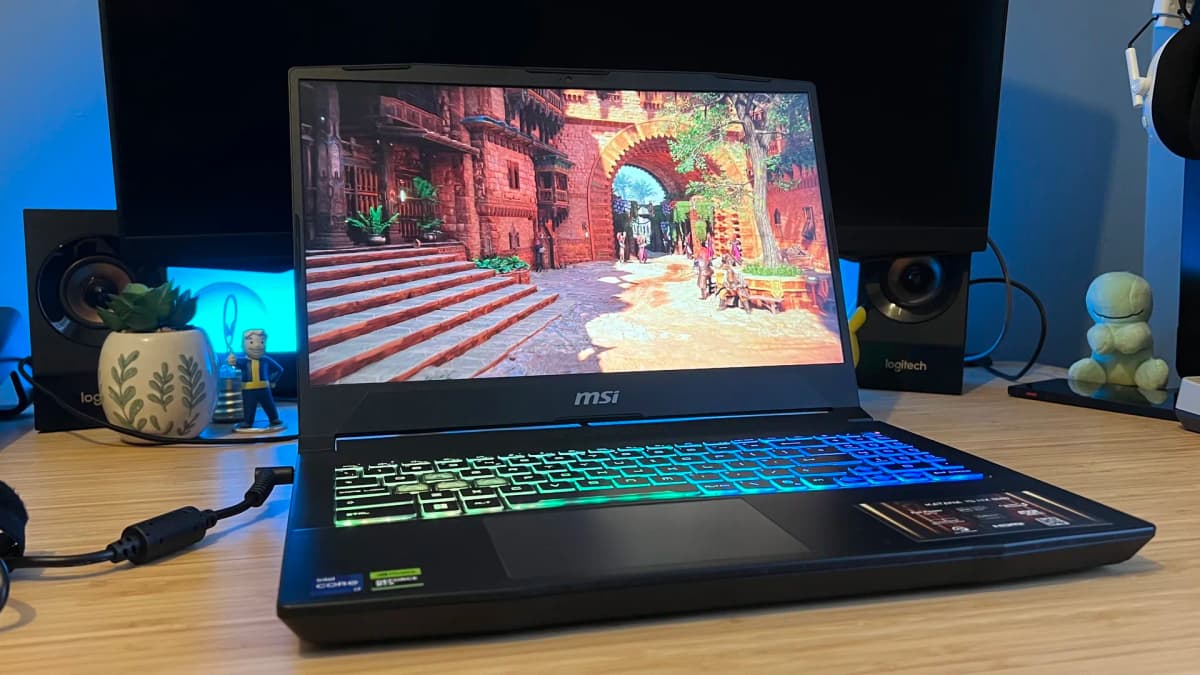
MSI keeps the Katana’s price in check with a full-plastic chassis, and going in I expected the usual: creaks, flex, and that hollow cheap-laptop “thunk” when you tap the deck. That didn’t really happen.
The shell is plastic, yes, but it’s dense and reassuring. The deck feels well supported, and the whole machine has a sturdiness that I normally associate more with Asus’s TUF line than MSI’s cheaper stuff. It still has that slightly boxy Katana vibe – this is not pretending to be a razor-thin ultrabook – but it’s also only about an inch thick. If you remember the chonky budget gaming bricks from even five or six years ago, this feels positively slim compared to those.
The 180-degree hinge is a nice touch. It doesn’t change your life for gaming, but it gives you more flexibility when you’re using the laptop for work or watching something on a cramped desk. More importantly, it feels solid rather than wobbly, which is more than I can say for the main hinge on the Acer Nitro V16 AI I’ve been testing – that machine has noticeably more flex and wobble when you adjust the screen.
A surprisingly great keyboard for the price
Budget gaming laptops often treat the keyboard as an afterthought. You get shallow travel, mushy feedback, and a general sense that you’re typing on a compromise. I went in assuming the Katana would be the same, especially with its focus on panel and GPU.
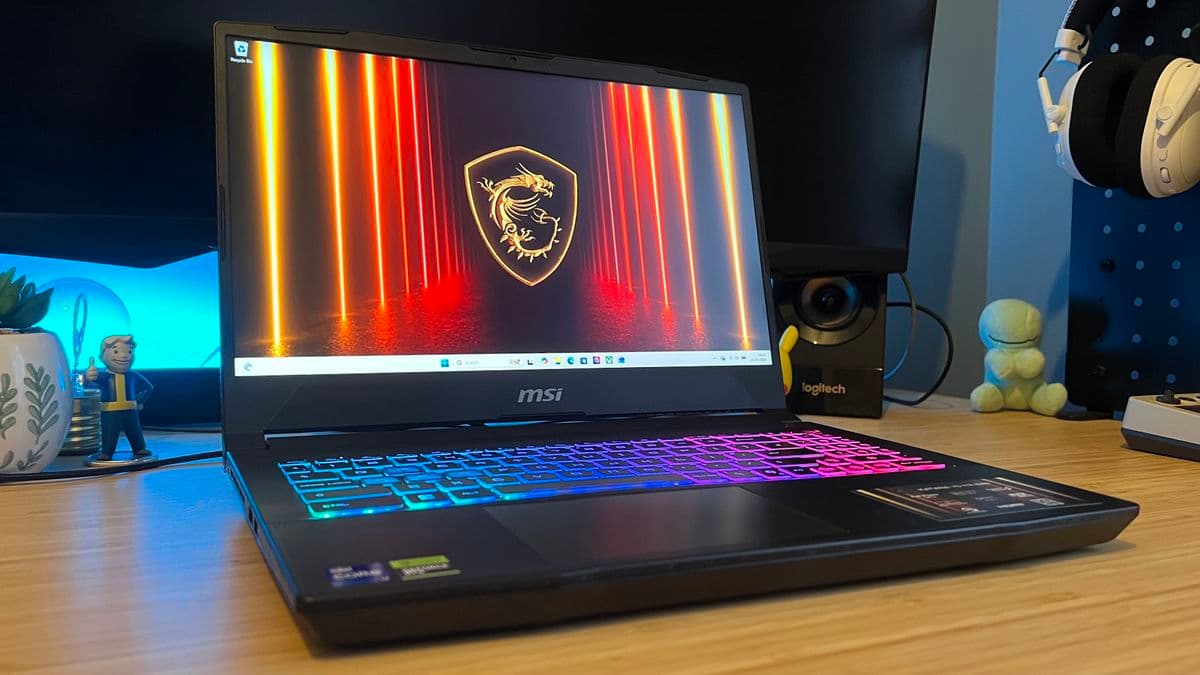
Instead, the keyboard turned out to be one of the nicest surprises of the whole machine. It’s light, springy, and there’s a very clear tactile bump to each press. I wrote long stretches of notes and played for hours without my fingers complaining, which is not something I say about many sub-$1,300 laptops.
It doesn’t have the prestige of the higher-end Lenovo Legion boards, but compared to something like the HP Victus – which very clearly pushes its bill of materials into the CPU/GPU at the expense of the keyboard and screen – the Katana feels much closer to a midrange machine in daily use.
How it stacks up against other budget contenders
On paper, a lot of budget laptops look tempting. Living with them is another story. Here’s how the Katana felt against the machines it’s really competing with in 2026.
Lenovo Legion 5 Gen 10 – the “better screen, slightly slower lungs” rival
The Legion 5 Gen 10 is the only other machine I’ve tested in roughly this price band that matches the Katana’s resolution – and then one-ups it with an OLED panel. Colors, contrast, black levels: the Legion 5 wins hands down. It’s also a bit more svelte and feels a touch more premium in hand.
Performance-wise, though, the Katana has more room to breathe. The chunkier chassis helps the RTX 5060 stretch its legs a little more. In a demanding QHD+ run like Cyberpunk 2077 at RT Medium, the Legion 5 is still closing in on 60fps territory in my testing, but the Katana tends to be a step ahead across my RTX 5060 pool. If you prize OLED and can live with slightly lower headroom, the Legion 5 Gen 10 is a phenomenal “best value” pick. If you want raw QHD+ performance per dollar, the Katana pulls in front.
Acer Nitro V16 AI – compact, clever, but usually slower
The Nitro V16 AI comes with the option of RTX 5060 or 5070, and plugs an AMD AI chip under the hood for those future-leaning features. Its 1200p panel is fine, but after a few days on the Katana’s QHD+ it feels like a step down in sharpness and overall punch.
Despite the Nitro’s 32GB RAM configuration in my tests, the RTX 5060 model generally sat at the bottom of the performance stack in this generation’s pool. In lighter games it occasionally edged above the Legion 5 Gen 10, but in more demanding runs it hovered just under that 60fps comfort zone at native resolution. The chassis feels solid – arguably even a bit more so than the Katana – but the main hinge has notable wobble and flex. I’d only recommend the Nitro V16 AI if you absolutely want a more compact shape and don’t mind giving up some performance and resolution.
HP Victus – “acceptable if you absolutely must stay under $900”
The HP Victus line still ships with RTX 40-series GPUs like the RTX 4050, so at first glance you’d think those machines would now be dirt cheap. In practice, they’re just “pretty affordable” rather than “steal of the century.” The RTX 4050 Victus 16 I’ve been using focuses its budget on components over niceties: performance is decent for 1080p in lighter games, comfortably north of 60fps in a lot of them, but the display and keyboard both feel noticeably cheaper than the Katana’s.
If you truly can’t stretch above that mid-$800 range, the Victus has its place. You’ll get solid 1080p gameplay and a current-enough GPU for older and less demanding titles. But if you can even get near $1,000, the jump to an RTX 50-series machine like the Katana is seriously tangible – both in raw performance and in overall experience.
Asus TUF A16 – the old budget favorite still has one specific edge
The Asus TUF line has basically been my go-to answer for years. The newer A16 model keeps the classic TUF strengths: a robust chassis, higher quality materials than you usually see at the price, and a design that feels a little more “serious” than the gamer-y flourishes from some brands.
Most of the TUF configs you’ll actually see on sale in the budget space are still running RTX 40-series GPUs. In my testing, RTX 40-series TUF machines under $1,000 can keep 1080p frame rates impressively close to 100fps in lighter games, and even hold those speeds across titles like Returnal and Hitman 3 with some sensible settings tweaks. If that’s your diet – lots of competitive shooters, older titles, AA and indie games – a discounted TUF A16 is still a great shout.
But for the next wave of big-budget releases, higher resolutions, and better image quality, the Katana’s QHD+ panel and RTX 50-series performance simply set you up better for the next few years. That’s why, for the first time in a long time, I’m pointing people to MSI rather than Asus for the “default” budget buy.
Budget gaming in 2026: how much you actually need to spend
Budget gaming laptops aren’t what they used to be, and not always in a good way. I still remember grabbing an RTX 3060 Asus TUF for around $800 when the 30-series was current. That’s basically a fantasy now.
Right now, the rough landscape looks like this:
- $700–$1,000 – last-gen RTX 4050 / RTX 4060 laptops, often 1080p panels. Good for lighter games and catching up on the past five years of releases.
- $1,000–$1,300 – RTX 5050 and RTX 5060 rigs when they’re on sale. This is where the Katana usually lives, and where new releases start to feel genuinely comfortable at higher resolutions.
- $1,300–$1,500 – cheaper RTX 5070 machines. You’ll see some surprisingly strong deals here, especially around sales, sometimes with nicer panels or more RAM.
If you care about future-proofing for the next few years of releases, my honest recommendation is to aim for that $1,000–$1,400 zone with at least an RTX 5060, and pounce on an unusually cheap RTX 5070 if one appears.
The pricing weirdness: when an RTX 5060 costs more than a 5070
Here’s where things get awkward for the Katana: the exact i7-14650HX / RTX 5060 / 16GB / QHD+ configuration I’ve been testing is, at the time of writing, more expensive than some RTX 5070 machines you can find on deal.
Retail pricing and discounts shift constantly, but right now you can, for example, snag an Acer Predator Helios Neo 16 with an RTX 5070 Ti, 32GB RAM, and a 2.5K 240Hz OLED panel for around $1,550 during sales. That’s obviously a step up into a different tier – mid-to-high-end rather than pure “budget” – but it does put pressure on an RTX 5060 Katana SKU that sometimes edges too close to that number.
Even within the budget space, there are RTX 5070 laptops that, thanks to aggressive discounts, occasionally dip below or match the Katana’s 5060 price. That’s the one thing stopping me from calling this an unconditional slam-dunk. If you shop during a big sale, you might stumble across a 5070 rig that technically beats the Katana on raw frames-per-second-per-dollar.
What those 5070 deals usually don’t give you, though, is the full package the Katana hits at its best prices: a legitimately sharp QHD+ panel, strong QHD+ performance, a decent keyboard, and a chassis that doesn’t feel like it’s one bad drop away from disintegrating. When the Katana’s RTX 5060 model sits nearer the lower end of its expected range, it’s an outstanding value. When it creeps too close to those discounted 5070s, you need to be more careful.
Bottom line: who should actually buy the MSI Katana RTX 5060?
If your budget lives in that $1,000–$1,300 zone and you want a machine that feels like it’s built for modern games rather than leftover stock from three years ago, the MSI Katana RTX 5060 15 HX B14W is, right now, the best budget gaming laptop I’ve tested.
You should absolutely put this at the top of your list if:
- You care about a sharper QHD+ screen and don’t want to settle for 1080p.
- You’re planning to play big new releases at high settings over the next few years.
- You want a keyboard that doesn’t feel like a total downgrade from midrange machines.
- You’re okay with an all-plastic shell as long as it feels dense and solid.
You might want to look elsewhere if:
- You find an RTX 5070 laptop on a serious discount at the same price – raw performance will win there.
- You care more about OLED quality than frame rate, in which case the Lenovo Legion 5 Gen 10 is an incredible alternative.
- Your hard ceiling is well under $1,000 – then the HP Victus or a discounted Asus TUF with a 40-series GPU will serve you better than stretching too far.
For my own recommendation list, the Katana has now replaced the Asus TUF line as the “default answer” when someone asks for a strong, sensible, budget gaming laptop. It doesn’t feel like a compromise machine; it feels like a proper gaming laptop that just happens to be cheaper than it looks, with a panel and performance combo that actually align with what the hardware is designed to do.
TL;DR
- The MSI Katana RTX 5060 15 HX B14W pairs a rare QHD+ screen with RTX 5060 performance that often beats pricier laptops at the same resolution.
- All-plastic build, but dense and sturdy, with a 180-degree hinge and a surprisingly good, tactile keyboard.
- In February’s testing it outperformed Asus TUF, Acer Nitro V16 AI, and HP Victus options in the budget class, and even pushed ahead of Lenovo Legion 7 and Alienware 16X RTX 5060 configs in many QHD+ runs.
- Current pricing is the only real catch: this i7-14650HX / RTX 5060 / 16GB model can be more expensive than some RTX 5070 deals, so timing your purchase matters.
- If you want a future-ready budget gaming laptop built around 1440p-class play without spending midrange money, this is the one to beat.
FinalBoss // Gear
Level up your setup
01Graphics cardson Amazon→02Gaming laptopson Amazon→03High-refresh gaming monitorson Amazon→04Discounted game keyson Kinguin→Affiliate links · As an Amazon Associate, FinalBoss earns from qualifying purchases.
Want to Level Up Your Gaming?
Get access to exclusive strategies, hidden tips, and pro-level insights that we don't share publicly.
Ultimate Reviews Strategy Guide + Weekly Pro Tips