
Table of Contents (11)
A modern N64 controller that refuses to grow a second stick
The first night I used the 8BitDo 64 Bluetooth Controller, I bounced straight from Mario 64 on Switch Online to a round of Dead Cells, feeling pretty smug about how well this weird N64-shaped thing was keeping up. Then I launched a modern 3D game that assumed dual analog controls and hit the wall immediately. My thumb hovered over the empty space where a right stick “should” be, and reality set in: this thing is unapologetically N64, for better and for worse.
That’s really the story of this controller. If your heart lives in the era of chunky cartridges, foggy castles, and yellow C-buttons, the 8BitDo 64 is dangerously close to perfect. If you want one pad to rule your Switch, Android, and PC library, it’s always going to feel a little bit like bringing a time traveler to a modern dinner party.
My setup and how I used it
For context, I tested the 8BitDo 64 over about three weeks:
- On Nintendo Switch: primarily with the Nintendo 64 Switch Online library, plus a mix of NES/SNES/GB games and some modern indies like Dead Cells and Stardew Valley.
- On Android: paired to a phone and a small tablet, mostly for emulation (N64, SNES, GBA) and controller-friendly mobile games.
- On PC: plugged into a Windows desktop for emulation (Project64, RetroArch) and a handful of 2D games on Steam.
I’m one of those people who grew up gripping the original three-pronged N64 controller in the middle like some kind of claw machine victim, so nostalgia is strong here. But I also play a lot of modern stuff, and my daily drivers are typically an 8BitDo Pro 2 and a Switch Pro Controller. So I came in knowing exactly what a second stick buys you… and why I still sometimes miss those yellow C-buttons.
Design: the N64 grows up (a little)
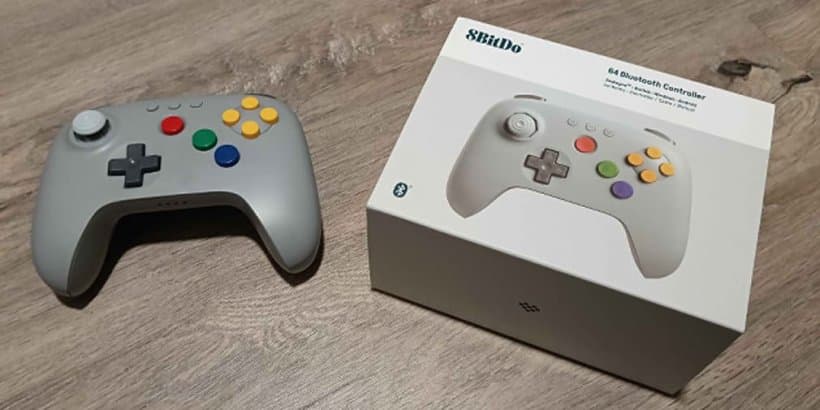
Picking up the 8BitDo 64 for the first time feels like meeting an old friend who finally figured out posture. The awkward trident of the original is gone; in its place is a more traditional modern silhouette with two comfortable grips. But the soul of the N64 pad is intact:
- The single analog stick sits in that center-front position your muscle memory expects.
- The four C-buttons are still clustered on the right, in that slightly raised diamond that used to pass as a camera system.
- You get both left and right Z-buttons on the back, which immediately feels like the “right” way the original should have shipped.
- A solid D-pad and standard A/B face buttons round things out.
All of this is wrapped in what feels like classic 8BitDo build quality: firm plastics with a bit of texture, no creaking when you twist the shell, and buttons that actuate with a clear, snappy click. The analog stick has a subtle resistance that reminded me more of modern controllers than the loose, grindy feel of a twenty-year-old original N64 pad pulled from a shoebox.
Physically, it’s just comfortable. I could marathon through a couple of hours of Ocarina of Time without my hand settling into that weird “claw on the middle prong” position that always made long sessions with the original feel like a bad ergonomics experiment. Here, your thumbs sit where you’d expect them to on a modern controller, but the layout still screams N64.
The only immediate visual clue that this is a modern pad is the row of system and pairing buttons and the little hardware toggle for switching between modes (more on that in a second). It’s subtle, but it’s the main reminder that this thing is doing a lot more than just talking to one late-’90s console.
Switch experience: this is what Nintendo’s official pad wants to be
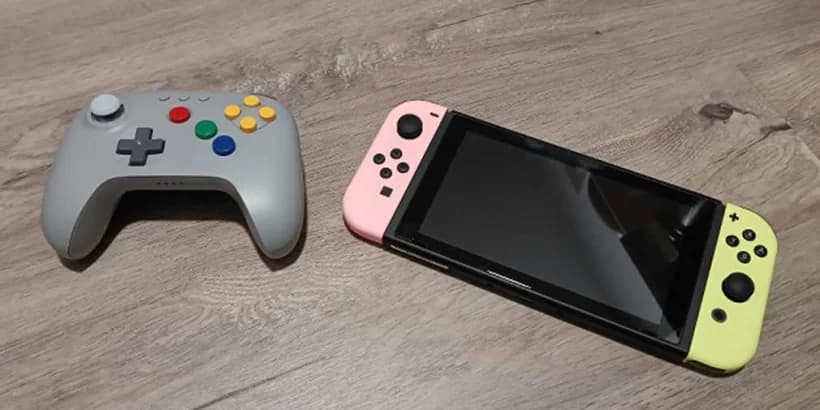
The 8BitDo 64 has a dedicated Switch mode, and once I flipped that toggle and went through the normal controller pairing menu, it basically behaved like a first-party pad. No dongles, no driver hacks, just standard Bluetooth pairing and done.
The magic kicks in when you boot up the Nintendo 64 collection on Switch Online. The controller auto-maps to the expected layout, so jumping into Mario 64, Star Fox 64, or F-Zero X feels uncannily natural. You press what you remember pressing, and Mario long-jumps the way he always did, just without your thumb worrying about shredding an aging analog stick.
One of my favorite moments was replaying the opening of Ocarina of Time and realizing I wasn’t subconsciously bracing for the slight latency and weird stick dead zones of my old third-party N64 pads. The stick response here is crisp; I could line up side-hops and backflips in the Kokiri training area cleanly, and aiming the slingshot with the single stick felt absolutely fine.
Outside the N64 app, the controller is still very usable for retro stuff. NES and SNES games feel great thanks to the solid D-pad and straightforward button layout. Game Boy and Game Boy Color titles are similarly at home here. For these collections, the pad felt almost overqualified; this is a N64 specialist moonlighting as a general retro controller.
Indies on Switch are where the picture gets a bit more complicated. In 2D games like Dead Cells, Celeste, or Stardew Valley, I had no complaints. These games were clearly designed with traditional pads in mind, and the 8BitDo 64 slots into that role cleanly. The analog stick or D-pad both work great for platforming and movement, and the C-buttons give you some extra options for remapping actions if the default feels off.
But the second you step into more modern 3D games that assume a dedicated right stick for camera control, the illusion cracks. I tried to power through some open-world sections in newer titles and kept feeling like I was wrestling the control scheme more than the enemies. You can sometimes rebind the yellow C-buttons or D-pad to hack together camera controls, but it never truly replaces the smooth precision of a second stick. You’re always aware that you’re using a controller from a slightly more primitive era.
Android and mobile: the best kind of overkill for retro
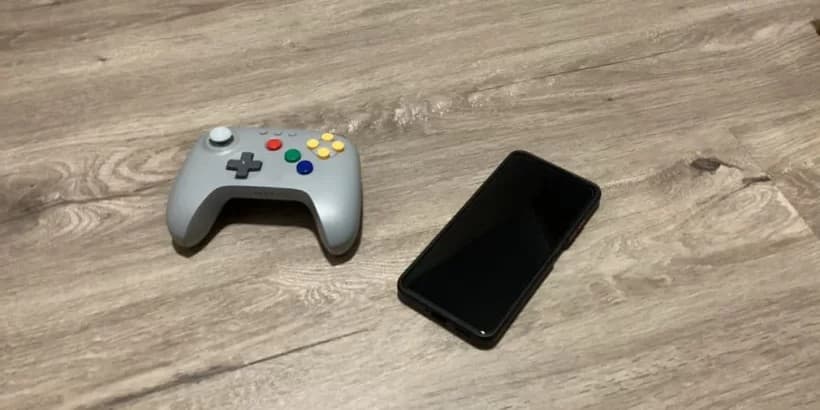
Pairing the controller with Android was as simple as slipping it into Bluetooth mode, holding the pairing combo, and selecting it from the Bluetooth menu. After that, my phone and tablet saw it as a generic game controller, which is exactly what you want.
Most of my Android time with the 8BitDo 64 was spent in emulators. For N64, it feels almost embarrassingly on-brand. The fact that the layout mirrors the original pad so closely means that in a lot of N64 emulators, auto-mapping just works. When I did need to tweak inputs-say, to make sure Z mapped to the correct trigger, or to decide what to do with the second Z-button-it didn’t take long.
Playing F-Zero X on my tablet propped up on a stand, with the 8BitDo 64 in hand, was the exact kind of “modern retro” setup I’ve always wanted: instant loading, wireless freedom, and no plastic fog machine of an original console on the TV stand. The controller never missed a beat in those high-speed races. No input drops, no weird lag spikes, just clean steering and rocket-fast shoulder taps to adjust the craft.
It also works surprisingly well with classic-style mobile ports that already play nicely with controllers. Castlevania: Symphony of the Night, Dead Cells, and similar games all felt right at home. In those cases, the controller doesn’t need to be N64-shaped at all, but the layout doesn’t get in the way, and having those C-buttons as extra action or inventory keys can actually be handy.
It also works surprisingly well with classic-style mobile ports that already play nicely with controllers. Castlevania: Symphony of the Night, Dead Cells, and similar games all felt right at home. In those cases, the controller doesn’t need to be N64-shaped at all, but the layout doesn’t get in the way, and having those C-buttons as extra action or inventory keys can actually be handy.
🎮 Get This Game at the Best Price
Compare prices instantly and save up to 80% on Steam keys with Kinguin — trusted by 15+ million gamers worldwide.
*Affiliate link — supports our independent coverage at no extra cost to you
Where things break down is, again, anything that expects dual analog by default. A lot of modern mobile shooters and third-person games assume two sticks. If the game doesn’t let you remap camera control cleanly to the C-buttons or doesn’t support customizable bindings at all, the 8BitDo 64 can suddenly feel like the wrong tool for the job. It’s not the controller’s fault in those cases; it’s just sticking too close to its retro identity to fully fit into the modern mobile scene.
PC and emulation: this is its natural habitat
On PC, the 8BitDo 64 can run either over Bluetooth or via a wired USB connection. I mostly used it wired for emulation, partly out of habit and partly because I had a cable sitting right there.
In RetroArch and standalone N64 emulators, mapping was painless. It took a few minutes to get the profile exactly how I wanted it-especially deciding how to handle the dual Z-buttons for games that only expect one—but once set, it felt fantastic. Compared to using a generic Xbox-style controller where you’re constantly translating “C-up” to “right stick up” in your head, having actual labeled C-buttons is more valuable than I expected. Muscle memory kicked back in fast.
It’s not just N64 either. The D-pad is good enough to make this a nice pad for SNES and Genesis-style games on PC. Again, you’re using a controller clearly themed around a specific console to play stuff from completely different eras, but it never feels wrong.
For modern 3D PC games, though, I wouldn’t recommend it unless the game is particularly simple or gives you deep control over keybindings. Steam is generally good at mapping controllers, but you always run up against that missing right stick and the extra headache of remembering which C-button you assigned to camera left or right. I tested it with a couple of lightweight 3D platformers and quickly retreated back to a Pro 2 once the novelty wore off.
Responsiveness, battery, and build quirks
In terms of feel and responsiveness, I never ran into anything that made me side-eye the controller. Inputs felt immediate on Switch and Android, and I didn’t notice random spikes of lag or dropped signals. It behaved like a solid Bluetooth pad, which is what you want from something that will often be used at a bit of distance from a TV or propped-up phone.
Battery life was “invisible” in the best way. I charged it every few evenings out of habit and never had it die mid-session. You plug it in via USB-C, and it tops off quickly enough that I never had to schedule my play sessions around it.
The only real build quirk I bumped into was that the C-buttons are slightly smaller and closer together than I remembered, and intense use can feel a bit cramped if you’re doing a lot of rapid presses. It’s not a dealbreaker, but after some long sessions in games that lean hard on C-button actions, my thumb appreciated switching to something with larger right-side face buttons.
The single-stick elephant in the room
Everything about this controller flows back to one design decision: 8BitDo chose not to “fix” the N64’s biggest modern limitation. There is still only one analog stick.
On one hand, that’s exactly why the pad works so well for what it’s aiming at. The second you bolt a right stick on there, you’re no longer holding an N64 controller, you’re holding a chimera that doesn’t fully satisfy either camp. The C-buttons would lose their purpose, the layout would stop matching on-screen prompts, and you’d be left with a weird hybrid.
On the other hand, that design choice permanently caps how versatile this thing can be. I kept finding myself in this pattern:
- Boot up an N64 game on Switch or emulation on PC – the controller feels perfect.
- Jump to a 2D indie on Switch or Android – still great, no issues.
- Launch a modern 3D game – instantly aware of the missing right stick and seriously considering swapping controllers.
In a way, that’s honest. This is not pretending to be your one-and-only controller. It’s saying, “I’m here for your retro stuff and the simpler games. For the rest, use something else.” If you accept that from the start, you’ll be much happier with it.
Who this controller is actually for
After living with the 8BitDo 64 for a few weeks, a very specific type of player emerged in my head as the “perfect match” for it:
- N64 obsessives on Switch who spend real time in the Nintendo 64 Switch Online library and want something that feels right without the weird ergonomics of the original pad.
- Retro and emulation fans on PC and Android who play a lot of N64, SNES, and other classic systems and are happy to have a dedicated “retro” controller next to a more modern one.
- Players who like physical nostalgia—people who don’t just want to play old games, but want a controller that looks and feels like it belongs to that era, just updated enough to be comfortable and wireless.
If you’re instead in the camp that wants one controller for Switch, PC, and mobile that will handle literally everything from Mario 64 to the latest dual-stick shooter, this is not that pad. You’d be much better off with something like an 8BitDo Pro 2 or a modern console controller, and maybe keep this around as a luxury sidekick for when you’re feeling nostalgic.
TL;DR: strengths and weak spots
- Feels fantastic for N64 games on Switch and in emulators, with layout and auto-mapping that match original hardware expectations.
- Much more comfortable than the original N64 pad, thanks to a modern shape, better stick, and dual Z-buttons.
- Works well for 2D and simpler games on Switch, Android, and PC, where a single stick and good D-pad are all you really need.
- Limited in modern 3D games that assume dual analog; you can hack around it in some titles with C-buttons and remapping, but it never feels fully natural.
- Build quality and wireless performance are solid, and battery life is good enough that it never became a problem during normal use.
FinalBoss // Gear
Level up your setup
01Retro consoleson Amazon→028BitDo controllerson Amazon→03Capture cards (Elgato & more)on Amazon→04Discounted game keyson Kinguin→
Affiliate links · As an Amazon Associate, FinalBoss earns from qualifying purchases.
Want to Level Up Your Gaming?
Get access to exclusive strategies, hidden tips, and pro-level insights that we don't share publicly.
Ultimate Reviews Strategy Guide + Weekly Pro Tips