
Table of Contents (12)
Living With Genki’s Force Field 2 on Switch 2
The first night I snapped Genki’s Force Field 2 onto my Switch 2, I honestly thought, “Oh, this is cute, but those handles are way too small to change anything.” Three days later, I was sitting on a short-haul flight, MagSafe battery magnetized to the back, joyfully burning through another Balatro run while the guy next to me fumbled with a power bank and a cable snaking over his tray table. That’s when it clicked: the Force Field 2 isn’t really about the grip; it’s about making the Switch 2 actually feel portable again.
I’ve spent the past week using this case daily on a launch Switch 2: commuting, couch-gaming, a train ride, and that flight. I also bounced between docked and handheld constantly, because the Switch 2 finally has the horsepower to make docked games like Final Fantasy 7 Remake Intergrade feel at home on a TV, yet battery life in handheld still drains fast when you’re pushing that 7.9-inch 1080p screen and beefier hardware. That tension-power versus portability-is exactly where the Force Field 2 tries to help.
Key Takeaways After a Week
- The grip shape is subtle; comfort is better, but this isn’t a chonky “ergonomic overhaul” grip.
- The real killer feature is the MagSafe ring on the back: it turns your Switch 2 into a magnetic battery sandwich.
- Dock compatibility is legit. It slides into the official dock without removing the case, though the fit is snug.
- Hinged Joy-Con covers are smarter than they look, especially for tabletop play.
- Cartridge storage is handy but underused; there’s space for more than what Genki gives you.
- The front cover transforms it into a legit travel shell while keeping bulk surprisingly low.
Design: Understated, Clever, and a Little Deceptive
Out of the box, the Force Field 2 looks very “Genki”: clean, understated, and just a bit nerd-chic. The main piece is a semi-transparent, dark-grey back panel that wraps around the Switch 2 and Joy-Con 2 rails. It adds two small, rounded handles that look almost too polite-more like gentle bumps than full-on grips.
Here’s the important part: those handles aren’t attached to the Joy-Cons themselves. Instead, they’re hinged panels anchored to the central back piece. You slide the whole panel onto the Switch 2 like a typical shell, and the handles swing closed over the Joy-Cons, snapping into place around them.
At first glance, I assumed this was just a weird aesthetic choice, but the first time I popped a Joy-Con off for tabletop mode, I got what Genki was going for. Instead of fighting with a grip that wraps directly around each Joy-Con, you just slide the controller up like normal, and the hinged cover stays on the main body. No wrestling, no flexing cheap plastic around the rails.
The plastic itself feels solid but not chunky. There’s a bit of flex when you install it, but once it’s snapped on, it hugs the tablet and controllers tightly. The semi-transparent back shows just enough of the Switch 2’s lines to keep it from looking like a random Amazon case, and the dark grey hides minor scuffs well—handy if you’re tossing it into a bag a lot.
Grip and Comfort: Subtle, Not Transformative
I’ve used some of those giant GameCube-style grips that basically turn handheld mode into a mini console controller bolted to a screen. Compared to those, the Force Field 2’s handles are minimal. They extend just enough to give your ring fingers and pinkies something to curl around but don’t dramatically widen the system.
After a couple of two-hour handheld sessions with Balatro and a bit of action-heavy stuff, I’d describe the comfort upgrade as “noticeable but not game-changing.” My hands cramped less than they do with a naked Switch 2, but if you’re hunting for a cure-all for handheld discomfort, those big, purpose-built grips still win.
Where the Force Field 2 earns its keep is how it balances comfort and portability. A lot of Switch 2 grips I’ve tried feel amazing in the hand and awful in a backpack. They snag on pockets, hog space, and completely kill the sleek, tablet-like profile. Here, the handles are small enough that I could still slide the console into my usual sling bag pocket without rethinking my packing.
If you have very large hands, you might find the handles a bit too modest. For my average-sized mitts, the extra purchase was just enough to make marathon sessions manageable while still keeping the overall footprint slim.
The MagSafe Ring: The Real Star of the Show
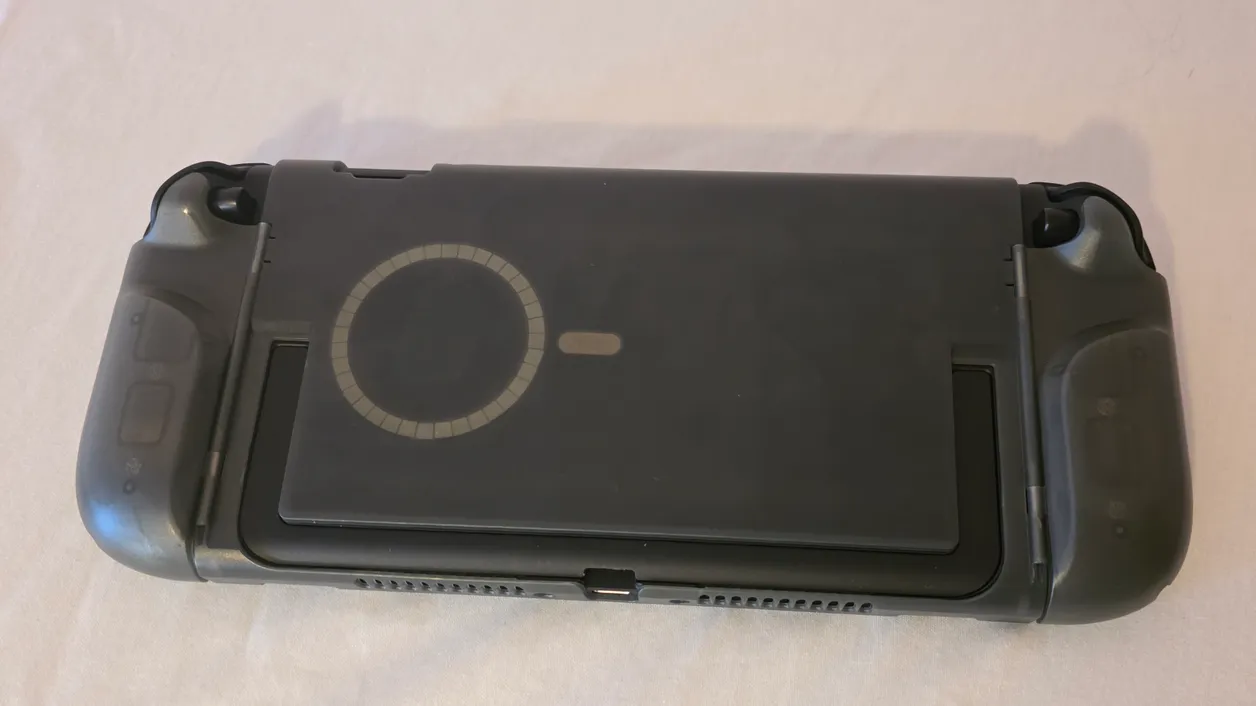
The thing that genuinely changed how I use my Switch 2 isn’t the grip at all—it’s the MagSafe ring smack in the center of the back panel.
Switch 2 battery life is… fine until it isn’t. Fire up something visually dense in handheld and between the higher-res screen and the new chip, your percentage ticks down faster than you’d like. It’s not unplayable, but it’s definitely in that “always charge before you leave the house” territory.
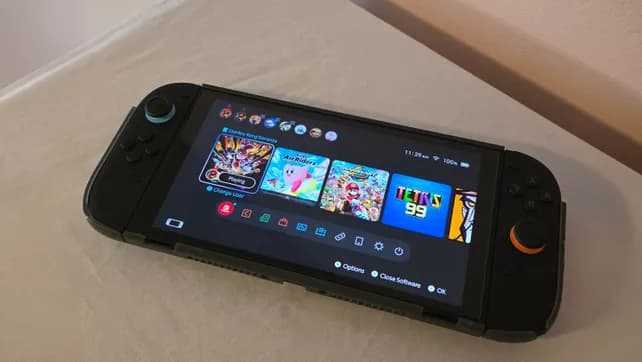
With the Force Field 2, I magnetically snapped Genki’s own slim MagSafe-compatible battery to the back, ran the included right-angle USB-C-to-C cable between them, and forgot about it. No dangling brick in my pocket. No cable wrapped around my fingers. It basically turned the Switch 2 into a slightly thicker handheld with a built-in extra tank of power.
On that short flight I mentioned earlier, I intentionally didn’t top off the console beforehand. I started at a little over half battery, clipped on the pack once I dipped under 30%, and played the rest of the flight plus part of the Uber ride afterward without even thinking about outlets. That’s the kind of quality-of-life change you only appreciate when you stop mentally budgeting battery life all the time.
I also tried a third-party MagSafe power bank I normally use with my phone. The magnet connection worked perfectly, but I had to swap the cable: the right-angle USB-C Genki bundles is clearly optimized around the shape and port placement of their own pack. With a different battery, a straight or differently-angled cable was less awkward. So yes, you can mix and match, but for the smoothest setup, Genki’s ecosystem has an edge.
Either way, the headline is the same: being able to slap a battery directly onto the console, with no pocket-tether, makes the Switch 2 feel truly mobile again. If you travel, commute, or just like gaming in random corners of your house, this is the killer trick.
Dock Fit and Kickstand: No Case Dance Required
The other thing I was nervous about was dock compatibility. A lot of third-party cases either don’t fit the official dock at all or slowly chew up plastic because they’re just a hair too thick.
Here, the Force Field 2 slides into the Nintendo dock with a snug but not scary fit. The first time, I lowered it in slowly, ready to yank the console if I felt resistance on the sides, but it seated just fine. Over the week, I docked and undocked several times a day and didn’t see any new marks or feel scraping on the edges.
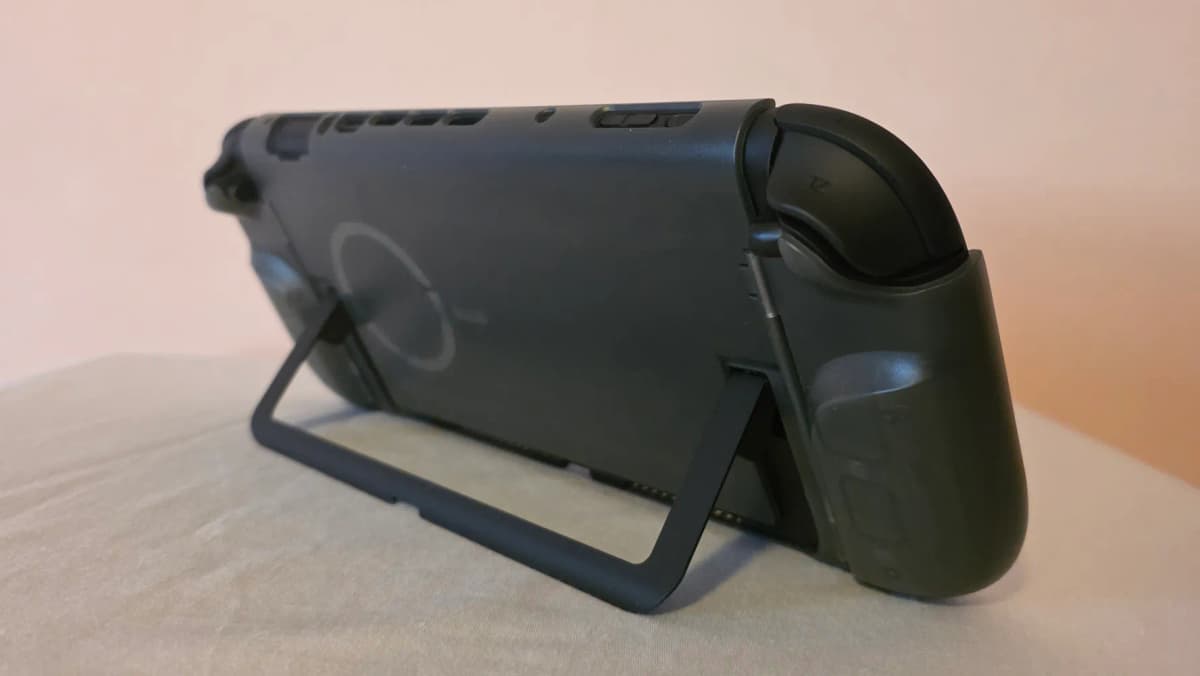
Genki also carved out space for the Switch 2’s improved kickstand, which is a small but important detail. You don’t lose tabletop mode, which would’ve been a dealbreaker for me. I spent one evening with the console on my kitchen counter, kickstand out, Joy-Cons detached, the hinged grip panels just resting back on the shell, and the MagSafe battery still attached. It was like a mini portable dockless setup, and it all worked without removing a single piece of the case.
Hidden Cartridge Storage in the Handles
Open those hinged handles and you’ll find one of my favorite little touches: each grip hides a cartridge slot inside. It’s one of those simple “why doesn’t everyone do this?” ideas.
On mornings when I didn’t feel like carrying a game case or pouch, I’d drop a couple of physical games into the handles—Balatro on one side, something meatier like a big RPG on the other—snap them shut, and walk out the door. When I got where I was going, I had just enough choice without carrying more stuff.
The downside: it’s only a couple of slots. There’s clearly more potential space in the overall design, especially when you bring the front cover into the picture. If you’re the sort of person who travels with a tiny library of physical carts, this will feel more like a bonus than a replacement for a separate game case.
The Front Cover: Low-Bulk Travel Armor
The “other half” of the Force Field 2 is a separate front shell that snaps over the console when the back piece is already attached. Think of it as a hard, rounded lid that covers the screen and controllers, turning the whole thing into a compact, smooth brick you can throw in a bag.
I really liked this part more than I expected. With the front cover on, the package still felt slimmer than most traditional hard cases I own. The rounded shape meant it didn’t snag on backpack internals or zippers, and it stacked neatly on top of my laptop in a messenger bag without making the whole setup awkward.
Protection-wise, it feels solid. I wouldn’t intentionally drop it off a table, but I’d trust it against the usual travel abuse: overhead bin bumps, crowded bag shuffles, or getting wedged between a book and a water bottle. The screen never felt exposed or fragile.
Where Genki left some opportunity on the table is the unused space between the screen and the inside of that lid. There’s room there to squeeze in more cartridge slots or even a little nook for Joy-Con straps. Instead, it’s just empty air. Not a dealbreaker, but every time I popped the cover off, I mentally pictured the extra storage that could’ve been.
Portability and Bulk: Surprisingly Compact
All this functionality usually comes at the cost of bulk, but the Force Field 2 keeps things impressively trim. With the back grip piece on, the Switch 2 gains less than an inch of total thickness. Add Genki’s own battery and you’re still in “slightly thick tablet” territory, not “portable brick.”
Even with both case halves and the battery attached, I could still slide the system into a mid-sized sling bag pocket I normally reserve for a paperback. That’s not something I can say about most of the chonky ergonomic grips or padded clamshell cases floating around right now.
If you’re the type who wants ultimate protection with foam cutouts and cable storage, this isn’t that. It’s not trying to be a full-on travel organizer. It’s more like armor you leave on 24/7 that also happens to play nice with bags and docks.
Minor Annoyances and Trade-Offs
A few things bugged me, even if none of them ruined the experience.
- Grip size: The handles won’t satisfy players who want a truly deep, controller-like grip. They’re a comfort nudge, not a cure-all.
- Cartridge capacity: Two slots in the handles and nothing in the front cover feels stingy given the potential space.
- MagSafe accessory quirks: Non-Genki batteries work fine, but you may need to experiment with cables so they don’t poke or bend in weird ways.
- No extra strap storage: There’s no obvious place for Joy-Con straps or a short USB-C cable if you want to carry them with the console.
None of this is dramatic enough to outweigh what the case gets right, but it’s worth knowing where the design plays it safe instead of going all-in on modular storage.
Where It Fits Among Other Switch 2 Accessories
The Switch 2 accessory scene is already wild. You’ve got those Kickstarter GameCube-style grips trying to rebuild the whole control layout, fancy controllers, massive padded cases, and standalone MagSafe battery banks meant for phones that people are hacking into their handheld setups.
The Force Field 2 doesn’t compete by being the biggest, most ergonomic, or most customizable option. It wins by doing three things at once:
- It gives just enough grip to be more comfortable than a naked Switch 2.
- It bakes in a smart, magnetic charging solution instead of expecting you to juggle third-party hacks.
- It stays dock-friendly and slim enough that you don’t have to baby it or take it off constantly.
If your priority is pure comfort in handheld, there are chunkier, more aggressive grips that beat it. If your priority is ultra-rugged, throw-it-across-the-room protection, there are bulkier clamshell cases that do more. But if you live in that middle ground where you’re bouncing between couch, TV, commute, and travel, this hits a really sweet spot.
Who It’s For
After a week of real-world use, here’s who I think will get the most out of Genki’s Force Field 2:
- Commuters and travelers who don’t want to think about battery life and hate juggling loose power banks and cables.
- Dock-heavy players who still care about handheld but refuse to peel a case off every time they want to play on TV.
- Minimalist packers who want one slim setup that protects the console, gives a better grip, and slips easily into a bag.
- Physical game fans who like having at least a couple of carts always riding shotgun in the console itself.
If you almost never play handheld, this is obviously overkill. If you’re obsessed with having six-plus cartridges on you at all times or you want a handle that practically turns the system into a full controller, you’ll probably be happier pairing a dedicated grip with a separate hard case and battery.
FinalBoss // Gear
Level up your setup
01Best-selling Switch 2 gameson Amazon→02Switch 2 accessorieson Amazon→038BitDo controllerson Amazon→04Discounted game keyson Kinguin→Affiliate links · As an Amazon Associate, FinalBoss earns from qualifying purchases.
Want to Level Up Your Gaming?
Get access to exclusive strategies, hidden tips, and pro-level insights that we don't share publicly.
Ultimate Reviews Strategy Guide + Weekly Pro Tips