
Table of Contents (15)
A $16 Ugreen M.2 Enclosure That Actually Makes Sense
If you have a spare M.2 SSD lying in a drawer, this discounted Ugreen USB‑C M.2 enclosure is one of the cheapest ways to turn it into a genuinely fast external drive. You’re looking at up to USB 3.2 Gen 2 speeds (around 1,000MB/s in the real world), a toolless design, support for common M.2 sizes, and an aluminium shell with a thermal pad – all for roughly £16/$16 in current sales. That combination makes it a very easy recommendation if your drive is compatible and you understand the 10Gbps speed ceiling.
Rock Paper Shotgun picked it out as a neat way to build a cheap Steam or PC game library on the go, but the same logic applies whether you’re on a desktop, laptop, or handheld like a Steam Deck: reuse the SSD you already own, add a small enclosure, and you’ve got a pocket‑sized, high‑speed external drive for a fraction of what prebuilt externals usually cost.
Specifications
What This Enclosure Actually Does for You
On paper, “USB 3.2 Gen 2 M.2 enclosure with UASP” sounds like a spec sheet buzzword salad. In practice, it means this little Ugreen box turns basically any supported M.2 SSD into something that behaves very much like a fast internal drive, just hanging off a USB‑C port.
With a decent NVMe drive inside, you can expect:
- Game‑library‑grade speeds – loading PC or Steam Deck games from it feels close to an internal SATA SSD and not that far off a midrange NVMe for many real‑world titles.
- Snappy file transfers – moving tens of gigabytes of footage or Steam backups happens in seconds, not minutes, if your host device’s USB‑C port can keep up.
- System‑image/backups that don’t feel painful – cloning OS drives or dumping large photo/video libraries is actually tolerable at ~1GB/s.
That’s the key thing: this isn’t a “cute little USB stick replacement”. Properly paired with a good SSD, it’s more like having a small external NVMe drive similar to premium branded externals, but built from parts you choose yourself.
Toolless Design: The Part You’ll Appreciate More Than the Specs
Most cheap M.2 enclosures live in that annoying middle ground where they’re not hard to use, but you still have to reach for a tiny screwdriver, fiddle with screws the size of glitter, and hope you don’t drop a standoff on the floor. Ugreen’s design is different: it’s genuinely toolless.
The enclosure uses a sliding or latch‑style mechanism (exact layout varies a bit by sub‑model) and a small internal buckle or clip to hold the SSD at the right angle before you press it flat. In practice that means:
- No tiny screws to lose, especially if you’re doing the install on a couch, train table, or hotel desk.
- Drive swaps are fast – slot in a new 2230 or 2280 SSD in under a minute.
- It’s far more beginner‑friendly for people who’ve never handled an M.2 drive before.
For anyone who tinkers with laptops, handheld PCs, or PS5 SSD upgrades, this is a huge quality‑of‑life thing. Spare drives accumulate quickly, and if reusing them is annoying, you simply won’t bother. With a toolless enclosure, you’re far more likely to actually turn those old 512GB or 1TB sticks into something useful.
Performance: What 10Gbps and UASP Really Mean
The enclosure connects over USB 3.2 Gen 2 at 10Gbps. That figure gets thrown around a lot, but two things matter more than the raw number: protocol support and realistic expectations.
First, protocol support: the Ugreen units in this family use a modern USB–NVMe/SATA bridge chip (like Realtek’s RTL9210B) that supports UASP (USB Attached SCSI Protocol) and TRIM. UASP is key for queue depth and latency – it lets USB storage behave more like modern internal drives instead of the old bulk‑only mass storage mode. TRIM support means your SSD can properly clean up unused blocks, preserving performance over time.
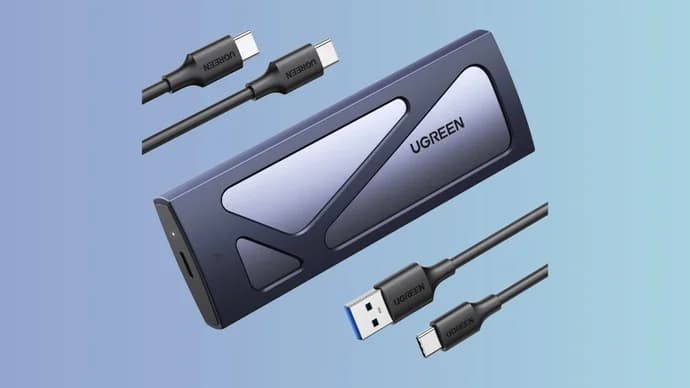
Second, realistic speed: 10Gbps is the bus ceiling, not what you’ll see in practice. After protocol overhead, you’re typically looking at roughly:
- 800–1,050MB/s sequential reads with a decent NVMe SSD.
- 700–1,000MB/s sequential writes depending on drive cache and size.
- Much lower, but still respectable random I/O – good enough for game loading and general app launching.
That’s right where you’d expect a good USB 3.2 Gen 2 enclosure to land, and it’s leagues ahead of cheap SATA‑only externals stuck at ~400–550MB/s. It’s not Thunderbolt 4 or USB4 territory, but those solutions cost very noticeably more and often require specific ports and cables.
The limiting factor for most people won’t be the SSD; it’ll be your host device’s port. If your PC or console only has USB 3.0 or a 5Gbps port, the enclosure will downshift to that speed. You’ll still get an advantage from UASP and a good SSD, but you won’t hit those ~1GB/s peaks.
Compatibility: NVMe vs SATA, Keys, and Sizes
Compatibility is the only area where you need to slow down and read the spec sheet carefully. Ugreen sells several nearly identical‑looking enclosures in this family. Some support both NVMe and SATA M.2 SSDs; others are NVMe‑only.
Here’s what to keep in mind before you hit “buy”:
- Interface type matters – M.2 is just the form factor. Under the label, your drive is either NVMe (PCIe) or SATA. Many laptop OEM SSDs are NVMe now, but some older or cheaper machines used SATA M.2. If your drive is SATA and you accidentally get an NVMe‑only enclosure, it simply won’t be detected.
- Keying gives you a hint – NVMe SSDs are usually M‑key; SATA M.2 can be B‑key or B+M‑key. Dual‑mode Ugreen enclosures often list “M‑key & B+M‑key support”. But don’t rely on the notch alone; check the drive spec if you can.
- Length support is generous – 2230, 2242, 2260, and 2280 are typically all supported. That covers small Steam‑Deck‑style drives up through standard desktop/laptop sticks. The internal bracket system lets you secure shorter drives so they don’t rattle around.
If you’re reusing a drive from a Steam Deck, handheld PC, or modern laptop, odds are very high it’s an NVMe SSD, which any of the NVMe‑capable Ugreen variants will be fine with. If you’re pulling from older thin‑and‑light laptops or budget notebooks, be more careful: a surprising number of those are SATA M.2.
Capacity is less of a concern. Most modern listings quote up to 8TB support, although a few older or cut‑down models cap at 6TB. In practical consumer use, you’re probably talking 512GB–4TB, where everything in this family handles those capacities without drama.
Thermals and Build: Aluminium Shell and Thermal Pad
External NVMe drives get hot – there’s no way around that. You’re pushing hundreds of thousands of IOPS and near‑gigabyte‑per‑second transfers through a tiny stick, with very little surface area and no active cooling. The enclosure’s job is not to make that heat disappear, but to spread it out and make it less of a problem.
Thermals and Build: Aluminium Shell and Thermal Pad
External NVMe drives get hot – there’s no way around that. You’re pushing hundreds of thousands of IOPS and near‑gigabyte‑per‑second transfers through a tiny stick, with very little surface area and no active cooling. The enclosure’s job is not to make that heat disappear, but to spread it out and make it less of a problem.
🎮 Get This Game at the Best Price
Compare prices instantly and save up to 80% on Steam keys with Kinguin — trusted by 15+ million gamers worldwide.
FinalBoss // Gear
Level up your setup
01Top-rated gaming headsetson Amazon→02High-refresh gaming monitorson Amazon→03Gaming chairson Amazon→04Discounted game keyson Kinguin→Affiliate links · As an Amazon Associate, FinalBoss earns from qualifying purchases.
*Affiliate link — supports our independent coverage at no extra cost to you
Ugreen leans on a pretty standard but effective recipe:
- An aluminium alloy shell that doubles as a heatsink.
- A thermal pad that presses the SSD’s controller and NAND against the shell so heat has a path out.
- Optional silicone sleeves on some bundles, mostly for grip and shock protection rather than pure cooling.
In real‑world use, that means the enclosure gets noticeably warm to the touch under sustained transfer, which is exactly what you want: heat leaving the SSD and spreading into the housing. For short bursts – launching games, copying smaller files – temperatures stay well within normal NVMe operating ranges.
If you’re hammering a high‑end PCIe 4.0 drive with endless 100GB transfers, you’ll still eventually hit thermal limits on the SSD itself. The enclosure can’t change silicon physics. But for typical portable‑drive workloads, the included thermal pad and aluminium body are more than adequate.
Use Cases: PCs, Laptops, Steam Deck, and More
Where this enclosure really earns its keep is how flexible it is once your spare SSD is inside. Because it’s just USB‑C mass storage with UASP, it plays nicely with pretty much anything recent that has a USB‑C port (and even a lot of USB‑A ports via adapter).
Some very tangible use cases:
- PC and laptop game library – Install Steam, Epic, GOG, or Xbox PC titles directly to the external drive. Over a 10Gbps link, loading times for most games feel close to an internal SATA SSD. For desktops with limited internal slots or laptops with only one M.2 slot, this is an easy capacity boost.
- Steam Deck and handheld PCs – Use it as a plug‑in game vault. Many handhelds only have 256–512GB internal storage, which evaporates with a handful of AAA installs. A 1–2TB spare NVMe in this enclosure can carry the rest of your library without sensible compromises.
- Media library – Store 4K Blu‑ray rips, Plex libraries, or photography archives. The ~1GB/s speed is overkill for playback, but great when shuffling content between machines or backing up SD cards.
- Backup and cloning drive – Pair it with backup software and you have a fast, pocketable target for incremental backups or full disk images. It’s especially handy for cloning laptop drives before upgrades.
- Cross‑platform project drive – For developers or creatives working across Windows/macOS/Linux, a USB‑C NVMe enclosure makes it painless to carry VMs, codebases, or active projects with you, with plenty of headroom for big builds or media scrubbing.
Because it’s plug‑and‑play, OS‑agnostic, and bus‑powered, you don’t have to think about drivers or external power bricks. One cable, one small metal stick, and you’ve effectively turned a bare SSD into a piece of everyday kit.
Value: Why This Can Be Cheaper Than Buying an External SSD
The deal angle is what makes this enclosure especially interesting right now. At full price, around US$20–25 / £20–25, it’s already competitive. At roughly US$16 / £16 in the current Amazon Spring Sale and cyclical discounts, it’s edging into “no‑brainer” territory for anyone with a spare drive.
To put it in perspective:
- A decent 1TB NVMe SSD can often be found in the US$50–70 range during sales.
- Add a ~US$16 Ugreen enclosure and you’re at ~US$66–86 total for a 1TB “DIY” external NVMe drive.
- Pre‑built 1TB USB 3.2 Gen 2 external NVMe drives from big brands are frequently US$90–120+ outside heavy discount windows.
If you already own the SSD – from a laptop upgrade, handheld storage bump, or a swap from a smaller to bigger drive – your cost is basically the enclosure and nothing else. There’s a quiet sustainability angle here too: instead of leaving that 256GB/512GB drive in a drawer until it becomes e‑waste, you turn it into a useful, everyday tool.
That’s the difference between “a cheap gadget” and “a genuine upgrade”: you’re not just buying more stuff, you’re unlocking hardware you already have.
Limitations and Things to Watch Out For
For all the positives, this isn’t a magic box. There are some clear limitations and gotchas you should be aware of before buying.
- 10Gbps speed ceiling – No matter how fast your PCIe 4.0 SSD is on paper (7,000MB/s etc.), this enclosure will cap out at ~1,000MB/s. That’s a USB 3.2 Gen 2 limitation, not Ugreen being lazy.
- Potential NVMe‑only variants – Some SKUs in this family handle both NVMe and SATA, others are NVMe‑only. If you’re reusing an older SATA M.2 SSD, double‑check the listing for “NVMe & SATA” support.
- Host port bottlenecks – Plugging into a 5Gbps USB‑A port, a USB 2 hub, or a poorly implemented front‑panel connector will restrict speeds significantly. For best performance, plug it directly into a USB‑C 10Gbps or better port on your motherboard, laptop, or handheld.
- Thermals under heavy write load – Sustained writes on small‑capacity, DRAM‑less, or lower‑end QLC SSDs can still cause speed drops once the SLC cache is exhausted, enclosure or not. That’s a drive characteristic, not an enclosure flaw.
- No Thunderbolt/USB4 features – If you specifically need 20–40Gbps bandwidth for tasks like editing uncompressed 8K video directly from the drive, you’ll want a much pricier Thunderbolt or USB4 enclosure instead.
None of these are deal‑breakers for the target audience – people who want a fast, affordable external drive from spare hardware – but they’re worth understanding so you’re not disappointed by physics or port limitations.
✓ PROS
+
Very affordable, especially on sale
+
Toolless design makes installation and swaps easy
+
Up to ~1,000MB/s with a good NVMe SSD and 10Gbps port
+
Supports common M.2 sizes (2230–2280)
+
Aluminium shell and thermal pad control SSD temperatures
+
UASP and TRIM support keep performance snappy
+
Works across PC, Mac, Linux, Steam Deck, and many handhelds
+
Great way to reuse spare SSDs and avoid e‑waste
✗ CONS
–
Capped at USB 3.2 Gen 2 (10Gbps) speeds
–
Some variants are NVMe‑only and won’t work with SATA M.2 drives
–
Performance depends heavily on the SSD and the host USB port
–
Can get warm under sustained load (normal, but noticeable)
–
Needs you to already own or buy an M.2 SSD – not an all‑in‑one solution
Who This Enclosure Is Actually For
Not everyone needs a build‑your‑own external SSD. If you just want a simple backup drive a couple of times a month and don’t care about speed, a cheap 2.5‑inch SATA external or even a big USB hard drive might actually make more sense per terabyte.
This Ugreen M.2 enclosure shines for a more specific group of people:
- PC gamers and Steam Deck owners with limited internal storage and spare M.2 SSDs lying around.
- Laptop upgraders who swapped their factory 256GB/512GB SSD for something bigger and now have a perfectly good drive doing nothing.
- Power users and tinkerers who want a fast, pocketable project drive or scratch disk they can plug into pretty much any modern machine.
- People who care about performance per dollar and are happy to assemble something themselves if it saves them 20–40% compared to prebuilt external SSDs.
If that describes you, the value proposition is excellent – especially at the current sale pricing. If you’re never going to open the thing, never going to swap drives, and don’t already have a spare SSD, a pre‑assembled external might look simpler, but you’ll pay for that simplicity.
8.5/10
VERDICT
As a discounted, toolless USB‑C M.2 enclosure, Ugreen’s unit hits the right balance of speed, compatibility, and price. It turns spare NVMe (and, on some variants, SATA) M.2 SSDs into genuinely fast external drives that are perfect for game libraries, media, and backups, without the premium tax of branded externals.