
Table of Contents (10)
Living With a Tiny UFO: My First Week With the Mercury V60 Pro
The Gravastar Mercury V60 Pro did something I didn’t expect: it made every other keyboard on my desk look boring. I unboxed it expecting another compact 60% board with a gimmick, typed a few lines, and suddenly my full-size workhorse looked like a beige office relic in comparison.
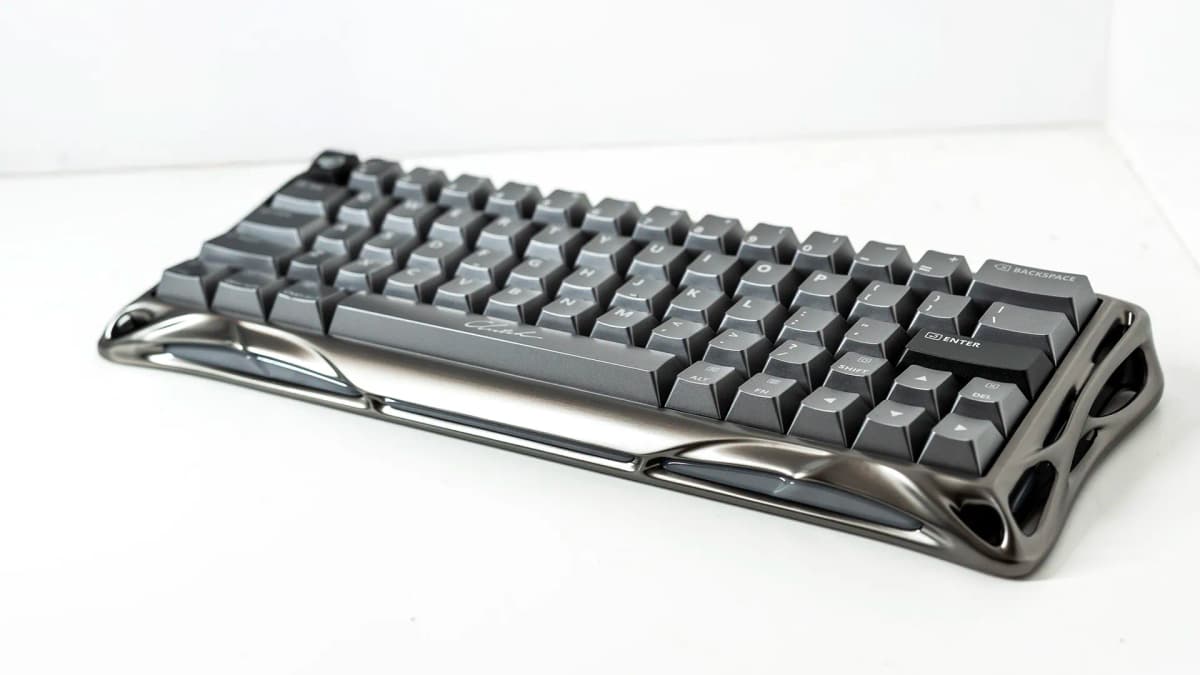
In the hand, it’s unmistakably aluminium. Cold, dense, and rigid in the way you only get from metal, but the shape is this strange, organic, sci‑fi shell. It looks less like a keyboard and more like a prop from a Cronenberg movie that’s one step away from fusing with your spine. I’ve seen “gamer” designs that scream RGB and angles; this one feels like it was grown rather than machined.
Then you plug it in, those “UFO” switches light up from underneath, and you realise the weirdness is backed up by some very serious tech: Hall‑effect magnetic switches with adjustable actuation, 8,000 Hz polling, and a web configurator that lets you poke at almost every aspect without installing some cursed Windows tray app.
After a week of swapping it between my gaming PC and my Mac, grinding out matches in shooters and writing this review on it, the Mercury V60 Pro has very clearly figured out who it’s for. It just might be my favourite “I care way too much about how my keyboard feels” board in a long time, even if it’s absolutely not for everyone.
Design and Build: Sci‑Fi Slab That Feels Premium (and a Bit Unhinged)
The chassis is the star here. The unit I’ve been using is the gunmetal finish – a deep metallic grey that catches light along its curves – but there’s also a brighter chrome‑silver option if you want something more eye‑searing. Pictures don’t really convey how strange it looks on a desk next to rectangular monitors and squared-off PC cases. It’s like someone dropped a piece of alien armour between your mouse and mousepad.
Despite being aluminium, it’s not absurdly heavy for a 60% board. It’s noticeably lighter than some chunky compact imports I’ve been testing (and a good chunk lighter than metal 96% Hall‑effect boards like Corsair’s Vanguard Pro 96 I’ve handled in the past), but it still has that reassuring, dense feel when you pick it up. Underneath, silicone feet do a decent job of holding it in place, though if you’re the type who rage‑types in Discord, you can still bully it a couple of millimetres across a smooth desk.
I like how restrained the actual hardware layout is. On the back: a single USB‑C port. On one edge: a small button to flip through the four onboard profiles. That’s it. No weird dongle bays, no plastic volume wheels glued on top just to justify the price. For a board that looks like it could open and eat your mouse, the IO is almost minimalist.
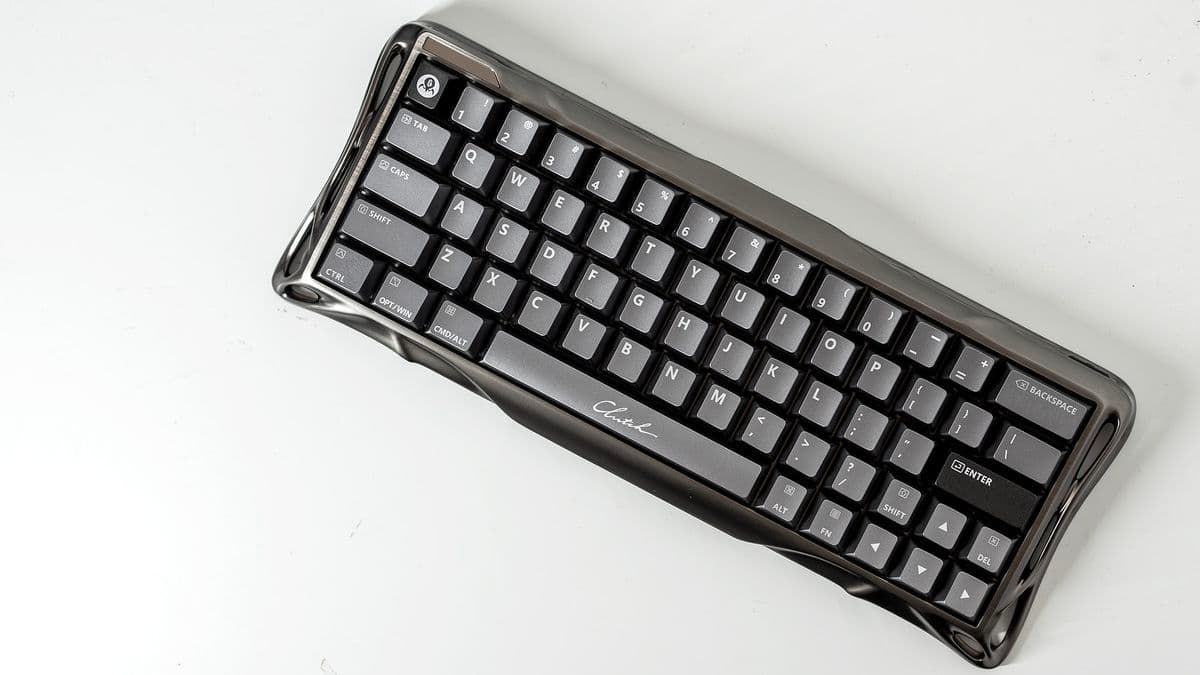
There are a few odd flourishes. Two keycaps have Mac modifier legends printed on them, which is great if you swap between Windows and Mac like I do. The spacebar, though, has “Clutch” written in a cursive font across it, which is… a choice. It doesn’t affect anything, obviously, but it’s the one piece of the design that feels like someone in marketing snuck into the room at 2 a.m.
Up in the top left corner of the frame there’s a tiny “gaming” indicator. Through the web configurator you can toggle an “indicator” light that does nothing except illuminate that word. You can even adjust its brightness. It’s probably the most pointless feature on the board, and yet I kept it on, because somewhere deep down I’m apparently 14 and need my keyboard to remind me of my life choices.
Layout and Everyday Use: 60% Freedom, 60% Compromise
The Mercury V60 Pro is a 60% layout: no F‑row, no numpad, no dedicated media keys. If you live in spreadsheets or constantly reach for F5/F11, you’re going to have to retrain your hands or look elsewhere. As someone who spends half the day writing and half playing games, 60% is usually the sweet spot between desk space and sanity, but each manufacturer makes slightly different trade‑offs.
Here, the most controversial decision is the right Shift key. It’s tiny, and shifted over from where a lot of people’s muscle memory expects it to be. The upside is that you get generously sized arrow keys on a 60% board, plus a sensible backspace and Enter. The downside is that the first couple of days, I was hitting the arrow cluster when I meant to capitalise something. If your right Shift is more decorative than functional, you’ll adapt. If you’re a touch typist who leans on it, be prepared to rewire your hands.
There’s also an absurdly large backslash key above Enter. I don’t know who needed a giant dedicated “\” in 2026, but they have been seen and heard. It doesn’t ruin the layout, it just feels like a strange allocation of real estate on an otherwise compact board.
Function-layer shortcuts handle the usual stuff: RGB modes, brightness, speed, media controls, and so on. After a couple of evenings I had the important ones in muscle memory. If you’ve used a 60% board before, nothing here will shock you, and if you haven’t, the learning curve is shallow but real. Swapping from a full-size to this for work took me about a day before I stopped reaching into empty air for the numpad.
On the plus side, having such a small footprint feels amazing. My mouse finally had room to breathe. I could angle the board slightly while still keeping everything inside my oversized desk mat. Packing it into a backpack for a LAN night felt trivial compared to lugging around a heavy TKL or full‑size.
“UFO” Hall‑Effect Switches: Adjustable, Smooth, and Fast as Hell
The main reason to care about the Mercury V60 Pro is what’s happening under the keycaps. Gravastar is using its own Hall‑effect design, branded as “UFO Magnetic Gaming Switches.” Hall‑effect switches detect the position of the stem using a magnetic field instead of physical contacts. That means no metal leaves snapping over a contact point, which removes a bunch of wear points and lets the board read exactly how far down a key is at insane speeds.
On paper, you can adjust actuation anywhere from a ridiculous 0.005 mm to a chunky 3.5 mm. In practice, I mostly lived between 0.1 mm and 2.0 mm, but it’s wild having that kind of per‑key control. The board scans key positions at 256 kHz and talks to your PC at up to 8,000 Hz, which works out to a theoretical minimum latency of about 0.125 ms. That’s firmly in the “you’ll never perceive this” territory. I can’t tell you I felt a magical difference swapping from 1,000 Hz to 8,000 Hz, but inputs never felt mushy or delayed.
What I did notice was how smooth the switches feel. Because the internal parts aren’t rubbing contacts together, there’s this clean, linear travel that reminds me of good optical switches, but with more configurable behaviour. There’s no scratch or ping out of the box on my unit, and the factory lube job is at least competent.
Gravastar also does a couple of clever things with how the keyboard handles simultaneous presses. When you change your mind mid‑input, the firmware prioritises the most recent keystroke, which is perfect for frantic strafing or platforming corrections. For true overlaps, it chooses the key that’s pressed the deepest, which cuts down on the “oops, I brushed the key next to it and ruined my combo” moments. There’s also SOCD logic for binding two opposing movement keys so one overrides the other, letting you flick left‑right‑left in shooters faster without the game freaking out.
Because the moving parts don’t physically slam into contacts, Gravastar rates these switches for over 100 million clicks. That’s well beyond how long I’ll realistically own any single board, but it’s reassuring if you’re about to dump $220 into a 60% you plan to main for years.
The “UFO” name supposedly refers to the switch housing shape, which lets more light through. You don’t really see that from the top, though, because the stock keycaps don’t have shine‑through legends. Instead, the RGB leaks around the sides of each key in a kind of neon underglow. Set to a static rainbow it looks like some alien hive tech humming quietly on the desk. I’m into it, but if you rely on backlit legends in the dark, you might grumble.
Web Configurator: No Bloatware, All the Knobs
This might be my favourite part: you don’t install any desktop software. Plug the keyboard in, head to Gravastar’s web configurator, and everything happens in your browser. The first time I connected, it automatically pushed a firmware update to the board, then dropped me into a visual map of every key.
You get four onboard profiles to play with. For each profile, you can:
- Set actuation point per key (or batch‑apply a value across the board)
- Enable Rapid Trigger on specific keys (I did this just for WASD and space in shooters)
- Define separate up/down points for analog‑style behaviour
- Configure dead zones so tiny brushes don’t register
- Remap keys and record macros
- Adjust per‑zone RGB across 16 dynamic lighting zones
Rapid Trigger in particular is addictive. I set WASD to actuate at around 0.1 mm and reset almost instantly when I lifted my finger, then jumped into an arena shooter. Strafing felt hyper‑responsive, and I could micro‑adjust my peeks without slamming keys all the way down. For typing, I switched back to a more sensible 1.8 mm actuation and turned Rapid Trigger off on the main alpha keys, which stopped me from accidentally firing off extra characters every time I rested a finger.
The configurator also lets the keyboard emulate a gamepad. It can send linear button signals instead of simple on/off keypresses, which is surprisingly handy in games that are coded poorly for keyboards or when your actual controller is across the room. I mapped a profile for a driving game, using the keyboard as a makeshift analog input, and while it’s not going to replace a real pad or wheel, it’s good enough to limp through story missions when your controller battery dies.
I’ve used keyboard software that feels like it was built as a university project (looking at you, some early magnetic boards) and stuff that’s over-designed to the point of being unusable. This sits in a nice middle ground: simple enough that I didn’t get lost, but with enough depth that I lost an hour fine‑tuning actuation curves for absolutely no practical reason.
Sound and Feel: Five Layers of Foam and a Satisfying Thock
Inside that alien shell are five layers of acoustic foam, and you can tell the first time you bottom out a key. There’s no hollow ping or cheap reverb; instead you get a deep, rounded “thock” that’s very easy on the ears. It’s not a silent board – people in the same room will know you’re typing — but it’s pleasantly damped rather than sharp and plasticky.
The stabilised keys (space, enter, shift) feel solid out of the box. No ugly rattling, no metallic tick. They’re not premium custom‑keyboard good, but for a pre‑built gaming board they land in the upper tier. I’ve typed this entire review on the Mercury V60 Pro, and my fingers never felt fatigued or annoyed at any particular key.
Because you can set a higher actuation point for typing than gaming, you can effectively give yourself a pseudo‑“work mode.” I had one profile with 2.0 mm actuation and gentler lighting for writing, then a second profile mapped to the hardware button for low‑actuation, Rapid Trigger madness in games. Flipping between them without touching any software is one of those tiny quality‑of‑life things that ends up mattering more than you expect.
Real‑World Gaming: Does 8,000 Hz Actually Matter?
On the numbers side, 8,000 Hz polling and a 0.125 ms theoretical minimum latency is impressive. In reality, the difference between that and a good 1,000 Hz board is subtle at best. Where the Mercury V60 Pro pulled ahead for me wasn’t raw speed but control.
Being able to set a hair‑trigger actuation on movement keys while leaving abilities and function keys at a deeper actuation means fewer accidental ults, fewer botched reloads, and more responsive strafing. In fast shooters, small inputs feel immediate and repeatable. In platformers, feathering jumps with Rapid Trigger on the jump key feels a little like you’re cheating compared to a fixed‑actuation switch.
For more relaxed games — RPGs, strategy titles — the advantage is less dramatic, but the typing feel and compact layout still pay off. Swapping back to a standard mechanical board after a few days of Hall‑effect tuning feels oddly blunt, like moving from a pressure‑sensitive trigger back to a simple on/off click.
Price and Competition: Where This $220 Board Actually Fits
Here’s the sticking point: the Mercury V60 Pro is $220 / £200. That’s not “I just want a keyboard for my kid’s school laptop” money. It’s competing with some heavy hitters in the enthusiast and premium gaming space.
Compared to something like the Gamakay x Naughshark NS68 — a much cheaper, also‑compact favourite in the budget space — the Gravastar feels vastly more premium in materials and typing comfort, and offers a different class of customisation. But you’re paying a serious premium for that aluminium shell, Hall‑effect magic, and web configurator.
Against boards like the Keychron Q3 Max, which sits slightly above it in price, the Mercury V60 Pro trades size and weight for speed and minimalism. The Q3 Max gives you a larger, heavier TKL layout with wireless options and more traditional mechanical switches. The Gravastar goes the other way: wired‑only, compact, and dialled hard into low latency and tweakable actuation.
If you look at other magnetic or Hall‑effect boards — Cherry’s XTRFY MX 8.2 Pro TMR or Corsair’s Vanguard Pro 96, for example — you see different compromises again: wireless support, hot‑swappability, bigger layouts, but more clunky desktop software and often louder branding. The Mercury V60 Pro plants its flag on three things: distinctive aluminium design, compact footprint, and a clean browser‑based configurator. If those line up with your priorities, its price starts to make more sense.
Annoyances and Misses
As much as I’ve enjoyed using it, the Mercury V60 Pro isn’t flawless.
- Wired‑only. In 2026, a $220 board not offering any wireless mode will be a deal‑breaker for some. I personally prefer wired for my main gaming rig, but it would have been nice to use this from the couch or quickly swap it to a laptop without a cable snaking across the coffee table.
- Right Shift placement. If your typing style depends heavily on right Shift, expect at least a couple of days of frustration. The trade‑off for big arrow keys is understandable, but it’s still awkward.
- Non‑shine‑through keycaps. The side‑glow aesthetic is cool, but if you game in a dark room and rely on illuminated legends, you’re either memorising your layout or buying aftermarket caps.
- Still some desk slide. The silicone feet do a decent job, yet furious typing or hard key presses can still nudge the board around on a slick surface. I’ve had heavier TKLs that felt more rooted.
- That “gaming” light. Funny? Yes. Useful? Absolutely not. It’s needless in a product that otherwise feels thoughtfully put together.
None of these are deal‑breakers on their own, but stacked together they make it clear this is a board built for a very specific user: someone who values compact size and low latency more than wireless convenience or traditional layout comfort.
Who the Mercury V60 Pro Is Really For
After a week of swapping profiles and games, I’d say the Mercury V60 Pro is perfect for a few particular types of players:
- FPS and arena shooter fans who want rapid, ultra‑consistent movement inputs and love tinkering with actuation and Rapid Trigger.
- Desk‑space minimalists who want a compact board that still feels premium and solid, not like a toy.
- People who swap between Windows and Mac and appreciate driver‑less operation, Mac legends, and not having to install another bloated RGB app.
- Tinkerers who will actually use the per‑key actuation, macros, and controller emulation instead of setting one rainbow mode and forgetting it.
If you mainly play MMOs or macro‑heavy games and live on dedicated macro columns, you’ll probably hate the 60% compromises. If you’re on a strict budget, there are excellent boards at half the price that will serve you well, just without the Hall‑effect trickery or the sci‑fi shell.
FinalBoss // Gear
Level up your setup
01Top-rated gaming headsetson Amazon→02High-refresh gaming monitorson Amazon→03Gaming chairson Amazon→04Discounted game keyson Kinguin→Affiliate links · As an Amazon Associate, FinalBoss earns from qualifying purchases.
Want to Level Up Your Gaming?
Get access to exclusive strategies, hidden tips, and pro-level insights that we don't share publicly.
Ultimate Reviews Strategy Guide + Weekly Pro Tips