
Table of Contents (7)
Turn a collectible Game & Watch into a pocket emulator – if you know what you’re doing
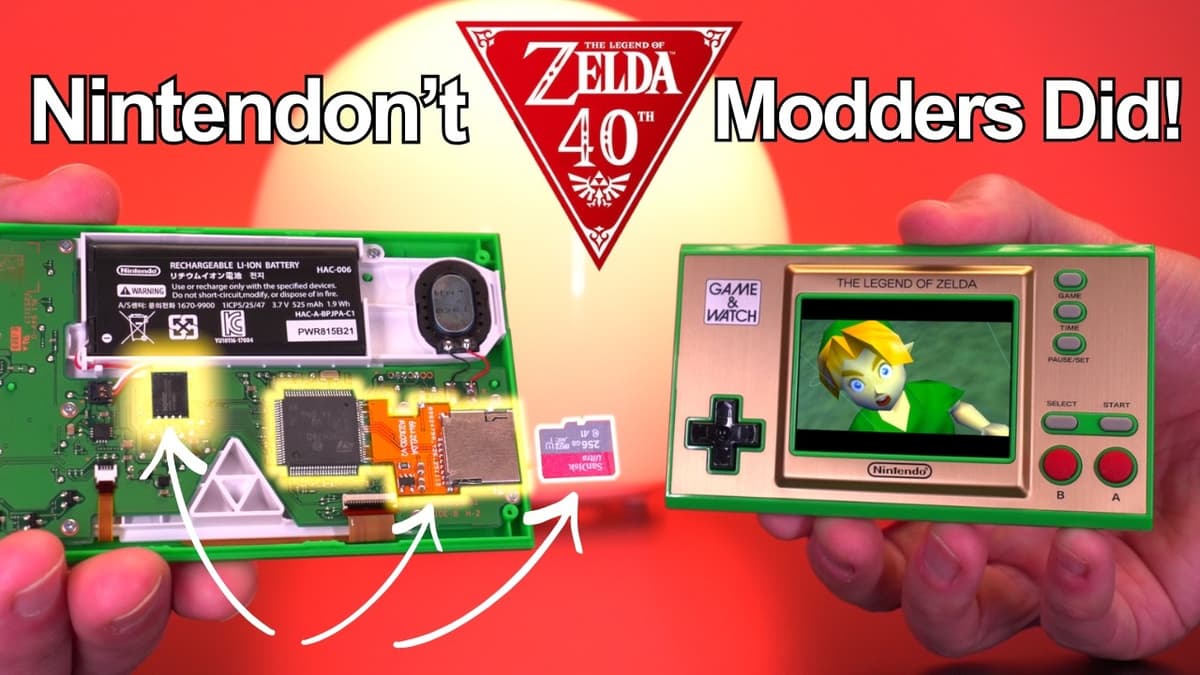
Five years after Nintendo’s 2021 Zelda Game & Watch dropped, a practical mod stack has finally arrived that turns the metal collectible into a tiny, capable emulator without sacrificing the unit’s original games or clock. The combo is simple in concept: replace the stock 16MB flash with a 64MB chip, add a microSD ribbon slot, and flash open‑source firmware (gnwmanager/Retro Go). Do it right and the device boots like stock – hold Game+Left to launch a Retro Go menu full of ROMs and emulators.
- New memory + SD = real emulation – 64MB EPROM options and microSD ribbon hacks are finally stable enough to support NES, Genesis, Game Boy and more on the Game & Watch.
- Open firmware is mature — gnwmanager and Retro Go are on GitHub and actively supported (Sylver is maintaining fixes), so this is not a one‑off proof of concept.
- It’s not for beginners — surface‑mount soldering, flex PCB assembly, and EPROM flashing carry real bricking risk; the tutorial does back up stock firmware but buyer beware.
- Collectors vs. modders tension — you keep the original features, but modding a limited collectible almost always affects its value and warranty.
Why it actually matters now
Modding enthusiasts have poked at Game & Watch hardware for years, but the pieces only just came together in 2026: affordable 64MB chips that physically fit swapouts, workable microSD ribbon solutions, a clear, step‑by‑step YouTube walkthrough from Macho Nacho Productions, and stable firmware hosted on GitHub. That confluence makes this iteration practical — not a hobbyist one‑off. With Retro Go’s UI, scaling filters and controller remapping, the mod produces a pocket device that challenges small dedicated emulators like the Anbernic RG series while keeping Nintendo’s excellent buttons and screen.
The work — what you’ll actually be doing
The video walkthrough is granular. It starts with a full dump of the original EPROM using an external programmer and Python scripts to back up the stock firmware (so you can restore if needed). Then comes hardware: desolder the tiny 16MB chip (heat gun, Kapton tape or soldering iron + wick), solder in a 64MB replacement, and attach a flex PCB ribbon for a microSD slot — that ribbon requires delicate soldering to the CPU legs. Finally, you flash the open firmware (gnwmanager/Retro Go) and test before resealing the case.
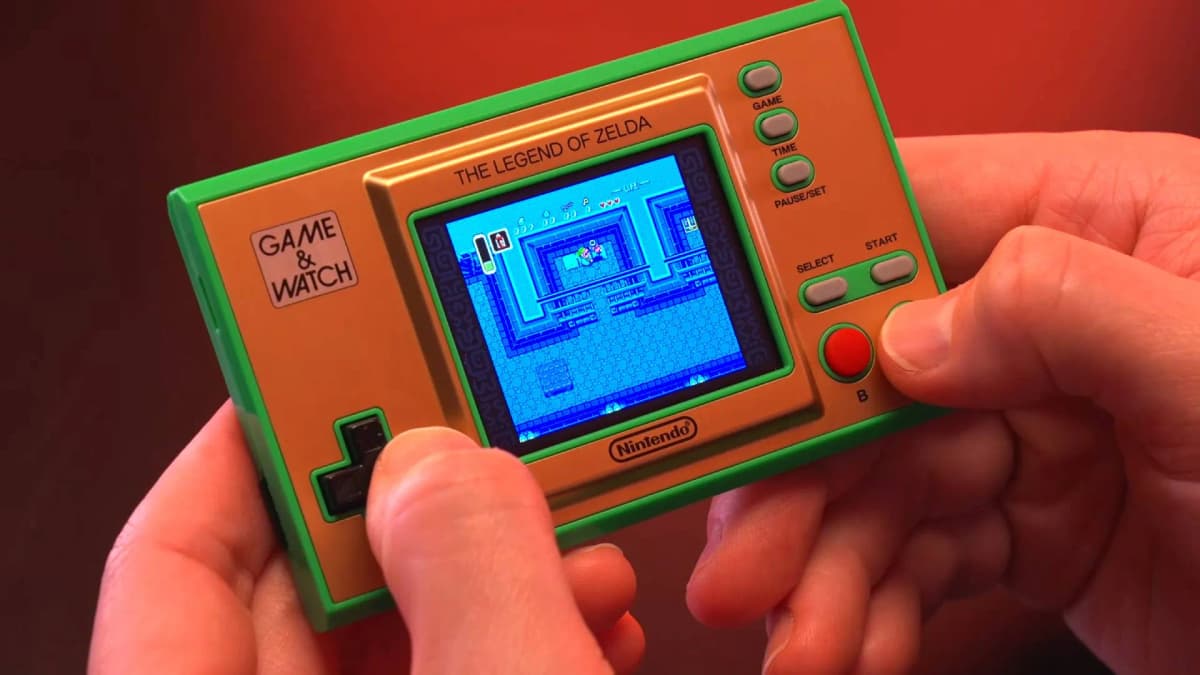
Tools: EPROM programmer, soldering iron for SMD work, flux, copper wick or heat gun, tinfoil/Kapton for board protection, and steady hands. The tutorial includes backup and restore steps, but small mistakes can brick the unit or ruin the pads on the motherboard.
The uncomfortable observation
Yes, it works — impressively well. But this is a classic modder’s tradeoff: you convert a limited Nintendo collectible into a delightfully practical emulator at the cost of a factory original. Even if the stock games and clock stay intact, the interior is altered and the case will be cut for an SD slot. For collectors who paid a premium back in 2021, that’s a loss; for someone who wants a tiny, high‑quality portable that runs real emulators, it’s a win.
Why the Zelda anniversary plays into this
The Zelda franchise’s 40th anniversary has stirred nostalgia and disappointment in equal measure — fans wanted big official gestures from Nintendo, and many turned to DIY to scratch that itch. Modding the Game & Watch is a form of celebration and reclamation: giving a 2021 collectible the ability to play broader retro libraries speaks to why Zelda endures — its history is enmeshed with hardware hacks, preservation and fans keeping classics alive.
What to watch next
- GitHub activity on gnwmanager/Retro Go and Sylver’s commits — frequent fixes mean better stability and new features.
- Follow‑up tutorials from Macho Nacho or others showing different 64MB chip models or cleaner microSD installations.
- Commercial kits or prebuilt modules that take the risk out of SMD soldering — if those appear, adoption will accelerate.
- Community threads about long‑term reliability — watch for reports of pad failures, SD wear, or emulation glitches over time.
If you’re curious but cautious: buy a sacrificial unit and practice. If you’re a collector, treat your OG Zelda Game & Watch like a museum piece — don’t mod it. Either way, this is one of the cleaner, better‑supported handheld conversions we’ve seen; it’s practical, reversible in principle, and it actually improves the device in meaningful ways for people who want to play retro libraries on the go.
TL;DR
A clear, well‑documented mod now lets you upgrade the Zelda Game & Watch from a novelty into a true retro emulator by swapping 16MB for 64MB, adding microSD, and flashing gnwmanager/Retro Go — but it requires SMD soldering, an EPROM programmer and a willingness to risk bricking a collectible. Watch the GitHub repos and tutorial follow‑ups; if prebuilt kits show up, adoption will jump.
FinalBoss // Gear
Level up your setup
01Best-selling Switch 2 gameson Amazon→02Switch 2 accessorieson Amazon→038BitDo controllerson Amazon→04Discounted game keyson Kinguin→Affiliate links · As an Amazon Associate, FinalBoss earns from qualifying purchases.
Want to Level Up Your Gaming?
Get access to exclusive strategies, hidden tips, and pro-level insights that we don't share publicly.
Ultimate Gaming Strategy Guide + Weekly Pro Tips