
Table of Contents (12)
The first night with the Vanguard Air 99: instant love, slow doubt
The first evening I plugged in the Corsair Vanguard Air 99 Wireless, I caught myself doing that dumb keyboard-nerd thing: typing nonsense into a blank document just to feel the keys move. No game, no work, just streaming keypresses into the void because the switches felt that good.
Low-profile boards usually leave me cold. They’re either laptop-flat and mushy or so thin they feel like they’ll flex if you look at them funny. The Vanguard Air 99 is different. The first few minutes were all “wow, Corsair finally nailed low-profile.” The next few days were a quieter, more complicated conversation: this thing feels premium as hell, but it also asks you to give up a bunch of stuff that’s quickly becoming standard at this price.
After about two weeks of using it as my daily driver for both work and a mix of shooters and MOBAs, my feelings settled into a very specific shape: the Vanguard Air 99 is an incredible sensory experience — sound, feel, build — wrapped around some strangely old-fashioned priorities for a $260 keyboard in 2026.
Specs in plain English: what you’re actually getting
On paper, this thing reads like a wish list for low-profile keyboard fans:
- Layout: 99% (full function row, nav cluster, arrows, no numpad)
- Switches: Corsair OPX low-profile optical switches (non hot-swappable)
- Mounting: Gasket-mounted plate with multiple layers of foam
- Keycaps: Doubleshot PBT with crisp legends
- Lighting: Per-key RGB
- Extras: Small integrated LCD strip, left-side macro/OBS keys, media wheel
- Connectivity: 2.4 GHz dongle, Bluetooth, USB-C wired
- Polling: Up to 8,000 Hz over wired and 2.4 GHz
- Compatibility: PC and Mac modes via a physical switch
- Software: Corsair Web Hub (browser-based)
- MSRP: $260 / £240
None of that sounds offensive. In isolation, most of it’s genuinely excellent. It’s the combination — and what’s missing at this price — that makes the Vanguard Air 99 such a strange beast.
Typing feel: low-profile finally feels “right”
The heart of this board is the Corsair OPX low-profile optical switch, sitting on a gasket-mounted plate with a stack of sound-dampening layers underneath. You feel that work instantly. There’s about 2.5 mm of total travel, which is short compared with a traditional mechanical switch but generous for a low-profile design. The result is this smooth, controlled plunge with a soft, cushioned bottom-out instead of a hard clack.
Optical switches often feel a bit sterile to me — fast, sure, but lifeless. Here they’re anything but. The combination of gasket mount and foam gives each press a muted, almost “creamy” feel. Stabilized keys in particular (space, enter, shift) are shockingly well behaved. There’s barely any rattle, and the sound profile is a satisfying mid-pitched “thock” rather than the high-pitched ping you sometimes get from metal-heavy low-profile designs.
To put it through something more demanding than “typing emails,” I loaded up a typing trainer and hammered on it for a while. My accuracy very quickly landed right where it does on my favorite full-height boards, and my speed crept up slightly just because of the shorter travel. When I focus, my fingers dance across this thing. Purely from a typing-feel standpoint, it’s one of the best low-profile experiences I’ve had.
If all you care about is how a board feels and sounds, the Vanguard Air 99 is absolutely in the top tier. That’s the part Corsair nailed.
But where are the analog tricks in 2026?
The flip side is that while typing feel has gone traditional-mech-nerd deluxe, the underlying tech is weirdly conservative for such an expensive board. The switches are optical, not Hall Effect analog. That means:
- No per-key adjustable actuation points
- No rapid-trigger or “instant reset” behavior for competitive twitch games
- No analog movement tricks (like half-press walking in some games)
Over the last year or so, I’ve spent time with a bunch of magnetic/analog boards — stuff like ROG’s Azoth 96 HE, Wooting’s HE boards, and newer Hall Effect offerings from Keychron and NuPhy. They’ve made adjustable actuation and rapid trigger feel less like gimmicks and more like the expected top-end feature set. Once you’ve dialed in a 0.1-0.2 mm actuation on your movement keys and slightly deeper activation on your ability keys, it’s hard to go back.
Jumping to the Vanguard Air 99, the keys still actuate quickly and cleanly, but it’s “one-size-fits-all” fast. There’s no tuning, no experimentation. It’s a very premium, very polished version of a fixed-actuation board in a world where the most expensive competitors let you treat each key like a configurable input axis.
For some people that won’t matter at all. If you don’t care about per-key actuation, the Vanguard Air 99’s optical switches still feel snappy and responsive, and the ultra-high polling (up to 8K) means keystrokes reach the PC faster than most games can realistically use. There was no perceivable latency or inconsistency in my testing, even in frantic FPS sessions.
But that’s the tension here: you’re paying flagship money for incredible feel and essentially ignoring a whole wave of “modern keyboard” features that similarly priced Hall Effect boards offer. Corsair’s betting that the sensory side of the experience matters more to you than raw feature bullets.
Gaming performance: great, just not cutting-edge
In actual games, the Vanguard Air 99 behaved almost exactly how I expected a high-end optical board to behave. I spent a lot of time in Counter-Strike 2 and Apex Legends on the 2.4 GHz dongle at high polling, and nothing ever misfired. Strafes were crisp, weapon switches instant, and the board never once dropped connection or stuttered. At a raw input level, it’s as solid as anything I’ve tested.
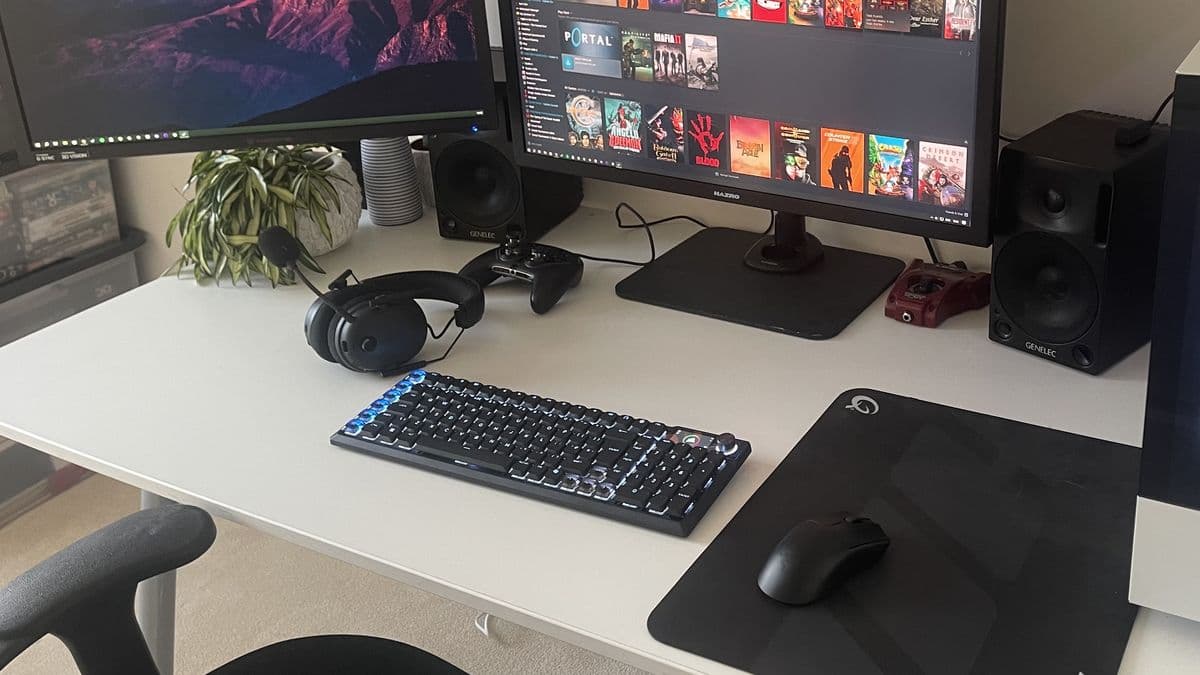
What I did miss, particularly in shooters, was that rapid-trigger behavior from analog boards where keys reset the instant you lift your finger a hair. Here you get a normal optical experience: fast, yes, but not “borderline telepathic” like the best Hall Effect implementations. It’s a bit like going from a high-end gaming mouse with a fully tunable sensor and debounce to a very good older one that’s just… fast by default. You won’t suddenly lose matches, but there’s less room to customize the feel to your own habits.
For more relaxed games — ARPGs, strategy, sim titles — that gap basically disappears. The comfortable, low-effort keystrokes and quiet sound profile actually become the main advantages. Long city-builder sessions felt less fatiguing than on taller, heavier switches. If you split your time between writing and gaming, the Vanguard Air 99 shines more as a hybrid board than as a pure “sweaty ranked queue” weapon.
Layout and ergonomics: 99% that doesn’t fit 100% of hands
Ergonomically, the Vanguard Air 99 is where my initial love started to wobble.
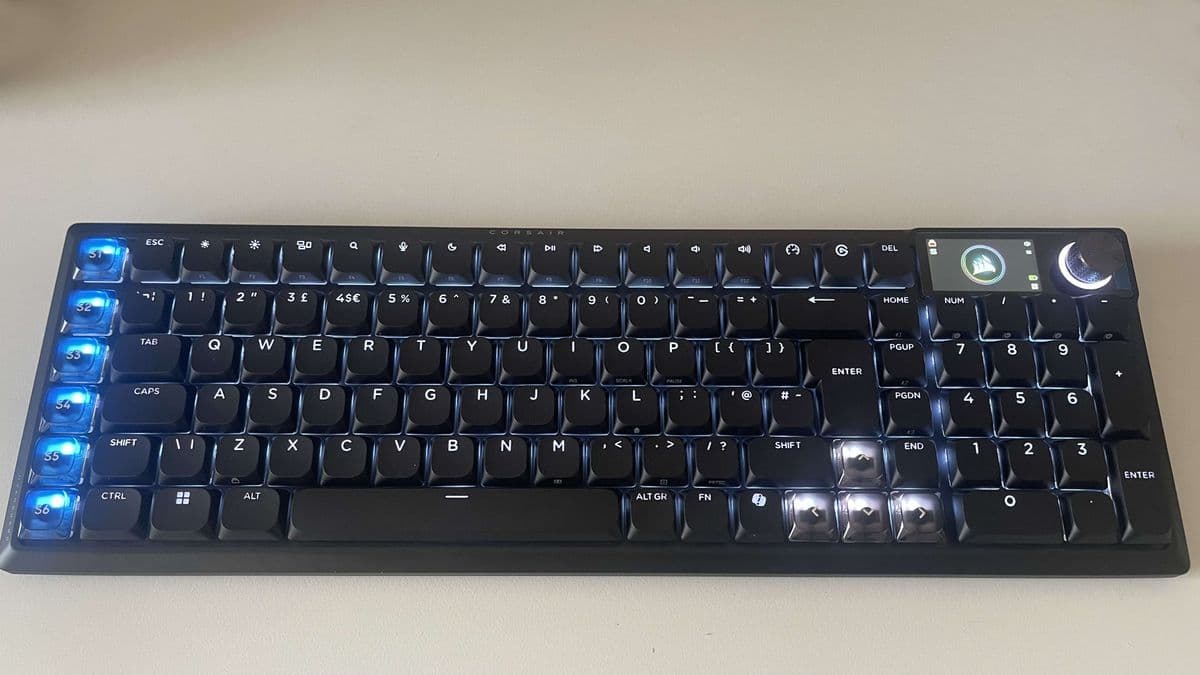
The 99% layout keeps almost everything from a full-size board except the numpad. You get arrows, a full navigation cluster, function row, and a column of six macro keys on the left. On paper it’s a nice compromise between compact and functional. On my actual desk, my fingers never fully made peace with it.
My main gripes after two weeks:
- The low-profile key height plus the way the rows are staggered made me overshoot keys more than usual during regular work.
- I kept brushing the left macro column when reaching for Ctrl or Shift, triggering macros or OBS functions I’d bound for testing.
- The flatness of low-profile caps, combined with the near-full-width layout, demanded more deliberate hand positioning than on my TKL boards.
Corsair does give you two stages of flip-out feet to change the angle, and that helped a bit. I settled on the lowest incline as my compromise. It never felt bad, but it also never became second nature in the way some other low-profile boards (like NuPhy’s narrower layouts) did after a couple of days.
Interestingly, when I jumped into short, focused sessions — typing tests, or a tight clutch round in CS2 — my fingers snapped into rhythm and everything was fine. It was during long, unfocused stretches of work that I noticed more mistakes and micro-adjustments. That tells me the layout and profile are physically fine, but less forgiving of lazy hand position than some chunkier, sculpted caps.
One other oddity: the arrow keys and the six macro/OBS keys use translucent keycaps that let a lot more RGB through than the rest of the board. Functionally, they’re easy to locate visually in low light, which is handy. Aesthetically, they look like someone swapped in a different keycap set after the fact. Your tolerance for that “highlighted cluster” look is going to be personal. I never fully warmed to it.
Build, RGB, and that little LCD: luxury meets gimmick
Physically, the Vanguard Air 99 feels like money. The aluminum top plate is rigid and pleasantly cool to the touch. The board is heavy enough that a casual shove won’t move it, which matters more on low-profile designs that tend to slide around. Pick it up and there’s zero flex, zero creak. Corsair’s build quality reputation is very much intact here.
Build, RGB, and that little LCD: luxury meets gimmick
Physically, the Vanguard Air 99 feels like money. The aluminum top plate is rigid and pleasantly cool to the touch. The board is heavy enough that a casual shove won’t move it, which matters more on low-profile designs that tend to slide around. Pick it up and there’s zero flex, zero creak. Corsair’s build quality reputation is very much intact here.
🎮 Get This Game at the Best Price
Compare prices instantly and save up to 80% on Steam keys with Kinguin — trusted by 15+ million gamers worldwide.
*Affiliate link — supports our independent coverage at no extra cost to you
The PBT keycaps are also excellent. Legends are razor-sharp, and the doubleshot construction gives RGB a clean, defined glow through the characters without too much spill around them. Per-key RGB control via Web Hub works as expected, and the diffusion is nice enough that I actually ran a fairly bright profile for once instead of my usual “barely on” preference.
The LCD, though. That’s where this board’s priorities feel off.
Sitting above the arrow cluster, the little strip can show things like caps lock status, connection mode, battery level, media info, and a few basic animations or logos. It doesn’t look bad. It just doesn’t do very much. During actual use, it mostly acted as a decorative status bar that I barely glanced at unless I was intentionally testing it.
The problem is what it costs you. Screens, even small ones, eat power. On a $260 wireless keyboard in 2026, that power budget could have gone toward longer battery life, or been saved entirely and translated into a lower MSRP. Instead you get a feature that’s cool in product photos and almost invisible in daily use.
Compared with something like Asus’s Azoth, where the OLED can be a real control surface (macros, system info, profiles), the Vanguard Air 99’s LCD feels like a half step: more than an LED indicator row, less than a meaningful display.
Wireless, battery, and software: solid, but not “forget it exists” good
On the connectivity side, Corsair got the fundamentals right. I switched constantly between three machines using all three modes:
- 2.4 GHz dongle on my main gaming PC
- Bluetooth on a MacBook
- USB-C wired to a work desktop
Swapping was quick and painless, and I never saw a single dropout on the dongle, even at high polling. Latency in Bluetooth mode is noticeably higher (as always), but fine for typing and casual play.
Battery life is harder to give a neat number for, because it depends heavily on how bright you run RGB and whether the LCD is doing anything fancy. What I can say is that this is not one of those “charge it once, forget about it for weeks” boards when you’re using RGB and 2.4 GHz regularly. I found myself plugging it in on a regular cadence rather than losing the cable, which is telling compared with ultra-low-profile office boards that can run for ages with no lighting.
It’s not terrible — you’re not topping up daily or anything — but the sense of “yeah, that LCD is costing me runtime” never quite went away. If you turn brightness down and stick to lower polling, it obviously stretches further, but then you’re neutering two of the product’s headline features to get acceptable endurance.
On the software front, I actually quite like Corsair’s browser-based Web Hub. It’s slower than a lean local app, but it’s also miles lighter than installing a full-fat iCUE suite just to remap a few keys. Once profiles were set, I barely had to touch it. Mac and PC mode toggling via a physical switch is also a great quality-of-life touch if you bounce between OSes.
$260 in 2026: where this fits in a brutal market
This is the part where the Vanguard Air 99 has the hardest time justifying itself.
Keyboard prices have been marching upwards across the board, and high-end wireless kits are especially painful now. But context matters. Around this price — sometimes for a little less, sometimes for a little more — you can now find:
- Hall Effect boards with per-key adjustable actuation and rapid trigger
- Customizable OLED displays that double as control surfaces
- Modular, hot-swappable designs that let you change switches later
- More ergonomic shapes or split layouts if comfort is king for you
The Vanguard Air 99 throws nearly all of its budget into three things:
- Luxurious build quality
- Superb low-profile typing feel
- Wireless convenience with high polling
The LCD is a sideshow, not a value-add. There’s no analog actuation, no hot-swap, and the ergonomics are solid but not special. At $200, I’d still call it a niche board, but the equation would hurt less. At $260, you have to really adore that specific low-profile optical feel to swallow the price.
I also can’t ignore the fact that a couple of years ago, this exact spec sheet — minus the LCD — would likely have lived well under the $200 mark. I’m not blaming Corsair alone here; the entire market has crept upward. But it makes this particular board a tougher recommendation unless its strengths line up almost perfectly with your priorities.
Who should actually buy the Corsair Vanguard Air 99 Wireless?
After living with it, I think the sweet-spot buyer profile is extremely specific:
- You love low-profile boards but hate cheap, laptop-like feel.
- You care more about refined sound and key feel than bleeding-edge features.
- You don’t need a numpad but want almost everything else on deck.
- You switch between PC and Mac and want a single, premium board that handles both cleanly.
- You’re okay giving up analog tricks like adjustable actuation for a “finished,” traditional mechanical experience.
If that’s you, and you’ve got the budget, the Vanguard Air 99 will make you very happy once you acclimate to the layout. The tactile experience is genuinely special for a low-profile keyboard, and the build quality is the sort of thing you appreciate every time you sit down.
If any of the following are true, though, I’d steer you elsewhere:
- You want your keyboard to be “future-proof” with analog or Hall Effect tech.
- You’re sensitive to ergonomics and prefer sculpted, higher-profile caps or split layouts.
- Your budget’s tight and every feature has to justify its existence.
- You’re buying specifically for battery life and hate charging peripherals often.
In those cases, a cheaper analog board, a more ergonomic split keyboard, or even Corsair’s own lower-cost offerings will likely serve you better. The Vanguard Air 99 is not a generalist recommendation; it’s a specialist’s indulgence.
FinalBoss // Gear
Level up your setup
01Top-rated gaming headsetson Amazon→02High-refresh gaming monitorson Amazon→03Gaming chairson Amazon→04Discounted game keyson Kinguin→Affiliate links · As an Amazon Associate, FinalBoss earns from qualifying purchases.
Want to Level Up Your Gaming?
Get access to exclusive strategies, hidden tips, and pro-level insights that we don't share publicly.
Ultimate Reviews Strategy Guide + Weekly Pro Tips