
Table of Contents (11)
Living with the Galaxy S26 Ultra as a gamer (and just… a person)
When I first booted up the Samsung Galaxy S26 Ultra, I did what I always do with a high-end Android slab: crank the brightness, install half my usual game library, and see what melts first – my thumbs, the thermals, or the battery. After two weeks of using it as my only phone, I’ve come away with a pretty clear picture.
The short version: this is an absurdly capable all-round flagship. The display is gorgeous, the cameras are so good they feel like cheating, and One UI 8.5 is stuffed with genuinely useful tricks (plus a bunch of noise). As a gaming phone, it’s “very good” in practice – but if you’re chasing raw frames-per-second and marathon sessions, it’s not the apex predator the price tag hints at.
I’ve been on the S26 Ultra (12GB RAM / 512GB) for about two weeks, with one particularly brutal week of daily commuting, GPS abuse, and a long-haul trip where I basically used it as a tourist camera and handheld console. Here’s how it held up.
Price and what you’re actually paying for
This thing is unapologetically premium. You’re looking at around $1,299 / £1,279 for the 256GB model, $1,500-ish for 512GB, and closer to $1,800 if you want the full 1TB plus 16GB RAM configuration. In some EU regions it starts around €1,449.
That’s “I could build a respectable gaming PC” money, or buy a dedicated gaming phone with higher refresh rates, better cooling, and still have cash left over. The S26 Ultra is very much a “do everything at once” device – you’re paying for the camera system, the display, the build, Samsung’s software ecosystem, and the long-term support, not just frames in Call of Duty Mobile.
Design and ergonomics: big, premium, and a bit anonymous
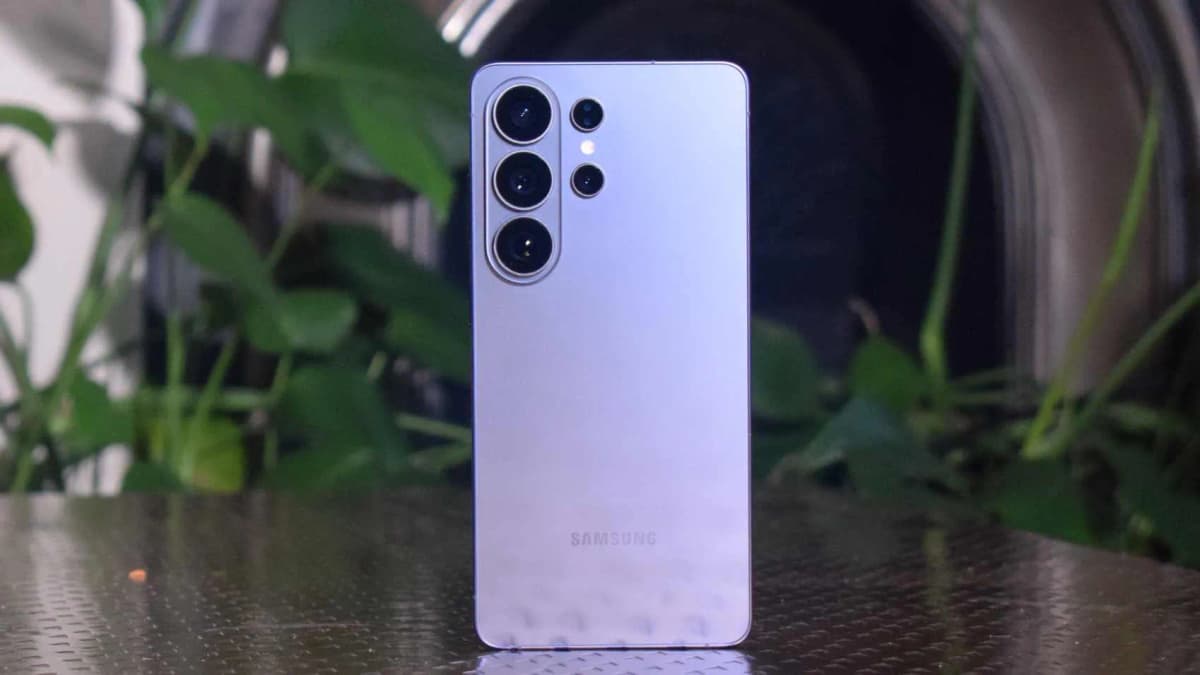
Visually, the S26 Ultra is peak 2026 slab: big, flat, and a little bit anonymous. My unit is the dark violet color, and from a few feet away it could be any recent Galaxy Ultra. Flat screen, flat back, individual camera rings instead of a camera island, and a clean aluminum frame.
Stats-wise, you’re looking at 163.8 x 78.1 x 7.9mm and 214g, with Gorilla Glass front and back and an aluminum frame. It’s not small, but if you’ve used any recent “Ultra” or “Plus” phone, you’ll adapt quickly. During gaming sessions the size is actually a plus: there’s plenty of screen real estate and the weight balances nicely in landscape. The trade-off is one-handed messaging is basically a thumb stretch workout.
There’s IP68 water and dust resistance (comforting when you’re doomscrolling over a sink), but some omissions that matter if you’re thinking “gaming phone”:
- No 3.5mm headphone jack — you’re on USB-C or Bluetooth
- No microSD card slot — your storage choice at purchase actually matters if you hoard games and 4K footage
- The camera bump is big enough that the phone rocks on a table unless you put a case on it
I also constantly covered the downward-firing speaker with my palm while gaming in landscape. It’s a decent stereo setup overall (earpiece + bottom speaker), but that bottom port is easy to block when you’re mid-gunfight. If you care about positional audio, just commit to a good pair of wireless buds or a USB-C headset.
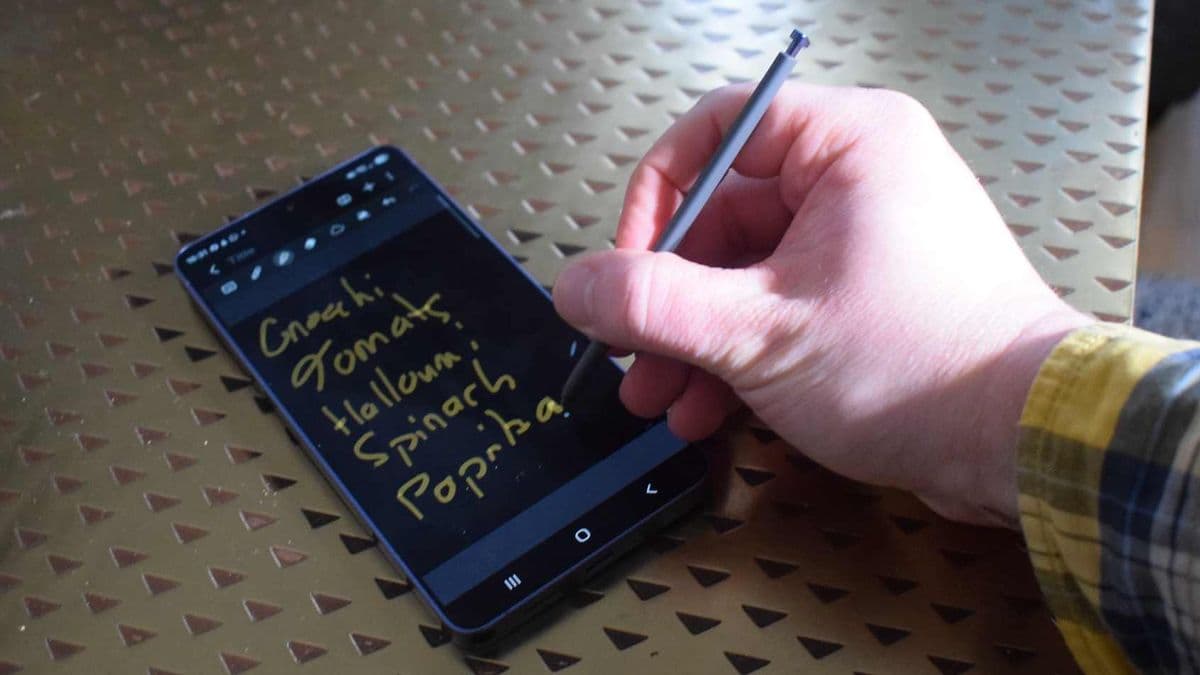
The S‑Pen lives in its usual slot along the bottom edge. I used it for annotating screenshots and the occasional quick note, but for gaming it’s basically irrelevant unless you’re into niche drawing/strategy titles. It’s a cool extra, but not something that justifies the price if you only care about games.
Display: stunning, fast enough, but not a true gaming panel
This screen is ridiculous in all the predictable Samsung ways. It’s a 6.9-inch Dynamic AMOLED 2X LTPO panel, 3120 x 1440 resolution, with an adaptive 1-120Hz refresh rate and support for HDR10+. Peak brightness goes up to around 2,600 nits, which is a fancy way of saying “yes, you can see this in midday sun without squinting yourself into a headache.”
For everyday use, it’s about as good as mobile displays get: deep blacks, punchy colors (which you can calibrate down if you hate Samsung’s default saturation), and razor-sharp text. Watching HDR content on this thing is dangerously addictive.
From a gaming angle, there are two caveats:
- Refresh rate tops out at 120Hz. Most dedicated gaming phones are flirting with 144Hz or 165Hz now. In reality, very few Android games actually support those higher refresh rates, but if you’re a specs chaser, this might sting.
- It’s “only” 8‑bit color. That’s fine for nearly everyone, but some competing flagships are pushing 10‑bit panels. You’re not going to notice this in PUBG Mobile, but it’s worth mentioning.
The new party trick is Samsung’s hardware-level privacy feature — effectively a built-in privacy filter in the display. When you toggle Privacy mode (per app, by location, or even restricted to certain on-screen regions like notification shade or password fields), the viewing angles narrow dramatically. In practice, on a packed train, I watched the person next to me lean in and still not really see my chat window. It works.
The trade-off is that when Privacy is on, the image loses a bit of vibrancy and looks slightly muted straight-on. For gaming, I kept it off — I’d rather have full punch and wide viewing angles — but it’s excellent for messages, banking apps, or email on the go.
Cameras: wildly overqualified for a “gaming phone”
Honestly, the camera system is one of the main reasons to buy this phone over a more focused gaming device. You get:
- 200MP main wide camera
- 50MP ultrawide
- 10MP 3x telephoto
- 50MP telephoto (5x, with long-range digital zoom beyond that)
- 12MP selfie camera
Samsung’s image processing is aggressive — this isn’t a “natural” look — but the results are the kind of punchy, vibrant photos that most people love sharing. On my trip, I basically retired my mirrorless camera because the S26 Ultra gave me sharp, contrasty, social-ready shots with almost no effort.
The telephoto combo (3x and 5x) is where it pulls ahead of a lot of other flagships. Portraits at 3x look fantastic, and the 5x lens was great for snagging architecture details or catching far-away signs without smearing into watercolor.
For enthusiasts, there’s a Pro mode for photo and video, plus the separate Expert RAW app that gives you zebra patterns, false color, and dual RAW + JPEG exports. These are not gimmicks — I shot a lot in RAW, pulled them into Lightroom, and had more flexibility than I expect from a phone.
For everyone else, Samsung stuffs in tools like Nightography for low-light shots, Super Steady video (which uses gyroscope data to stabilize and lock the horizon), and a surprisingly good Food mode that lets you tap a subject and have the phone blur the background and tweak contrast around it. Most of it “just works” in that very Samsung way: overprocessed but extremely usable.
If a great camera is high on your list alongside gaming, this is a huge point in the S26 Ultra’s favor versus most dedicated gaming phones, which usually treat cameras as an afterthought.
One UI 8.5 and Samsung’s AI tricks: cluttered but powerful
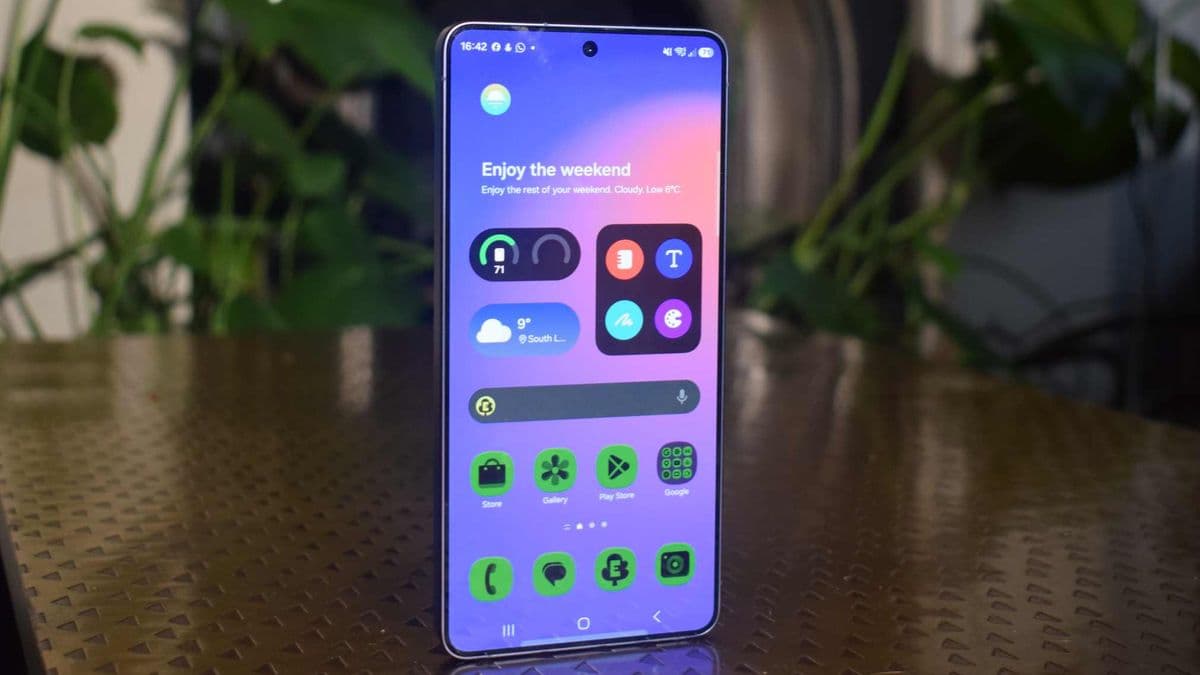
Out of the box, One UI 8.5 on top of Android 16 hits you with a tidal wave of Samsung apps and toggles. The first hour with the phone was basically me uninstalling or disabling things and pruning the app drawer. Once you do that, though, there’s a lot of genuinely useful stuff here.
Two features that actually changed how I use the phone:
- Finder: Samsung’s system-wide search is no joke. It digs into app data, files, and even transcripts of voice recordings. I used it constantly to jump straight into game settings, find screenshots, and pull up notes without remembering which app I saved them in.
- Audio Eraser: You can scrub out background noise (wind, traffic, crowd murmur) from videos and clips, even in some third-party apps. I used it on a couple of short clips recorded next to a noisy street, and it turned “unusable” into “actually fine for sharing.”
Samsung is understandably leaning hard into AI this year. You’ve got Circle to Search (draw a circle on anything on screen and get search results), AI call screening with a chatbot that can answer and summarize calls, translation helpers, and in the Gallery app a Generative Edit mode that lets you remove or move objects around like a cut-rate Photoshop wizard.
- Finder: Samsung’s system-wide search is no joke. It digs into app data, files, and even transcripts of voice recordings. I used it constantly to jump straight into game settings, find screenshots, and pull up notes without remembering which app I saved them in.
- Audio Eraser: You can scrub out background noise (wind, traffic, crowd murmur) from videos and clips, even in some third-party apps. I used it on a couple of short clips recorded next to a noisy street, and it turned “unusable” into “actually fine for sharing.”
Samsung is understandably leaning hard into AI this year. You’ve got Circle to Search (draw a circle on anything on screen and get search results), AI call screening with a chatbot that can answer and summarize calls, translation helpers, and in the Gallery app a Generative Edit mode that lets you remove or move objects around like a cut-rate Photoshop wizard.
🎮 Get This Game at the Best Price
Compare prices instantly and save up to 80% on Steam keys with Kinguin — trusted by 15+ million gamers worldwide.
*Affiliate link — supports our independent coverage at no extra cost to you
Generative Edit is very hit-and-miss. Sometimes it nails object removal well enough that you’d never know something was there; other times it replaces people with weird smudges or obvious AI artifacts. Fun toy, but not something I’d rely on for serious editing.
On the long-term side, Samsung is promising seven years of Android OS updates and security patches on the S26 Ultra. That’s a big deal if you plan to keep your phone for a long time — and given the price, you might want to. From a gaming perspective, it also means you’re very likely to be able to run whatever the mobile space throws out for the rest of this decade.
Gaming performance: fast, smooth, and a little too warm
Under the hood, you’re getting Qualcomm’s Snapdragon 8 Elite Gen 5 and either 12GB or 16GB of RAM (my review unit had 12GB). This is absolutely flagship silicon, with support for hardware-accelerated ray tracing and spatial audio — the kind of stuff mobile marketing teams love to shout about.
I threw most of my usual test roster at it: Call of Duty Mobile, Rainbow Six Mobile, Genshin Impact, Honkai: Star Rail, and a mix of lighter titles like Vampire Survivors and Wild Rift. I ran everything at the highest settings possible, usually at 60fps where supported.
In raw performance terms, the S26 Ultra is one of the fastest phones I’ve used. Benchmarks put it just behind a few aggressively tuned gaming phones (think RedMagic, ROG Phone territory) and the latest iPhones in some synthetic tests, but in real-world play I never saw meaningful frame drops or stutter. Genshin at max settings stayed consistently smooth, and CoD Mobile felt locked in even during intense firefights.
Thermals are where you start to see the “this is a normal flagship, not a gaming brick” side. Qualcomm chips of the last few years like to run hot, and while Samsung has clearly improved the vapor chamber and cooling layout, the phone definitely gets warm if you play something heavy for 30-45 minutes. It never became too hot to hold, but the upper back and frame heated up enough that I noticed it and instinctively loosened my grip.
On the plus side, I didn’t see thermal throttling tank my frame rate in any obvious way during those sessions. It’s more a comfort thing than a performance collapse. Still, compared to gaming phones with chunkier cooling and fans, you feel the difference in long sessions.
One annoyance: by default, Samsung funnels your games into its Gaming Hub rather than just dropping icons into the normal app drawer. The first time I downloaded a couple of titles and couldn’t find them, I thought the install had failed. You can disable this behavior in settings (and I immediately did), but it’s one of those “Samsung being Samsung” things that new users will trip over.
Gaming Hub itself isn’t useless — you get performance profiles, notifications management, and some shortcuts — but it feels like an extra layer I don’t really need. What I did appreciate more was the system-wide Modes feature: I set up a “Gaming” mode that, with one tap, kills most background activity, mutes notifications, locks brightness, and tweaks some display settings. That did more for my actual experience than any AI trickery.
Battery life and charging: fine for normal days, fragile for gaming binges
The S26 Ultra packs a 5,000mAh battery — the same capacity we’ve been seeing in big Android flagships for a while now. In light to moderate daily use (music streaming, messaging, some camera use, web browsing, a bit of gaming), I had no trouble making it from morning to bedtime with 20-30% left.
Once I treated it like a gaming phone, the story changed. A couple of scenarios from my testing:
- Travel day: 2–3 hours of GPS + maps, lots of camera use, maybe an hour of mixed gaming in airports = me nervously watching the battery percentage and looking for outlets by early evening.
- At-home gaming session: Starting at 100%, two hours of Genshin Impact and Honkai with brightness at 70–80% dropped the battery into the low 40s. Not catastrophic, but you feel it.
More than once, I needed a mid-day top-up on busier days. If your routine is “30–60 minutes of games on the train and some light use otherwise,” you’ll be alright. If you’re picturing 3–4 hour mobile sessions away from a plug, this is not your endurance champion.
Charging is reasonably quick but not industry-leading. Samsung supports up to 60W wired charging, which got me from roughly 5% to full in around 45 minutes in my testing. Wireless charging caps at 25W, which is fine for desk charging but not something you rely on for fast top-ups. The phone helpfully shows you an estimate of how long until full on the lock screen, which I ended up glancing at more than I’d like to admit.
If you’re coming from a gaming phone with 90–120W charging, Samsung’s approach will feel tame. It’s fast enough, just not “panic refuel before the next ranked match” fast.
Is the Galaxy S26 Ultra a good gaming phone?
As a gaming device, the S26 Ultra sits in an interesting spot. On paper, it has almost everything you’d want:
- Top-tier Snapdragon 8 Elite Gen 5 chip
- Up to 16GB RAM and fast UFS 4.x storage
- Large, bright 6.9-inch QHD+ AMOLED at 120Hz
- Improved cooling that keeps performance stable
In actual use, it chews through current games without breaking a sweat and will almost certainly keep up with new releases for years. If you’re a “normal gamer” — a couple of hours a day, mostly popular titles, sometimes on the go — you’ll be happy with how it performs.
Where it falls short of dedicated gaming phones is in the extremes:
- 120Hz cap instead of 144/165Hz
- No hardware triggers or extra physical controls
- Thermals that get warm in long sessions
- Battery that isn’t built for marathon gaming days
- Price that’s significantly higher than many gaming-focused competitors
If gaming is your number one, two, and three priority, there are cheaper phones that will give you higher refresh panels, cooler operation, and tactile extras specifically for games. The S26 Ultra is more like a high-performance luxury sedan that also happens to be quick on a track day — not a stripped-out race car.
Who should actually buy this?
Over these two weeks, the people I kept mentally recommending the S26 Ultra to were not hardcore mobile gamers, but:
- Content creators and camera nerds who also game: You get a legitimately excellent camera system and strong gaming performance in one device.
- Power users who live in Samsung’s ecosystem and want the best One UI experience, plus long software support.
- “One device for everything” buyers happy to pay for a phone that does almost everything at a very high level, gaming included.
If you’re instead thinking “I want the best phone specifically for gaming, and I don’t care about cameras or S‑Pen or fancy AI stuff,” I’d look at dedicated gaming phones or slightly cheaper flagships with higher refresh displays and beefier cooling first.
FinalBoss // Gear
Level up your setup
01Top-rated gaming headsetson Amazon→02High-refresh gaming monitorson Amazon→03Gaming chairson Amazon→04Discounted game keyson Kinguin→Affiliate links · As an Amazon Associate, FinalBoss earns from qualifying purchases.
Want to Level Up Your Gaming?
Get access to exclusive strategies, hidden tips, and pro-level insights that we don't share publicly.
Ultimate Reviews Strategy Guide + Weekly Pro Tips