
Table of Contents (7)
My first night with Wave Link: finally, my non‑Elgato mic gets invited
When I first heard that Elgato’s Wave Link software had been opened up to any microphone your PC or Mac can see, I downloaded it within minutes. I don’t own a single Elgato mic. My main setup is a Shure MV7 on a boom arm, with a modest USB interface for when I’m playing around with XLR mics. Up until now, Wave Link might as well have been behind a paywall for me: no Elgato hardware, no dice.
That changed with Wave Link 3.0. It’s now a free standalone mixer for creators that doesn’t care whose logo is on your mic, as long as Windows or macOS recognises it. So I spent a week using it for everything: Twitch streams, YouTube recordings, late-night Discord sessions, and boring-but-necessary work calls.
My first 30 minutes were that classic mix of curiosity and mild panic you get with any new audio tool. The UI drops you into a grid of channels and mixes that looks a little like a baby DAW crossed with a spreadsheet. I expected a fight. Instead, about ten minutes later I had my game, Discord, Spotify, browser, and mic all routed into separate faders, with different levels for my headphones and my stream.
That was the first hint Wave Link might stick around: it gave me the kind of routing I usually cobble together with multiple virtual cables and half a day of swearing, but in a UI I could actually understand without a tutorial marathon.
Five mixes, eight inputs, one brain that finally isn’t melting
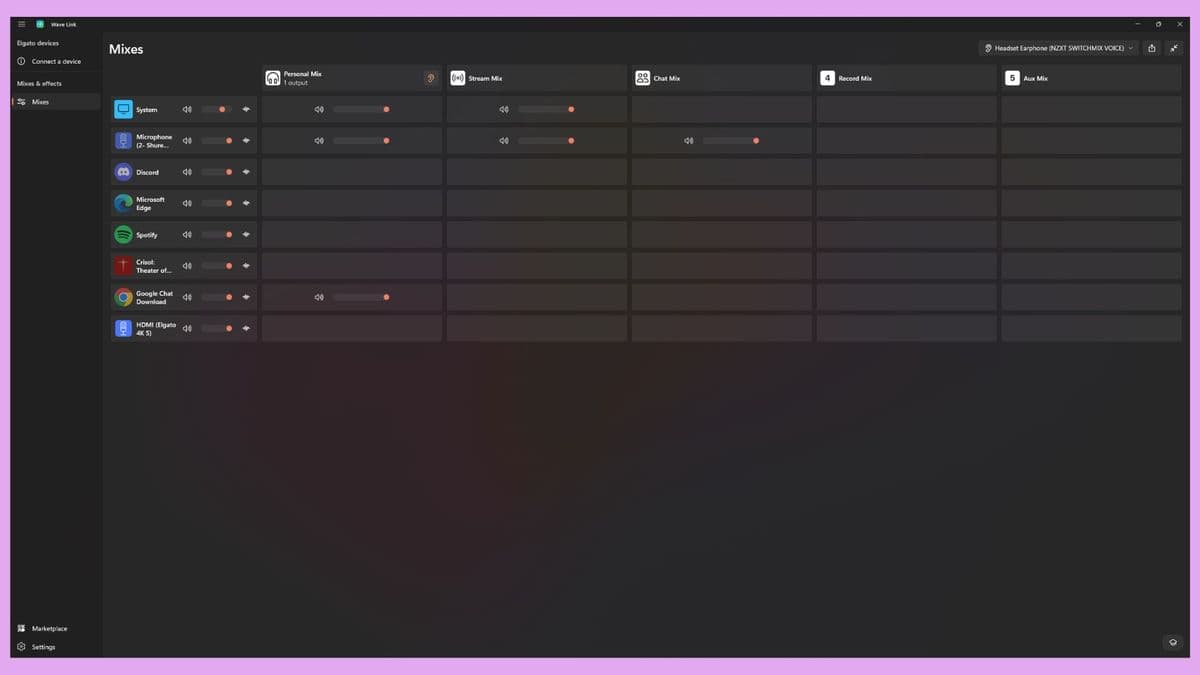
The core idea of Wave Link is simple but powerful. You get up to five separate mixes (tabs along the top), and up to eight inputs that can feed into them. Each input is typically an app or device: your mic, your game, your browser, your music player, chat apps, capture card, whatever.
In practice, I ended up with something like this:
- Mix 1 – Headphones: What I hear while I play and record.
- Mix 2 – Stream: What Twitch hears.
- Mix 3 – Voice Chat: A cleaner feed for Discord with less music and game noise.
- Mix 4 – Recording: A controlled mix for local capture, just in case.
- Mix 5 – Work: A boring-but-useful preset for meetings and calls.
The interface is a matrix: rows are your inputs, columns are your outputs (the mixes). For each input, you can turn it on or off per mix and set a volume. That means I can have my game booming in my headphones, but drop it way down in the Stream mix so my voice isn’t fighting with explosions. Or I can nuke Spotify from the Work mix with a single click while leaving it in my personal headphone mix for sanity.
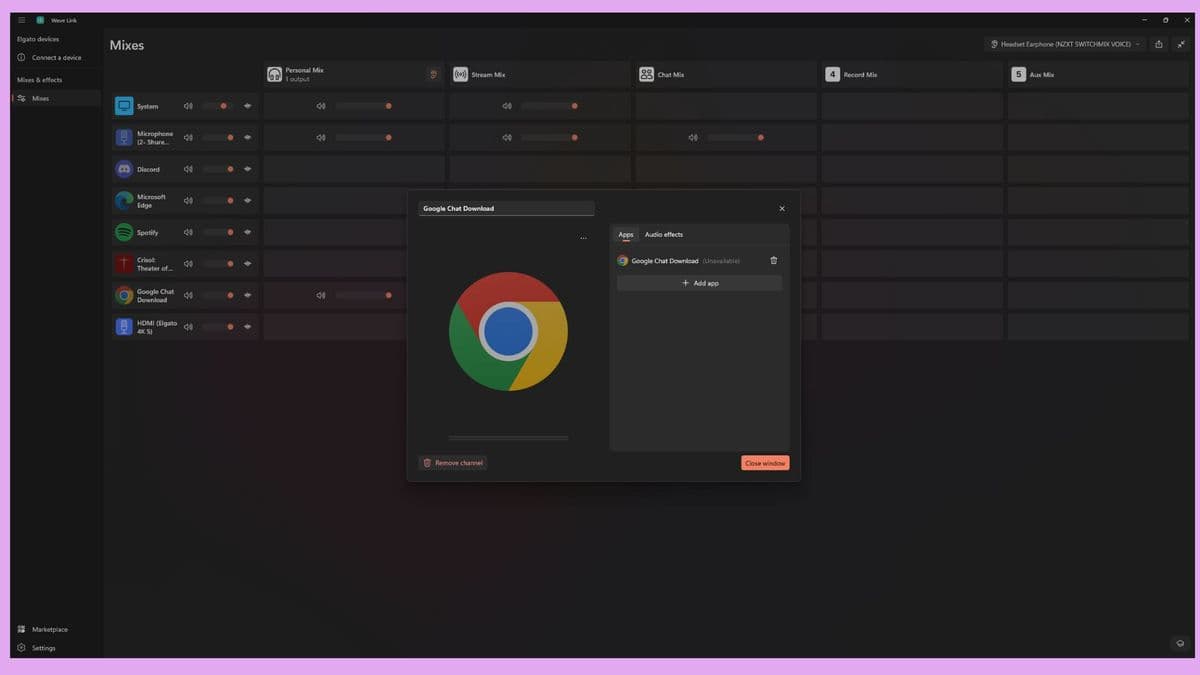
There are a couple of quirks. Wave Link uses the names Windows and macOS expose for apps, which can be… unhelpful. Chrome showed up as something like “Google Chat Download” for me, which took a second to decode. Once you figure out which mystery label is which app, you’re fine, but it’s a reminder that this is all sitting on top of OS audio plumbing.
The eight-input cap is the first real limitation I ran into. If you’re a typical solo streamer with a mic, a game, a browser, music, and maybe a capture card, eight is plenty. When I started adding niche stuff-separate inputs for Discord and Slack, a dedicated system sounds channel, an extra virtual cable for weird routing-I hit that ceiling quickly. You can send any one input to multiple mixes, but you can’t add the same source twice as separate inputs to treat it differently.
So if you were dreaming of having two separate Chrome channels, one heavily compressed for your ears and one untouched for the VOD, that’s not happening right now. In my normal use, it wasn’t a deal-breaker, but advanced route-goblins will feel that cap.
Real-time effects that genuinely cut down my post-processing
The routing is nice, but the thing that really sold me is the effects system. Wave Link lets you stack effects on each input: EQ, compressor, limiter, de-esser, noise gate, and more, plus additional plugins from Elgato’s own marketplace. It also supports standard plugin formats (VST3/AU) if you already have a folder of favourites, though I mostly stuck with the built-in stuff and some of the free downloads.
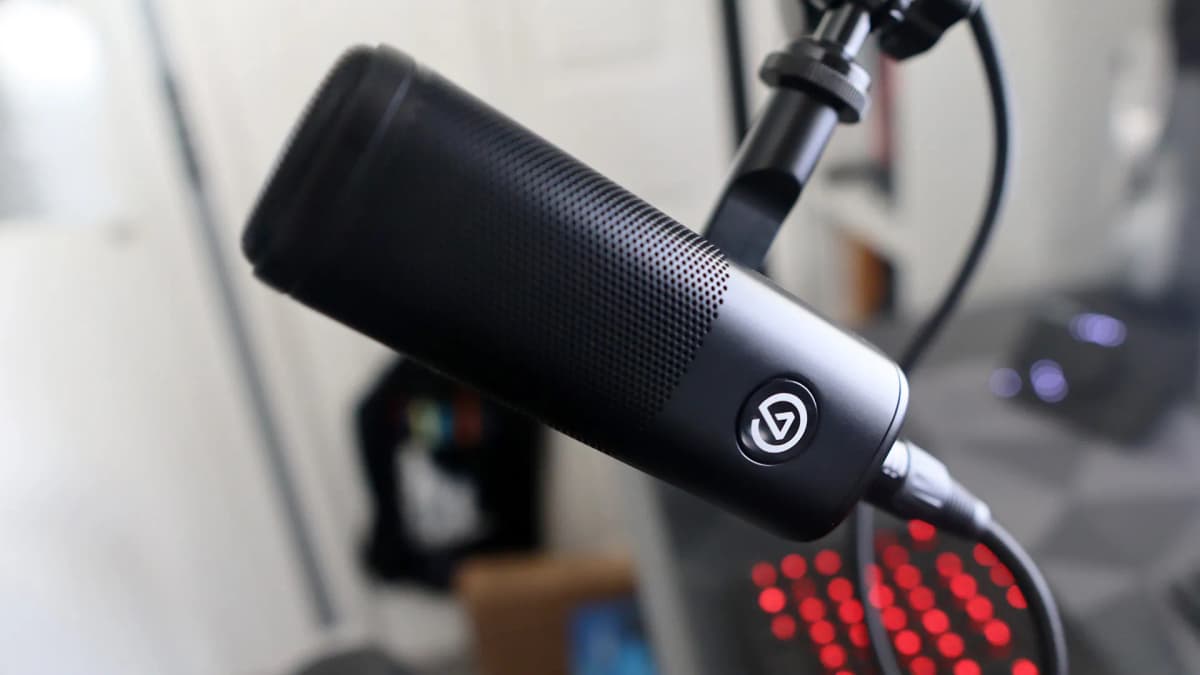
On my mic channel, I set up a pretty typical streamer chain:
- A high-pass filter to clear out low-end rumble from my desk and PC.
- A compressor to keep my voice sitting nicely in the mix when I get animated.
- A de-esser to tame the harsh “s” sounds my MV7 is famous (or infamous) for.
- A gentle EQ bump around 3–4 kHz for clarity, and a small low-mid cut so I don’t sound like I’m trapped in a wardrobe.
Normally, I do a lighter version of this live in OBS and then the “proper” polish in Reaper or Audacity after recording. With Wave Link, I realised after a couple of sessions that I wasn’t reaching for my post chain as often. The live sound was already close enough that for YouTube videos and VODs, I could pretty much roll with it.
Where it gets fun is applying effects to non-mic sources. Spotify was the obvious one: the jump in loudness between different tracks or playlists can be wild. I slapped a compressor and a limiter on the music channel and suddenly my soundtrack sat nicely under my voice without surprise volume spikes when a new song kicked in. Same with browser audio: YouTube ads, random trailers, and game sites can be way louder than the rest of your mix. A touch of compression there goes a long way.
CPU-wise, on my Windows 11 machine (Ryzen 7, RTX 4070, 32 GB RAM), Wave Link barely registered. Even with several effect stacks running, it sat in the low single-digit percentages. Latency never became noticeable for monitoring, and I didn’t have to do any weird buffer tweaks to keep crackles away. It just behaved.
The catch-and it’s a big philosophical one—is where in the signal chain these effects live. They’re applied at the start of the channel’s path, before that signal is split into the different mixes. In plain English: the same processed signal goes to every mix. You can’t have a bass-boosted, “radio voice” chain for your stream while sending a flatter, more natural tone to your friends on Discord. You can’t compress game audio for your own ears while leaving it untouched on the VOD.
You can toggle effects on and off very quickly—with a click in the UI or a mapped button on a Stream Deck—so I found myself occasionally tapping between “stream voice” and “Discord voice” presets mid-session. It works, but it’s a workaround, not a real solution. Per-mix effect stacks would be a game changer here.
Limitations that nudged me, but didn’t push me away
After about 10–12 hours of streams, recordings, and calls, a few consistent pain points emerged.
- Shared effect stacks across mixes: As mentioned, processing lives on the input, not the output. Great for simplicity, bad for tailoring sound per destination.
- Eight-input ceiling: Fine for a lot of people, but tight if your workflow is already complex. A couple of virtual cables and extra apps and you’re out of room.
- App naming weirdness: A minor annoyance, but when you’re trying to quickly mute the right channel mid-stream, “Google Chat Download” instead of “Chrome” is a good way to panic-mute the wrong thing.
- No built-in ducking: There’s no simple “auto-duck game audio when I talk” option. You can fake it with sidechain-capable plugins, but that’s beyond the typical user.
On the upside, stability was rock solid. I didn’t have any crashes or audio dropouts, and it played nicely with OBS, Discord, and the usual suspects. It also didn’t fight me on sample rates, which is where a lot of virtual mixers fall over—no random “device in use” errors or crackling audio when I swapped from 44.1 to 48 kHz projects.
The other limitation isn’t technical, it’s ecosystem-based. Wave Link now ships as part of Elgato’s wider “Wave Next” creator platform: new mics, XLR interfaces, and upgraded Stream Deck hardware. That’s cool if you’re bought into their world, because everything speaks the same language. If you’re not, you’ll still bump into some features and tutorials that assume you’ve got Wave-branded gear. The software itself stays friendly to outside hardware, but you can feel the gentle nudge toward the ecosystem.
How it stacks up against Rode, Logitech, VoiceMeeter and the usual suspects
Before Wave Link opened up, my go-tos for this kind of thing were Rode Unify, Logitech’s newer mixing software, and the old warhorse: VB-Audio’s VoiceMeeter.
Rode Unify is slick and powerful, but mostly designed for Rode’s own hardware. Its routing options are decent, but it doesn’t give you the same per-output flexibility Wave Link does, and the hardware lock-in is a non-starter if you’re already happy with another mic.
Logitech’s Mixline-style tools (depending on which keyboard or headset you own) tread a similar path: nice ideas, but not as intuitive, and the effects side feels more like a bonus feature than a serious mixing environment. They’ll give you separate game/chat mixes, but Wave Link’s matrix view made more sense to me within about five minutes.
VoiceMeeter is the big comparison. It’s absurdly powerful for what it is, and I have a lot of respect for it. But it’s also visually dated, fiddly, and pretty unforgiving if you’re not already comfortable with the more arcane parts of Windows audio. I’ve had amazing setups with it, and I’ve also had entire evenings where I gave up in frustration because one Windows update silently broke everything.
Wave Link slots neatly in the gap between those worlds. It’s not as endlessly configurable as a full-blown virtual studio, but it’s way more approachable. You trade some edge-case power (per-mix effects, more than eight inputs, niche routing tricks) for speed, clarity, and the fact that you can reasonably expect a friend to set it up without remote-desktoping into their PC for an hour.
And crucially, it’s genuinely free. VoiceMeeter starts nagging for donations after a while, and hardware-locked mixers expect you to buy into their ecosystem. Wave Link just asks that your OS recognises your mic or interface; brand doesn’t matter. For a lot of people, that’s the whole story right there.
Performance, macOS, and Stream Deck: how it behaves in a real setup
My main testing was on a Windows 11 desktop, streaming and recording at 1080p60 with OBS. With a handful of effects on my mic and a couple of compressors on music and browser channels, Wave Link never became the bottleneck. GPU and encoder hit their usual limits long before audio did.
On macOS, Wave Link targets modern versions (think current-gen macOS rather than ancient Intel relics). I only had a short session on a MacBook to sanity-check it, but the interface mirrored the Windows version almost 1:1. If you bounce between platforms, your mental model of “this row is my mic, that column is my stream” transfers perfectly.
The Stream Deck integration is where it quietly becomes addictive. Mapping mute toggles, mix switches, and effect on/off buttons to physical keys feels luxurious after years of alt-tabbing or hunting for tiny software icons. With a Stream Deck or Stream Deck+, I could:
- Tap one key to switch from my “Stream” mix to my “Work” mix.
- Toggle my “Podcast Voice” EQ preset on my mic when I went live, then kill it before hopping into Discord.
- Hard-mute Discord or game audio on the Stream mix when I needed to talk directly to chat.
None of this is impossible with other software, but the glue between Wave Link and Stream Deck is tighter than anything I’ve cobbled together with hotkeys and scripts. It feels like someone actually thought through common creator workflows rather than just exposing a generic API and walking away.
Who Wave Link is perfect for (and who should look elsewhere)
After living with it for a bit, I have a pretty clear picture of who Wave Link 3.0 is made for.
- Streamers and VTubers: If you’re on Twitch, YouTube, or Kick with a single PC (or a simple dual-PC / console + capture card setup), Wave Link gives you exactly the kind of routing and real-time control you want without turning your rig into a science project.
- Content creators who hate post-processing: If you’d rather spend time editing content than mangling audio, the live effects chain and multiple mixes can shave real hours off your workflow.
- People who already own decent mics/interfaces: The big selling point is that you don’t need to swap gear. Your Shure, Audio-Technica, or random Amazon special mic can all ride along.
- Remote workers who game: Having a “Work” mix and a “Play” mix you can flip between instantly is surprisingly nice. One click and your coworkers don’t hear your Spotify or game audio bleeding in.
Meanwhile, you might want to look elsewhere if:
- You’re running a multi-guest live production with half a dozen mics and complex routing. At that point, a proper DAW or hardware mixer will treat you better.
- You need per-mix processing for the same source (e.g., radically different processing for podcast vs. stream vs. call), and you’re not willing to compromise.
- You’re on Linux. This is Windows and macOS territory only right now.
FinalBoss // Gear
Level up your setup
01Capture cards (Elgato & more)on Amazon→02USB microphoneson Amazon→03Gaming keyboardson Amazon→04Gaming deskson Amazon→Affiliate links · As an Amazon Associate, FinalBoss earns from qualifying purchases.
Want to Level Up Your Gaming?
Get access to exclusive strategies, hidden tips, and pro-level insights that we don't share publicly.
Ultimate Reviews Strategy Guide + Weekly Pro Tips