
Table of Contents (14)
My Honest Take: Don’t Buy the Steam Machine Expecting Native 4K 60fps
The first time I saw Valve casually drop “4K 60fps” alongside the Steam Machine, my eyebrows did that automatic PC-nerd twitch. On paper it sounds great, but if you’ve spent any time with current midrange GPUs or console-class hardware, you know how loaded that claim is.
It took me a moment to unpack why it bugged me. It’s not that 4K 60fps is impossible. With aggressive upscaling, smart presets, and some compromises, you can absolutely get a sharp-looking 4K image on living room TVs. The problem is expectation. Say “4K 60” and most people hear “native 4K, high settings, smooth as butter.” That’s not what this box is realistically built for.
The moment it clicked for me was when I looked at Valve’s own Verified target: 1080p at 30fps. That’s the baseline they’re certifying games against. Yet marketing language is dangling 4K 60 like it’s a given. Those two things don’t comfortably coexist without a lot of fine print, and that fine print is where your display choice lives.
So here’s my stance, as someone who’s spent way too many evenings tweaking PC graphics options: if you’re planning to park a Steam Machine on a desk or in a small media setup, pair it with a 1440p (QHD) monitor, not a 4K panel. That one decision will do more for your day-to-day enjoyment than another 2 million pixels ever will on this hardware tier.
I’m going to walk through why 1440p is the real sweet spot for Valve’s mini PC, how resolution vs refresh rate actually feels in practice, and three very specific 1440p monitors that make sense for different budgets and tastes: Sony’s Inzone M10S, the KTC G27P6, and Alienware’s AW2725DF.
Steam Machine Reality Check: 4K Is a Party Trick, Not the Baseline
Under the hood, the Steam Machine is basically a console-class gaming PC. Think custom AMD silicon using RDNA 3 graphics, roughly in the same performance neighborhood as a PlayStation 5 or a standalone midrange GPU like an RX 7600. You’re not getting RTX 4090 levels of brute force here, and that matters a lot for 4K.
Look at what happens on those existing consoles. “4K” is often shorthand for “upscaled internal resolution plus a bunch of software magic,” not “native 3840×2160 at all times.” Games lean on:
- Dynamic resolution scaling that quietly drops internal resolution during heavy scenes.
- Upscaling tech (Temporal AA, FSR, etc.) that reconstructs a 4K-ish image.
- Performance modes that cut visual features to hit 60fps.
Valve is going to do the same playbook. They’ve already mentioned AMD’s FSR upscaling pipeline, and FSR 3 / 4 style tech can absolutely make a 1440p image look convincingly 4K on a big TV. But this is where the nuance lives: that’s still a 1440p workload under the hood, not “true 4K ultra” rendering.
At GDC, Valve’s Verified program requirement of 1080p30 tells you something important: the guaranteed baseline is modest. 4K60, by contrast, is going to be the nice when it works scenario, not the rule. Demanding native 4K 60fps from a PS5-class GPU on modern AAA titles, with all the sliders cranked, is like expecting a hot hatchback to tow a caravan up a mountain at 150 km/h. Physics will fight you.
And that’s before you enable ray tracing. On current midrange GPUs, ray tracing and native 4K tend to get along about as well as oil and water. You end up cutting settings so far back that the theoretical resolution advantage becomes less impressive than you’d expect.
This is exactly why 1440p is such a sweet spot for this level of hardware. It shaves enough pixel load off the GPU that you can keep higher presets, maybe dabble in ray traced shadows or reflections, and still enjoy a smooth framerate. Instead of praying for 60fps at 4K, you’re comfortably cruising at 90-144fps at 1440p in a lot of games – which feels dramatically better in motion.
Why 1440p (QHD) Is the Steam Machine’s Natural Habitat
1440p sits in that Goldilocks zone between 1080p and 4K, especially on 27-32″ screens. You get a visible step up in sharpness from 1080p without demanding the brute-force GPU power that true 4K throws at silicon.
The numbers make the story obvious:
- 1080p (1920×1080) = ~2.1 million pixels.
- 1440p (2560×1440) = ~3.7 million pixels.
- 4K (3840×2160) = ~8.3 million pixels.
Going from 1080p to 1440p adds about 75% more pixels. That’s substantial, but still manageable for modern midrange GPUs, especially with good engine optimization and upscalers.
Jump from 1440p to 4K, though, and you’re more than doubling the pixel count again. Your GPU has to shade, light, and output over twice as many fragments every single frame. That’s where performance falls off a cliff on anything without high-end desktop-class horsepower.
On a 27″ display, the perceived difference between a good 1440p image and 4K at normal desk distance is a lot smaller than those raw pixel counts suggest. If you’re sitting 60–80 cm away, what you actually notice more is:
- How smooth motion feels (refresh rate).
- How clean the anti-aliasing is.
- The contrast, HDR, and black levels of the panel.
- Input latency and responsiveness.
I say this as someone whose daily driver is a 27″ 1440p high-refresh monitor. I can tell the difference when I move to a 4K screen for work or testing, but in fast-paced games, I feel the jump from 60Hz to 144–240Hz way more than the jump from 1440p to 4K.
For the Steam Machine specifically, 1440p lets you:
- Keep higher quality textures and effects without murdering fps.
- Use upscaling (FSR) to reach a sharper “4K-like” output without native-4K cost.
- Exploit high refresh monitors (240–480Hz) with genuinely high frame rates in competitive titles.
- Avoid turning every new AAA release into a settings-tweaking minigame just to stay above 60fps.
And there’s a very practical, non-nerdy reason too: money. Good 1440p OLED and mini-LED monitors are now in a price bracket that doesn’t feel completely deranged. True 4K with high refresh on OLED or mini-LED? That still tends to blow a massive hole in your budget, especially if you’ve already dropped serious cash on the Steam Machine itself.
Specs Snapshot: Steam Machine vs 1440p Monitor Picks
To ground this a bit, here’s a quick comparison between the kind of hardware Valve is shipping and the three 1440p monitors that actually make sense to pair with it.
Specifications
The important takeaway here isn’t to memorize every number, it’s the pattern: all three displays are 1440p, all chase high refresh rates, and all lean on modern panel tech (OLED / QD‑OLED) to make games look more vivid and responsive, instead of just pushing more raw pixels.
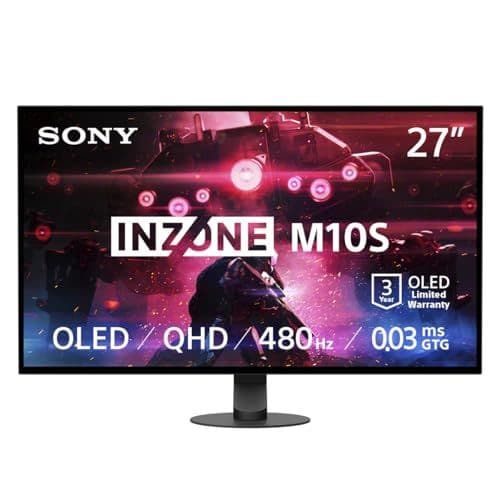
Monitor Pick #1: Sony Inzone M10S – 1440p at 480Hz for the Frame Rate Addicts
The Sony Inzone M10S is one of those monitors that feels like it was bred in a lab for esports highlight reels. 1440p resolution, OLED panel, and a frankly ridiculous maximum refresh rate of up to 480Hz. On paper, it makes the Steam Machine look a bit underdressed, like turning up to a track day in a hot hatch while everyone else arrived in race-tuned GT cars.
Let’s be real: the Steam Machine is not going to push 480fps in modern AAA games at 1440p. Not even close. Where a crazy-fast display like this makes sense is in competitive titles that already run lean and mean: think Counter-Strike, Valorant, Overwatch, Apex Legends, maybe even future arena shooters. Those games are designed to scale down visually and scale up in frame rate, and they’re exactly where a 240–480Hz OLED display shines.
What makes the M10S interesting as a Steam Machine companion is this mix:
- 1440p native – perfect res match for the hardware.
- OLED panel – deep blacks, near-instant response, gorgeous HDR.
- Absurd refresh headroom – you’ll never feel capped by the display.
The catch, and it’s a big one, is price. This thing is a full-fat investment, and we still don’t even know how much the Steam Machine itself will cost beyond “more than a Steam Deck OLED and probably more than a PS5 or Series X.” Pairing a pricey mini PC with an equally pricey esports-grade monitor is what I’d gently call a “passion build.” Fun, but definitely not value-optimized.
Who does it make sense for? If you already know you live in shooters, you care more about input latency than cinematic ray tracing, and you’re the kind of player who actually feels the jump from 240Hz to 360/480Hz, the M10S is a wild but defensible choice. For everyone else, it’s the flagship poster child that proves a point: 1440p isn’t a compromise, it’s where cutting-edge panels are aiming their sweet spot.
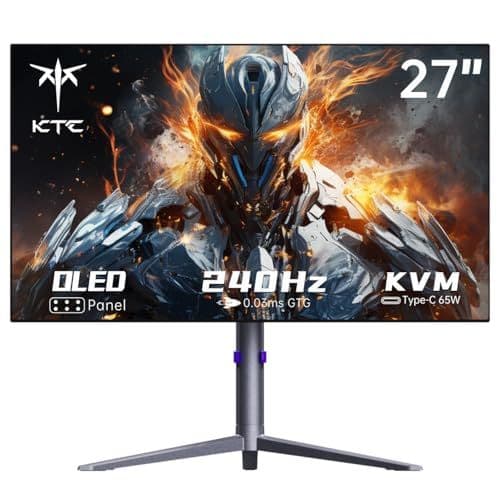
Monitor Pick #2: KTC G27P6 – The Sensible 1440p OLED Sweet Spot
The KTC G27P6 is the monitor that keeps popping into my head whenever someone asks, “What should I actually buy?” It’s a 27″ 1440p OLED running up to 240Hz, usually hovering around that psychological ~$500 price point that feels high-end without tipping into absurd.
If you haven’t heard of KTC, that’s fair. It’s not a household name, but it’s one of those OEM-style brands that quietly makes panels for other, bigger logos you have heard of. The G27P6 uses the same LG OLED panel family you find in some more expensive branded monitors, which is really what matters: deep blacks, instant pixel response, and fantastic contrast.
Why I keep coming back to this one for the Steam Machine:
- 1440p at 240Hz is right in the performance wheelhouse for a console-class GPU in many games, especially competitive ones on high/medium settings.
- OLED gives every game a visual pop that even a cheaper 4K IPS panel can’t match – especially in dark scenes.
- Reasonable price compared to Sony’s extreme offerings and a lot of big-brand OLEDs.
- Quality-of-life extras like USB‑C power delivery and built-in speakers make it pull double duty for laptops, work machines, or even a docked handheld like the Steam Deck.
What I like about 1440p 240Hz on a box like the Steam Machine is that you can mix and match your priorities per game without hitting a wall. In single-player, you might cap at 90–120fps, crank up visuals, and still get buttery motion. In competitive shooters, you can drop shadows and post-processing, and genuinely reach toward the 200fps+ territory where 240Hz starts to pay off.
Is it the cheapest way to get a screen on your Steam Machine? No. You can grab a basic 1080p 144Hz IPS for a fraction of the cost. But if you’re buying Valve’s new toy as a “this is my main gaming box for the next few years” machine, the G27P6 feels like the right level of ambition: you’re investing in panel tech and refresh rate that will still feel modern long after 4K becomes cheaper.
Monitor Pick #3: Alienware AW2725DF – The Balanced QD‑OLED Power Play
The Alienware AW2725DF is the monitor I’d personally lean toward if I were pairing something Steam Machine-class today. It hits that middle ground between “I want cutting-edge” and “I don’t want to explain this receipt to my bank.” It’s a 27″ 1440p QD‑OLED panel with a maximum refresh rate around 360Hz, and it has that classic Alienware build and styling that actually feels like you bought something premium.
QD‑OLED brings its own flavor to the table. Compared to traditional WOLED:
- You get even punchier colors, especially in HDR scenes and bright highlights.
- There can be a slight blueish tint to blacks in very specific bright-room scenarios, but in practice it still looks phenomenal for games.
On the performance side, a 360Hz ceiling is more than enough headroom for a midrange GPU today, but not so extreme that you’re spending half the price on pushing from “very fast” to “theoretical esports record-chasing.” Most people are never going to feel the difference between 360Hz and 480Hz with the sort of frame rates a Steam Machine-class GPU can realistically sustain at 1440p.
I also like that the AW2725DF tends to dip closer to the $500 range during sales, even though its official MSRP is higher. That makes it directly competitive with the KTC’s “good OLED for a fair price” proposition, but with Dell’s support network and a more mainstream badge on the front.
If the Sony Inzone M10S is the all-out, no-compromise esports toy, and the KTC G27P6 is the smart enthusiast pick, the Alienware feels like the one that’ll show up most often on real-world desks. QD‑OLED, high refresh, 1440p, and a brand most people already trust – it’s hard to argue against that combo for a console-class PC like the Steam Machine.
Resolution vs Refresh Rate: What Actually Feels Better?
There’s a trap a lot of people fall into (and I absolutely fell into it years ago): chasing resolution as the be‑all, end‑all of image quality. 4K! 8K! More pixels! It sounds intuitive, but once you live with high-refresh monitors, your brain quietly rewires what it cares about in games.
Here’s the mental model I use, especially for something like the Steam Machine:
- If you’re sitting far away on a couch (2–3+ meters) in front of a 55–65″ TV, resolution does a lot of heavy lifting. The big panel means individual pixels can be visible at lower resolutions, and you’re probably capped at 60–120Hz anyway. That’s the 4K TV scenario.
- If you’re at a desk with a 27–32″ monitor, your face is close enough that motion clarity, latency, and contrast usually matter more than raw resolution. That’s the 1440p high-refresh monitor scenario.
With the Steam Machine, Valve is trying to straddle both worlds: a couch console and a tiny desktop PC. The hardware can absolutely hang in the living room on a 4K TV with tuning and upscaling. But if you’re in the second category – mouse, keyboard, 27″ display – going for 1440p and high refresh is how you squeeze the best actual experience out of the same silicon.
On my own setup, I’d take 1440p at 120–144fps over native 4K at 60fps every single time. You feel the extra smoothness in camera pans, in aiming, in simply walking through a dense open world. Little micro-stutters are less jarring, input feels more immediate, and the whole thing just feels more “alive.”
And that’s before we talk about upscaling. A really solid 1440p output upscaled to 4K on a screen, especially with the temporal reconstruction tricks modern engines use, already looks fantastic. Running native 4K just to have the GPU cry in the corner, while you slash settings and frame rate, often ends up feeling like an ego move rather than a quality one.
What About Just Using a 4K TV with the Steam Machine?
If you’re treating the Steam Machine like a console – plugged into a 4K living room TV, controller in hand – you’re not wrong to stick with 4K there. It’s the natural resolution of the panel, the interface looks crisp, and you can lean on upscaling plus console-style “Performance vs Quality” toggles inside games.
In that setup, the smartest move is usually this:
- Set output resolution to 4K so the UI looks sharp.
- Pick a Performance or Balanced preset in games when available.
- Let the Steam Machine and the game engine dynamically adjust internal resolution and FSR upscaling under the hood.
- Target a stable 60fps rather than obsessing over every pixel.
Where my 1440p recommendation really kicks in is for people who were thinking of buying a brand‑new display specifically for the Steam Machine. If you’re dropping fresh money, chasing a 4K 144Hz+ OLED or mini‑LED monitor to hang off a console-class GPU is mismatched. A good 1440p panel will look better, feel smoother, and cost less – and the Steam Machine will be much more comfortable driving it at consistently high frame rates.
The Money Question: Is 1440p “Wasting” an Expensive Steam Machine?
I’ve already heard variants of this: “If I’m spending serious money on Valve’s box, I deserve 4K.” I get the sentiment. On paper, 1440p feels like old news compared to all the 4K marketing noise.
But here’s the thing: in PC land, trading resolution for fidelity and frame rate is normal. It’s not a hardware indictment, it’s simply smart optimization. Most people I know running $700+ GPUs still drop from 4K to 1440p in certain games so they can crank ray tracing and stay comfortably above 60–90fps.
On top of that, 4K gaming monitors are still the main budget killer in a build. Yes, you can find cheaper IPS 4K 60–120Hz screens, but you won’t get the same blacks, HDR, or responsiveness as an OLED or a good mini‑LED 1440p panel. Once you start looking at 4K OLED or 144Hz+ 4K monitors, prices jump fast – often far beyond what the Steam Machine itself is likely to cost.
Use that money where it actually matters:
- A high-refresh 1440p OLED / QD‑OLED monitor.
- Better headphones or speakers for positional audio.
- Storage upgrades for the Steam Machine if it supports them.
- A decent mechanical keyboard and mouse if you’re going desk-first.
1440p isn’t a consolation prize here. It’s a resolution that lines up with the Steam Machine’s actual GPU horsepower, keeps your system in its comfort zone, and leaves you with enough budget to enjoy modern panel tech instead of just raw pixel count.
Pros and Cons of Going 1440p with the Steam Machine
To pull this together, here’s how the 1440p route really stacks up against chasing 4K on Valve’s new hardware.
✓ PROS
+
Much higher, more stable frame rates vs 4K on console-class hardware
+
Lets you use higher settings and still stay above 60–100fps
+
1440p looks razor-sharp on 27–32″ monitors at desk distance
+
OLED / QD‑OLED 1440p panels are far more affordable than equivalent 4K
+
Better alignment with Valve’s realistic performance envelope (1080p30 Verified baseline)
+
High-refresh 1440p displays (240–360Hz) give room to grow with future hardware
+
Easier to drive ray tracing or heavy effects without tanking performance
✗ CONS
–
Not as numerically impressive as “4K” on a spec sheet
–
Slightly less crisp text/UI vs 4K on very large desktop monitors
–
Some productivity workflows (photo/video at 4K) benefit from the extra resolution
–
If you already own a great 4K TV/monitor, staying at 1440p internal can feel psychologically like a downgrade
–
Console-style “Quality vs Performance” modes are often tuned assuming 4K output
FinalBoss // Gear
Level up your setup
01Graphics cardson Amazon→02Gaming laptopson Amazon→03High-refresh gaming monitorson Amazon→04Discounted game keyson Kinguin→Affiliate links · As an Amazon Associate, FinalBoss earns from qualifying purchases.
Want to Level Up Your Gaming?
Get access to exclusive strategies, hidden tips, and pro-level insights that we don't share publicly.
Ultimate Tech Strategy Guide + Weekly Pro Tips