
Table of Contents (6)
Wave Link 3.0 finally makes per‑app mixing available to anyone – with strings attached
Creators who used to need an Elgato mic or interface to get per‑app mixes no longer do. Wave Link 3.0 is free, works with any Windows 11 or macOS 15‑recognized device, and gives streamers up to five custom mixes with per‑app volume control in a matrix UI. That matters because a useful chunk of the streaming audio stack has been locked behind hardware until now – but the release also sharpens Elgato’s hardware pitch rather than replacing it.
- Free, universal compatibility: any mic/interface recognized by Windows 11 or macOS 15+ can be routed into Wave Link 3.0.
- Power features: five independent mixes, up to 4 hardware + 8 software inputs, VST3/AU support and Elgato Marketplace effects.
- Limits remain: shared effect stacks across mixes, no ASIO on Windows, eight‑input cap and unanswered CPU/latency questions.
- Hardware nudge: Wave Next devices add onboard Wave FX processing and zero‑latency VST insert – the software release pulls creators toward the new hardware.
Why this actually matters for creators
Per‑app mixing has been one of those small but constant headaches for streamers. Want game sound lower on your stream but full on your headphones? Want Discord in a separate mix? Until now, doing that cleanly often meant spending on a hardware mixer or an Elgato device that unlocked Wave Link’s features. Wave Link 3.0 tears down that gate. For hobbyists and small creators, that reduces both cost and technical friction — and it means better audio control becomes an expected baseline, not a luxury.
Elgato also redesigned the UI around a horizontal routing matrix, which is less intimidating than traditional channel strips if you’re not an audio engineer. PC Gamer’s hands‑on noted the app is intuitive and genuinely helpful for streaming and recording workflows — an important validation for anyone who worried the “free” app would feel like a crippled demo.
The uncomfortable observation: free software, obvious hardware play
Call it what it is: Wave Link 3.0 being free is a strategic loss leader. Elgato launched Wave Next hardware at the same time — Wave:3 MK.2, Wave XLR Pro and more — that include a Wave FX Processor doing onboard DSP, Clipguard 2.0 and zero‑latency VST inserts. If Wave Link 3.0 solves routing for everyone, the hardware adds latency‑free effects and tighter Stream Deck integration. In short, Elgato just widened the market and positioned premium hardware as the obvious upgrade path.
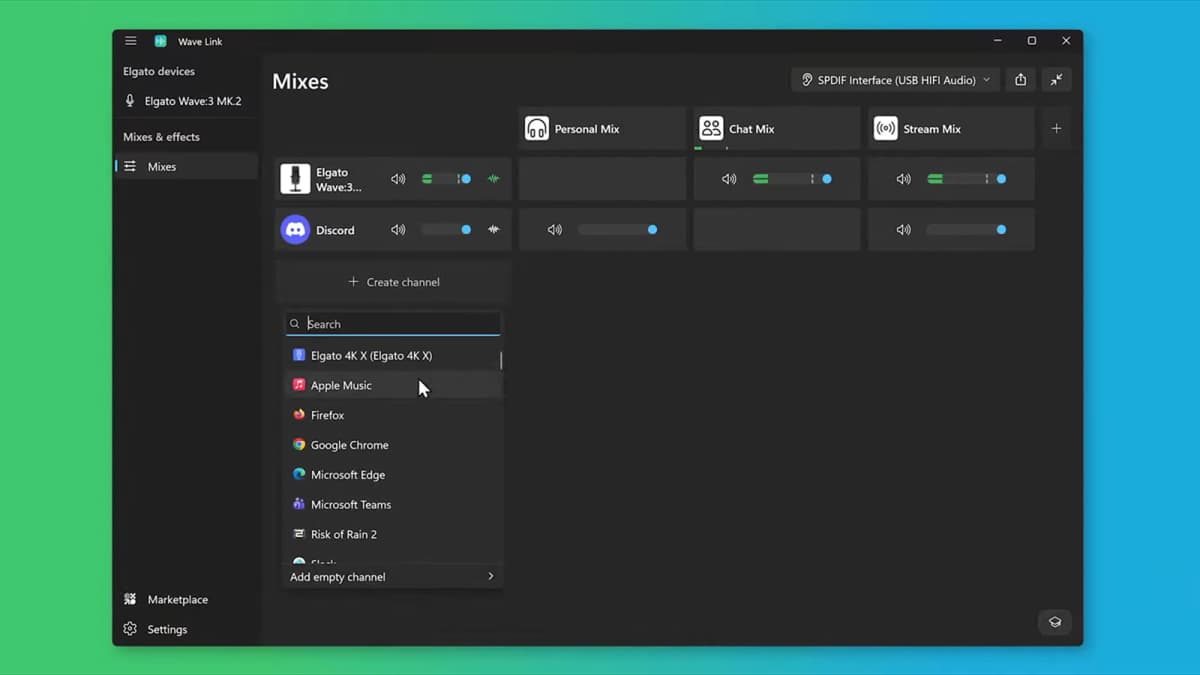
That’s not inherently bad. Hardware with onboard DSP genuinely improves some workflows. But the PR team would prefer you notice the free app and not the incentives baked into features like low‑latency VST insert, autogain and Stream Deck profiles that work best with new Stream Deck+ hardware.
The real limits you should care about
Wave Link 3.0 ships with solid basics — VST3/AU, five mixes, marketplace effects — but it’s not the end of the line for pros. The app lacks ASIO support on Windows, caps inputs (4 hardware + 8 software), and, crucially, shares effect stacks across mixes rather than letting you tailor effects per mix. Early hands‑on reports also flag latency and CPU load as wildcard variables that will decide whether this replaces hardware workflows or simply helps beginners.
If you’re a power user who depends on low‑latency monitoring, multi‑interface setups, or per‑mix plugin chains, Wave Link 3.0 may be a step forward rather than a replacement. If you’re upgrading from a basic USB mic and OBS mixing, it’s a big one.
What to watch next
- Wave XLR Pro shipping Q2 2026 — real reviews of the hardware’s Wave FX Processor and zero‑latency VST insert will show if Elgato’s hardware premium is worth it.
- Performance metrics — look for independent latency and CPU benchmarks, especially on macOS where Elgato claims reduced latency and a Performance Mode.
- Marketplace adoption — third‑party VST/AU availability in Elgato’s Marketplace will determine whether Wave Link becomes a creator standard or just another branded tool.
If I were talking to Elgato’s PR team I’d ask one blunt question: why remove the software gate now if not to accelerate hardware sales? The honest answer matters; the product helps creators either way, but the business motive changes how you judge long‑term support and feature prioritization.
TL;DR
Wave Link 3.0 removes Elgato’s hardware requirement and makes per‑app, multi‑mix audio routing freely available to creators, with VST/AU support and Stream Deck integration. It’s a meaningful quality‑of‑life upgrade for streamers, but shared effect stacks, input caps, and no ASIO mean professionals will still have reasons to buy dedicated hardware — especially Elgato’s new Wave Next lineup. Watch hardware reviews and latency benchmarks in Q2 2026; they’ll decide whether this is a democratizing win or a funnel into premium gear.
FinalBoss // Gear
Level up your setup
01Top-rated gaming headsetson Amazon→02High-refresh gaming monitorson Amazon→03Gaming chairson Amazon→04Discounted game keyson Kinguin→Affiliate links · As an Amazon Associate, FinalBoss earns from qualifying purchases.
Want to Level Up Your Gaming?
Get access to exclusive strategies, hidden tips, and pro-level insights that we don't share publicly.
Ultimate Gaming Strategy Guide + Weekly Pro Tips