

Table of Contents (29)
Vapor Chambers vs Heatpipes: Why Laptop Cooling Just Got Way More Interesting
The first time I opened a modern gaming laptop and saw the cooling system, I honestly thought someone had flattened a copper waterblock with a steamroller. No classic bundle of round heatpipes, just this huge, thin copper plate covering the CPU, GPU, and half the motherboard.
That was my proper introduction to vapor chambers in laptops. I’d seen them in graphics cards and phones, but here it was: a 2D copper sandwich basically replacing most of the traditional pipe maze. And it immediately raised a question: is this just another marketing buzzword, or did cooling design actually level up?
It took a bit of digging and a few too-hot laptops on my desk before it really clicked. The problem isn’t just that CPUs and GPUs are getting more powerful; it’s that they’re dumping huge amounts of heat into a tiny area. Modern mobile chips can spike to 80-120 watts inside a few square centimeters. That’s not “warm laptop on your lap” territory. That’s “mini space heater under your keyboard.”
Traditional heatpipes were never designed for this kind of heat density in such cramped, ultra-thin chassis. They’re great at moving heat from A to B along a few narrow paths. What they’re not great at is spreading that heat out evenly across an entire surface before your silicon starts screaming.
That’s where vapor chambers come in – and why high-end laptops keep shouting about them in spec sheets. They’re not magic, but they solve a very specific, very modern problem better than the old designs.
Quick refresher: what your laptop cooler is actually trying to fix
Before getting into vapor chambers, it helps to frame the problem they’re trying to solve. Modern mobile CPUs and GPUs – whether it’s Intel’s latest Core Ultra, AMD’s Ryzen HX chips, or Nvidia’s 100–150 W laptop GPUs – are doing more work per square millimeter than ever. Performance is going up, but so is power density.
It’s not just about total wattage. A 90 W CPU spread over a big desktop heatspreader is a very different beast from 90 W concentrated in a much smaller mobile die pressed directly under your keyboard. Laptops are thin, airflow is constrained, and there’s barely any vertical room for big fin stacks.
In that environment, a few very specific things matter a lot:
- How fast you can pull heat away from tiny hotspots on the CPU/GPU before they hit their throttle limits.
- How evenly you can spread that heat across a larger surface so more metal and more fins can help dissipate it.
- How efficiently you can do that in a thin form factor without needing huge fans that turn your laptop into a leaf blower.
Traditional copper heatpipes are still great at some of this. But they’re fundamentally one-dimensional devices. They move heat along a path. Vapor chambers, by design, move heat across a surface. That difference ends up being a big deal.
What a vapor chamber actually is (and how it cools your chips)
If you’ve seen a vapor chamber in a teardown, it just looks like a flattened copper plate. The magic is hidden inside. Think of it as a “2D heatpipe”: a flat, vacuum-sealed copper shell with a tiny amount of working fluid and a wick structure.
Inside that copper sandwich, four things are happening in a loop:
- Evaporation: The CPU or GPU dumps heat into part of the vapor chamber (the “evaporator” region). Because the chamber is under partial vacuum, the working fluid inside boils at a much lower temperature than 100 °C. It turns into vapor, even though the chip might “only” be at 60–80 °C.
- Vapor transport: The hot vapor now expands and rushes through the hollow inside of the chamber. Since gas fills the available space quickly, heat is effectively spread across the entire chamber area, not just along a narrow tube.
- Condensation: Out at the cooler edges – usually where the fins are attached and the fans are blowing – the vapor gives up its heat to the metal walls, condenses back to liquid, and cools down.
- Return flow: A capillary wick structure (a porous copper layer or mesh bonded to the inner surfaces) pulls the liquid back toward the heat source via capillary action, even against gravity.
This whole loop is powered purely by the phase change between liquid and vapor. No pump, no moving parts, just physics. The working fluid can be water or another liquid tuned for the right boiling point at the internal pressure the manufacturer sets.
The key side effect: because vapor spreads so easily inside that sealed cavity, a vapor chamber can flatten out intense hotspots. Instead of one tiny patch of copper trying to absorb 90 W from a small die, that heat gets smeared across a wide, thin copper surface that the fans and fins can actually use.
How that’s different from classic heatpipes
Here’s where the 1D vs 2D thing comes in. Technically, a heatpipe and a vapor chamber are based on the same principle: vacuum, working fluid, evaporation/condensation, wick. The only real difference is geometry.
- Heatpipes: Long, narrow tubes. Heat goes in one spot, gets carried along the tube as vapor, and exits somewhere else. Amazing at moving heat efficiently from point A to point B. Not great at covering area.
- Vapor chamber: Short and wide. Heat goes into a section of the chamber, and the vapor can spread out in all directions across the surface. Amazing at equalizing temperature over an area. Not designed for long-distance transport.
That dimensional difference is everything. In a desktop tower cooler, you want to pull heat up and away into a big fin stack, often several centimeters above the CPU. Long heatpipes are perfect for that. In a thin laptop, you don’t have that kind of height. You’re dealing with a mostly flat space under the keyboard and a narrow exhaust region along one edge.
So manufacturers increasingly do this: use one big vapor chamber to “soak” and spread the heat from the CPU, GPU, VRAM, and sometimes VRMs across the available footprint… then connect that to dense fin stacks and blower fans at the edges.
Or put another way: heatpipes move heat somewhere else; vapor chambers make more of the space you already have actually useful.
Spec sheet reality check: what “vapor chamber cooling” usually means
Whenever I see “vapor chamber cooling” on a laptop product page, I immediately want more detail, because it can mean wildly different things. Sometimes it’s a full-coverage chamber replacing nearly all traditional pipes. Sometimes it’s a small plate just under the GPU, with everything else still handled by heatpipes.
To put this into something more concrete, here’s a simplified comparison of two hypothetical 16-inch gaming laptop designs: one old-school, one vapor-chamber-heavy.
Real-world designs are messier, of course. Some laptops combine a vapor chamber over the GPU with classic pipes over the CPU, or the other way around. Some stretch a single chamber across both chips but still add a couple of pipes as “overflow lanes.” But the general trend in higher-end devices is clear: more surface area covered by vapor chambers, fewer traditional pipes.
Why vapor chambers make so much sense in high-end laptops
The big question is: does this shiny copper plate actually help, or is it just there so marketing can throw in a buzzword next to RGB and “AI-enhanced cooling”?

From what I’ve seen and tested, and from how the physics plays out, vapor chambers genuinely solve several nasty problems in powerful laptops:
1. Hotspots are the enemy of boost clocks
Modern CPUs and GPUs are obsessed with temperature. Their boost algorithms constantly watch thermal headroom and will slam on the brakes the moment a sensor hits a predefined limit (often 95–105 °C for laptop CPUs and around 87–90 °C for many GPUs).
The thing is, you can have plenty of cooler metal elsewhere in the cooler, but if a small patch directly above part of the die is saturated, that hotspot dictates your boost clock. Heatpipes don’t always spread out those hotspots well, because each pipe only touches a narrow strip of the baseplate or contact block.
A vapor chamber, especially one that directly interfaces with the die or via a thin heatspreader, is much better at smearing that heat sideways. Instead of one region instantly shooting up to 95 °C, the entire chamber warms more evenly. That alone can buy you dozens or even hundreds of extra MHz in sustained boost under the same fan noise level.
2. Better use of scarce fin area and airflow
Laptop designers are always constrained by where they can physically put fin stacks and vents. Usually it’s a couple of strips along the rear and sides. To make those fins earn their keep, you want as much of their length as possible attached to something hot.
Heatpipes tend to concentrate the thermal load into relatively small regions at their end. A vapor chamber bonded along the whole fin stack, by contrast, can feed heat more evenly across that edge, which means the far ends of the fins are doing useful work instead of just existing as dead metal.
More active fin area = more effective heat rejection at the same fan speed. Again, not magic, just better geometry for the space you have in a laptop.
3. Cooling more than just the GPU/CPU die
One thing I immediately appreciated when I saw a big vapor chamber in a gaming laptop: it wasn’t just covering the main chips. It stretched out to grab VRAM chips, power delivery components (VRMs), and sometimes even parts of the PCB that tend to heat up under sustained load.
With traditional heatpipes, you often have separate thermal pads or small auxiliary plates trying to hand off that heat into the pipes indirectly. With a vapor chamber, those hotspots can dump energy straight into the same 2D thermal “pool” as the CPU and GPU. That’s especially important when you’re hammering both the GPU and memory for long gaming or rendering sessions.
4. Thinner, flatter, more consistent contact
Laptops live and die by fractions of a millimeter. A full-contact vapor chamber can be designed to sit very flat across a wide area, with carefully tuned standoffs for different components. You can’t easily do that with several big, round heatpipes stacked on top of each other.
That tends to mean better contact pressure and less variation in how well different parts of the die are cooled. When you’re dealing with chiplets or asymmetric die layouts (very common now in both CPUs and GPUs), having that uniform, flat heat pickup is a real win.
5. Potentially quieter at the same performance level
Because vapor chambers spread heat so effectively, you often don’t need to run fans as aggressively for a given sustained load. Instead of fans constantly spiking to deal with sudden local hotspots, the system can ramp more smoothly and stay at a more comfortable RPM.
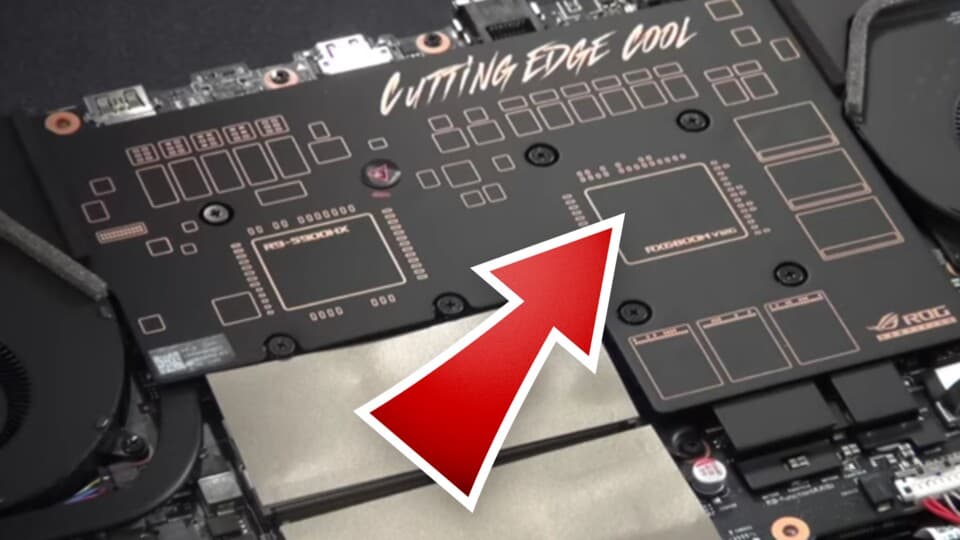
In practice, I’ve noticed laptops with well-designed vapor chamber systems often feel “less panicked” under load. They still get loud – we’re not breaking the laws of thermodynamics here – but the cooling system doesn’t constantly yo-yo between quiet and jet engine every time the GPU hits a heavy scene.
The catches: where vapor chambers aren’t automatically better
It’s tempting to mentally file vapor chambers under “always better than heatpipes,” but the reality is more nuanced. There are some very real trade-offs and edge cases where they’re not ideal.
1. They’re more expensive and harder to manufacture
Making a reliable vapor chamber isn’t trivial. You’re fabricating a flat, sealed cavity, lining it with a wick structure, filling it with precisely the right amount of working fluid, pulling a vacuum, and then permanently bonding the shell. Any manufacturing defect – micro leaks, wick issues, contamination – can kill performance or the entire part.
Heatpipes are much more mature tech, cheaper, and easier to produce in enormous quantities. That’s why you still don’t see vapor chambers in every mid-range laptop: they add cost, and OEMs are ruthless about bill-of-materials on devices that don’t absolutely need the extra thermal headroom.
2. They’re flat and relatively inflexible
A heatpipe can snake around components, bend at angles, and jump from one part of the chassis to another. A vapor chamber is basically a flat plate. You can shape the outline, but you can’t just bend it around a corner or over a tall component.
That’s fine in many laptops where the motherboard area is mostly flat, but it’s a limitation in more complex 3D layouts. It’s part of why desktops still lean heavily on heatpipes: tower coolers and horizontal coolers both need those long, bendable tubes to reach fin stacks placed well above or beside the CPU.
3. Efficiency depends on temperature gradients
Vapor chambers shine when there’s a decent temperature difference between the hot evaporator and the cooler condenser regions. If the entire chamber is nearly the same temperature because you’re already close to its cooling capacity, performance gains versus a good heatpipe design shrink.
In other words: if your laptop cooler as a whole is undersized or poorly ventilated, a vapor chamber won’t magically fix it. The heat still has to go somewhere. It just spreads out more nicely before hitting a hard limit.
4. Mechanical damage is more catastrophic
If you dent or puncture a heatpipe, you can lose a bit of performance, maybe one pipe in a set fails, but the others still work. If a vapor chamber loses vacuum or leaks, the whole thing basically turns into dead copper. It’ll conduct some heat like a normal block of metal, but all that phase-change magic is gone.
For end users, you’re unlikely to destroy a chamber under normal use, but for manufacturers and service centers, it’s a more sensitive component. That also matters for long-term reliability in thin chassis that flex or get knocked around in backpacks.
Laptops vs desktops: why you don’t see vapor chambers everywhere on PC
Given all the benefits in laptops, it’s fair to ask: why aren’t vapor chambers just standard in desktop coolers too? The answer comes down to geometry, cost, and how much physical space you have to work with.
Desktop tower coolers: heatpipes still rule
In a desktop tower cooler, the goal is different. You’re not trying to flatten heat across a cramped 2D footprint; you’re trying to yank it off the CPU and send it up into a big fin array with a ton of surface area and relatively unconstrained airflow.
Long, thick heatpipes are perfect for that. They can:
- Move heat vertically away from the socket to where tall fins can live.
- Allow creative fin layouts that avoid RAM and motherboard clearance issues.
- Be stacked and bent to maximize fin contact while keeping cost under control.
You do sometimes see vapor chambers used as a base plate in high-end desktop coolers, particularly under big fin stacks or in some GPU-like hybrid designs. Their job there is the same: spread the heat from a relatively small CPU heatspreader more evenly into all the heatpipes sitting above it.
But building an entire desktop cooler as a giant vapor chamber isn’t usually worth it. There’s enough vertical space to just throw more fins and heatpipes at the problem for less money.
GPUs: the vapor chamber’s other natural home
If you’ve followed graphics card teardowns in the last few generations, this will all sound very familiar. High-end GPUs have been using vapor chambers for years, especially reference designs from Nvidia and AMD.

The logic is identical to laptops:
- Very high heat density on a GPU die.
- VRAM and VRMs that also need serious cooling.
- Limited “height” over the card thanks to slot constraints.
- A desire to use as much of the heatsink length as possible for dissipation.
So you end up with a big, flat vapor chamber covering the GPU die and memory, feeding heat into a long heatsink. The laptop world is basically lifting that idea and smashing it into a thinner, even more constrained form factor.
Pros and cons of vapor chambers in laptops (the short version)
If you want a quick high-level snapshot before we go into buying advice, here’s how I’d summarize vapor chambers specifically in the context of modern laptops.
Buying a laptop in 2026: how much should you care about vapor chambers?
This is where theory meets wallet. If you’re scrolling through gaming laptop listings and half of them scream “dual-fan vapor chamber cooling,” how should that affect your choice?
Where vapor chambers genuinely matter a lot
There are a few laptop categories where I’d actively prefer a well-done vapor chamber system over a pure heatpipe design:
- High-end gaming laptops (RTX 4070 class and up, or equivalent): Once you’re pairing 80–150 W GPUs with 45–80 W CPUs in a thin chassis, every trick to tame hotspots and spread heat helps. Vapor chambers are almost a prerequisite for keeping sustained fps high without turning the fans into hairdryers.
- Creator/workstation laptops used under constant heavy load: If you’re doing Blender renders, video encoding, or AI workloads for hours, you’ll likely hit thermal limits. Vapor chambers can buy you better sustained performance and, just as importantly, more stable behavior over long sessions.
- Thin-and-light “performance ultrabooks”: When a 14-inch machine claims desktop-class performance, I start looking closely at its cooling. A vapor chamber doesn’t guarantee success, but it’s a strong sign the vendor knows they’re playing with fire and at least tried to engineer around it.
Where they’re a nice-to-have, not a must
On the other hand, there are plenty of laptops where the presence or absence of a vapor chamber is not a deciding factor:
- Office and everyday laptops (U-series CPUs, integrated graphics): These chips simply don’t push the same heat density. A couple of heatpipes and a decent fan are fine here. Vapor chambers might reduce fan noise a bit, but they’re not the difference between “usable” and “thermal throttling mess.”
- Entry-level gaming laptops with modest GPUs: If your GPU is capped at, say, 60–80 W and your CPU isn’t allowed to go wild, a well-executed heatpipe design can absolutely keep up. I’d rather have more intake/exhaust vents and a smart fan curve than a poorly implemented vapor chamber.
- Chunky 17-inch “desktop replacement” bricks: These machines sometimes have enough sheer volume and fin space that a classic multi-pipe layout still works beautifully. A vapor chamber might help, but there’s less pressure on every square millimeter of space.
Red flags and marketing fluff
There are also cases where “vapor chamber cooling” is splashed all over the box, but everything else about the system screams compromise:
- Tiny exhaust vents or clearly restricted intakes: If the bottom can barely breathe and the back edge has only a small slit for hot air, it doesn’t matter how fancy the copper plate is. The bottleneck is airflow, not heat spreading.
- Very aggressive power limits on the CPU/GPU: Some laptops shout about their vapor chambers, then quietly run the GPU at a much lower wattage than comparable models. That’s one way to keep temps down, but you’re paying for silicon you’re not fully using.
- Single-fan designs with high-end GPUs: I get nervous when I see a supposedly powerful GPU paired with a single fan, even with a vapor chamber. It can work with a heavy performance cap, but physics still wants two fans to move serious air through a slim chassis.
Whenever I’m evaluating a laptop, I treat “vapor chamber” as one signal in a bigger picture that includes chassis thickness, vent layout, fan count, power limits, and real-world thermal test data. It’s a promising sign in the right context, not a golden ticket.
Second-order effects: battery, noise, and surface temps
There are a few side effects of vapor chambers that don’t always make the spec sheet but absolutely matter in day-to-day use.
Battery life under load
Better cooling can actually improve battery life under heavy load, at least indirectly. When your CPU or GPU isn’t constantly smashing into thermal limits, it can run closer to its optimum efficiency point instead of bouncing between overboost and throttling.
In practice, that might mean your laptop holds a steady, efficient 60–70 W combined load in a game instead of spiking to 100 W, then cutting back when temps spike. Vapor chambers help keep those spikes under control by smoothing out the thermal response.
Surface temperatures where your hands rest
Ironically, the thing vapor chambers are good at – spreading heat – can make certain parts of the laptop feel warmer to the touch. With a very localized heatpipe design, you might have a scorching hotspot above the WASD keys but a relatively cool palm rest. A big vapor chamber might make the entire midsection mildly warm instead.
I personally prefer a “medium warm everywhere” feeling to a “one spot that feels like it’s melting” situation, but it’s something to be aware of. Good laptops pair vapor chambers with carefully designed internal insulation and keyboard decks to keep that heat away from your thumbs.
Fan noise character
One of the underrated benefits of vapor chambers is how they change the rhythm of fan noise. Instead of sharp, frequent bursts as the cooler chases temperature spikes, you get smoother, slower ramps because the system has more thermal inertia to work with.
From a usability standpoint, a laptop that hums steadily at a moderate level often feels less annoying than one that keeps spiking from silent to loud and back, even if the peak noise is technically lower on the spiky system. Vapor chambers help the “steady hum” style of cooling design.
VERDICT
If you care about sustained performance in a thin gaming or creator laptop, vapor chamber cooling has gone from “nice extra” to “very close to non-negotiable.”
VERDICT
If you care about sustained performance in a thin gaming or creator laptop, vapor chamber cooling has gone from “nice extra” to “very close to non-negotiable.”
FinalBoss // Gear
Level up your setup
01Top-rated gaming headsetson Amazon→02High-refresh gaming monitorson Amazon→03Gaming chairson Amazon→04Discounted game keyson Kinguin→Affiliate links · As an Amazon Associate, FinalBoss earns from qualifying purchases.