
Table of Contents (10)
A month with the Wooting 60HE v2: the first 60% that actually stuck
I’ve bounced off a lot of 60% keyboards over the years. I love the idea of reclaiming desk space and having my mouse arm closer in, but in practice I always end up crawling back to something bigger once the missing keys start to grate. The Wooting 60HE v2 is the first tiny board that hasn’t just survived on my desk – it’s kicked off my full-size and TKL boards entirely.
I’ve been through the Wooting saga from the original Wooting One, to the first 60HE, to the 80HE that had been my daily driver until this arrived. Each step has been smoother, faster, and more refined. The 60HE v2 is the moment it all comes together: premium build, the new Lekker Tikken Hall-effect switches, and Wootility software that finally feels like it can keep up with the insane things this hardware can do.
On paper it’s “just” another 60% Hall-effect board. In practice it’s the most convincing argument I’ve seen for paying real money for this tech instead of treating it as a gimmick or a pro-only toy.
Building it from parts: stupidly simple, surprisingly fun
I went for the DIY route rather than the pre-assembled option. If that sounds intimidating, it really shouldn’t. This is about as close to plug-and-play as custom keyboards get.
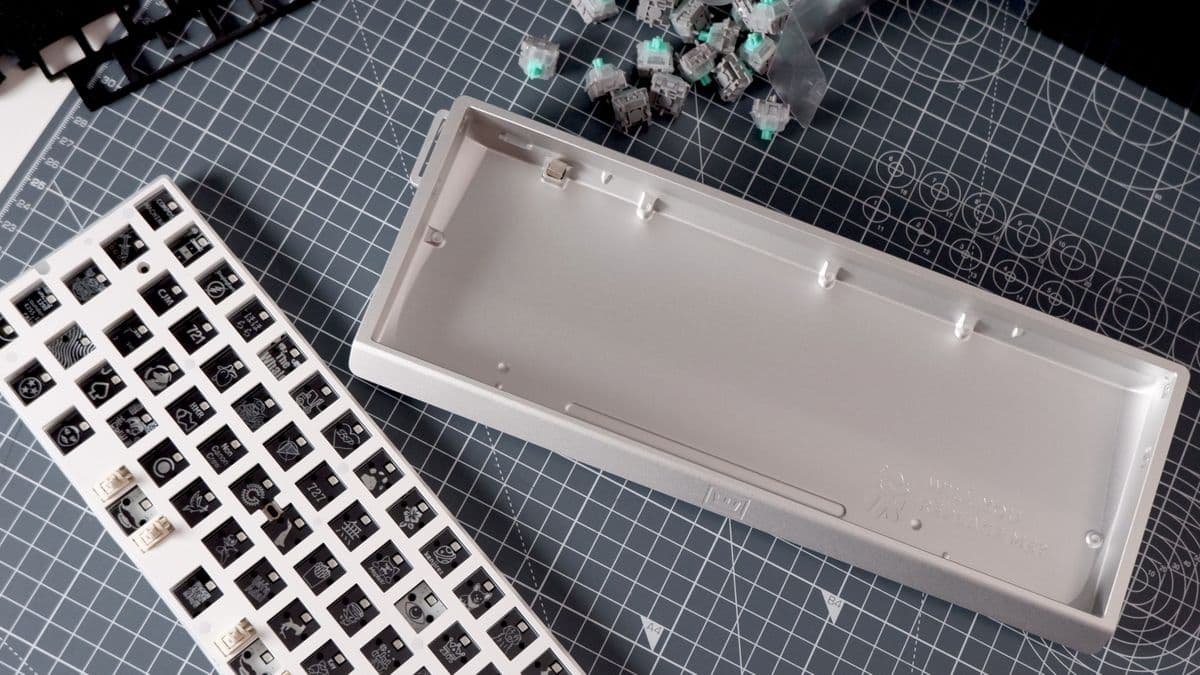
My kit was: the 60HE v2 Module (the PCB with all the Hall-effect smarts), an aluminium case, Lekker Tikken switches, and PBT keycaps. The “build” was basically four steps:
- Drop the foam inlay into the case.
- Press the Module down until it clicks into place.
- Push in the switches.
- Snap on the caps.
No soldering, no weird stabiliser surgery, no praying you didn’t bend a pin somewhere. It felt more like assembling Lego than doing a proper custom build, and I mean that in the best way possible. If you’ve ever swapped a GPU, you’re qualified to “build” this keyboard.
Under the Module you can see annotations for all the components, and the top is covered in little drawings and easter-egg icons under each key. None of it changes the feel, but it adds a sense of personality that most gaming boards lack. It feels like hardware made by people who actually enjoy this stuff.
Wooting lets you choose a dampening layer between the Module and the case: a silicone block, EPDM foam, or whatever custom material you want to cut yourself. I tried both included options and settled on the silicone block, which gave me a deeper, more muted sound without killing all the character. Skip dampening entirely and the board gets louder and sharper – fun for a bit, slightly less fun if you share an office with other humans.
Split spacebar: the 60% layout cheat code
The biggest decision on this board isn’t the colour of the case; it’s whether to go with the split spacebar layout. Historically I’ve only used split bars on ergonomic boards, and I treated it as a nice-to-have. On the 60HE v2, it turned out to be the key that made 60% livable for me.
In split mode, the long spacebar is replaced with three keys: a slightly longer left space, a shorter right space, and a fully programmable extra key in the middle. Wooting ships the caps to match, and Wootility makes remapping them trivial.
After a day of paying attention to my thumbs, I realised I basically never hit space with my left thumb while typing. So in my “writing” profile I set the right space to regular space, and the left space to Delete. On a 60% board there’s no dedicated Delete key, so without that I’d be doing Fn+Backspace constantly. One less chord to hit hundreds of times a day adds up.
The middle split key is my left-hand Fn when I’m typing, which makes arrow keys, F-keys, and other layer stuff painless. In my gaming profile it becomes a melee key in shooters and action games, freeing my thumb from having to head over to “V” or “E” like an animal.
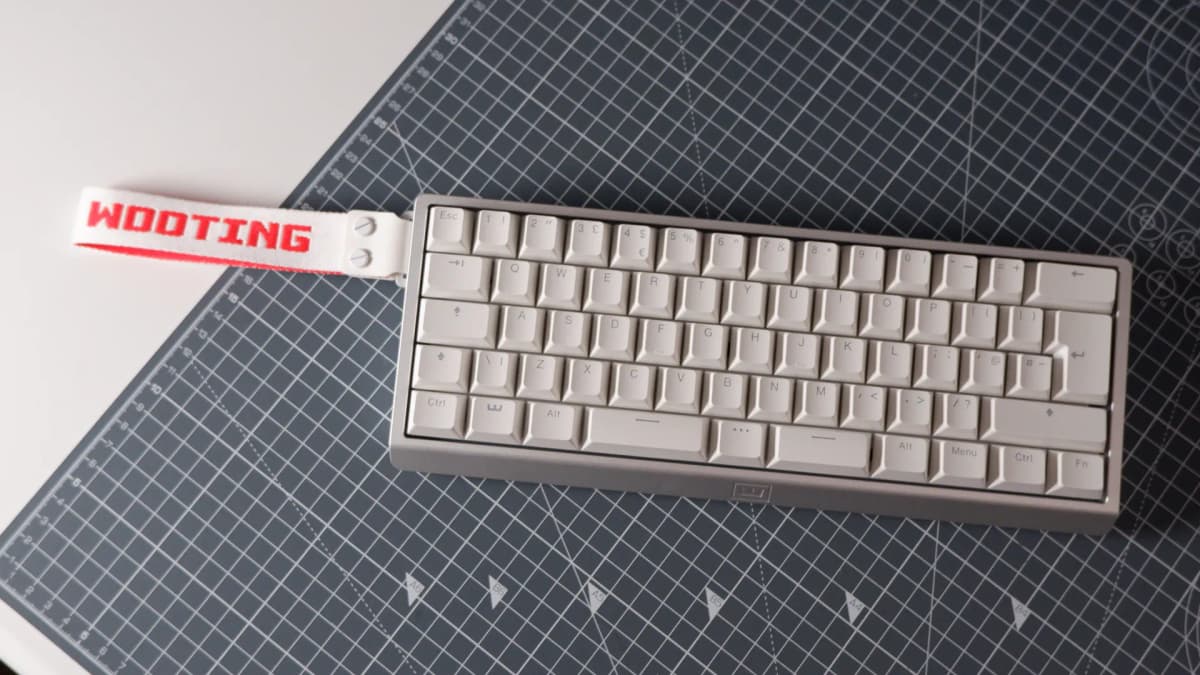
If this all sounds like needless complexity, there’s a regular non-split spacebar option and you can ignore the entire feature. But split space plus smart layers is what pushed this from “cute tiny board” to “actually usable every day” for me.
Typing feel: Lekker Tikken and genuinely premium acoustics
I type for eight to ten hours a day between work, writing, and general nonsense online, so gaming boards that only feel good in a lobby screen don’t last long here. The 60HE v2, especially with the aluminium case, feels like a serious custom keyboard first and a sweaty esports device second.
The new Lekker Tikken switches are the star. Wooting pitches them as a deeper, slightly more muted alternative to its earlier Hall-effect switches, and that lines up with what my ears are hearing. Compared to the older Lekker L60s in the original 60HE, Tikken switches wobble less, rattle less, and land with a cleaner “thock” rather than a plasticky tick.
The rest of the construction backs that up: FR4 plate, Poron foam, and that solid aluminium shell give every keypress a firm, controlled bottom-out. It hits that sweet spot where keys feel substantial without being fatiguing. I’ve daily-driven some heavy customs like the ROG Azoth Extreme and the Keychron Q-series boards; the 60HE v2 absolutely belongs in that conversation.
In Wootility I keep my “typing” profile relatively conservative: actuation set around 1.6 mm instead of the crazy 0.1 mm it can go down to. I rest my fingers on the home row, so anything lighter turns my sentences into accidental WASD jazz. With that single tweak, it feels as stable and predictable as any non-analogue board I own.
It isn’t flawless. Every so often, usually on the right side of the split spacebar, I’ll catch a faint metallic ping. It’s rare enough that I had to go hunting for it to be sure it wasn’t in my head, but it is there. Not deal-breaking, not constant, but it stops this from being an acoustically perfect board.
Hall-effect in practice: from nice-to-have to hard to live without
Plenty of boards now use magnetic or Hall-effect sensors – from niche customs to mainstream offerings like Cherry’s recent magnetic XTRFY line and various NuPhy and NZXT models. What still sets Wooting apart is how easy it makes that tech to actually use.
Hall-effect means the board can read the entire travel of a key, not just “pressed” or “not pressed”. On the 60HE v2, every key’s actuation point can be adjusted from 0.1 mm to 4.0 mm in 0.1 mm steps. Wootility shows a live visualisation of the travel, so it’s obvious what’s happening when you tweak it.
On my “FPS” profile, WASD is set around 0.8 mm, space a little deeper, and other keys more forgiving so I don’t accidentally hit abilities during frantic weapon swaps. In games like Arc Raiders and Deadlock, that meant crispy strafes without my character constantly tap-dancing when I rested my fingers.
Rapid Trigger is where the magic really clicks. Turn it on and a key doesn’t have to reset all the way to the top to register another press. Instead, inputs fire the moment the switch starts moving back up. For fast counter-strafing or mash-friendly abilities, it turns frantic key spamming into something that actually tracks with what my fingers are doing.
Then there’s Tachyon Mode – Wooting’s branding for 8 kHz polling plus a few extras. Enable it, and the keyboard’s microcontroller talks to your PC up to eight times more often than the standard 1 kHz rate, shaving off input latency. The trade-off is reduced or disabled RGB lighting and some power saving. On a mouse I notice 8 kHz more readily; on a keyboard, the 60HE v2 already feels so snappy at 1 kHz that Tachyon is more about peace of mind than a night-and-day difference. Still, it’s there if chasing absolute minimum latency is the priority.
Analogue movement is also on the table. You can map keys to controller axes so a half-press on “W” becomes a slow walk and a full press becomes a sprint. In slower-paced games it can be fun and surprisingly natural, but I’ll be honest: after years of trying this on various Hall-effect boards, I keep drifting back to regular digital movement. It’s cool that the 60HE v2 can do it; it just isn’t something I use daily.
The more interesting tricks are buried in the “Advanced Keys” section. Mod Tap lets a key behave one way when tapped and another when held – for example, tap Caps for Escape, hold Caps for Ctrl. Dynamic Keystroke takes it further, letting you assign up to four different actions to different depths of a single keypress. It’s overkill for most people but extremely powerful if you live for macro wizardry.
Snappy Tappy (SOCD cleaning) and Rappy Snappy, Wooting’s clever ways of deciding which opposite-direction key “wins” when both are pressed, are clearly aimed at fighting game and rhythm communities. Rappy Snappy uses the last key pressed or the furthest-pressed key, depending on configuration. Snappy Tappy’s more aggressive SOCD behaviour can run afoul of anti-cheat in games like CS2, so it’s a feature I only touch in dedicated profiles. Extremely powerful, but not something to leave on globally if bans are a concern.
Wootility: the rare gaming software I don’t dread opening
I’ve used enough clunky peripheral software to develop a mild allergy to RGB apps. Wootility is one of the few that feels genuinely thought-through rather than cobbled together for a product launch.
Profiles are front and centre; my main ones are “O” for typing and “P” for gaming, switched with a quick Fn+O/P chord. Each profile has its own actuation settings, advanced key options, and lighting. Pre-made templates exist for racing, analogue movement, and other niches if digging through every menu by hand isn’t appealing.
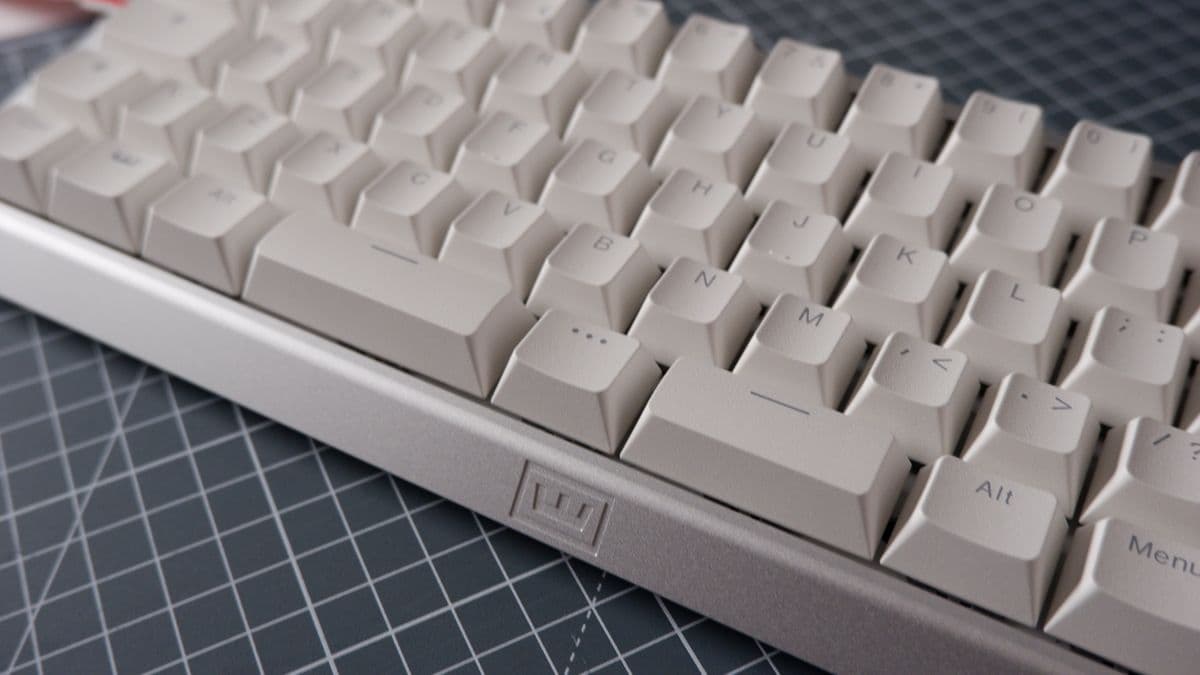
Remapping is drag-and-drop: click a key on the on-screen layout, pick a function, done. No hunting through ten layers of submenus. The analogue visualiser, where you can watch keys move in real time and see their activation point, is particularly satisfying when tuning actuation.
Lighting is clean and straightforward. The white FR4 plate the switches sit on acts like a diffuser, so RGB looks soft and even rather than a cluster of visible LEDs. If anything gets under the caps – cat hair, dust, the usual – it’s visible against that white background, but cleaning Hall-effect switches is easier than cleaning mechanical leaf-and-contact designs anyway.
Build options, prices, and how it stacks up
Specs in brief:
- Size: 60% layout
- Case options: ABS plastic or aluminium (plus several aftermarket customs)
- Format: split or non-split spacebar
- Switches: Hall-effect (Lekker Tikken standard)
- Keycaps: PBT (ABS available in some regions)
- Connection: USB-C, wired
- Price: $240 (aluminium pre-built), $180 (ABS pre-built), $140 (Module only, BYO case/switches/caps)
The Module follows the standard 60% footprint, so if the official cases don’t do it, there’s a small ecosystem of custom housings designed around it. Wooting offers a basic black ABS shell, black and silver aluminium cases, and then wild options like the Alumaze60, the Optimum collab, and the OwLab chassis. That OwLab case hits around £350 on its own thanks to a suspension-mounted internal structure that lets you tune between bouncy and stiff – overkill for most, but the point is, the 60HE v2 plays nicely with serious custom hardware.
Price-wise, Wooting has very clearly stepped into the premium zone. The 60HE v2 at $240 in aluminium is its most expensive “standard” keyboard to date. The ABS version at $180 isn’t cheap either, especially when the previous-gen 60HE+ still sits around $155 and the 80HE starts at $200.
Against the competition, it’s not outlandish but it isn’t a bargain. Keychron’s Q5 HE floats around $230. NZXT’s Function Elite is about $190. NuPhy’s Air60 HE hits roughly $110 if a lightweight, low-profile board is the priority. Asus’ ROG Azoth 96 HE shoots well past premium into silly money territory when kitted out.
The difference with the 60HE v2 is how complete the package feels. Some rivals have good hardware with clumsy software. Others have slick software wrapped around cases that feel hollow or mushy by comparison. Wooting finally feels competitive on both fronts at once: rock-solid build, and Wootility that doesn’t make me want to uninstall it after the first session.
Who this keyboard actually makes sense for
After a month of swapping it between work and games, a few things crystallised.
- If competitive performance is the top priority and budget isn’t ultra-tight, this is one of the few Hall-effect boards that genuinely feels worth the premium. Rapid Trigger, custom actuation, high polling, and advanced SOCD behaviour all work as advertised and are simple to configure.
- If 60% layouts usually feel like a compromise, the split spacebar plus clever profiles go a long way toward fixing the missing-keys problem. Once I’d lived with left-space-as-Delete, I stopped missing a dedicated Delete key entirely.
- If the only desired feature is “I want Rapid Trigger because the pros say it’s good,” cheaper Hall-effect boards exist. They won’t match the 60HE v2’s typing feel, build, or software, but they will get that core benefit for less money.
- If typing quality matters as much as gaming, the Lekker Tikken switches and aluminium case put this in the same league as many enthusiast customs while still giving you esports-grade tools.
The one big caveat is the layout itself. A 60% board demands layer usage for navigation, function keys, and some punctuation depending on the layout. With Wootility and the split spacebar, the 60HE v2 makes that as painless as any small board I’ve used, but anyone absolutely reliant on dedicated arrow keys or a numpad will still be happier on the 80HE or a different form factor.
Bottom line: Wooting’s most complete keyboard yet
Across Wooting’s entire lineup, the 60HE v2 is the first board that feels truly “finished” in every direction. The typing experience is good enough that I’d recommend it even if it didn’t have a single gaming feature. The gaming features are strong enough that, paired with Wootility, they don’t just read like marketing bullet points – they change how the keyboard feels in play.
The higher price, the rare ping on larger keys, and the inherent quirks of a 60% layout stop it from being perfect. But as an overall package – build, sound, feel, software, and performance – this is the most convincing premium Hall-effect keyboard I’ve used so far.
- Rating: 9/10
- Best for: players serious about responsiveness and customisation, who also care how their board sounds and feels.
- Skip if: budget is tight or a 60% layout already drove you mad once.
TL;DR
- Superb typing feel thanks to Lekker Tikken Hall-effect switches, FR4 plate, Poron foam, and a dense aluminium case.
- Split spacebar and flexible layers turn a 60% layout into something that can genuinely replace larger boards for everyday use.
- Wootility software is intuitive, powerful, and makes features like Rapid Trigger, analogue movement, Mod Tap, and per-key actuation easy to set up.
- 8 kHz polling (Tachyon Mode) and advanced SOCD options push it into serious competitive territory.
- Minor downsides: rare ping on some larger keys, higher price than the original 60HE/60HE+, and the usual 60% learning curve.
- If a premium, feature-packed Hall-effect board is the goal and the budget can stretch, the Wooting 60HE v2 is the one I’d buy right now.
FinalBoss // Gear
Level up your setup
01Top-rated gaming headsetson Amazon→02High-refresh gaming monitorson Amazon→03Gaming chairson Amazon→04Discounted game keyson Kinguin→Affiliate links · As an Amazon Associate, FinalBoss earns from qualifying purchases.
Want to Level Up Your Gaming?
Get access to exclusive strategies, hidden tips, and pro-level insights that we don't share publicly.
Ultimate Reviews Strategy Guide + Weekly Pro Tips