
Table of Contents (20)
How I Finally Stopped Rebuilding My “Ultimate” Gaming Setup
After rebuilding my “ultimate” gaming setup three times in two years, I finally landed on a rig that actually feels done: 4K/120Hz capable, quiet, and comfortable for eight-hour sessions. The annoying part is that I could’ve saved a ton of money and time if I hadn’t approached it backwards the first two times-chasing flashy parts instead of planning the whole ecosystem.
This guide is what I wish someone had handed me before I started. It’s aimed at a 2025-ready setup: 1440p high refresh or 4K 120Hz gaming, light streaming, and a clean, ergonomic desk that doesn’t sound like a jet engine. I’ll walk through the exact decisions I made, where I messed up, and how you can avoid the same traps.
Step 1: Lock In Your Budget and Priorities (Don’t Skip This)
The breakthrough for me came when I stopped thinking “What’s the fastest GPU?” and started thinking “What experience do I actually want?” My goal: a smooth 4K 120Hz experience in single-player games and 1440p high refresh for competitive titles, plus quiet fans and a clean desk for streaming and work.
Before you look at a single part, write down three things:
- Your main resolution and refresh target (e.g. 1440p 240Hz, 4K 120Hz).
- Whether you’ll stream, record, or do heavy productivity (video, 3D, etc.).
- Your hard total budget, including monitor, desk, and peripherals.
For most people I’ve helped, the sweet spot for a serious 2025-ready setup has been around the $1,500-$2,500 range for the PC, plus extra for the monitor and desk.
Roughly, this allocation has worked best for me:
- GPU: 35-40% of the PC budget (up to 50% if 4K is your main target).
- CPU: 20-25%.
- RAM: 10–15%.
- Storage: 10–15%.
- Motherboard: 10–15%.
- PSU: 5–10%.
- Case & cooling: 5–10%.
Common mistake I made: I blew money on an overkill CPU and fancy motherboard, then paired them with a mid-range GPU. My frame rates barely improved over my old build. Don’t do that-if gaming is the focus, the GPU usually deserves the biggest slice.
Step 2: Start With the Screen and Space, Not the Tower
The biggest upgrade in how my games felt wasn’t my GPU-it was going from a 60Hz TV to a proper gaming monitor. If you’re planning a 2025 setup, your display and desk layout should drive your PC choices, not the other way around.
Here’s how I approach it now:
- Competitive focus: 24–27″ 1440p at 240Hz+ with adaptive sync (G-Sync Compatible / FreeSync). Fast response matters more than resolution.
- Cinematic / single-player focus: 27″ 1440p 165Hz or 32″ 4K 120Hz. If you can swing it, an OLED like the ASUS ROG Swift PG27AQDM at 1440p is incredible for contrast and motion.
- Desk depth: For 32″ and ultrawides, you really want 70–80cm (27–31″) of desk depth so the screen isn’t in your face.
Why this matters: A 4K 120Hz monitor demands a much stronger GPU than a 1440p 144Hz screen. Once you decide on the monitor, you’ll know if you really need a top-tier GPU or if a “x70-tier” card is enough.
Also think about where everything will physically go: PC on desk vs. floor, space for a mic arm, and whether you want a dual-monitor setup. I didn’t plan this the first time and ended up with a monster case on a tiny desk, with my mic blocking half my screen.
Step 3: Picking the Core PC Parts Without Wasting Money
Once your budget and monitor are locked, you can finally talk parts. I’ll keep this brand-agnostic, because the principles hold whether you’re buying current-gen Nvidia/AMD GPUs or Intel/AMD CPUs in 2025.
CPU: Don’t Overspend If You’re Just Gaming
In my last rebuild, I downgraded from an expensive top-end CPU to a gaming-focused mid-high model (think along the lines of a Ryzen 7 X3D chip or an Intel i5/i7 with strong gaming benchmarks). My frame rates barely changed, but my wallet felt a lot better.
If you:
- Mostly game: Go for the chip that reviewers call “best for gaming,” not “best overall.” Extra cores beyond 8–12 often sit idle.
- Game + stream / edit: Then grab something with more cores and threads, even if pure gaming FPS is slightly lower.
GPU: Match It to Your Resolution
This is where most of your gaming performance comes from. My rule of thumb based on actual use:
- 1080p / 1440p 144Hz: Mid-range “x60 Ti / x70” tier from the latest gen is usually enough with upscaling.
- 1440p 240Hz or 4K 120Hz: High-end “x80” or better. For 4K with ray tracing, expect to pay for near-flagship silicon.
Don’t make my mistake of pairing a 4K 120Hz OLED with a mid-tier GPU and expecting magic. I ended up playing most games at 1440p anyway until I upgraded the card.
RAM & Storage: Think About Real Usage
I tried to cheap out with 16GB of RAM once. Bad idea. With a modern game, Discord, a browser, and maybe OBS open, I was paging to disk constantly.
- RAM: 32GB DDR4/DDR5 is the sweet spot now. Aim for a known “sweet spot” speed (e.g. DDR5-6000) your platform likes, and enable XMP/EXPO in BIOS.
- Storage: At least 1TB NVMe SSD for Windows + key games, plus another 1TB if you juggle a big library. I like a fast 1TB for OS/competitive titles and a cheaper 2TB for the rest.
Motherboard, PSU, and Case: The Boring Stuff That Saves You Later
Motherboard: I wasted cash once on a “hero” board with features I never used. Now I look for:
- Enough M.2 slots for my planned drives.
- Decent VRMs (so the CPU isn’t throttled).
- Rear I/O that matches my needs (Wi-Fi, USB-C, etc.).
- A platform with a future (e.g. a socket that will support another CPU generation).
PSU: The time I cheaped out here, my PC shut down under load. Never again.
- Pick a reputable 80+ Gold or better unit.
- Capacity: GPU + CPU power draw, then add ~40% headroom. For a single high-end GPU, 850–1000W is usually safe.
- Look for modern standards (like ATX 3.0/3.1) so you can handle future GPU spikes.
Case: I now prioritize airflow and build quality over RGB. A mesh front, space for at least three intake fans, and clear GPU clearance are non-negotiable. Smaller form factor looks cool, but building in it is much harder—if this is your first time, go mid-tower.
Step 4: Cooling and Noise – Where Most “Ultimate” Builds Fail
My first “ultimate” rig could hit 4K 120FPS… for about five minutes before the fans went full hurricane. This is where thoughtful cooling saves your sanity.
Air vs. liquid cooling (from actually using both):
- Big air coolers (twin-tower designs) are quieter, simpler, and plenty for even high-end CPUs if your case has airflow.
- AIO liquid coolers look cleaner and can help in cramped cases, but introduce pump noise and more things that can fail.
Right now I run a large air cooler and a front mesh case with 3x intake and 2x exhaust fans. Under full load it’s a soft woosh instead of a roar.
Fan curve tuning: This is the secret sauce. In BIOS (often under something like Q-Fan or Hardware Monitor):

- Set a gentle curve so fans stay low until ~50°C.
- Ramp more aggressively from 60–80°C.
- Do this for CPU and case fans separately if your board allows it.
It takes 10–15 minutes and makes a huge difference in day-to-day noise while keeping temps safe under load.
Step 5: Peripherals That Actually Improve Your Gameplay
The second big “aha” moment for me was realizing how much my mouse, keyboard, and audio setup changed how I played. RGB is fun, but feel and function matter more.
Mouse & Keyboard
Mouse: When I switched from a heavy office mouse to a lightweight gaming mouse (~60–70g), my aim consistency in shooters noticeably improved.
- Pick a shape that fits your grip (palm, claw, fingertip).
- Higher DPI sensors are standard now; what matters is comfort and weight.
- Wireless is fine in 2025-ready gear—latency is basically a non-issue on good models.
Keyboard: I like a TKL (no numpad) to pull the mouse closer. Mechanical switches are mostly preference:
- Linear (smooth) for FPS.
- Tactile (bump) for typing.
- Sound profile matters more than people admit—loud clicks get old fast.
Audio and Mic
I tried to survive on a cheap “gaming headset” mic for way too long. Swapping to a decent pair of headphones plus a USB mic made a huge difference for both immersion and call quality.
- Headphones: Closed-back if you need isolation; open-back if you want a wider, more natural soundstage (great for spatial awareness, but they leak sound).
- Mic: A mid-range USB mic on a boom arm is miles better than built-in headset mics.
If you stream, add a simple pop filter and position the mic slightly off to the side of your mouth to avoid breath noise.
Step 6: Cable Management, Ergonomics, and Lighting
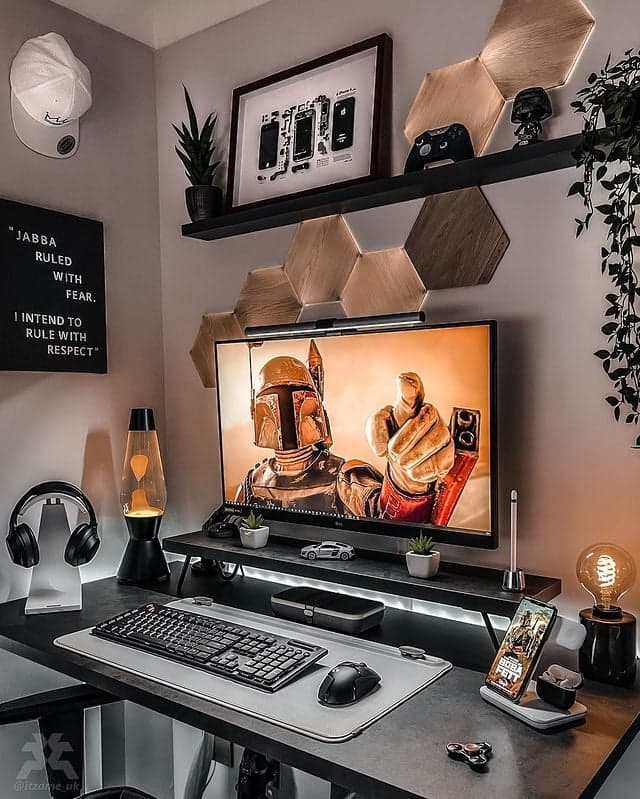
My second build was powerful but looked like a fire hazard: cables everywhere, monitor too high, chair destroying my back. Fixing this made the setup feel “ultimate” more than any FPS increase.
Cable Management Basics
Inside the case:
- Route as many cables as possible behind the motherboard tray.
- Use the case’s cable channels and tie-down points with Velcro straps.
- Keep front airflow area clear—no dangling PCIe cables in front of fans.
On the desk:
- Use a cable tray under the desk or adhesive clips along the back edge.
- Run one thick “umbilical” down from the desk instead of multiple loose cables.
- Leave enough slack for monitor arm movement and chair adjustment.
Ergonomics & Lighting
Quick ergonomics checklist that saved my shoulders and wrists:
- Monitor top ~ at eye level.
- Arms at roughly 90° when using keyboard and mouse.
- Feet flat on the floor or on a footrest.
- Chair with lumbar support (or a dedicated lumbar pillow).
For lighting, I ditched blinding RGB strips in favor of a simple bias light behind the monitor and a warm desk lamp. It reduces eye strain and keeps the room looking clean on camera.
Step 7: Software Tuning – Turning Parts Into a Smooth Experience
This is where a lot of people stop, but a bit of software tuning is what makes your 2025-ready hardware actually feel premium.
System and Driver Setup
After installing Windows:
- Install the latest GPU driver from Nvidia/AMD’s site (I avoid “cleaner” third-party tools, just use the official package).
- Install chipset and motherboard drivers from the board manufacturer.
- In
Settings → System → Display → Advanced display, set your monitor to its maximum refresh rate. - Enable adaptive sync (G-Sync Compatible / FreeSync) in both the monitor OSD and GPU control panel.
In-Game Settings and Monitoring
I always do a new-game setup pass like this:
- Start with the game’s “High” preset, not “Ultra.” Ultra usually wastes frames on tiny visual gains.
- Enable DLSS/FSR/XeSS or equivalent upscaling at “Quality” for a big FPS boost with little visual loss.
- Cap FPS to just under your refresh rate (e.g. 118 for 120Hz) via in-game limiter or a tool like RTSS to reduce input lag and stutter.
- Watch temps and usage with an overlay (MSI Afterburner or similar). If your GPU is constantly at 100% and CPU is low, you’re GPU bound—lower GPU-heavy settings like resolution, RT, and shadows.
Advanced but worth it: Undervolting your GPU. On my last build I shaved ~10°C and a noticeable chunk of fan noise with a mild undervolt, with almost no FPS loss. Just follow a detailed, card-specific guide and test carefully.
Step 8: Maintenance and a Smart Upgrade Path
The reason my current setup still feels “ultimate” instead of “obsolete” is that I finally planned for upgrades instead of hard walls.
- Dust routine: Every 3–6 months, power down, take the side panel off, and use compressed air to clear filters, fans, and heatsinks.
- Check temps yearly: If CPU or GPU temps suddenly spike compared to launch, fans or thermal paste might need attention.
- Plan upgrades: I chose a motherboard and PSU that can handle at least one GPU generation upgrade without replacing everything.
My personal upgrade order if money is tight:
- Monitor (if you’re still on 60Hz).
- GPU (once your monitor can show more FPS).
- Storage / RAM (when games start hitching or you’re uninstalling constantly).
- CPU / motherboard (last, when frame times show you’re truly CPU bottlenecked).
Wrapping Up: Your “Ultimate” Setup Is Built Over Time
If there’s one lesson from my three rebuilds, it’s this: the ultimate 2025 gaming setup isn’t a specific parts list, it’s a balanced system that matches your goals—monitor, tower, desk, and software all working together.
Start with the experience you want, build around your display, put most of your budget into GPU and monitor, and don’t neglect cooling, ergonomics, and cable management. If you do that, your first “ultimate” build can actually stay ultimate for years, instead of turning into an expensive learning experience like my first two.
If I can eventually land on a quiet, clean 4K-capable setup without ripping it apart every six months, you absolutely can too—just tackle it one smart step at a time.
FinalBoss // Gear
Level up your setup
01Top-rated gaming headsetson Amazon→02High-refresh gaming monitorson Amazon→03Gaming chairson Amazon→04Discounted game keyson Kinguin→Affiliate links · As an Amazon Associate, FinalBoss earns from qualifying purchases.
Want to Level Up Your Gaming?
Get access to exclusive strategies, hidden tips, and pro-level insights that we don't share publicly.
Ultimate Guide Strategy Guide + Weekly Pro Tips