
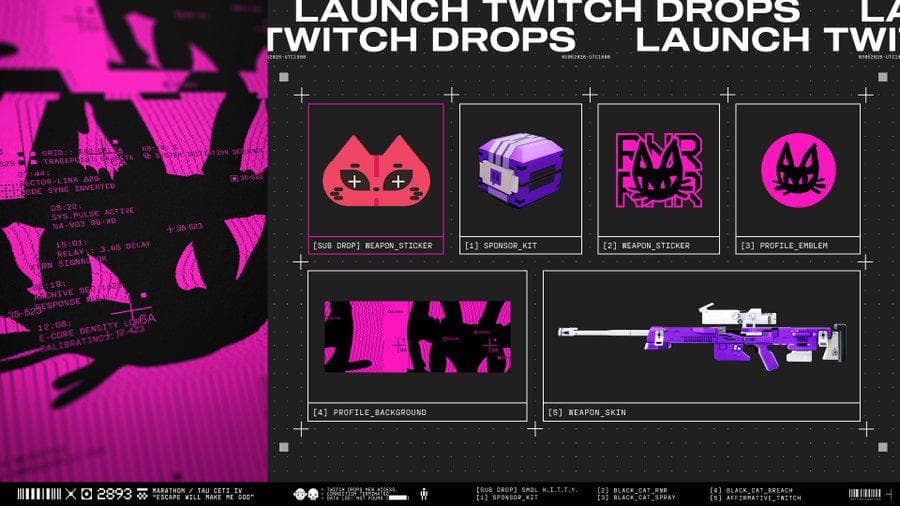
You watched the streams, the hours ticked by, and the cosmetics never showed up in Marathon. The reason is almost always the same: a Twitch Drop is not delivered automatically. You have to link the right accounts, watch a Drops-enabled stream, and then manually claim each reward in your Twitch Drops Inventory before Bungie pushes it to the game.
Table of Contents (9)
The short version
- Link first: Bungie account settings → Account Linking → Twitch → Authorize.
- Watch: any stream in the Marathon category with Drops enabled — you do not need one specific creator.
- Ladder: the first reward unlocks after 1 hour of watch time, with more tiers up to 4 total hours; the top tier includes a weapon skin.
- Claim: open your Twitch Drops Inventory and press Claim on every tier — watch time alone does not deliver anything.
- Wait: delivery to Marathon can take up to 48 hours after you claim.
- The subscription catch: the standard watch-time rewards are free, but the bonus Smol K.i.t.t.y. weapon sticker required subscribing to a participating streamer.
Twitch tracks your watch progress, not Marathon. So when a reward goes missing, the cause is upstream of the game: the Bungie and Twitch accounts were never linked correctly, the stream was not actually eligible for Drops, or the reward unlocked on Twitch but was never claimed manually.
What you need before you start
Get the setup right before you spend hours watching. This is where most failed Drops are lost, especially when you are chasing a top-tier cosmetic near the end of a campaign.
- A Bungie account connected to the platform identity you actually play Marathon on
- A Twitch account you stay logged into the entire time you watch
- A live Marathon stream that clearly shows Drops enabled
- Enough watch time to reach the tier you want (1 hour minimum, 4 hours for the full set)
- The Twitch Drops Inventory open so you can claim each reward as it unlocks
Step 1: Link Bungie and Twitch the right way
Linking happens through your Bungie account settings, not a Marathon-specific portal. The path is Bungie account settings → Account Linking → Twitch → Authorize.
- Sign in to your Bungie account.
- Open your account settings.
- Go to
Account Linking. - Select
Twitch. - Choose
Authorizeand log into the correct Twitch account. - Approve the connection, then return to Bungie to confirm the link is active.
The easy mistake is linking the wrong pair. If your Twitch account is correct but your Bungie login is tied to the wrong platform identity, the Drop can unlock on Twitch and still fail to land on the Marathon profile you play. Verify that the linked Bungie account is the one you expect to play on before you move on.
If you already linked Twitch for another Bungie game, check that the connection is still active. A stale or broken authorization looks fine at a glance and still causes delivery problems later.
Step 2: Watch an eligible Marathon stream
Open Twitch and watch a stream in the Marathon category that has Drops enabled. You do not need one specific creator for the standard watch-time rewards — any eligible stream counts as long as the Drops label is active and you are logged into the linked Twitch account.
Players waste time sitting in the Marathon category without checking whether the stream is actually participating. The category alone is not enough. Look for the Drops notice on the stream page, then let the watch time build.
The launch Marathon Drops campaign ran from March 5 to March 9, 2026, with the daily window described as either 6 PM UTC to 6 PM UTC or 10 AM PT to 10 AM PT across the four days. If a future campaign goes live, the reward names may change, but the watch-and-claim flow stays the same unless Bungie announces a different system.
While watching, check your Twitch Drops Inventory periodically. That is the cleanest way to confirm your progress is moving. If the progress bar is not updating there, Marathon is not where you troubleshoot first.
Step 3: Claim each reward in Twitch before expecting it in Marathon
This is the step players miss most. Hitting a watch-time tier is not the same as receiving the reward. When a Drop reaches its required watch time, open your Twitch Drops Inventory and press Claim for that reward. With multiple tiers, repeat that for each one as it unlocks.
Unclaimed rewards do not appear in Marathon until you claim them on Twitch. Watch time alone is not enough. If you leave Twitch without claiming, the reward sits unredeemed in your inventory and looks bugged when it is not.
After you claim, Marathon receives the entitlement through Bungie’s standard account system — there is no separate manual code redemption page. Relaunch the game or return to the title screen, let the account sync, then check the relevant inventory or customization area for the cosmetic or weapon skin.
Delivery is often quick, but it can take up to 48 hours after you claim. If the reward does not show up immediately, that delay alone does not mean the Drop failed.
The Marathon Twitch Drops rewards (launch campaign)
The launch campaign used a time-gated reward ladder. The first reward unlocked after 1 hour of watch time, additional rewards followed with more watch time, and the ladder topped out at 4 total hours, including a weapon skin.
Here is the part that trips people up: the watch-time tiers were free, but there was one extra reward gated behind money. The bonus Smol K.i.t.t.y. weapon sticker required subscribing to a participating streamer — it was not part of the standard 1-to-4-hour track. So treat the watch-time ladder as the core set you can earn for free, and only consider a subscription if you specifically want that sticker.
- The 1-hour to 4-hour watch tiers are the free core of Marathon Twitch Drops.
- The Smol K.i.t.t.y. weapon sticker is the one reward that required a paid subscription to a participating streamer.
- If a new campaign is active, check the live Twitch campaign page for the current reward names and timers before spending anything.
Common mistakes
- Treating watch time as the finish line. The reward only arrives after you manually press Claim in the Twitch Drops Inventory.
- Linking the wrong account pair. The Drop can unlock on Twitch and still miss the Bungie platform identity you actually play Marathon on.
- Sitting in the category without checking the Drops label. The Marathon category alone does not qualify — the individual stream must have Drops enabled.
- Logging out or switching Twitch accounts mid-watch. You must stay logged into the linked account the whole time for progress to count.
- Assuming a missing reward is a bug. Delivery can take up to 48 hours after claiming; check the inventory and relog before panicking.
- Paying for a subscription expecting the full set. Only the bonus Smol K.i.t.t.y. sticker needed a subscription; the rest is free watch time.
Troubleshooting missing Marathon Twitch Drops
If rewards are not appearing, start with Twitch and your account links before assuming Marathon is broken. Every common failure happens before the reward ever reaches the game.
- You only received the first reward: you reached the 1-hour tier but not the later ones, or you forgot to claim the later tiers manually in Twitch.
- You watched for hours and got nothing: recheck that the stream was Drops enabled for Marathon and that you stayed logged into the linked Twitch account.
- The reward is in Twitch but not in Marathon: give it time — delivery can take up to 48 hours. After that, relog and verify the Bungie–Twitch link.
- Progress is not moving at all: open the Twitch Drops Inventory first. If progress is not updating there, the game cannot receive anything yet.
- You linked the wrong account: unlinking and relinking can fix it, but confirm the correct Bungie profile first so you do not repeat the mistake.
Practical takeaway
Run the same checklist every time: confirm the Bungie–Twitch link, watch a Drops-enabled Marathon stream, check the Twitch Drops Inventory for progress, claim each reward manually, then give Marathon up to 48 hours to sync. The reward names change between campaigns; the process does not. The one step players skip — manually claiming on Twitch — is the step that turns watch time into an actual cosmetic.
Once your loadout is sorted, put it to work: see our 6 survival tips to stay alive longer in raids and the best faction upgrades and how to unlock them.
FinalBoss // Gear
Level up your setup
01Capture cards (Elgato & more)on Amazon→02USB microphoneson Amazon→03Gaming keyboardson Amazon→04Gaming deskson Amazon→Affiliate links · As an Amazon Associate, FinalBoss earns from qualifying purchases.
Want to Level Up Your Gaming?
Get access to exclusive strategies, hidden tips, and pro-level insights that we don't share publicly.
Ultimate Guide Strategy Guide + Weekly Pro Tips